Deactivate Inactive Matrix Users Without Deleting Room History
Review device activity, deactivate confirmed inactive Synapse accounts through the Admin API, and learn what the optional erase flag actually removes.
To remove an inactive local Matrix account from service, use Synapse’s POST /_synapse/admin/v1/deactivate/<user_id> endpoint after reviewing the account and its devices. Synapse calls this deactivation: it revokes credentials and removes the user from rooms, but it does not hard-delete the account record or the user’s messages. The current Synapse v1.157 documentation also distinguishes deactivation from the optional erase flag, which has narrower effects than many admins expect. Synapse User Admin API documentation. These steps follow the Synapse v1.157 API reference, checked October 10, 2026; confirm behavior against the documentation for your deployed version.
No. The Admin API’s supported operation is deactivation. It removes active access tokens, devices and end-to-end encryption keys, pushers, password hash, third-party IDs, and the user’s room memberships. Pending invites are rejected and account data is removed. This is a consequential change even when erase is false.
Setting "erase": true additionally removes the user’s display name, avatar URL, and custom profile fields, and marks the account as erased. It does not delete sent or received messages, uploaded media, SSO ID mappings, or every other record that may contain personal data. Existing room members can still see the user’s messages; the documentation says those messages are hidden from people who join the room later. Do not treat this API flag as a complete legal erasure workflow. Follow your organization’s retention and privacy process before using it. Review the exact deactivation and erasure effects.
If you need a reversible restriction while an account is investigated, consider Synapse’s suspend endpoint instead. Suspension blocks actions such as sending messages, joining rooms, and sending invites, while preserving a path to unsuspend the account. Deactivation is the better fit for an account that has passed your offboarding or inactivity policy.
There is no universal inactivity threshold. Set one from your organization’s policy, then check actual device activity rather than treating an old registration date as proof. A dormant account may belong to a service, a rarely used client, or a person on leave. Exclude service identities and homeserver administrators from cleanup unless an owner has approved their removal.
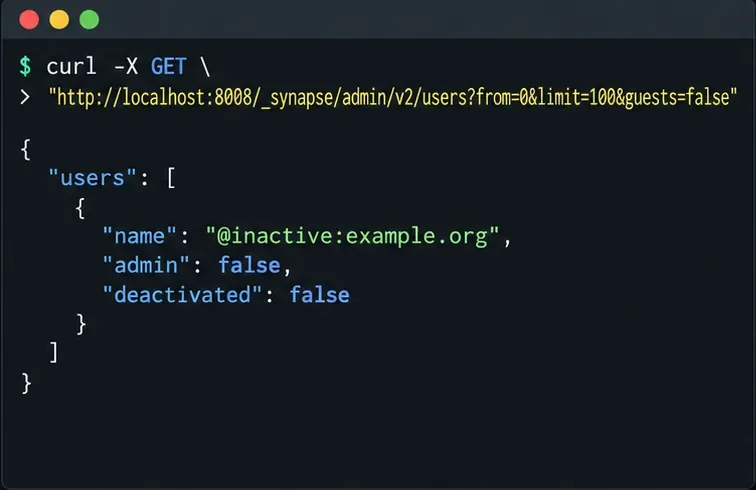
/_synapse/admin/ out of public reverse-proxy access and making Admin API requests from the Synapse host when practical. Send the token in an Authorization header; do not paste it into a shared script or publish it in logs. Synapse Admin API authentication and access guidance.next_token; use its returned value as the next request’s from value. The optional guests=false filter excludes guests, but Synapse documents that this parameter is not supported when Matrix Authentication Service integration is enabled. Remove it in that setup.curl -sS -H "Authorization: Bearer $SYNAPSE_ADMIN_TOKEN" \
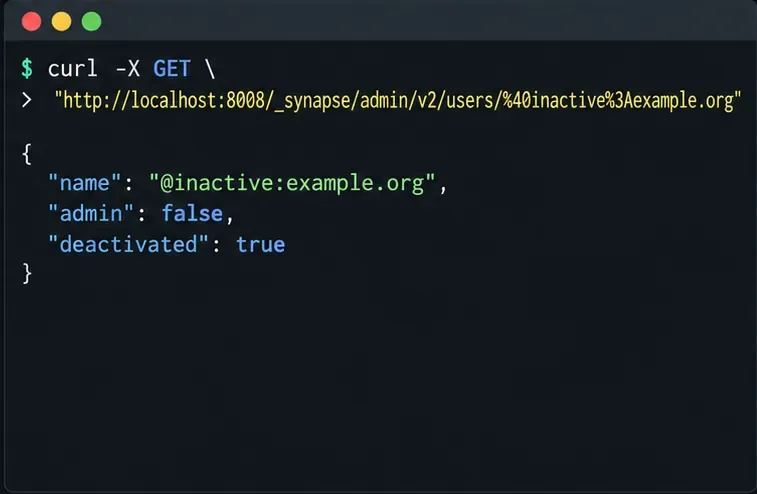
"$SYNAPSE_URL/_synapse/admin/v2/users?from=0&limit=100&guests=false"Inspect the returned name, admin, user_type, and deactivated fields. The listing excludes deactivated accounts by default. The example below shows a single candidate; a real server may return multiple pages.
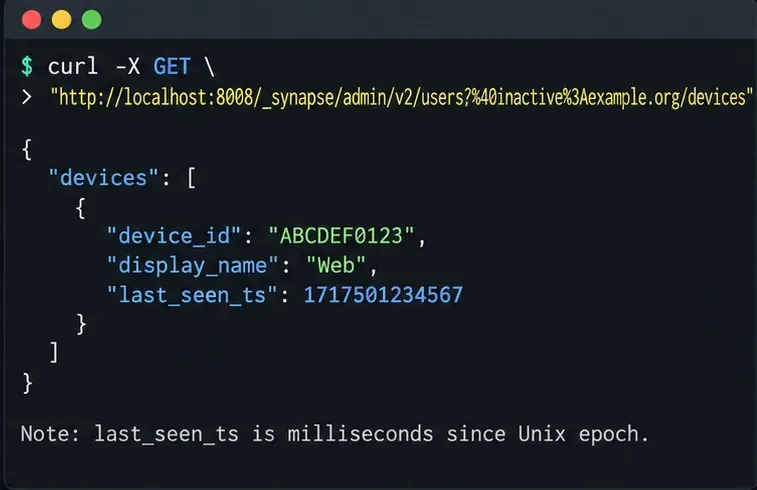
GET /_synapse/admin/v2/users/<user_id>/devices. Compare every device’s last_seen_ts with your policy cutoff; it is a Unix-epoch timestamp in milliseconds and can be a few minutes out of date. Treat it as evidence to review, not an automatic deletion decision.curl -sS -H "Authorization: Bearer $SYNAPSE_ADMIN_TOKEN" \
"$SYNAPSE_URL/_synapse/admin/v2/users/%40inactive%3Aexample.org/devices"Replace the sample Matrix ID with the local user you reviewed. If a device was used recently, stop and confirm with its owner. If timestamps are old but the account is an admin, bot, support identity, or SSO-linked user, verify ownership and dependencies before continuing. The device API documents last_seen_ts and its units.
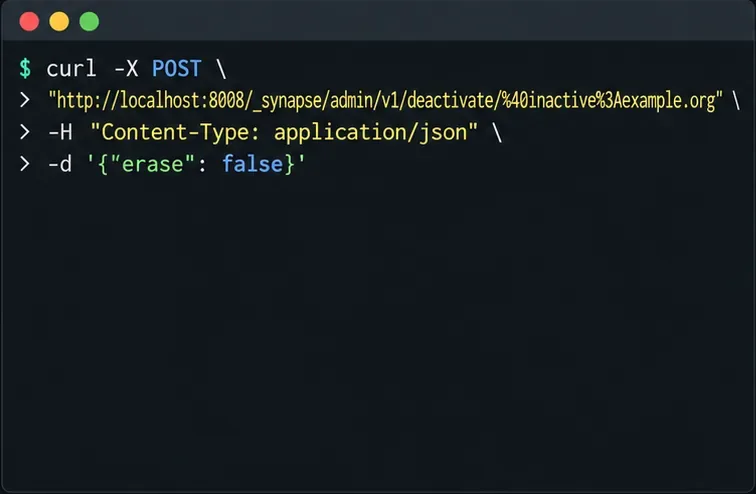
Use the fully qualified local Matrix ID, not a display name. The deactivation endpoint accepts an optional JSON object with erase; it defaults to false. Leaving the default preserves the profile fields while still removing sessions, devices, room memberships, and other deactivation data described above.
curl -sS -X POST \
  -H "Authorization: Bearer $SYNAPSE_ADMIN_TOKEN" \
  -H "Content-Type: application/json" \
  -d '{"erase": false}' \
  "$SYNAPSE_URL/_synapse/admin/v1/deactivate/%40inactive%3Aexample.org"
Run this for one reviewed user at a time. A successful response is not a substitute for checking that you targeted the intended account. Do not turn a list of old timestamps into a bulk POST loop until each account has passed your review and retention checks.
Query the account again with GET /_synapse/admin/v2/users/<user_id>. Confirm that the response identifies the expected Matrix ID and reports "deactivated": true. The account should no longer have active access tokens, devices, or room memberships. Keep the request time and account ID in your administrative record, but never store the bearer token in that record.
curl -sS -H "Authorization: Bearer $SYNAPSE_ADMIN_TOKEN" \
  "$SYNAPSE_URL/_synapse/admin/v2/users/%40inactive%3Aexample.org"
Only set "erase": true when your retention or privacy decision specifically calls for Synapse’s erased marker and profile-field removal. That setting still does not remove message history or uploaded media. If you need those handled, use the separate documented event-redaction and media-management procedures, and verify their effects independently. Also plan carefully before deactivation: reactivation can require setting a new password for local-password accounts, and deleted device encryption keys cannot be restored by simply reactivating the account.
For the exact account you targeted, confirm the follow-up query returns "deactivated": true. If the result differs or the request errors, stop and investigate the response before repeating the POST.
Review device activity, deactivate confirmed inactive Synapse accounts through the Admin API, and learn what the optional erase flag actually removes.
Find whether PostgreSQL memory comes from query work, shared buffers, connections, or maintenance, then make targeted Synapse-safe changes.
Trace slow Matrix room joins to one remote homeserver, federation backoff, local database load, or an outbound sender queue before changing Synapse settings.
Stop open account creation on a self-hosted Synapse server, or keep sign-ups invite-only with limited-use registration tokens.
Clear Element's unverified-session warning using a trusted device or recovery key, with checks that protect your encrypted chat history.
Distinguish database lock contention from expired WebDAV locks, then choose and configure the right ownCloud 10 fix.
Trace a blank ownCloud Web screen to browser cache, missing web assets, service errors, or reverse-proxy URL settings with targeted checks.
Set ownCloud’s web PHP memory limit, restart the matching service, and verify the active value without confusing it with CLI settings or upload limits.
Find out whether MySQL, PHP, socket settings, or database permissions are blocking ownCloud 10, then verify a safe fix.
Make public link expiration mandatory in ownCloud Classic, set a maximum lifetime, and check existing shares that may need separate cleanup.