Games Not Launching on Steam frustrates many users when a title refuses to start despite successful installation. The problem often traces to corrupted files, outdated drivers, or interference from Steam's overlay features. This article provides precise fixes that address the most common triggers.
Common Reasons Games Fail to Launch on Steam
Steam games rely on a mix of local files, system drivers, and background services. When any component is damaged or outdated, the launcher may hang or close without an error message. Before attempting fixes, ensure Steam itself is fully updated through the client settings menu and that your Windows user account has administrator rights.
Network restrictions or antivirus software can also block the executable. Check that no VPN or firewall rule is actively interfering with Steam's connection to its servers.
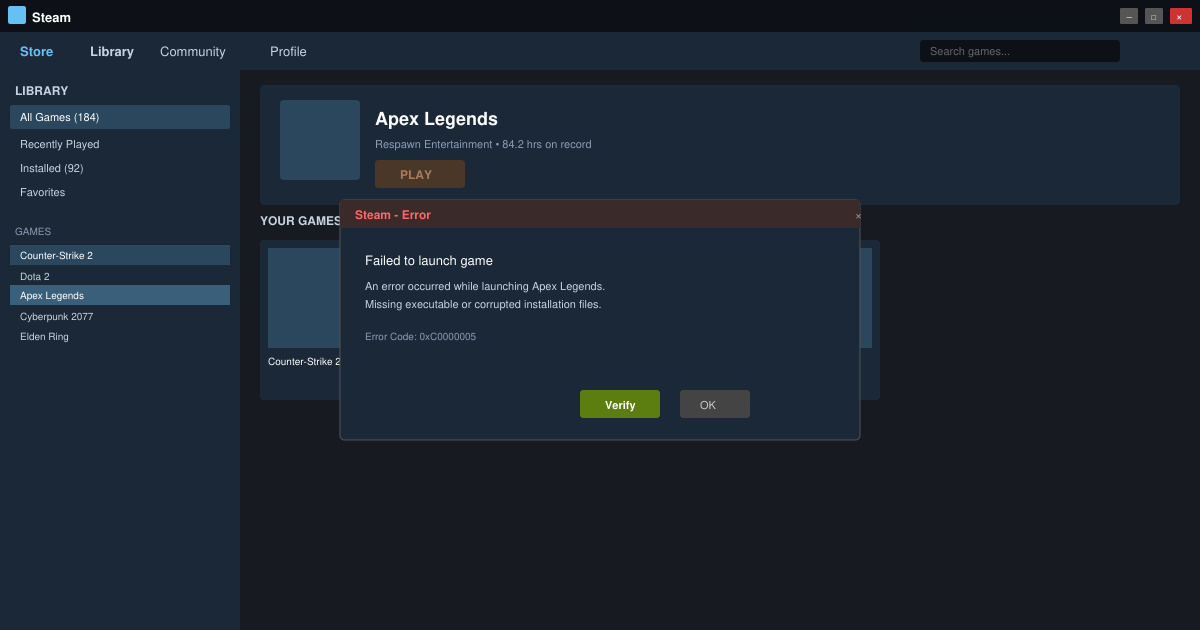
Step-by-Step Fixes for Games Not Launching on Steam
-
Verify Integrity of Game Files
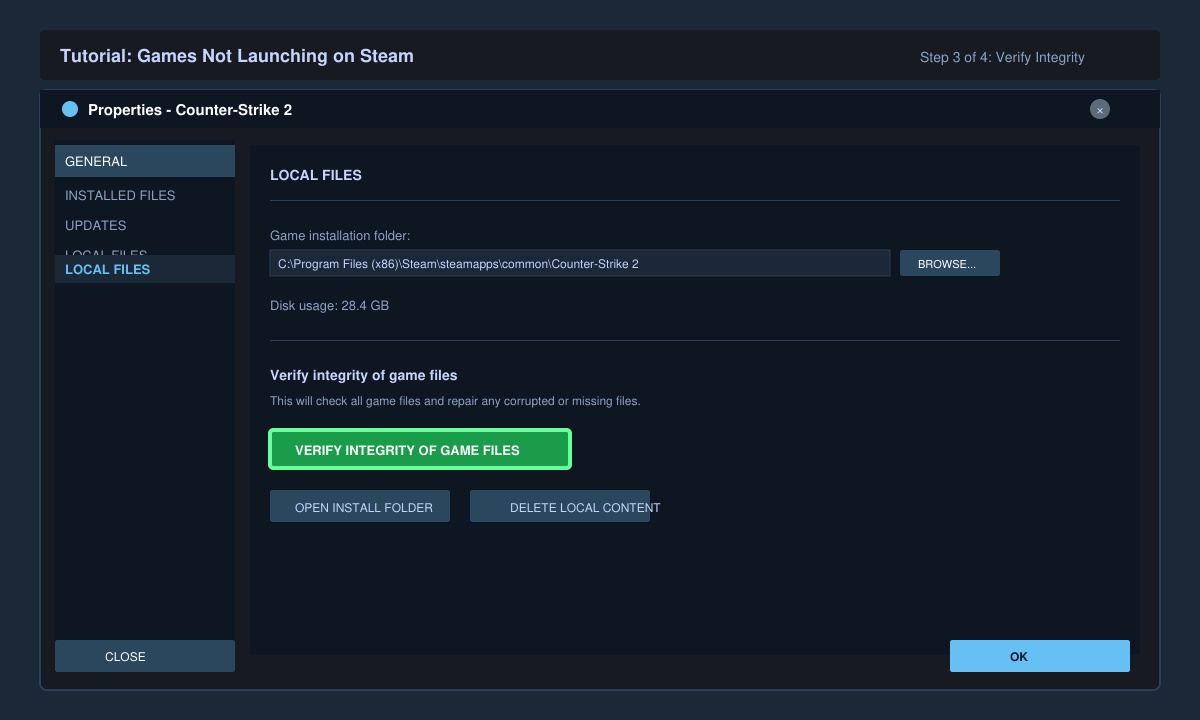
Open the Steam client and navigate to your Library. Right-click the affected game, select Properties, then click the Installed Files tab. Press the button labeled Verify integrity of game files. Steam will scan and replace any missing or corrupted files automatically. This process usually takes between two and ten minutes depending on game size.
-
Update Graphics Drivers
Outdated GPU drivers frequently cause launch failures. Visit the official site for your graphics card manufacturer (NVIDIA, AMD, or Intel) and download the latest studio or game-ready driver package. Run the installer and select a clean installation option if available. Restart your computer afterward before testing the game again.
-
Disable the Steam Overlay
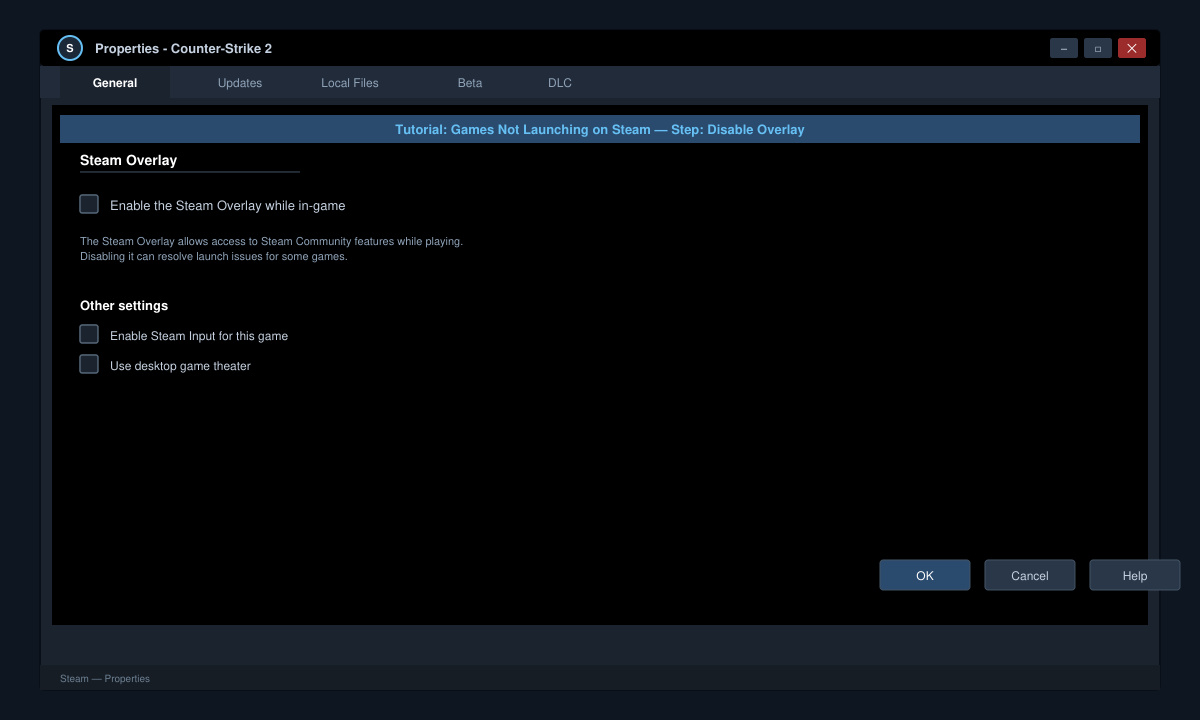
Steam's in-game overlay can conflict with certain titles. Return to the game's Properties window, switch to the General tab, and uncheck Enable the Steam Overlay while in-game. Click OK and attempt to launch the title. Re-enable the overlay later only if the game starts successfully.
-
Run Steam and the Game as Administrator
Right-click the Steam shortcut on your desktop or Start menu and choose Run as administrator. If the game still refuses to start, locate its executable inside the Steam\steamapps\common folder, right-click it, open Properties, go to the Compatibility tab, and enable Run this program as an administrator.
Additional Tips and Common Mistakes
- Restart your router and computer before each new troubleshooting step to clear temporary memory conflicts.
- Disable third-party overlays from Discord, NVIDIA GeForce Experience, or MSI Afterburner while testing.
- If the game uses Easy Anti-Cheat or BattlEye, verify that those services are allowed through Windows Defender Firewall.
- Avoid deleting the entire Steam folder; always use the built-in repair tools first to preserve download progress.
Frequently Asked Questions
Why does a game launch on one PC but not another?
Differences in graphics drivers, Windows updates, or background applications usually explain inconsistent behavior across machines.
Can I fix Games Not Launching on Steam without reinstalling the game?
Yes. The verification process, driver updates, and overlay changes resolve most cases without a full reinstall.
Does clearing the Steam download cache help?
Clearing the cache through Steam Settings > Downloads can resolve corrupted manifest files that prevent executables from starting.
Conclusion
Applying the verification, driver, and overlay steps in order resolves Games Not Launching on Steam for the majority of users. Test the game after each change to identify the exact cause.







