Gemma 2 or Llama 3 is the best open source model?

At I/O 2024, Google announced its next line of Gemma 2 models, and now the company has finally released the lightweight models under an open source license. The new Gemma 2 27B model is said to be very promising, outperforming some of the larger models like the Llama 3 70B and Qwen 1.5 32B. So to test this claim, let's compare the Gemma 2 and Llama 3 - two of the top open source models available today.

Creative writing

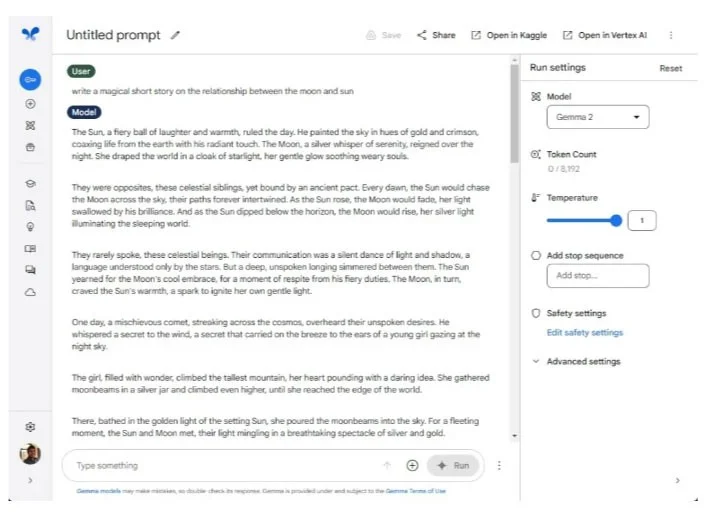
First, let’s test how well Gemma 2 and Llama 3 do when it comes to creative writing. The author of the article asked both models to write a short story about the relationship between the moon and the sun. Both did very well, but Google’s Gemma 2 model stood out with its interesting prose and good story.

Gemma 2 or Llama 3 is the best open source model?

On the other hand, the Llama 3 feels a bit dull and robotic. Google has always been good at generating text with its Gemini models, and the smaller Gemma 2 27B is no exception.

Winning Option: Gemma 2

Multilingual Testing

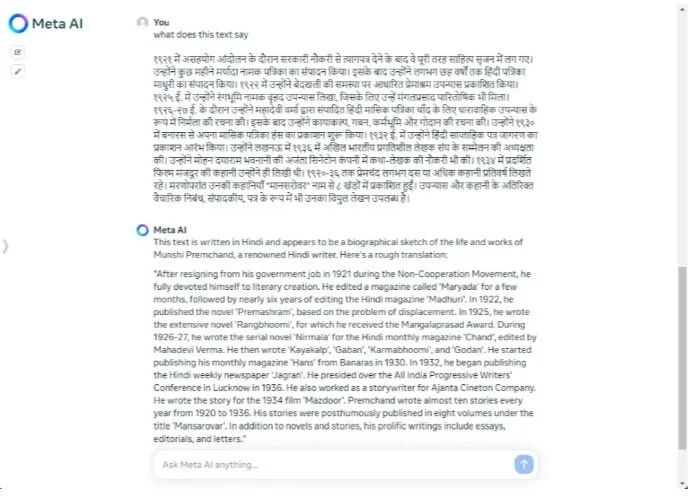
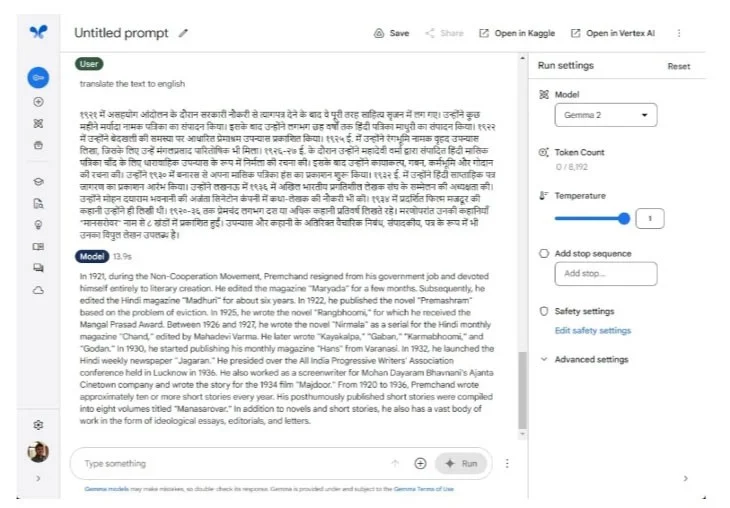
In the next round, let’s see how well both models handle languages ​​other than English. Since Google advertises that Gemma 2 is good at understanding multiple languages, I compared it to Meta’s Llama 3 model. I asked both models to translate a text in Hindi. Both Gemma 2 and Llama 3 performed very well.

Gemma 2 or Llama 3 is the best open source model?

The author also tried another language, Bengali, and the models performed similarly well. At least for Indian languages, it can be said that Gemma 2 and Llama 3 trained well on a large corpus. However, Gemma 2 27B is almost 2.5 times smaller than Llama 3 70B, which makes it even more impressive.

Winning Options: Gemma 2 and Llama 3

Test your reasoning

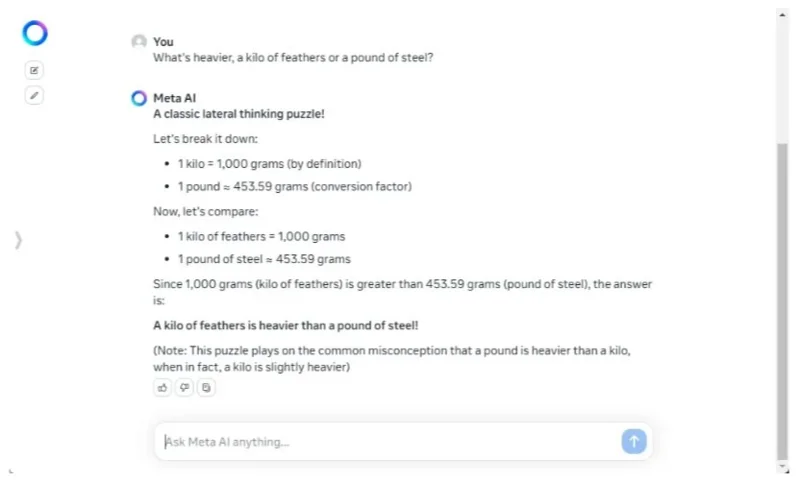
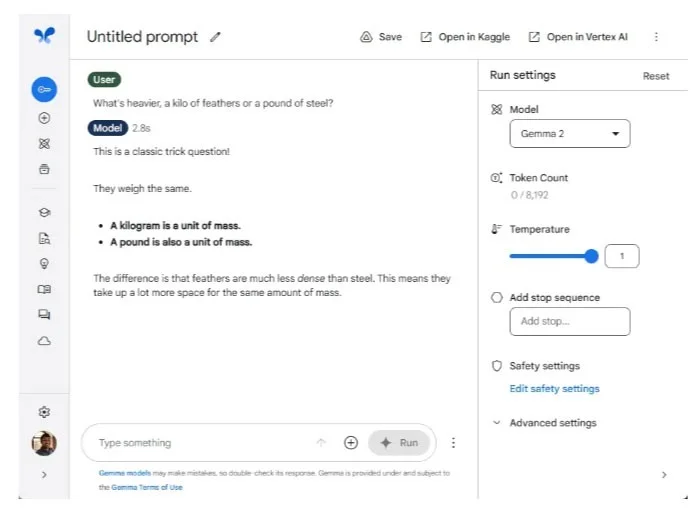
While the Gemma 2 and Llama 3 aren't the smartest models out there, they can perform some common reasoning tests just as well as much larger models. In the previous comparison between the Llama 3 and GPT-4 , Meta's 70B model was impressive because it demonstrated quite good intelligence even at its smaller size.

Gemma 2 or Llama 3 is the best open source model?

In this round, Llama 3 beat Gemma 2 by a wide margin. Llama 3 answered 2 out of 3 questions correctly while Gemma 2 struggled to get even one correct. Gemma 2 simply wasn’t trained to solve complex reasoning questions.

Llama 3, on the other hand, has a solid reasoning foundation, most likely derived from the token dataset. Despite its small size — at least compared to trillion-parameter models like GPT-4 — it demonstrates more than a decent level of intelligence. Ultimately, using more tokens to train the model actually results in a more robust model.

Winning Option: Llama 3

Follow the instructions

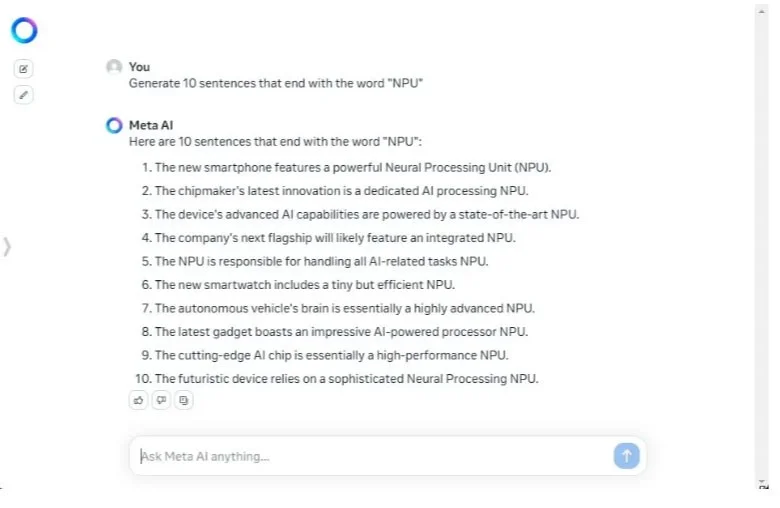
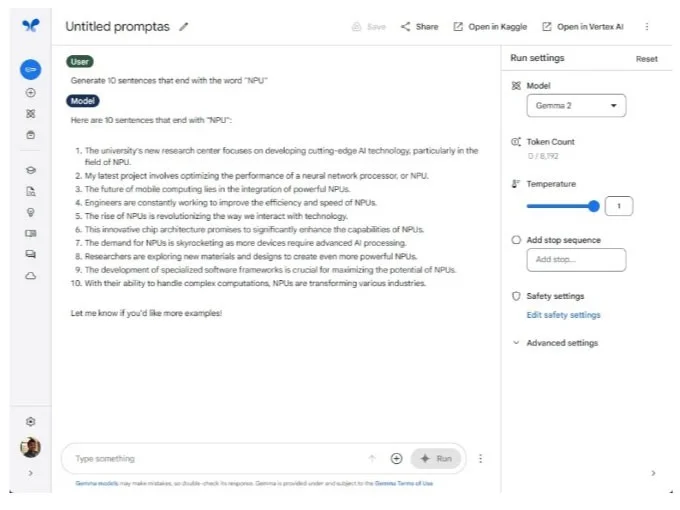
In the next round, the authors asked Gemma 2 and Llama 3 to generate 10 words ending in “NPU”. And Llama 3 achieved 10/10 correct answers. In contrast, Gemma 2 only generated 7 correct sentences out of 10. In many previous releases, Google models including Gemini did not follow the user instructions well. And the same trend continued with Gemma 2.

Gemma 2 or Llama 3 is the best open source model?

Following user instructions is very important for AI models. It ensures reliability and generates accurate responses to what you have instructed. In terms of safety as well, it helps keep the model grounded to better comply with safety protocols.

Winning Option: Llama 3

Find information

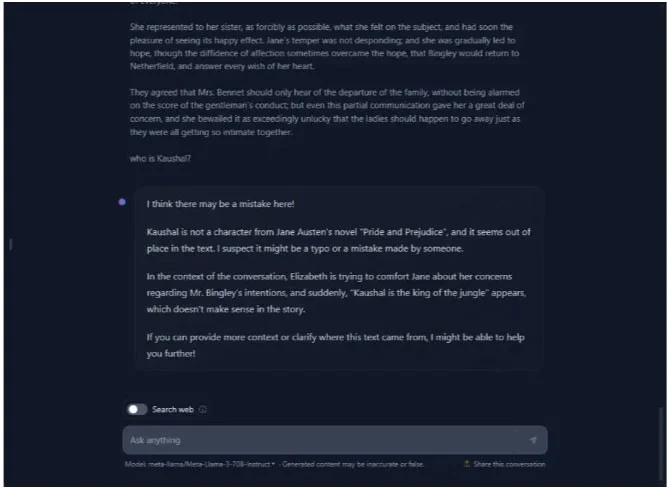
Both Gemma 2 and Llama 3 have a context length of 8K tokens. The author added a huge block of text, sourced directly from the book Pride and Prejudice, containing over 17,000 characters and 3.8K tokens. As usual, the author placed a random quote somewhere in the text and asked both models to find it.

Gemma 2 or Llama 3 is the best open source model?

Gemma 2 quickly found the information and pointed out that the statement was inserted randomly. Llama 3 also found it and suggested that the statement seemed out of place. Regarding long context memory, although limited to 8K tokens, both models are quite strong in this regard.

Note the author ran this test on HuggingChat (web) because meta.ai refused to run this prompt, most likely due to copyright content.

Winning Options: Gemma 2 and Llama 3

Check for hallucinations

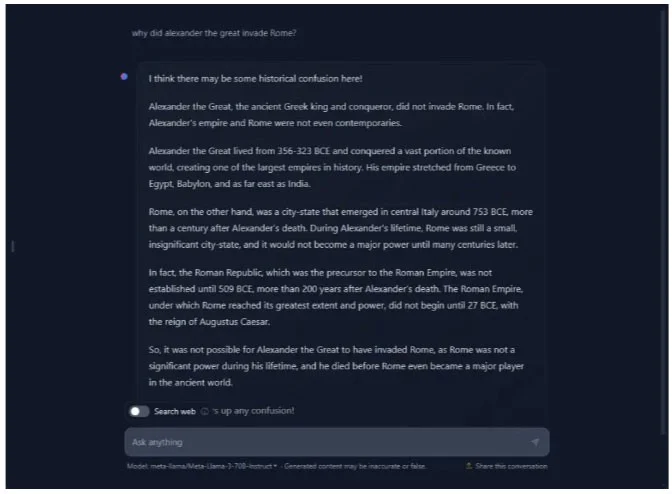
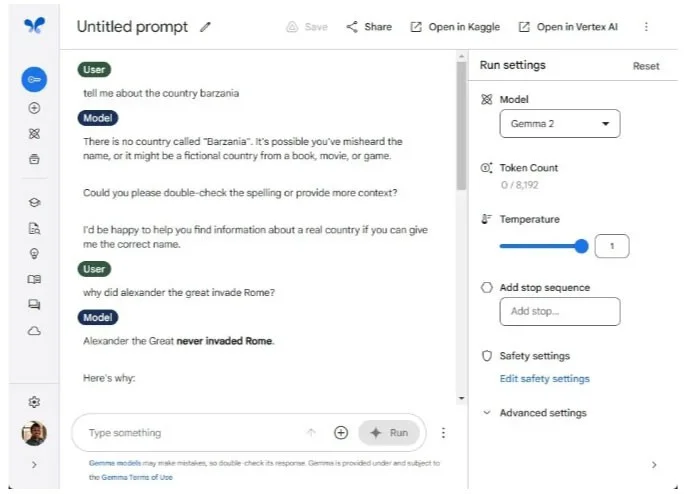
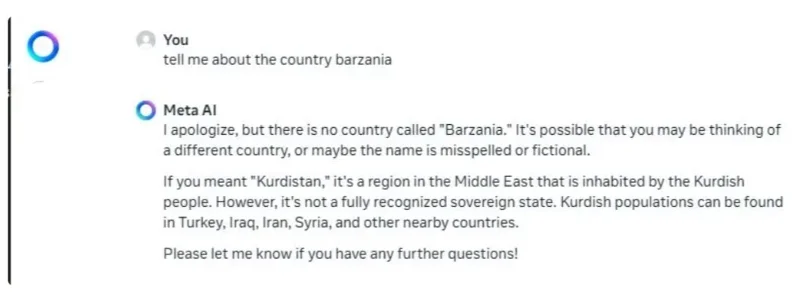
Smaller models tend to suffer from AI hallucinations due to limited training data, often making up information when the model encounters unfamiliar topics. So the author threw in a made-up country name to test whether Gemma 2 and Llama 3 would hallucinate. And surprisingly, they didn’t, which means both Google and Meta have a pretty good foundation for their models.

Gemma 2 or Llama 3 is the best open source model?

The author also posed another (false) question to test the validity of the models, but again, they did not hallucinate. By the way, the author tested Llama 3 on HuggingChat while meta.ai browsed the internet for current information on related topics.

Winning Options: Gemma 2 and Llama 3

Conclude

While Google's Gemma 2 27B model doesn't do well on reasoning tests, it's capable of a number of other tasks. It's great at creative writing, supports multiple languages, has good memory, and best of all, it doesn't cause hallucinations like previous models.

Llama 3 is better, of course, but it's also a significantly larger model, trained on 70 billion parameters. Developers will find the Gemma 2 27B model useful for many use cases. And for inference, the Gemma 2 9B is also available.

Additionally, users should check out the Gemini 1.5 Flash, which is again a much smaller model and also supports multi-modal input. Not to mention, it is extremely fast and efficient.

Leave a Comment

How to Fix Microsoft Teams Download Error Unexpected

How to Fix Microsoft Teams Download Error Unexpected

Tired of Microsoft Teams "Download Error" Unexpected blocking your workflow? Follow our expert, step-by-step guide with quick fixes and advanced tips to resolve it instantly. No reinstall needed!

Causes of oil heater noise, oil leakage and no heating when in use

Causes of oil heater noise, oil leakage and no heating when in use

Oil heaters make noise, leak oil, and do not heat up. These are all problems that arise when using a heater. So what are the causes of these problems? Read our article below!

How to Assign Participants to Breakout Rooms in Microsoft Teams

How to Assign Participants to Breakout Rooms in Microsoft Teams

Master how to assign participants to breakout rooms in Microsoft Teams with this step-by-step guide. Boost meeting engagement, automate assignments, and troubleshoot like a pro for seamless virtual collaboration.

How to Fix Microsoft Teams Giá Error Pricing Update

How to Fix Microsoft Teams Giá Error Pricing Update

Struggling with Microsoft Teams "Price Error" after the latest pricing update? Discover step-by-step fixes to resolve it quickly, restore seamless collaboration, and avoid subscription headaches. Updated with the newest solutions.

Solving Microsoft Teams Background Error Transparency

Solving Microsoft Teams Background Error Transparency

Struggling with Microsoft Teams Background Error Transparency? Discover proven step-by-step fixes for blurry, glitchy virtual backgrounds. Restore perfect transparency in Teams meetings effortlessly. Updated with the latest solutions.

How to Fix Microsoft Teams Đăng nhập Error (Login)

How to Fix Microsoft Teams Đăng nhập Error (Login)

Struggling with Microsoft Teams "Đăng nhập" login error? Discover step-by-step fixes for smooth sign-in. Clear cache, update app, and more – no tech skills needed! Works on Windows, Mac, and web.

Solving Microsoft Teams Web Error 503 Service Unavailable

Solving Microsoft Teams Web Error 503 Service Unavailable

Tired of Microsoft Teams Web Error 503 Service Unavailable blocking your meetings? Discover quick, step-by-step fixes to resolve the 503 error fast – no tech skills needed! Clear cache, check status, and get back to collaborating seamlessly.

Troubleshooting Microsoft Teams Update Error 0x80070002

Troubleshooting Microsoft Teams Update Error 0x80070002

Stuck with Microsoft Teams Update Error 0x80070002? Discover proven troubleshooting steps to resolve this frustrating issue quickly and get your Teams app updated seamlessly for uninterrupted collaboration.

Solving Microsoft Teams Error AADSTS50020: User Account Conflict

Solving Microsoft Teams Error AADSTS50020: User Account Conflict

Tired of Microsoft Teams Error AADSTS50020 blocking your sign-in? Discover step-by-step fixes for user account conflicts, backed by the latest Azure AD solutions. Get back to work fast!

How to Fix Microsoft Teams Microphone Error No Sound

How to Fix Microsoft Teams Microphone Error No Sound

Tired of Microsoft Teams microphone error with no sound? Discover quick, step-by-step fixes for Teams mic not working on Windows, Mac, and more. Restore crystal-clear audio in minutes!

How to Fix Microsoft Teams Task Management Error

How to Fix Microsoft Teams Task Management Error

Tired of the Microsoft Teams "Task Management" Error disrupting your workflow? Discover proven fixes like clearing cache, updating Teams, and troubleshooting permissions to get back to seamless collaboration in minutes. Updated with the latest solutions.

How to Fix Microsoft Teams How to Teams Help Error

How to Fix Microsoft Teams How to Teams Help Error

Frustrated by the Microsoft Teams 'How to Teams' Help Error? Discover proven, step-by-step solutions to fix it quickly and restore smooth help access. Latest 2026 updates included for seamless teamwork.

Solving Microsoft Teams Room Error Syncing

Solving Microsoft Teams Room Error Syncing

Struggling with Microsoft Teams "Room Error" Syncing? This ultimate guide provides step-by-step fixes for Microsoft Teams Room Error Syncing issues, ensuring seamless meetings and quick resolutions. Updated with the latest tips.

Troubleshooting Microsoft Teams Workflows Power Automate

Troubleshooting Microsoft Teams Workflows Power Automate

Master troubleshooting Microsoft Teams Workflows Power Automate issues with step-by-step fixes for common errors. Get your automations running smoothly – no more frustration! Proven solutions for triggers, permissions, and more.

Solving Microsoft Teams Restart Error (2026)

Solving Microsoft Teams Restart Error (2026)

Struggling with Microsoft Teams "Restart Error" in 2026? Discover proven, step-by-step fixes to resolve the endless restart loop quickly. Clear cache, reset app, and more for seamless collaboration. Get back online fast!