GitHub Copilot is now available in Apple Xcode and Windows Terminal
Windows Terminal is the modern host application for command-line shells like Command Prompt, PowerShell, and bash (via WSL).
GitHub, the world's most popular developer community platform, has officially crossed the 150 million member mark. To celebrate this milestone, Microsoft is offering GitHub Copilot for free in VS Code. This free version also comes with a full suite of features including chat and code completion, multi-file editing, multiple model selection, third-party extensions like Perplexity, Stack Overflow, etc.
The free version of GitHub Copilot has the following limitations when compared to the GitHub Copilot Pro version:
The following features will not be available:
To get around these limitations, developers can sign up for the GitHub Copilot Pro plan, which costs $10/month. Microsoft also notes that this new GitHub Copilot Free plan with limited functionality is only for individual developers. Users assigned to Copilot Business or Copilot Enterprise are not eligible for free access.
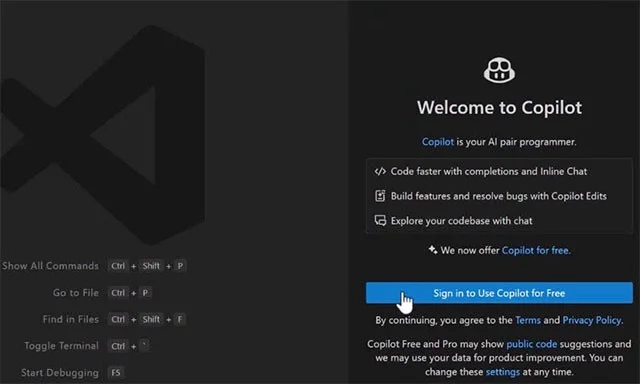
Speaking about the plan to roll out this new service, GitHub CEO Thomas Dohmke said:
GitHub has a long history of providing free products and services to developers. Starting with free open source and public collaboration, we’ve added free private repositories, free minutes for GitHub Actions and GitHub Codespaces, and free package and release hosting. Today, we’re adding GitHub Copilot to the mix by launching GitHub Copilot Free.
Along with the announcement of the GitHub Copilot Free plan, Microsoft also announced the general availability of Copilot Chat on GitHub for all users. As part of GA, GitHub has removed the limit on the number of repositories you can index, allowing developers to use Copilot Chat across their entire codebase.
Copilot Chat's new free plan and general availability demonstrate GitHub's commitment to making AI developer tools more accessible.

Tired of Microsoft Teams workflows and Power Automate errors halting your productivity? Get step-by-step solutions to common issues like authentication failures, timeouts, and flow errors. Fix them in minutes and automate effortlessly!
Facing Microsoft Teams "Download Error" on MacBook? Discover proven troubleshooting steps to resolve download failures quickly, from cache clears to reinstalls, and get back to smooth teamwork.
Tired of the frustrating Microsoft Teams "Where is Teams" Folder Error? Discover proven, step-by-step troubleshooting fixes to resolve it quickly and restore smooth teamwork. Latest methods included!
Frustrated by Microsoft Teams JavaScript Error on desktop app? Discover proven steps to fix it fast: clear cache, update, reset, and reinstall. Get back to seamless collaboration in minutes!
Struggling with Microsoft Teams "Guest Login" Error? Discover step-by-step fixes, from quick cache clears to admin settings, to resolve guest access issues fast and collaborate seamlessly. Updated with the latest tips!
Tired of the Microsoft Teams "For PC" download error blocking your work? Follow our proven, step-by-step guide to resolve it quickly and get Teams running smoothly on your PC today.
Struggling with Microsoft Teams "Windows 7" login error? Discover step-by-step fixes for this frustrating issue on Windows 10/11. Clear cache, edit registry, and more – get back to seamless collaboration today!
Tired of Microsoft Teams Error Code 0x80070005 blocking your meetings? Follow this 2026 guide with step-by-step fixes for access denied issues. Get Teams running smoothly in minutes!
Master the installation of the Microsoft Teams Add-in for Outlook 2026 effortlessly. Boost your productivity with seamless scheduling and meetings. Follow our proven, up-to-date steps for instant success!
Struggling with Microsoft Teams "License Error" 2026? Discover proven, step-by-step solutions to resolve it fast. Clear cache, check licenses, and get back to seamless collaboration—no IT help needed!
Whether youre in your 50s, 60s, or even 70s, its not too late to prioritize your health and put yourself first. Here are the best exercises for people 50 and older.
Struggling with Microsoft Teams Error Caa50024 on Windows 10/11? Follow our step-by-step fixes to resolve crashes and launch issues quickly. Latest proven solutions for seamless teamwork.
Stuck with Microsoft Teams login error AADSTS50011? Discover proven, step-by-step fixes to resolve the reply URL mismatch issue and log in seamlessly. No tech skills needed!
Tired of the frustrating Microsoft Teams "Win 7" Compatibility Error blocking your meetings? Get instant fixes with our step-by-step guide, including workarounds for older Windows versions. Resolve it now and stay connected!
Tired of the endless Microsoft Teams "Error R" restart loop? Get step-by-step fixes to solve Microsoft Teams Error R quickly. Clear cache, reset, reinstall & more for smooth collaboration. Works on Windows, Mac & web.








