How to play and equip Yorn season S1 2023

Yorn is a marksman who has been present in Lien Quan Mobile for a long time with the ability to destroy enemies from quite a distance. In this S1 2023 season, this general has a power that makes many players wary. This article will help you build equipment and play Yorn in the S1 2023 season effectively.

Table of Contents

Learn Yorn's move set

Before knowing how to play Yorn, we will need to understand this champion's skill set.

How to play and equip Yorn season S1 2023

Passive: Endless Names

The fifth consecutive normal attack fires 7 rounds of Infinite Arrows dealing physical damage.

How to play and equip Yorn season S1 2023

Move 1: Explosive Arrow

Yorn fires an explosive arrow to the target area, dealing physical damage and slowing the target. His next attack will trigger the Endless Arrows passive.

How to play and equip Yorn season S1 2023

Move 2: God's Name

Yorn briefly gathers power and fires an arrow that flies across the map. The arrow will stun enemy champions and deal physical damage. Additionally, the next basic attack will trigger the Endless Arrows passive.

How to play and equip Yorn season S1 2023

Move 3: Rain of Arrows

Yorn summons a mobile matrix that continuously damages random enemies inside every second, dealing physical damage. Additionally, his next basic attack will trigger the Endless Arrows passive.

Order of skill increase for Yorn

Players need to upgrade max skill 2 for general Yorn to increase long-range attack ability, supporting their team in combat. Therefore, the order of increasing skills will be as follows: Skill 2 > Skill 1 > Skill 3. From level 4, players can upgrade in the order shown in the image below.

How to play and equip Yorn season S1 2023
Summoner Spells for Yorn

Yorn is a marksman with extremely high hand damage but quite low health. Therefore, to increase Yorn's ability to escape from combat every time the enemy general approaches, players should use the Flash spell.

How to play and equip Yorn season S1 2023

Flash:

Instantly turn in the specified direction a short distance.

Gem table for Yorn Lien Quan season S1 2023

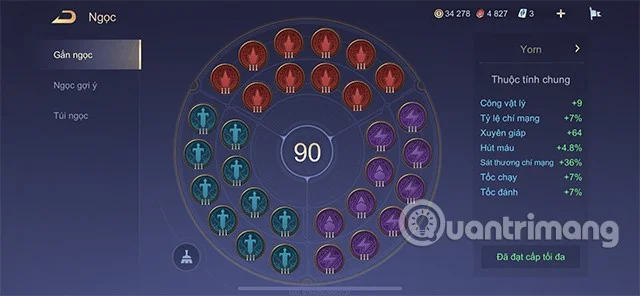
With his strong damage ability, Yorn needs to be equipped with the following gem table:

  • Red Gem: Critical Rate +0.7% ; Critical Damage +3.6%
  • Purple Gem: 7 Gems (Attack Speed ​​+1% Movement Speed ​​+1%) and 3 Gems (Lifesteal +1.6%)
  • Green Gem: Physical Attack +0.9; Armor Penetration +6.4

How to play and equip Yorn season S1 2023

Badges for Yorn in season S1 2023

The Origin City as the main branch and the Light Tower as the secondary branch will create the most suitable badge set for this marksman general. Specifically, when playing Yorn, you need to set up the badge set:

  • Main Branch: Origin City: Level 1 Super Healer, Level 2 Hunter, Level 3 Alchemist.
  • Sub-branch: Light Tower: Level 1 Contrast, Level 2 Secret.

How to play and equip Yorn season S1 2023

How to build Yorn Lien Quan Mobile season S1 2023

Below are suggestions for Yorn's equipment in this 22nd ranked season. You can refer to and try to apply it.

  • Nomad Boots : +25% Attack Speed. +60 Movement Speed.
  • Holy Sword: +100 Physical Attack. +25% Critical, Critical Damage increased by 50%.
  • Storm Twin Blades : +35% Attack Speed, +25% Critical Rate, +7% Movement Speed. Hurricane: Increases effect resistance by 35% for 2 seconds after a critical strike.
  • God-Slaying Bow: +50 Physical Attack, +30% Attack Speed, +10% Critical Rate. God-Smashing: Basic attacks deal 50 physical damage (doubled for ranged champions). Penetration: Increases armor penetration by 20% (doubled for ranged champions).
  • Fenrir's Fang: +200 Physical Attack. Targets below 50% health take 30% additional damage.
  • Guardian Angel: +120 Armor. Revives you after 2 seconds at the place you were killed with 2000 health (+100 health per champion level).

How to play and equip Yorn season S1 2023

How to play marksman Yorn season S1 2023

To play Yorn well, everyone needs to grasp the following points:

  • Due to his long attack range, combined with his passive, Yorn needs to be played aggressively in the early game, but the lane is too high because this marksman is very immobile and easily ganked in the early game.

How to play and equip Yorn season S1 2023

  • In the mid-game, everyone needs to take advantage of resources and support from their teammates to gain an advantage in small skirmishes to have money to buy equipment for themselves.
  • With the ability to deal continuous damage, in the late game Yorn can duel with any opponent this marksman faces.

Standard combo for Yorn

With Yorn, players can apply the following combos:

Skill 1 to slow down enemy generals' movement > Normal attack to activate Endless Arrows passive > Skill 3 to continuously deal damage to enemy generals in range > Continue normal attack to activate passive > Skill 2 to finish off enemy generals in case the enemy general wants to run.

In addition, Yorn players should continuously use skill 2 to shoot at the fighting area of ​​their team and the opponent. The ability of Yorn's skill 2 to shoot across the map can sometimes increase the damage caused to the enemy team, helping teammates defeat the opponent more easily.

How to play and equip Yorn season S1 2023

Above are the details of How to play and equip Yorn in season S1 2023 that Quantrimang wants to suggest to you. Players can refer to and try to apply and leave their feelings in the comments section.

Leave a Comment

Solving Microsoft Teams Web Error 503 Service Unavailable

Solving Microsoft Teams Web Error 503 Service Unavailable

Tired of Microsoft Teams Web Error 503 Service Unavailable blocking your meetings? Discover quick, step-by-step fixes to resolve the 503 error fast – no tech skills needed! Clear cache, check status, and get back to collaborating seamlessly.

Troubleshooting Microsoft Teams Update Error 0x80070002

Troubleshooting Microsoft Teams Update Error 0x80070002

Stuck with Microsoft Teams Update Error 0x80070002? Discover proven troubleshooting steps to resolve this frustrating issue quickly and get your Teams app updated seamlessly for uninterrupted collaboration.

Solving Microsoft Teams Error AADSTS50020: User Account Conflict

Solving Microsoft Teams Error AADSTS50020: User Account Conflict

Tired of Microsoft Teams Error AADSTS50020 blocking your sign-in? Discover step-by-step fixes for user account conflicts, backed by the latest Azure AD solutions. Get back to work fast!

How to Fix Microsoft Teams Microphone Error No Sound

How to Fix Microsoft Teams Microphone Error No Sound

Tired of Microsoft Teams microphone error with no sound? Discover quick, step-by-step fixes for Teams mic not working on Windows, Mac, and more. Restore crystal-clear audio in minutes!

How to Fix Microsoft Teams Task Management Error

How to Fix Microsoft Teams Task Management Error

Tired of the Microsoft Teams "Task Management" Error disrupting your workflow? Discover proven fixes like clearing cache, updating Teams, and troubleshooting permissions to get back to seamless collaboration in minutes. Updated with the latest solutions.

How to Fix Microsoft Teams How to Teams Help Error

How to Fix Microsoft Teams How to Teams Help Error

Frustrated by the Microsoft Teams 'How to Teams' Help Error? Discover proven, step-by-step solutions to fix it quickly and restore smooth help access. Latest 2026 updates included for seamless teamwork.

Solving Microsoft Teams Room Error Syncing

Solving Microsoft Teams Room Error Syncing

Struggling with Microsoft Teams "Room Error" Syncing? This ultimate guide provides step-by-step fixes for Microsoft Teams Room Error Syncing issues, ensuring seamless meetings and quick resolutions. Updated with the latest tips.

Troubleshooting Microsoft Teams Workflows Power Automate

Troubleshooting Microsoft Teams Workflows Power Automate

Master troubleshooting Microsoft Teams Workflows Power Automate issues with step-by-step fixes for common errors. Get your automations running smoothly – no more frustration! Proven solutions for triggers, permissions, and more.

Solving Microsoft Teams Restart Error (2026)

Solving Microsoft Teams Restart Error (2026)

Struggling with Microsoft Teams "Restart Error" in 2026? Discover proven, step-by-step fixes to resolve the endless restart loop quickly. Clear cache, reset app, and more for seamless collaboration. Get back online fast!

How to Create Breakout Rooms in Microsoft Teams Before a Meeting

How to Create Breakout Rooms in Microsoft Teams Before a Meeting

Master how to create breakout rooms in Microsoft Teams before a meeting with this easy guide. Pre-assign participants, boost collaboration, and elevate your virtual sessions effortlessly.

How to Fix Microsoft Teams Layout Error: Sidebar Missing

How to Fix Microsoft Teams Layout Error: Sidebar Missing

Tired of Microsoft Teams sidebar missing? Get instant fixes for layout errors. Step-by-step guide with latest tips to restore your Teams sidebar fast and frustration-free.

Solving Microsoft Teams Download Error for Macbook

Solving Microsoft Teams Download Error for Macbook

Struggling with Microsoft Teams Download Error on MacBook? Get step-by-step fixes for smooth installation on the latest macOS. Solve download failed issues quickly and easily.

Solving Microsoft Teams Error J Accounts

Solving Microsoft Teams Error J Accounts

Tired of Microsoft Teams Error J blocking your accounts? Get instant fixes for Error J in Teams with step-by-step guides, cache clears, and account resets. Regain access fast—no tech skills needed!

Rethinking Document Management to Streamline Your Workflow

Rethinking Document Management to Streamline Your Workflow

Work slows down when files sit in too many places, approval steps feel confusing, and people spend more time searching than actually finishing tasks. Strong document management can bring order back without making daily work feel complicated.

How to Fix Microsoft Teams Whiteboard Error Login

How to Fix Microsoft Teams Whiteboard Error Login

Frustrated by the Microsoft Teams Whiteboard Error Login? Discover proven, step-by-step fixes to resolve it quickly and get back to seamless collaboration. Latest solutions for desktop, web, and mobile. No tech skills needed!