Skype Free Phone Calls

Skype Free Phone Calls let you connect with friends and family worldwide at no cost. Follow this guide to set up and start making free calls quickly and easily.
High-Tech is an exciting new clan in the Teamfight Tactics Season 14 lineup, featuring a mechanism for using special items exclusively for champions of this clan.
The High-Tech lineup offers a flexible gameplay, combining strong resistance and damage thanks to buffs that add health and attack speed. Without needing other clans, High-Tech can completely handle resistance and damage, just add 1-2 other generals and you have a delicious team to climb the ranks.
In this article, we will learn how to build an effective High-Tech squad, from choosing champions, equipment, to playing tactics.
Characteristics of the Clan
The High-Tech clan in DTCL Season 14 allows players to equip special items for champions of this clan. These items not only increase basic power but also stack Health and Attack Speed based on the number of High-Tech champions activated.

The generals of the High-Tech clan include:
How to build a High-Tech squad
To maximize the power of the High-Tech clan, you should aim to activate at least 5 or 7 High-Tech to receive special items and significant buffs. Below is a basic lineup that you can refer to:
Team composition:

Characteristic
This comp focuses on a balance between tankiness from tanks (Jax, Sejuani) and high damage from carries (Jhin, Varus, Zeri). Mordekaiser and Naafiri play a supportive role, both dealing damage and providing utility to teammates.
Choose champions and arrange positions

Top (Tank)
Carry
Support
Situate:
Put Jax, Mordekaiser, and Sejuani in the front row to absorb damage. Jhin, Varus, and Zeri should be in the back row to maximize damage output. Naafiri can stay in the middle to support both lines.
Build items for High-Tech champions

Choosing the right equipment, especially taking advantage of High-Tech items, is an important factor for the team to maximize its strength. Below are suggestions for equipment for each champion:
In addition to the above equipment, don't forget to equip High-Tech items for champions to take advantage of the Health and Attack Speed buffs from the clan.
Early game

Focus on finding low-cost High Tech champions like Jax, Naafiri, and Jhin. The main thing is to get 3 High Tech and get the first High Tech item. If you intend to roll for Jhin, don't spend money to level up, save money to roll for Jhin later, it's okay to lose streaks. On the other hand, if you want to find Zeri or Varus, level up to 4 in round 3-1.
Mid-game
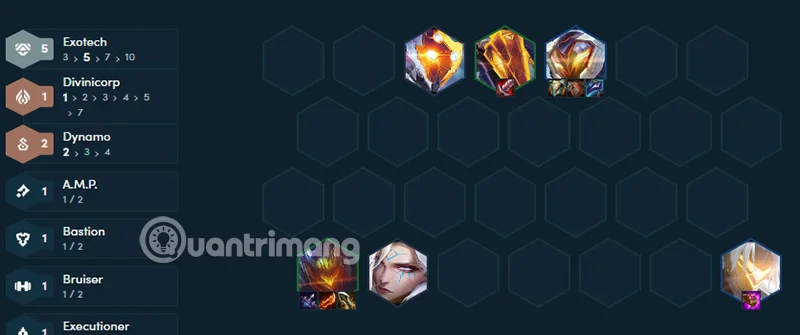
Find Mordekaiser and Varus and put them in the team to boost to 5 High Tech. If you roll for Jhin to 3 stars, stop at level 6 and slowroll him with more than 50 gold. Equip Jhin, he can hold Zeri's items, so later if you upgrade Zeri easily in the late game, use Magnet to remove items, level up to 7 when you have 3 stars for Jhin.
End of Game
Completing 7 High Tech is a milestone that you can easily achieve. If you can reach 9 and find the High Tech Seal, you can reach 10 High Tech. However, finding 10 High Tech is very difficult. So stop at 7 CNC and take good care of the generals in the team, and level up for Zeri at the end of the game.
Since High Tech relies heavily on special items, prioritize collecting them early. Also, pay attention to the enemy team to arrange your generals properly to avoid being countered.
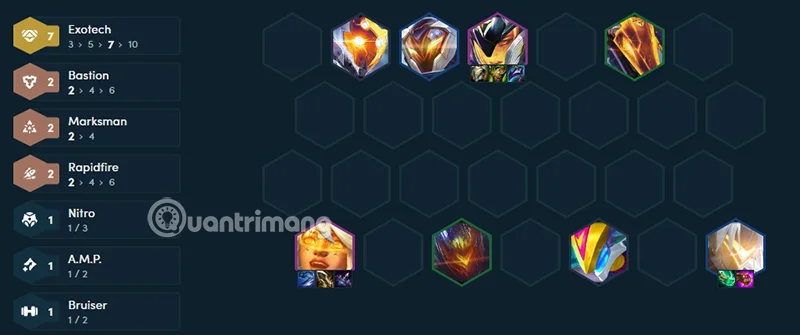
The High-Tech squad in DTCL Season 14 is a potential choice with unique gameplay thanks to special items and powerful buffs. And especially High-Tech has full tank and damage-dealing generals, so you only need to gather enough CNC without having to rely too much on generals in other clans.
If you know how to build and deploy a reasonable strategy, you can completely climb the ranks effectively with this squad. Hopefully, this article has provided you with an overview and useful tips to rotate this card more effectively.
Skype Free Phone Calls let you connect with friends and family worldwide at no cost. Follow this guide to set up and start making free calls quickly and easily.
Stuck in the Discord Update Failed Loop? Follow these targeted fixes to break the cycle and complete the update without repeated failures or reinstalls.
Travel planning used to mean folders full of printed confirmations, handwritten notes, guidebooks, and a slightly terrifying number of browser tabs. Now, pretty much everything you need for a trip can live on the device already in your pocket.
Discover how Canva Free for Teachers gives educators full access to premium design tools at no cost. Verify your status and start creating classroom materials in minutes.
Skype How to Call International is simple and cost-effective once you set up credit and use the right country codes. Follow this guide to place clear calls from anywhere.
Make Skype to Skype Calls Free in minutes with this clear guide. Set up your account, add contacts, and start unlimited voice and video calls at no cost.
Fix the Your Connection is Not Private Chrome error quickly with these exact steps. Restore secure browsing by addressing certificate and settings issues in minutes.
Record heat has lifted air-conditioning demand while gas-market shocks have returned volatility to power prices. That creates a real risk of painful bills—but not a guaranteed, Europe-wide price explosion.
Large format printing has long faced criticism for its environmental impact. Traditional substrates, solvent-based inks, and short-lived promotional campaigns have all contributed to the perception that eye-catching graphics come at a high environmental cost.
Long-distance travel can involve heavy traffic, changing weather conditions, and rider fatigue. If you are also dealing with the responsibilities of moving home, such as packing belongings or coordinating accommodation, a long ride may add unnecessary pressure to an already busy schedule.





