How to post Telegram Stories on mobile

The Telegram Stories feature is now available to all Telegram accounts, without having to register for a Telegram Premium account or use any supporting application. Basically, the Telegram Stories feature is similar to when you record Facebook Stories videos or create Instagram Stories, sharing interesting moments. You can record videos or post photos to Telegram Stories like other applications. Below are instructions for creating Telegram Stories.

Instructions for recording Telegram Stories on your phone

Step 1:

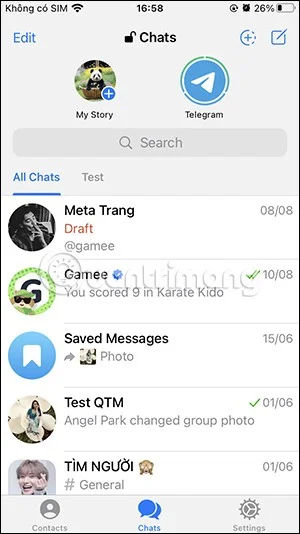
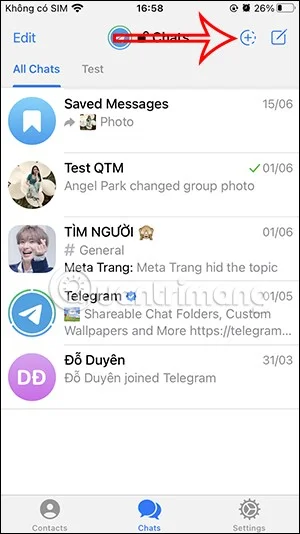
After updating the Telegram app to the latest version, you access the app as usual. Then you click on the circular plus icon to record videos, photos Telegram Stories or click on My Story as shown below.

How to post Telegram Stories on mobile

Step 2:

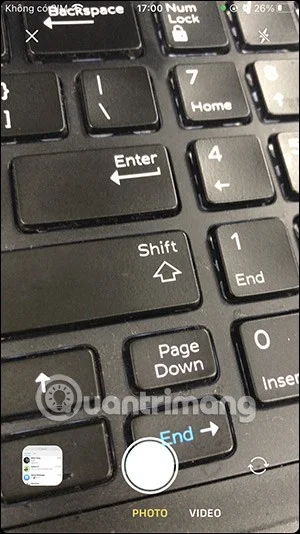
Displays the screen for you to record a Telegram Story video or post a Telegram Story image. If you want to use a photo available on your phone, tap the photo album in the left corner of the screen.

How to post Telegram Stories on mobile

Step 3:

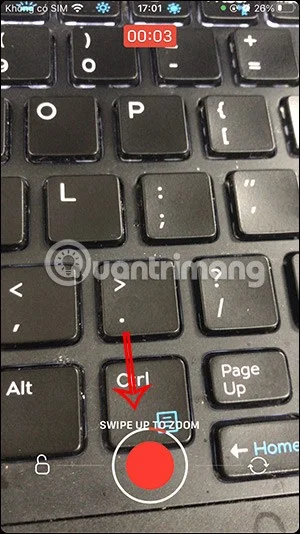
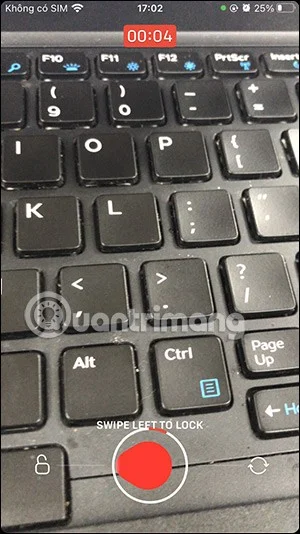
While recording Telegram Stories videos, when you press and hold the round button and drag to the right, it will switch between front and rear cameras , drag to the left to lock the video recording screen , drag up to zoom the screen , release your hand to stop recording Telegram Stories videos.

How to post Telegram Stories on mobile

Step 4:

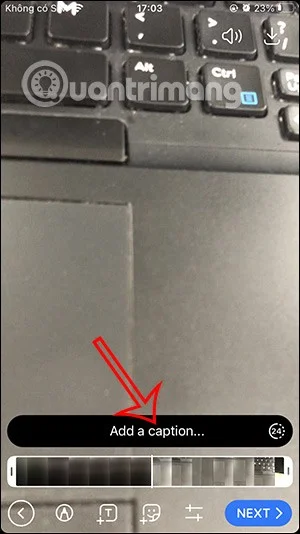
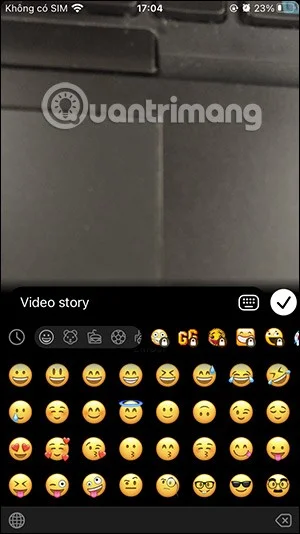
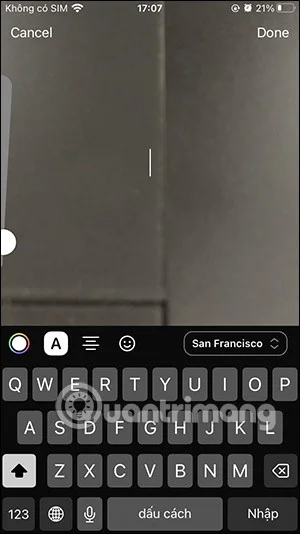
Switch to the Telegram Stories video editing interface. First, write a caption for this Story video. If you subscribe to Telegram Premium, you can unlock many different stickers.

How to post Telegram Stories on mobile

Step 5:

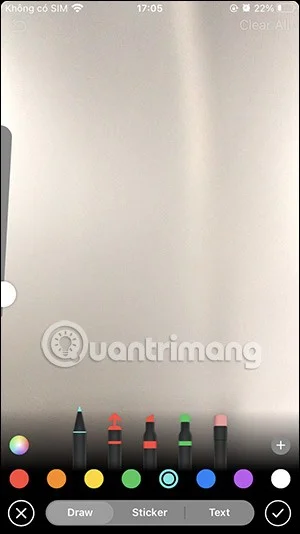
Next, adjust the white video frame to crop the video if you want. When you click on the pen icon, a drawing board will appear for us to insert text, stickers into the video,...

How to post Telegram Stories on mobile

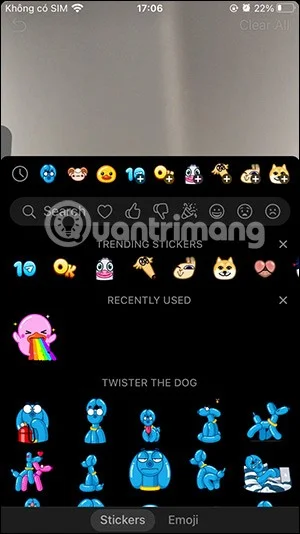
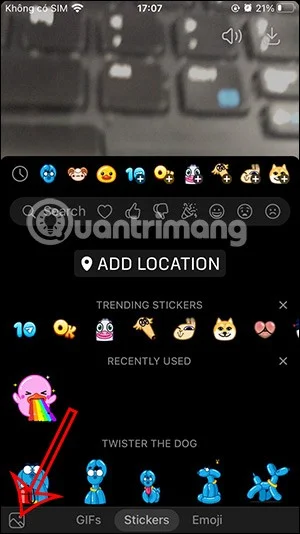
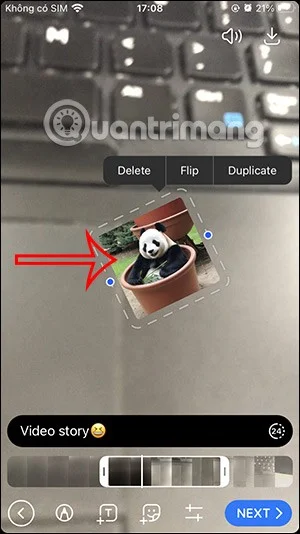
Tap the T icon to write text on the video. When you tap the sticker icon, you have the option to insert a location into the video if you want. Or add a photo to this Story video, by tapping the photo icon in the bottom left corner.

How to post Telegram Stories on mobile

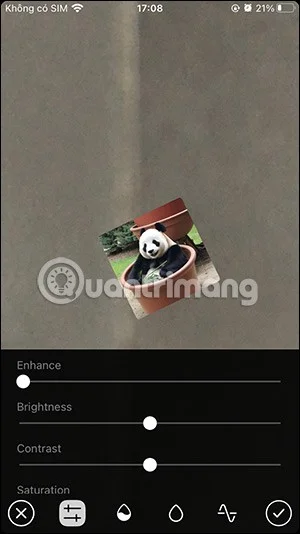
Finally, click on the 2 horizontal bar icon to edit some other settings for the video such as lighting,... When you have a satisfactory Telegram Stories video, click Next to post .

How to post Telegram Stories on mobile

Step 6:

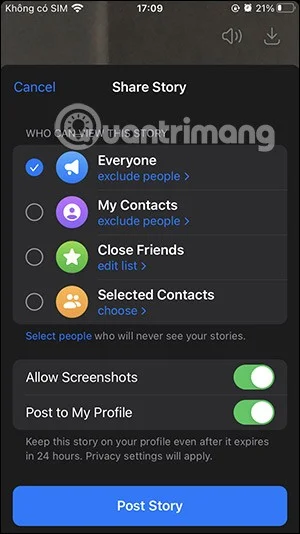
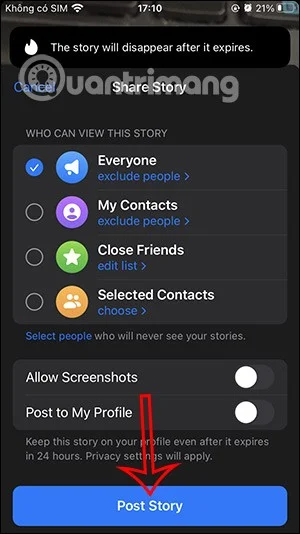
Before posting a Telegram Story video, users can choose who can see the story and whether they can take screenshots of the story. Tap Post Story to post.

How to post Telegram Stories on mobile

As a result, we get a Telegram Story video as shown below. You continue to post images or videos to Telegram Story as usual.

Note, you can only post 3 stories within 24 hours with a free Telegram account.

Video tutorial on posting Telegram Stories on your phone
Leave a Comment

Causes of oil heater noise, oil leakage and no heating when in use

Causes of oil heater noise, oil leakage and no heating when in use

Oil heaters make noise, leak oil, and do not heat up. These are all problems that arise when using a heater. So what are the causes of these problems? Read our article below!

How to Assign Participants to Breakout Rooms in Microsoft Teams

How to Assign Participants to Breakout Rooms in Microsoft Teams

Master how to assign participants to breakout rooms in Microsoft Teams with this step-by-step guide. Boost meeting engagement, automate assignments, and troubleshoot like a pro for seamless virtual collaboration.

How to Fix Microsoft Teams Giá Error Pricing Update

How to Fix Microsoft Teams Giá Error Pricing Update

Struggling with Microsoft Teams "Price Error" after the latest pricing update? Discover step-by-step fixes to resolve it quickly, restore seamless collaboration, and avoid subscription headaches. Updated with the newest solutions.

Solving Microsoft Teams Background Error Transparency

Solving Microsoft Teams Background Error Transparency

Struggling with Microsoft Teams Background Error Transparency? Discover proven step-by-step fixes for blurry, glitchy virtual backgrounds. Restore perfect transparency in Teams meetings effortlessly. Updated with the latest solutions.

How to Fix Microsoft Teams Đăng nhập Error (Login)

How to Fix Microsoft Teams Đăng nhập Error (Login)

Struggling with Microsoft Teams "Đăng nhập" login error? Discover step-by-step fixes for smooth sign-in. Clear cache, update app, and more – no tech skills needed! Works on Windows, Mac, and web.

Solving Microsoft Teams Web Error 503 Service Unavailable

Solving Microsoft Teams Web Error 503 Service Unavailable

Tired of Microsoft Teams Web Error 503 Service Unavailable blocking your meetings? Discover quick, step-by-step fixes to resolve the 503 error fast – no tech skills needed! Clear cache, check status, and get back to collaborating seamlessly.

Troubleshooting Microsoft Teams Update Error 0x80070002

Troubleshooting Microsoft Teams Update Error 0x80070002

Stuck with Microsoft Teams Update Error 0x80070002? Discover proven troubleshooting steps to resolve this frustrating issue quickly and get your Teams app updated seamlessly for uninterrupted collaboration.

Solving Microsoft Teams Error AADSTS50020: User Account Conflict

Solving Microsoft Teams Error AADSTS50020: User Account Conflict

Tired of Microsoft Teams Error AADSTS50020 blocking your sign-in? Discover step-by-step fixes for user account conflicts, backed by the latest Azure AD solutions. Get back to work fast!

How to Fix Microsoft Teams Microphone Error No Sound

How to Fix Microsoft Teams Microphone Error No Sound

Tired of Microsoft Teams microphone error with no sound? Discover quick, step-by-step fixes for Teams mic not working on Windows, Mac, and more. Restore crystal-clear audio in minutes!

How to Fix Microsoft Teams Task Management Error

How to Fix Microsoft Teams Task Management Error

Tired of the Microsoft Teams "Task Management" Error disrupting your workflow? Discover proven fixes like clearing cache, updating Teams, and troubleshooting permissions to get back to seamless collaboration in minutes. Updated with the latest solutions.

How to Fix Microsoft Teams How to Teams Help Error

How to Fix Microsoft Teams How to Teams Help Error

Frustrated by the Microsoft Teams 'How to Teams' Help Error? Discover proven, step-by-step solutions to fix it quickly and restore smooth help access. Latest 2026 updates included for seamless teamwork.

Solving Microsoft Teams Room Error Syncing

Solving Microsoft Teams Room Error Syncing

Struggling with Microsoft Teams "Room Error" Syncing? This ultimate guide provides step-by-step fixes for Microsoft Teams Room Error Syncing issues, ensuring seamless meetings and quick resolutions. Updated with the latest tips.

Troubleshooting Microsoft Teams Workflows Power Automate

Troubleshooting Microsoft Teams Workflows Power Automate

Master troubleshooting Microsoft Teams Workflows Power Automate issues with step-by-step fixes for common errors. Get your automations running smoothly – no more frustration! Proven solutions for triggers, permissions, and more.

Solving Microsoft Teams Restart Error (2026)

Solving Microsoft Teams Restart Error (2026)

Struggling with Microsoft Teams "Restart Error" in 2026? Discover proven, step-by-step fixes to resolve the endless restart loop quickly. Clear cache, reset app, and more for seamless collaboration. Get back online fast!

How to Create Breakout Rooms in Microsoft Teams Before a Meeting

How to Create Breakout Rooms in Microsoft Teams Before a Meeting

Master how to create breakout rooms in Microsoft Teams before a meeting with this easy guide. Pre-assign participants, boost collaboration, and elevate your virtual sessions effortlessly.