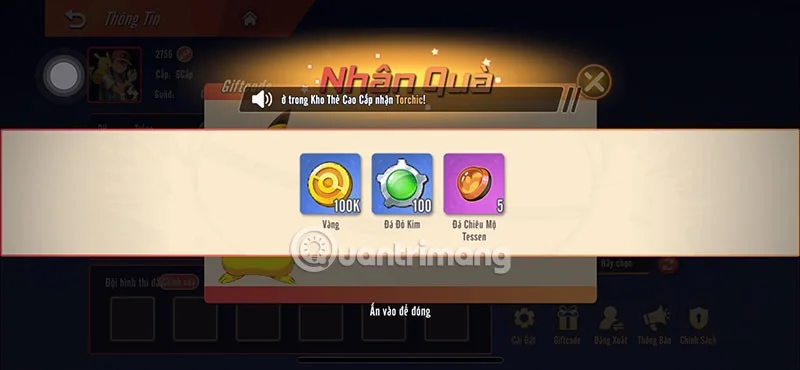
Receiving the game code Super Academy 3D and exchanging it for gifts is one of the things that many players do right when they first enter the game. You will need more help than the tutorial when you enter the game "empty-handed".
Not only that, you can also receive a series of event tasks to earn rewards in addition to the giftcode that the game publisher releases to players. However, please redeem the rewards from the giftcode that the game publisher released to players before with the code table below.
Redeem this code to get gold, diamonds, level up stones, level up material gifts, red gold stones, tessen recruitment stones...
Still in use (Latest)
SHV3D222
Redeem this code to get gold, diamonds, level up stones, level up material gifts, red gold stones, tessen recruitment stones...
Still in use (Latest)
SHV3D333
Redeem this code to get gold, diamonds, level up stones, level up material gifts, red gold stones, tessen recruitment stones...
Still in use (Latest)
SHV3D444
Redeem this code to get gold, diamonds, level up stones, level up material gifts, red gold stones, tessen recruitment stones...
Still in use (Latest)
SHV3D555
Redeem this code to get gold, diamonds, level up stones, level up material gifts, red gold stones, tessen recruitment stones...
Still in use (Latest)
SHV3D666
Redeem this code to get gold, diamonds, level up stones, level up material gifts, red gold stones, tessen recruitment stones...
Still in use (Latest)
SHV3D777
Redeem this code to get gold, diamonds, level up stones, level up material gifts, red gold stones, tessen recruitment stones...
Still in use (Latest)
Enter redemption code
Quick Guide
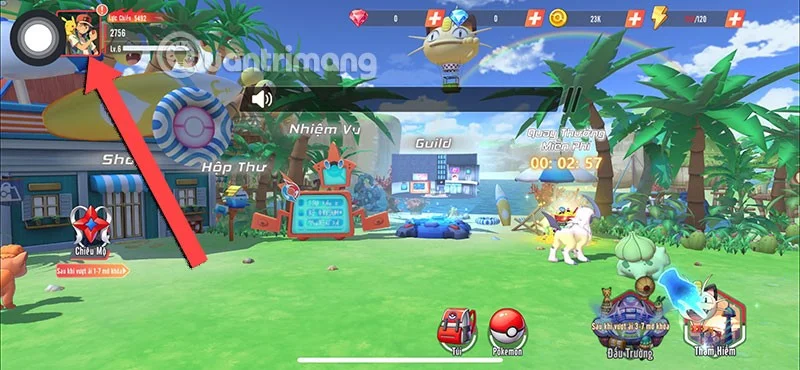
B1: Complete the initial instructions, select the avatar icon in the upper left corner.
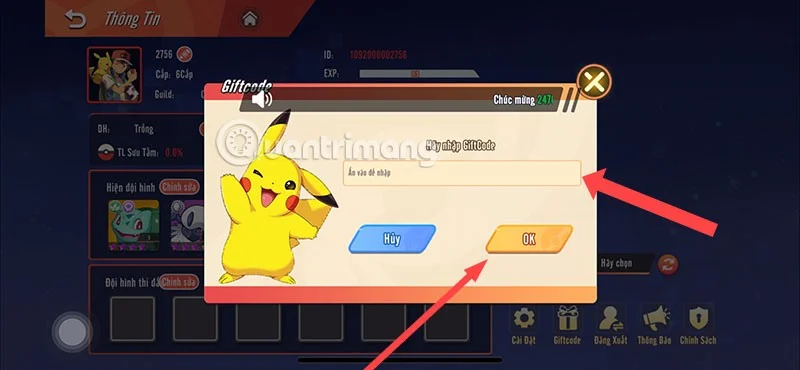
Step 2: Select Giftcode > enter the valid code in the code table above.
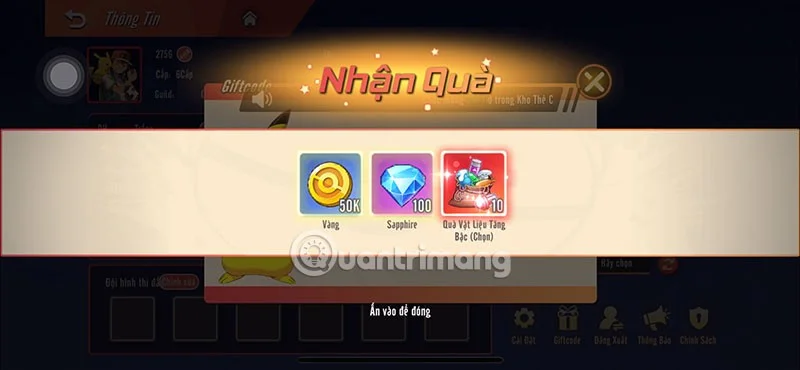
B3: Select OK, if the code is still valid, you will receive the reward immediately.
Detailed instructions
Step 1: First, select the avatar icon in the upper left corner of the screen.
Step 2: Select the Giftcode icon in the feature list below.
Step 3: Once the code table is open, enter the code in the code input box above, then select OK to redeem the giftcode. If the code is still valid, you will receive the corresponding gifts immediately after.
Enter code but can't redeem gift?
You may have entered an expired code, giftcodes are often released by game publishers. Among them are game codes released by game publishers with a short usage time, especially when that code is a game code taken from an event mission.
Codes from events are usually short-lived, and sometimes players need to redeem them as soon as they receive them. Often, when the event ends, the event code will only be valid for a few days before it becomes completely invalid.
Another reason is that you have entered the wrong code, in case you cannot copy the code in the code table above or copy the event code released by the game publisher. You must enter each character in the game exactly to be able to redeem the code for a reward. At the same time, you should also note that each code can only be used once, regardless of whether it is a code from the game publisher or an event code.
Where to get more codes?
As mentioned above, you can receive codes in events that the game publisher organizes for players. You should turn on notifications when following the game publisher's official social networking pages so as not to miss any code giving events.
In addition, they will also give players game codes on special occasions such as holidays, game updates with new content, opening new servers, reaching a large number of players or similar events.
That's all the information about the Super Academy 3D code, currently, the code for new players is only in the code table above. If you want to receive more codes from the game publisher, you should participate in events organized by the game publisher to receive reward codes.