Meet Opera Air: Operas New Browser

Many people are skeptical when a web browser claims to help relax the mind. But Opera's new Air browser is surprisingly useful, with handy tools for focusing, meditating, exercising, and more.

You may not feel the stress melt away, but Opera Air is definitely worth using.

Table of Contents

Opera Air is the browser built for relaxation.

Meet Opera Air: Opera's New Browser

Opera Air has exciting features focused on relaxation. In January 2025, Opera launched a new concept focused on hygge, which is all about coziness and calm. Now, Opera Air continues the Scandinavian vibe with a minimalist design and apps for focus, mindfulness, relaxation, exercise, and more.

But before you dismiss this as a gimmick, there are a few things to note. First, Opera Air comes with Opera’s other great tools, like a built-in VPN, ad blocking, tab gallery, Aria AI, and more. So switching to Opera Air isn’t about “relaxation or productivity.” You get it all in one package.

Second, Opera Air is really useful. Another cool feature is the “Take a Break” timer. Sometimes you get so focused that you forget to get up for hours at a time, which is a bad habit. A little reminder to take a break, stretch your legs, and generally adjust your posture is very welcome.

Use these Opera Air tools for focus, productivity, relaxation, and more

Binaural Audio Boosts

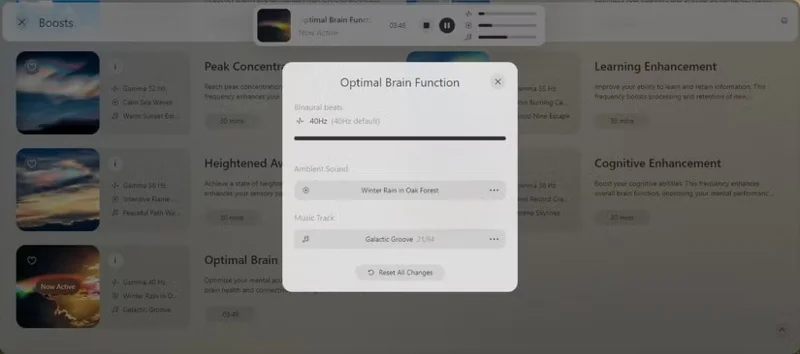
Opera frames its binaural audio integrations as Boosts, which are designed to stimulate your brain in a variety of ways. Binaural beats emit different sound frequencies between your ears to create something like an auditory hallucination. When used properly, it prompts your brain to create a new, unique frequency or beat, depending on the original input frequency, which can aid in relaxation, focus, attention, clarity, etc. Furthermore, binaural beats affect each listener differently, so what you hear and feel from a particular combination may be different for your wife, child, etc.

Opera's Boosts have three components: A lo-fi track, an ambient track, and a binaural frequency. Optimal Brain Function Boost, for example, has a 40Hz gamma wave, plays "Winter Rain in Oak Forest" as the ambient track (there are others to choose from), and cycles through a 64-track playlist. You can set Boosts to play for 15, 30, 60, or 90 minutes, or indefinitely if you really like.

Meet Opera Air: Opera's New Browser
Install binaural audio in Opera Air browser

You can also adjust the volume of each element in Boost. Want more emphasis on binaural frequencies? Turn it up. There’s also the option to adjust what kind of frequencies you’re listening to. Opera Air’s Boosts are a really useful and quick way to focus without leaving your browser.

Many people rarely listen to music with lyrics while working. They have huge playlists of relaxing electronic music, focus music, and similar sounds to help them focus during the day. That's why Opera Air Boosts are a really useful and quick way to get into the zone without leaving your browser.

Take a Break

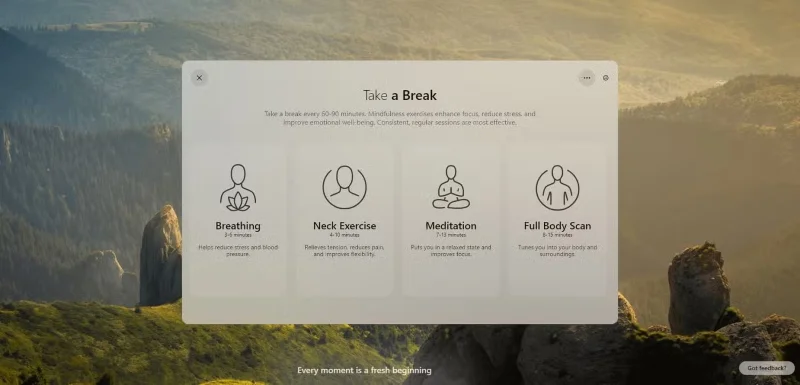
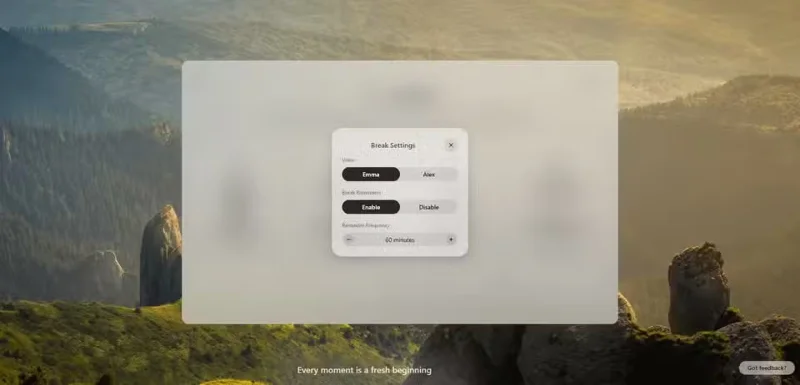
Opera Air's Take a Break mode gently nudges you to get up and move with a small reminder every 45-180 minutes (adjustable).

Meet Opera Air: Opera's New Browser

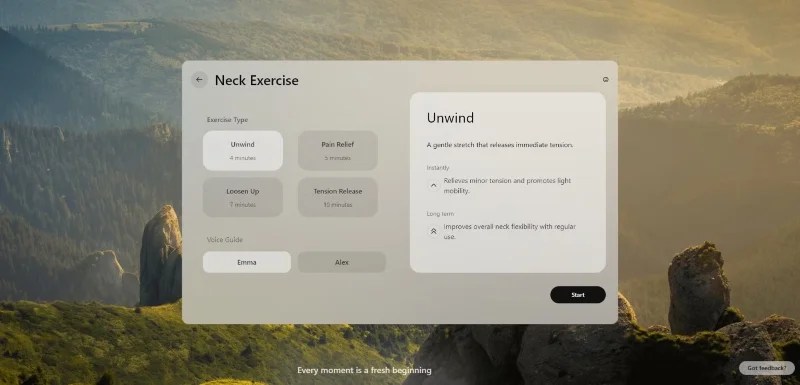
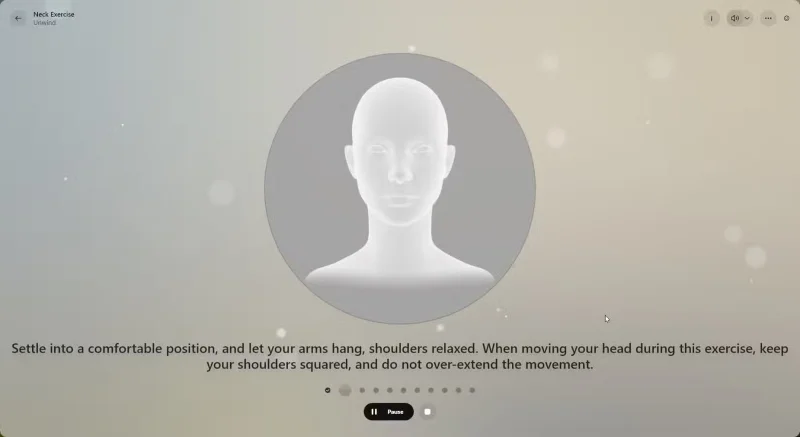
Take a Break offers four different workouts, each designed to reduce stress, increase focus, and more. The workouts are relatively short, with the longest being Full Body Scan, which takes up to 15 minutes. Once clicked, each option has specific workout types, allowing you to customize the time and voice guidance for better focus.

Meet Opera Air: Opera's New Browser

The benefits you get from these exercises really depend on what you put into them. The Neck Exercise takes 4-10 minutes, which is often a source of discomfort during long periods of hunching over a keyboard. So choosing the Unwind or Pain Relief option will provide a 4 or 5 minute guided stretch that will help relieve the tension. The camera option doesn’t seem to work or have any effect, but that may change in the future as new versions of Opera Air come out.

Meet Opera Air: Opera's New Browser

But most importantly, simply taking a break and focusing on something different can do wonders for productivity, and guided meditation and gentle movement are also great ways to lift your spirits.

Amazing increase in concentration after using Opera Air

Perhaps Opera Air has brought something different to the world of browsers and ultra-focus workspaces. You will really focus when using Opera's new browser. People love the variety of Boosts available and while the effect will vary from person to person, they will definitely have a positive impact on you.

Combined with short breaks, meditation, and guided stretching from Take a Break, I found myself more focused while working, returning to my task and continuing instead of fiddling with Reddit, games, or other things.

There are some parts that are a little unclear. The giant bubbles in the background of the browser illustrate this. It's understandable that Opera is trying to represent the concept of "Air" in the browser's name, but they look a bit odd. Many people also don't like the video-based background - it's too distracting in an otherwise relaxing browser.

The only real way to know if this is the right option for you is to try Opera Air!
Leave a Comment

Causes of oil heater noise, oil leakage and no heating when in use

Causes of oil heater noise, oil leakage and no heating when in use

Oil heaters make noise, leak oil, and do not heat up. These are all problems that arise when using a heater. So what are the causes of these problems? Read our article below!

How to Assign Participants to Breakout Rooms in Microsoft Teams

How to Assign Participants to Breakout Rooms in Microsoft Teams

Master how to assign participants to breakout rooms in Microsoft Teams with this step-by-step guide. Boost meeting engagement, automate assignments, and troubleshoot like a pro for seamless virtual collaboration.

How to Fix Microsoft Teams Giá Error Pricing Update

How to Fix Microsoft Teams Giá Error Pricing Update

Struggling with Microsoft Teams "Price Error" after the latest pricing update? Discover step-by-step fixes to resolve it quickly, restore seamless collaboration, and avoid subscription headaches. Updated with the newest solutions.

Solving Microsoft Teams Background Error Transparency

Solving Microsoft Teams Background Error Transparency

Struggling with Microsoft Teams Background Error Transparency? Discover proven step-by-step fixes for blurry, glitchy virtual backgrounds. Restore perfect transparency in Teams meetings effortlessly. Updated with the latest solutions.

How to Fix Microsoft Teams Đăng nhập Error (Login)

How to Fix Microsoft Teams Đăng nhập Error (Login)

Struggling with Microsoft Teams "Đăng nhập" login error? Discover step-by-step fixes for smooth sign-in. Clear cache, update app, and more – no tech skills needed! Works on Windows, Mac, and web.

Solving Microsoft Teams Web Error 503 Service Unavailable

Solving Microsoft Teams Web Error 503 Service Unavailable

Tired of Microsoft Teams Web Error 503 Service Unavailable blocking your meetings? Discover quick, step-by-step fixes to resolve the 503 error fast – no tech skills needed! Clear cache, check status, and get back to collaborating seamlessly.

Troubleshooting Microsoft Teams Update Error 0x80070002

Troubleshooting Microsoft Teams Update Error 0x80070002

Stuck with Microsoft Teams Update Error 0x80070002? Discover proven troubleshooting steps to resolve this frustrating issue quickly and get your Teams app updated seamlessly for uninterrupted collaboration.

Solving Microsoft Teams Error AADSTS50020: User Account Conflict

Solving Microsoft Teams Error AADSTS50020: User Account Conflict

Tired of Microsoft Teams Error AADSTS50020 blocking your sign-in? Discover step-by-step fixes for user account conflicts, backed by the latest Azure AD solutions. Get back to work fast!

How to Fix Microsoft Teams Microphone Error No Sound

How to Fix Microsoft Teams Microphone Error No Sound

Tired of Microsoft Teams microphone error with no sound? Discover quick, step-by-step fixes for Teams mic not working on Windows, Mac, and more. Restore crystal-clear audio in minutes!

How to Fix Microsoft Teams Task Management Error

How to Fix Microsoft Teams Task Management Error

Tired of the Microsoft Teams "Task Management" Error disrupting your workflow? Discover proven fixes like clearing cache, updating Teams, and troubleshooting permissions to get back to seamless collaboration in minutes. Updated with the latest solutions.

How to Fix Microsoft Teams How to Teams Help Error

How to Fix Microsoft Teams How to Teams Help Error

Frustrated by the Microsoft Teams 'How to Teams' Help Error? Discover proven, step-by-step solutions to fix it quickly and restore smooth help access. Latest 2026 updates included for seamless teamwork.

Solving Microsoft Teams Room Error Syncing

Solving Microsoft Teams Room Error Syncing

Struggling with Microsoft Teams "Room Error" Syncing? This ultimate guide provides step-by-step fixes for Microsoft Teams Room Error Syncing issues, ensuring seamless meetings and quick resolutions. Updated with the latest tips.

Troubleshooting Microsoft Teams Workflows Power Automate

Troubleshooting Microsoft Teams Workflows Power Automate

Master troubleshooting Microsoft Teams Workflows Power Automate issues with step-by-step fixes for common errors. Get your automations running smoothly – no more frustration! Proven solutions for triggers, permissions, and more.

Solving Microsoft Teams Restart Error (2026)

Solving Microsoft Teams Restart Error (2026)

Struggling with Microsoft Teams "Restart Error" in 2026? Discover proven, step-by-step fixes to resolve the endless restart loop quickly. Clear cache, reset app, and more for seamless collaboration. Get back online fast!

How to Create Breakout Rooms in Microsoft Teams Before a Meeting

How to Create Breakout Rooms in Microsoft Teams Before a Meeting

Master how to create breakout rooms in Microsoft Teams before a meeting with this easy guide. Pre-assign participants, boost collaboration, and elevate your virtual sessions effortlessly.