Leftover Halloween Candy and Pumpkins: What to Do Next

Sort leftover Halloween candy safely, share or repurpose sealed treats, and choose food use or compost for pumpkins based on their condition.
A new AI-powered investment scam is spreading across social media platforms, stealing millions of dollars in the process. It's called Nomani, and here's how you can spot it.
How Nomani uses AI and social media to lure victims?
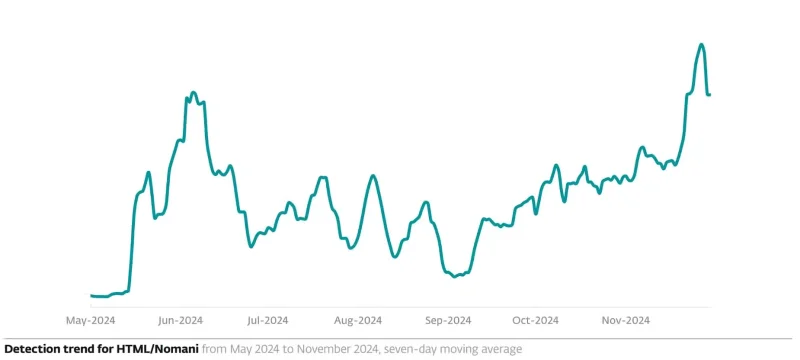
Nomani — a play on the word “no money” — is an investment scam that uses AI deepfake videos , malicious social media ads, and branded company posts to lure victims into fake investment schemes that promise quick and massive returns. The spike began in May 2024 and grew 335% from the beginning of the year to the second half of the year, according to ESET. Between May and November 2024, 8,500 domains and tens of thousands of attempts to access Nomani were blocked, with 100 new URLs related to the scam detected every day.
Fraudsters use deepfake videos of celebrities and influencers to lure victims into investing with the “rich and famous.” Celebrities are impersonated to lend legitimacy to the investment scheme. In some cases, highly localized fraudulent ads are used, impersonating heads of state and local political or business leaders.
In the United States and Canada, deepfake videos of Elon Musk promoting a “unique cryptocurrency investment opportunity” have been used. In other cases, previous victims of fraud have been targeted by groups impersonating Interpol or Europol.
The group lured victims with promises of refunds or assistance in recovering stolen funds using fake social media ads. These fake ads were distributed on Facebook and Instagram, with some using Facebook Messenger and Instagram Threads. X (formerly Twitter) and YouTube were also used to post fake customer reviews and deepfake video testimonials to lure victims into using the “investment platform.” These fraudulent positive reviews ranked highly in Google searches.
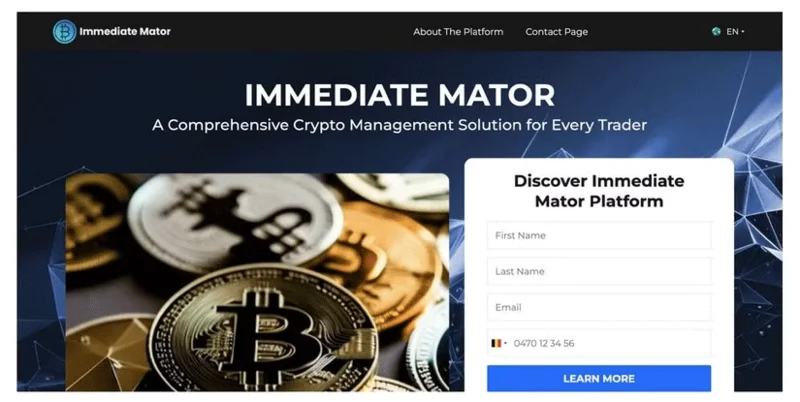
The fake ads are posted from a combination of stolen legitimate profiles, including hacked business or influencer pages, newly created profiles with few followers and posts, and pages that mimic legitimate companies or media outlets. Scammers use official logos, colors, and social media content previously taken from legitimate pages to create clones. The ads direct victims to fraudulent websites where their data is harvested.
Scammers use contact information from fraudulent websites to call victims directly and trick them into investing their money. Some are persuaded to take out loans, while others are forced to download remote access apps onto their devices. When victims ask for payment, they are asked to pay more or provide their personal identification or credit card information. After taking the victims’ data and money, the scammers disappear. Nomani’s scam is similar to the infamous pig butchering scams.
The Easy Way to Spot the Nomani AI Investment Scam
First, there are the low-resolution AI video ads and testimonials associated with this scam. The scammers use the low resolution to hide the AI video rendering errors, making it harder to see on small smartphone screens. You’ll also notice strange sentence structure in the speech, unnatural breathing patterns of the person in the video, and poor audio-video synchronization. You’ll also notice that keywords are repeated throughout the video.
Other telltale signs that you're watching a deepfake video include robotic-sounding dialogue, strange pronunciation of words, poor lip synchronization, jerky and unnatural body movements, and lack of eye movement.
Like other investment scams, the Nomani scam promises quick, easy, and huge returns. A dedicated call center convinces victims to borrow money to increase their investments or download remote access apps to withdraw payments. The call center features a fake investment manager who asks victims to invest more until there is no more money left.
Remember, promises of easy money are the biggest red flag. Like any financial scam, free food is only in the mousetrap.
Sort leftover Halloween candy safely, share or repurpose sealed treats, and choose food use or compost for pumpkins based on their condition.
Compare workplace Halloween costume choices by respect, dress code, mobility, and safety—and learn when a subtle accessory or a policy check is the better option.
Find a couples costume that fits your style, budget, and comfort level, from Addams Family classics to original inside-joke duos.
Need a last-minute high school Halloween costume? Compare 10 easy closet-based ideas by prep time, comfort, school-day practicality, and simple safety checks.
Use a simple 2026 Halloween decorating timeline for indoor décor, outdoor displays, and fresh pumpkins, with practical adjustments for weather and events.
Mix five vivid, approachable Halloween cocktails with measured recipes, simple prep tips, and an alcohol-free option for your party guests.
Find 15 office-friendly Halloween costume ideas for 2026, with practical checks for dress codes, respectful themes, comfort, and workplace safety.
Plan a fun elementary school Halloween party with easy crafts, games, inclusive treats, costume tips, and a sample 75-minute classroom schedule.
Compare realistic side hustles for 2026 by startup cost, fees, flexibility, and income control, with current tax and scam guidance from official sources.
Upgrade your home office ergonomics with current OSHA and NIOSH guidance on chair fit, monitor height, laptop setup, lighting, and movement.








