Make Realistic Fake Blood Without a Cleanup Surprise

Mix a glossy prop-only fake blood batch, choose safer products for skin and costumes, and test cleanup before Halloween night.
Every major smartphone company is touting AI as the next frontier for smartphone innovation. While AI is certainly valuable, there are more groundbreaking technologies being developed that could change the way we use our phones in ways never before imagined.
1. Graphene batteries and solid-state batteries
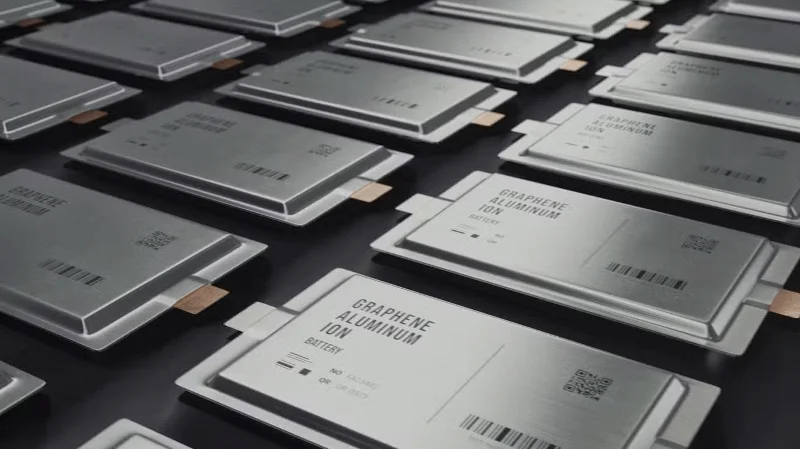
Almost all modern consumer electronics use lithium-ion batteries. They were conceived in the 1970s and first commercially available in the early 1990s. Since then, we have relied almost entirely on this precious metal to advance our technology. And now, we are starting to reach the limits of their value.
As users continue to expect more from their devices and experiment with new form factors, they're demanding faster processors and larger screens, both of which require more power. But there's only so much space inside a phone, and most of that space is taken up by the battery.
That means that while lithium-ion once helped drive progress, it is now holding it back. It’s clear that we need to find ways to store more energy in a smaller space.
Fortunately, there are some promising candidates, namely graphene batteries and solid-state batteries. Both offer higher energy density, longer life, and faster charging speeds. If we continue to invest in research, we could be looking at a future where a single charge lasts a week or more, and a phone recharge takes 10 minutes or less.
2. Over-the-air charging
Many people don't like wireless charging, mainly because it's not technically wireless. After all, the charging pad you put your phone on still has to be plugged into the wall with a wire.
Ideally, you'd be able to charge your phone anywhere in the room without having to set it down — that's exactly what over-the-air charging promises. Xiaomi and Motorola have been working on this technology for a while.
The reason this technology isn’t ready yet is because transmitting electricity through the air is even more difficult and slower than transmitting it through a charging pad. However, if we switch to graphene batteries, its high conductivity could help speed up charging and mitigate this drawback.
3. Ultra-thin bendable glass is more durable
The fragility of foldable phone displays is the biggest factor holding back their adoption. Even if we eliminate all the other common issues with foldable phones, creating a glass that is both bendable and durable is still very difficult.
Why? Because flexibility and strength are opposite qualities. To make a sheet of glass that can bend, you have to make it thinner, which will inevitably make it weaker, and vice versa.
The good news is that companies are actually working to fix this problem. Corning, the company that makes Gorilla Glass, is investing in making ultra-thin glass more durable for the next generation of foldable phones.
“We are actively developing next-generation glass-based solutions that will continue to push the boundaries of durability and provide consumers with the damage protection they expect from their devices.”
4. Long-range continuous optical zoom
We expect smartphones to have multiple camera lenses: One for wide angle, one for ultra-wide angle, and one for telephoto. But this isn’t ideal because these lenses have fixed focal lengths, which results in inconsistent image and video quality. That’s why the quality of your photos, while good at certain zoom levels, drops as soon as you zoom in anywhere between those fixed focal lengths.
For example, if your phone has a 3x telephoto lens, zooming in to 2.9x will probably produce a worse photo. However, when you zoom in to 3x, the phone switches to the telephoto lens and you'll see an increase in image quality.
Companies are trying to mitigate the impact of this decline by adding higher-resolution cameras and digital cropping. But all of these are just temporary fixes until we figure out how to achieve long-range continuous optical zoom on smartphones. Ideally, phones would have just one great camera that could do it all—and we’re getting closer.
At CES 2023, LG Innotek announced the world's first camera module capable of 4x-9x continuous optical zoom in a folding optical design. This far exceeds the range of the Sony Xperia 1 VI, which allows continuous zoom from 3.5x to 7.1x.
Another approach to achieving this is to use a retractable camera lens, just like DSLRs and mirrorless cameras. Xiaomi showed off a concept phone with the same feature in 2020, and we’ve seen it implemented in an actual commercial device on the Tecno Phantom X2 Pro. Of the two devices, the foldable optics design is more likely to be the future of smartphone cameras.
5. MicroLED panel
MicroLED is likely to be the next standard for smartphone displays. OLED is the most advanced smartphone display today thanks to its color accuracy and deep blacks, but it suffers from burn-in and isn’t as bright as LCD.
MicroLED solves both of these problems while still retaining the benefits of OLED, consuming less power and reducing screen glare. Samsung’s Wall TV already uses microLED, so we probably won’t have to wait too long to see it appear on a flagship Galaxy phone.
6. Completely bezel-less display
People have been building completely bezel-less phones for years. We’ve yet to see a commercial device, because the front of the device houses not only the display, but also the proximity sensor, ambient light sensor, earpiece, and most importantly, the selfie camera. And there’s a limit to how high you can fit them.
Even if you move all the other components elsewhere, the front camera still has to be on top for obvious reasons. So the only way to hide it is to “bury” it under the screen. Some gaming phones have under-screen cameras, but the image quality is poor because the screen reduces the light reaching the sensor.
However, under-display cameras are getting better and better, and when they're good enough to be included in flagship phones, they'll enable the design leap we've all been waiting for.
While some of the above innovations may take years to appear on smartphones, others could arrive in the next three to five years. That may seem like a long time, but given their potential, they're worth the wait.
Mix a glossy prop-only fake blood batch, choose safer products for skin and costumes, and test cleanup before Halloween night.
Create a gentle Halloween look with pastel colors, friendly ghosts, easy no-carve accents, and practical safety tips for your home.
Create a spooky office cubicle with Halloween desk decor ideas that keep your workspace usable, tidy, and mindful of workplace safety.
Plan a recognizable Halloween 2026 look with pop culture costumes inspired by Spider-Man, Supergirl, Toy Story 5, Moana, Mario, and Wednesday.
Sort leftover Halloween candy safely, share or repurpose sealed treats, and choose food use or compost for pumpkins based on their condition.
Compare workplace Halloween costume choices by respect, dress code, mobility, and safety—and learn when a subtle accessory or a policy check is the better option.
Find a couples costume that fits your style, budget, and comfort level, from Addams Family classics to original inside-joke duos.
Need a last-minute high school Halloween costume? Compare 10 easy closet-based ideas by prep time, comfort, school-day practicality, and simple safety checks.
Use a simple 2026 Halloween decorating timeline for indoor décor, outdoor displays, and fresh pumpkins, with practical adjustments for weather and events.
Mix five vivid, approachable Halloween cocktails with measured recipes, simple prep tips, and an alcohol-free option for your party guests.








