If you play Roblox frequently, you've likely made many friends. However, what if you want to remove someone from your friends list? Is it possible?

In this article, we’ll cover several effective methods for removing contacts from your friend list in Roblox. You can choose the one that best suits your needs.
1. The Regular Way
As of 2015, Roblox has limited the maximum number of friends to 200. If you reach this limit, you must delete some friends to make space. Here’s how to do it:
- Log in to your Roblox account.
- Navigate to the user’s profile.
- Click the Unfriend button.
This method is straightforward and ensures you remove only the friends you want, but it can be time-consuming, especially for multiple deletions.
2. Using Multiple Tabs
You can expedite the process by utilizing your browser’s multi-tab capabilities. Here’s how:
- Open your Roblox account in your browser (e.g., Google Chrome).
- Right-click on a friend’s profile and select “Open in New Tab” (you can also Ctrl + click or use the mouse wheel).
- Open tabs for each friend you want to remove.
- Go to each tab and press the Unfriend button.
- After doing one batch, close those tabs and repeat the process.
This method enhances efficiency but still requires some effort.
3. Roblox Friend Removal Button Extension
If you would like a more seamless experience without opening multiple tabs, consider using the Roblox Friend Removal Button:
- Open Google Chrome.
- Go to the Chrome Web Store.
- Search for the Roblox Friend Removal Button.
- Click Add to Chrome.
This will add a button to your Roblox friend list, allowing you to unfriend contacts directly from the menu without additional clicks.

4. Using AutoClicker
If you prefer automation, consider downloading the AutoClicker:
This open-source tool automates repetitive clicks, enabling you to focus on other tasks while it works through your friend list.
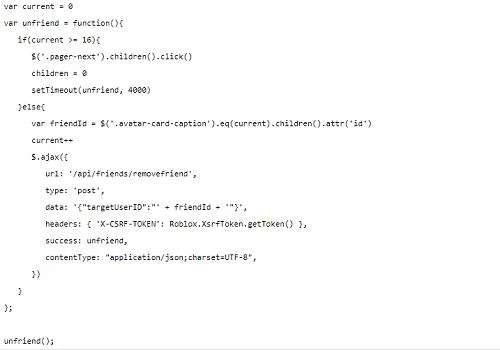
5. Automated Script via Console Programming
Some users have successfully removed their entire friends list using a script. Follow these steps:

- Open your Roblox Friends List in your browser.
- Right-click the page and select ‘Inspect’ (Ctrl + Shift + I on Chrome).
- Open the Console tab (F12 can also be used).
- Paste the script and press ENTER.
- If errors arise, repeat Step 4 as necessary.
Note: Always be cautious with third-party scripts.
A Clean Slate
In this guide, we've presented five effective strategies for removing friends from your Roblox list. Whether you prefer manual methods or automated tools, you can clear your friend list and start anew, allowing you to make new connections!
Have you removed friends from Roblox before? Which methods did you find most successful? Share your experiences in the comments below!








Katie -
Great article! I found it very helpful. Now I can focus on playing with my real friends!
Alex -
Thanks! This article really helped me lighten my friends list. Needed to do this for ages
OliverTech -
I love how straightforward this guide is. Wish I had known this sooner to avoid all the drama
VictoriaC -
I did this last week and I feel like I can finally breathe! Friends list was sooo cluttered
Emily_K -
Can someone explain the difference between deleting and unfriending? I’m confused
Ninja Lizard -
LOL, I was just thinking of this! Sometimes you just need a fresh start, right?
Grace -
This is such timely advice, I just had a huge fallout with some gamers! Time to clean up
Mia -
Such a helpful post! I think I've made more noise than friends on that list
Roblox Master -
I appreciate the details! Now I can easily manage who I want to keep as friends.
Lucy -
Great tips! ❤️ Everyone should consider cleaning their friends list now and then.
HannahBanana -
I tried this, and it worked like a charm! Goodbye fake friends, hello fun!
Jill -
This is perfect! I didn’t know I could just do it in one go. Thanks for the tip
MaxPower -
Can someone tell me if deleting friends affects our game stats? I'm a bit worried
Tommy Gamer -
I really needed this! I had so many friends I didn't even talk to. It feels good to clean up my list!
Jayden -
Thought I was the only person overwhelmed by my friends list! So glad I found this!
Liam the Builder -
Who else is sad to let go of their friends? Just kidding! This needed to happen!
Jasmine -
LOL, I thought I'd never do this but now it feels liberating! Time to start fresh.
Jesse -
I'm curious, is there a limit to how many friends you can have on Roblox
Nick -
Thanks a lot for this! My friends list was getting out of control
Sarah123 -
This is super useful! But, do you think there’s a way to do it faster
Emily -
Wow, I didn't know it could be so easy to delete all friends in Roblox! Thank you for the guide
Kai -
How often do people actually clean their Roblox friend lists? Is it just me
BenjiBoi -
Yesss! This makes everything so much easier. Can’t wait to try it out!
Jake -
Thanks for sharing! I was overwhelmed by my friends list, and now it’s easy to manage
TommyG -
Can we also block players during this process? Looking to keep my gameplay clean