When we hear about workstations, we will see that it is a durable machine of good quality for businesses with the ability to store, work efficiently and an extremely large price. In which there is a product that is indispensable for ECC RAM , an important component that creates the efficiency of work. So what is ECC RAM and why is it important? Therefore, equipment for workstations is also very demanding, including CPUs with multiple cores and threads, dedicated graphics cards (Quadro, FirePro) or even Server hard drives (SSD Enterprise, SAS, ... ) and indispensable RAM ECC , an important component to create efficiency of work. So what is ECC RAM and why is it important?
1. What is ECC RAM?
RAM server server with ECC (Error Checking and Correction) capability is a type of RAM capable of controlling the flow of data in and out. For a common RAM stick (Non - ECC ), during high speed signal transmission, it is easy to crash, especially when used in the sever. When a crash occurs, RAM (Non-ECC) has to reload the entire data stream because it is not capable of managing the data flow.
For ECC RAM , when a crash occurs, ECC RAM only needs to ask to resend the correct packet (packet) that crashed. ECC RAM has 9 chips (Non-ECC RAM has 8 chips) , it has automatic error correction mode, so ECC RAM has higher stability and performance than other normal RAMs.
2. ECC . RAM classification
There are two types of ECC RAM on the market today:
RAM Unbuffered ECC (RAM ECC UDIMM)
Unbuffered ECC RAM (RAM ECC UDIMM) is a type of Unbuffered RAM that adds ECC features with self-checking and error correction. Unbuffered RAM (RAM UDIMM) is memory without buffers or registers designed on the memory module, but instead, these devices are designed on the motherboard.
RAM Unbuffered ECC memory access instructions are sent directly to the memory module, faster than RAM Registered ECC because it does not have to be sent indirectly through the Registered chip.
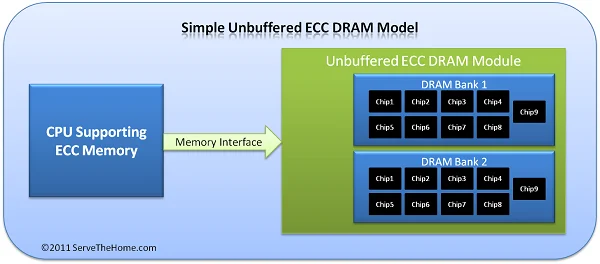
Mechanism of action of ECC UDIMM
RAM Registered ECC (RAM ECC RDIMM)
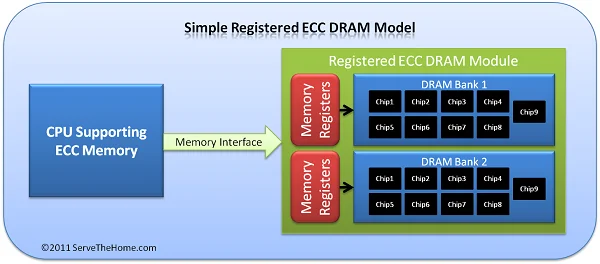
First of all, RAM Registered ECC (RAM ECC RDIMM) is a type of RAM Registered with additional ECC features for self-checking and error correction. RAM Registered (RAM RDIMM) is memory that contains registers that are mounted directly on the memory module.
Registers re-drive signals across the memory chips and allow the module to hold more memory chips. The access command of the RAM Registered ECC is sent to the Registered chip first and then transmitted to the memory module.

How ECC RDIMM . works
3. Distinguishing Non-ECC, Registered ECC and Unbuffered ECC RAM
Normal Ram(UDIMM,non ECC)

UDIMM RAM is RAM without buffers or registers.
- There are 8 memory chips, no middle chip.
- Usually there is no letter after the bandwidth parameter or yes but not E - R .

ECC RDIMM (ECC Registered)

ECC-RDIMM RAM is a type of RAM that contains registers that are mounted directly on the memory module. Registers help re-direct signals across the memory chips and allow the module to hold more memory chips. The access instruction of Ram will be transmitted to the register first and then transmitted to the memory module, reducing the CPU's memory control load. In addition, this RAM has an additional ECC feature for self-checking. and fix errors.
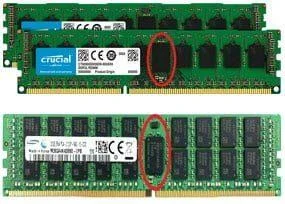
- Usually 10 chips on the front or with 1 chip in the middle, larger than the rest of the chips (ECC chips).
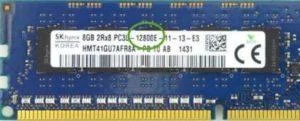
- Usually the letter after the bandwidth parameter is CHEAP

- With the DDR4 ECC Registered line, it is annotated with the RDIMM character right on the RAM stamp.

ECC UDIMM (ECC Unbuffered)

- RAM ECC-UDIMM is Ram UDIMM but adds ECC feature for self-checking and error correction.
- ECC-UDIMM RAM has memory access instructions delivered directly to the memory module faster than ECC RDIMM because it does not have to be sent indirectly through the register.
- Usually has 9 chips per side – 1 chip more than UDIMMs (ECC chips), and usually the chips are the same size.
- Usually the letter after the bandwidth parameter is E or ECC

- With the DDR4 ECC Unbuffered line, it is annotated with the ECC-UDIMM character right on the RAM stamp.

4. Operation mechanism of RAM Registered ECC has both advantages and disadvantages:
The most obvious disadvantage of RAM Registered ECC is due to its operating principle. Because the access instructions must be sent to the Register chip first and then transmitted to the memory module, the instruction instructions will take approximately 1 CPU cycle.
The advantage is that when using RAM Registered ECC will help reduce the CPU's memory control load, a part of the work to directly access the memory has already been performed by the Register chip. Thanks to that, the CPU will reduce the workload, make the machine run better and more efficiently.
This becomes especially important in server environments. For example, for a Supermicro X8DTH-6F Motherboard that supports two E5600 type CPUs, the gap is even greater with 48GB ECC UDIMM or 192GB ECC RDIMM.
For virtualized environments where memory capacity and memory bandwidth are key factors for achieving high virtualization density, RAM Registered ECC is the better choice. If you bought Unbuffered ECC RAM and then want to upgrade, you will most likely have to replace all your old RAM with new RAM and increase the cost quite a bit.
Customers can buy all kinds of RAM server, ... with ECC UDIMM and ECC RDIMM modules at the best price and reputation at WebTech360.
And that's why workstations need a special RAM line, specifically ECC RAM, hope you will choose the right RAM for you to work more efficiently.
If you are looking to buy ECC Ram, you can come to WebTech360 . Here you can completely buy yourself high-quality PC Ram sticks, get free advice and introduce affordable prices when you have a need to buy.