When you begin to familiarize yourself with the computer , you must have heard about the concepts of storage of the machine such as File or Folder. So what exactly is File and Folder, what are the notes to use? Check out the answer in the article below!
1. What is file?
File, also known as File, is responsible for storing user data created on the computer platform. Files are encrypted and can include a variety of formats such as text, images, audio, video, ...
Instead of storing these data individually, it will be easier to manage, organize and search for more than one thing you have in common. Each File will have its own use, depending on the intended use of the user.
2. Principle of precise file naming
File name consists of 2 main parts are the name and the extension . The name part can be arbitrarily set, but the extension must be set according to a certain file format rule.
Some of the basic file formats are:
- .doc , .docs : text file, usually the file was created using Microsoft Word .
- .exe : Executable file (Software installation file).
- .gif : Graphics conversion format file (Animation file).
- .jpg , .jpeg , .png : Image file.
![What is File, Folder? How to best name files and organize folders]()
- .mp3 : Audio file.
- .mp4 : Video MPEG 4 file.
- .pdf : Portable Document Format file (non-editable text).
- .ppt , .pptx : Microsoft PowerPoint format file .
![What is File, Folder? How to best name files and organize folders]()
- .psd : Adobe Photoshop file.
- .rar , .zip : Compressed file.
- .txt : Original text file, no format.
- .xls , .xlsx : Microsoft Excel format file .
In addition, you also need to pay attention not name the file containing special characters such as " / , \ , * ,, > , ; ".
3. What is a folder?
Folder is a folder - a special file responsible for storing data files on your computer. Folder can be viewed as the parent file of the File, a Folder will contain many similar files, assisting users in managing and organizing these files.
A directory exists in the form of a tree, meaning that within a directory it can contain other directories as well. Subfolders will be under the management of the home directory, and only when containing files, that folder will take up computer space.
![What is File, Folder? How to best name files and organize folders]()
4. Folder organization and arrangement are logical and easy to find
Storing data on your computer saves a lot of paper storage in real life, but if you do not know how to organize and organize them neatly, your data will be messed up!
So let's take a look at some archiving tips to help you easily find folders when you need them as follows:
- Give a short name, easy to remember
Since we can completely name the directory arbitrarily, for easy searching, you should name it according to the main content of that directory. For even more detail you can attach a time and place (if any), which will be very helpful in managing your directory.
In addition, I recommend that you name the folder with unsigned characters and spaces between letters, use "_" instead of a space to limit the folder name error when used on other devices. .
![What is File, Folder? How to best name files and organize folders]()
- Do not duplicate folder names
You can put the same folder names if you leave them in different locations. However, you should limit duplication to avoid confusion.
Please assign specific features to the folder name such as timestamp, location, customer name, version number, ... Do not assign any name to the folder to continue working quickly, because After that it can take a lot of time and effort to rearrange them!
- Make use of the available folders
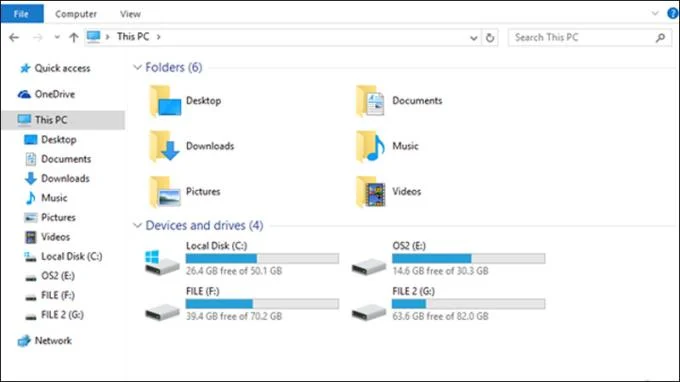
Normally, some main folders will be available on the machine such as Video, Music, Documents, ... For your convenience, use these available folders as the parent folder, then add the branches. other item.
![What is File, Folder? How to best name files and organize folders]()
- Organize folders from large to small
Imagine the tree as a mind map, for easy management, you should arrange the biggest idea first, then small and detailed gradually.
Thus, not only helps your folder tree be more neat, but the logical arrangement of folders will help you not have to edit old folders every time you want to add a new folder, you just have to branch a branch. New Folder is done.
See also :
>>> What is Raw? Should I save images as Raw when taking pictures?
>>> Update and shut down is what? Is it okay to shut down the computer while updating?
And those are the File and Folder profiles, as well as some archiving tips to keep your data tidy. Thank you for watching, look forward to the next article!