What You Need to Know About Mountain-Bracing Bolt in Genshin Impact

Is Mountain-Bracing Bolt useful for your exploration in Genshin Impact? This article will provide you with everything you need to know about Mountain-Bracing Bolt in Genshin Impact .
What You Need to Know About Mountain-Bracing Bolt in Genshin Impact

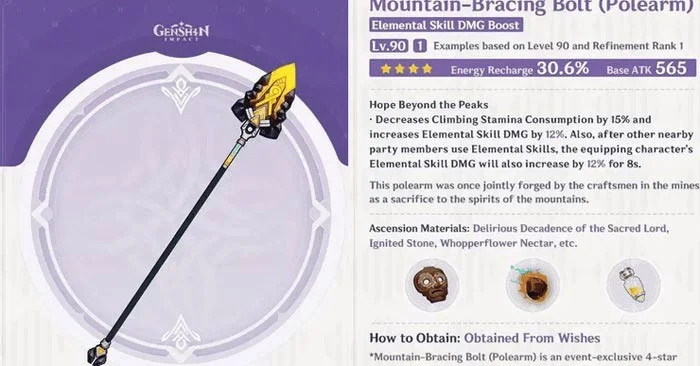
The Mountain-Bracing Bolt is a 4-star, event-exclusive weapon in Genshin Impact, introduced in version 5.1. It can only be obtained through Weapon Banner pulls and is not available in the Standard Banner. Despite being a 4-star weapon, it provides both Energy Recharge and Elemental Skill DMG boosts, making it a solid choice for 4-star weapon characters who rely heavily on Elemental Skills for damage.

Mountain-Bracing Bolt Stats and Uses in Genshin Impact

At level 90 and tweaked level 1, the Mountain-Bracing Bolt has the following stats:

Basic Attack 565
Secondary attack 30.6% energy recharge
Weapon Passivity The weapon wielder will have 15% reduced climbing stamina consumption and 12% increased Elemental Skill damage. Additionally, after other party members use their Elemental Skills, the character wielding this weapon will receive an additional 12% Elemental damage boost lasting 8 seconds.

With these stats, the Mountain-Bracing Bolt is ideal for characters who deal damage primarily through their Elemental Skills. Therefore, characters with weapons with below-average DPS can effectively use this 4-star weapon. If you upgrade the Mountain-Bracing Bolt to Refinement Level 5, the Elemental Skill damage for the character wielding this weapon will increase by 24%. This can be further enhanced by 24% when other party members use their Elemental Skills.

How to get Mountain-Bracing Bolt in Genshin Impact

The Mountain-Bracing Bolt is an event exclusive weapon introduced in Genshin Impact 5.1. It is currently featured on the weapon banner during the first phase of this version, along with several other 4-star weapons. This phase will end on October 29, 2024, and after that date, the Mountain-Bracing Bolt will not be available.

Best Mountain-Bracing Bolt User

Mountain-Bracing Bolt is a great weapon for both on-field and off-field DPS characters who focus on using their Elemental Skills to deal damage. Currently, there are two characters who can fully utilize the Mountain-Bracing Bolt:

Kachina

The Mountain-Bracing Bolt is a great choice for the 4-star Geo character Kachina. She can even be seen using this weapon in the Natlan Archon Quest cutscene. Kachina's main damage comes from Turbo Twirly, which is part of her Elemental Skill. Equipping the Mountain-Bracing Bolt will greatly increase her elemental damage output and help with her need to recharge her Energy.

Emily

Emilie is an effective off-field DPS supporting character who relies heavily on her Elemental Skills and Elemental Reactions to deal damage. Equipping Emilie with Mountain-Bracing Bolt allows her to deal significant additional damage when using her Elemental Skills. Since she primarily operates off-field, you can keep your DPS characters on the enemy, increasing the overall damage output of the entire team.


Leave a Comment

Troubleshooting Microsoft Teams Joining Error via Link

Troubleshooting Microsoft Teams Joining Error via Link

Struggling with Microsoft Teams "Joining Error" via link? Discover quick, step-by-step troubleshooting fixes for smooth meeting joins. Updated with the latest solutions for desktop, web, and mobile.

How to Fix Microsoft Teams MS Team Error 2026

How to Fix Microsoft Teams MS Team Error 2026

Frustrated by Microsoft Teams "MS Team Error" 2026? Discover proven, step-by-step solutions to get back online instantly. Latest 2026 updates included for seamless fixes.

How to Fix Microsoft Teams Loading Error Infinite Loop

How to Fix Microsoft Teams Loading Error Infinite Loop

Struggling with Microsoft Teams "Loading Error" infinite loop? Follow our expert, step-by-step guide to fix it quickly. Clear cache, update app, and more for seamless teamwork. Works on Windows, Mac & web.

How to Fix Microsoft Teams Chat Error Not Sending

How to Fix Microsoft Teams Chat Error Not Sending

Struggling with Microsoft Teams "Chat Error" not sending messages? Discover step-by-step fixes for the latest Teams issues, from cache clearing to network tweaks. Get back to chatting seamlessly in minutes!

How to Fix Microsoft Teams Meet Joining Error

How to Fix Microsoft Teams Meet Joining Error

Tired of Microsoft Teams "Meet" joining error blocking your meetings? Discover proven, step-by-step fixes to resolve Microsoft Teams Meet joining issues quickly and get back to seamless collaboration. Updated with the latest troubleshooting tips.

Troubleshooting Microsoft Teams Installation Has Failed on Windows 11

Troubleshooting Microsoft Teams Installation Has Failed on Windows 11

Struggling with Microsoft Teams "Installation Has Failed" on Windows 11? Follow our step-by-step troubleshooting guide with proven fixes, from clearing cache to advanced repairs, to resolve the error quickly and painlessly. Get Teams running smoothly today!

How to Fix Microsoft Teams Breakout Rooms Not Showing

How to Fix Microsoft Teams Breakout Rooms Not Showing

Tired of Microsoft Teams Breakout Rooms not showing up? Follow our ultimate guide with step-by-step fixes, troubleshooting tips, and prevention strategies to get breakout rooms working seamlessly for productive meetings.

Solving Microsoft Teams Shortcut Error and Startup Crashes

Solving Microsoft Teams Shortcut Error and Startup Crashes

Tired of Microsoft Teams shortcut error blocking your workflow? Learn proven steps to solve Microsoft Teams shortcut error and startup crashes for smooth collaboration. Quick, easy fixes inside!

How to Fix Microsoft Teams Planner Error in Channels

How to Fix Microsoft Teams Planner Error in Channels

Struggling with Microsoft Teams "Planner Error" in channels? Discover proven, step-by-step solutions to resolve it quickly and restore seamless collaboration. No tech skills needed!

How to Set Up Microsoft Teams for School and Education

How to Set Up Microsoft Teams for School and Education

Discover how to set up Microsoft Teams for school and education effortlessly. Get free access, create classes, assignments, and meetings with our ultimate guide for teachers and students. Boost learning today!

How to Use Microsoft Teams Whiteboard in 2026

How to Use Microsoft Teams Whiteboard in 2026

Discover how to use Microsoft Teams Whiteboard in 2026 with this complete guide. Learn access methods, AI-powered features, step-by-step tutorials, and pro tips for seamless collaboration in virtual meetings. Boost productivity today!

Troubleshooting Microsoft Teams Bị lỗi (General Errors)

Troubleshooting Microsoft Teams Bị lỗi (General Errors)

Stuck with Microsoft Teams errors? Get step-by-step fixes for crashes, sign-in failures, audio glitches, and more. Proven solutions to resolve general Teams issues fast and frustration-free.

Troubleshooting Microsoft Teams Wiki Not Loading Error

Troubleshooting Microsoft Teams Wiki Not Loading Error

Stuck with Microsoft Teams Wiki not loading error? This ultimate troubleshooting guide delivers quick, step-by-step solutions to fix the issue fast and restore seamless collaboration.

Where to Find the Microsoft Teams Installation Folder on Your PC

Where to Find the Microsoft Teams Installation Folder on Your PC

Struggling to locate the Microsoft Teams Installation Folder on your PC? This step-by-step guide reveals exact paths for new and classic Teams, per-user & per-machine installs. Save time troubleshooting!

Troubleshooting Microsoft Teams Proxy Error Settings Fix

Troubleshooting Microsoft Teams Proxy Error Settings Fix

Struggling with Microsoft Teams Proxy Error? Discover proven Troubleshooting Microsoft Teams "Proxy Error" Settings Fix steps. Clear cache, adjust proxy settings, and get back to seamless calls in minutes with our expert guide.







