Desk Decorating Ideas for a Spooky Office Cubicle

Create a spooky office cubicle with Halloween desk decor ideas that keep your workspace usable, tidy, and mindful of workplace safety.
Even with the advent and proliferation of digital TV, HDTV broadcasting capabilities, and source devices (such as Blu-ray players and media streaming devices ), the old barriers to universal video standards have not been overcome. This article explains why the NTSC and PAL standards remain important.
Note : This information applies to TVs from many manufacturers, such as LG, Samsung, Panasonic, Sony, and Vizio.
Frame rate
Although video is now predominantly digital, the frame rates used in analog video systems are still incorporated into digital TV and HDTV standards. In video (analog, HD, and 4K Ultra HD), as in film, the images viewed on screen appear as complete frames. However, there are differences in how the frames are broadcast, transmitted through streaming media or physical media, and displayed on screen.
Lines and pixels
A live or recorded video image consists of scan lines or rows of pixels. In a movie, the entire image is displayed at once. In contrast, the lines or rows of pixels in a video image are displayed across the entire screen, starting at the top of the screen and moving down to the bottom. These rows are displayed in either interlaced or progressive format.
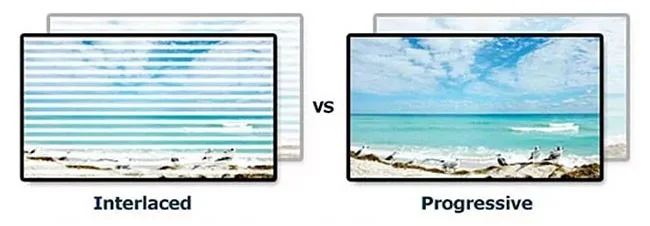
Interlaced scanning divides the lines into two fields. The odd-numbered lines or rows of pixels are displayed first, followed by the even-numbered lines or rows of pixels, creating one complete frame.
Progressive scan displays rows sequentially instead of transmitting rows as two alternate fields. This means that both odd-numbered and even-numbered lines or pixel rows are displayed in numerical order.
The number of vertical lines or rows of pixels determines the detail of an image. The more lines in an image, the more detailed the image. The number of lines is fixed in a system.
NTSC and PAL
The two main analog video systems are NTSC and PAL.
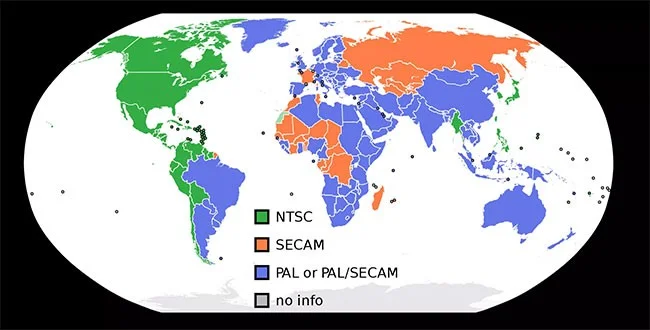
NTSC consists of 525 lines or rows of pixels, 60 fields at 30 frames per second, at 60Hz system for transmitting and displaying video images. Each frame is transmitted in two fields of 262 lines/rows of pixels displayed alternately. The two fields are combined, so each frame is displayed with 525 lines/rows of pixels. NTSC is the official analog video standard in the United States, Canada, Mexico, parts of Central and South America, Japan, Taiwan, and South Korea.
PAL is the world's dominant format for analog television broadcasting and video display. It consists of 625 lines/pixels, 50 fields at 25 frames per second, a 50Hz system. Like NTSC, the signal is interlaced into two fields of 312 lines/pixels each. Because fewer frames (25) are displayed per second, you may sometimes notice a slight flicker in the image, similar to that of a film slide. However, PAL has slightly higher resolution and better color stability than NTSC. Countries that use the PAL system include the UK, Germany, Spain, Portugal, Italy, China, India, Australia, and most of Africa and the Middle East.
NTSC/PAL and DigitalTV/HDTV aspect ratios
Although the increased resolution of video software content standards, high-definition broadcasting and digital is a step forward when comparing HDTV to analog NTSC and PAL standards, frame rate is the common foundation of both systems.
In countries that use the NTSC-based standard, 30 separate frames are displayed every second (i.e. one complete frame every 1/30th of a second). In countries that use the PAL-based standard, 25 separate frames are displayed every second (i.e. one complete frame every 1/5th of a second). These frames are displayed using either interlaced scanning (480i or 1080i) or progressive scanning (480p, 720p or 1080p).
In the case of digital TV and HDTV, which evolved from NTSC, if the frames are transmitted as interlaced images (1080i), each frame consists of two fields and each complete frame is displayed every 30 seconds, using the NTSC-based 30 frames per second rate. If the frame is transmitted in progressive scan format (720p or 1080p), it is displayed twice every 30 seconds.
HDTV and PAL-based digital TV frame rates
In the case of digital TV and HDTV which evolved from PAL, if the frames are transmitted as interlaced images (1080i), each frame consists of two fields and one complete frame is displayed every 25 seconds, using the PAL-based rate of 25 frames per second.
If the transmitted frame is in progressive scan format (720p or 1080p), it will display twice every 25 seconds.
Conclude
Digital TV, HDTV, and Ultra HD, while a huge step forward in what you see on your TV or projector screen, are still rooted in analog video standards that are over 65 years old.
As a result, there are differences in the digital and HDTV standards being used around the world, placing limitations on video standards worldwide.
Additionally, as the transition continues toward digital and HD-only transmission, many people still have NTSC and PAL-based video playback devices, such as VCRs, analog camcorders, and non- HDMI DVD players plugged into HDTVs (and 4K Ultra HD TVs).
Even with formats like Blu-ray, there are cases where the main movie or video content may be in HD format and some of the video extras may be in standard definition NTSC or PAL format. DVDs are still created in NTSC or PAL format.
While 4K content is now widely available through streaming and Ultra HD Blu-ray Disc, 4K TV broadcast standards are still in their early stages of implementation. 4K TVs must support analog video formats as long as analog video playback devices are in use.
Broadcasting and streaming in 8K resolution is now a thing too, although the high price tag keeps it from becoming widely accepted.
Finally, you may no longer be using analog video equipment, but others may still be.
Create a spooky office cubicle with Halloween desk decor ideas that keep your workspace usable, tidy, and mindful of workplace safety.
Plan a recognizable Halloween 2026 look with pop culture costumes inspired by Spider-Man, Supergirl, Toy Story 5, Moana, Mario, and Wednesday.
Sort leftover Halloween candy safely, share or repurpose sealed treats, and choose food use or compost for pumpkins based on their condition.
Compare workplace Halloween costume choices by respect, dress code, mobility, and safety—and learn when a subtle accessory or a policy check is the better option.
Find a couples costume that fits your style, budget, and comfort level, from Addams Family classics to original inside-joke duos.
Need a last-minute high school Halloween costume? Compare 10 easy closet-based ideas by prep time, comfort, school-day practicality, and simple safety checks.
Use a simple 2026 Halloween decorating timeline for indoor décor, outdoor displays, and fresh pumpkins, with practical adjustments for weather and events.
Mix five vivid, approachable Halloween cocktails with measured recipes, simple prep tips, and an alcohol-free option for your party guests.
Find 15 office-friendly Halloween costume ideas for 2026, with practical checks for dress codes, respectful themes, comfort, and workplace safety.
Plan a fun elementary school Halloween party with easy crafts, games, inclusive treats, costume tips, and a sample 75-minute classroom schedule.








