Summerween Explained: What It Is and How to Celebrate

Learn how the Gravity Falls-inspired summer Halloween works, choose a date and celebration style, and plan a low-stress Summerween party.
When you no longer use your Viber account on a device or switch your phone, it is crucial to log out of your Viber account to protect your information.
Unlike other apps, logging out of Viber can be a bit challenging. Follow the guidelines in this article to understand how to do it on Android, iOS, and computers.
There are three different methods to log out of your Viber account on Android. Here’s how:
Open the Viber app for Android, tap the three-dash icon in the top left corner to select Settings. In the Settings interface, click on Account.



Continue by clicking Deactivate. You will need to enter your phone number, then tap Deactivate account. Confirm the action when prompted. Be aware that deactivating your account will erase all your data.



Open Viber and tap the three-dash icon in the top left corner. Select Exit and confirm when the “Quit Viber?” message appears.

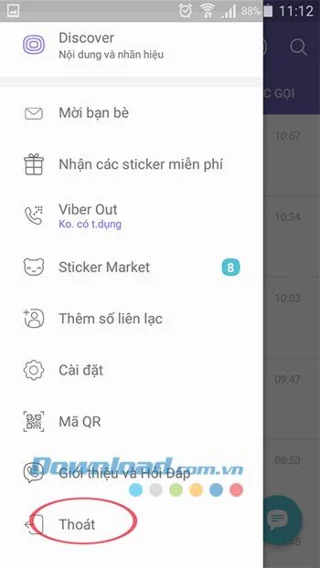
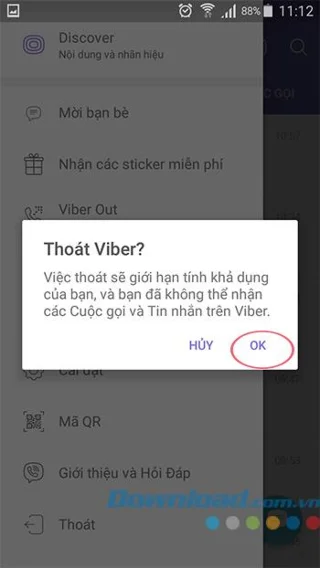
To delete Viber data, affecting chat history and calls while logging out, go to Settings on your phone, navigate to Application Manager, find the Viber app, and click on Clear data.



Open the Viber app for iOS, click the More icon in the bottom right corner, then select Settings to set up your Viber account logout. Next, tap Account > Deactivate account.
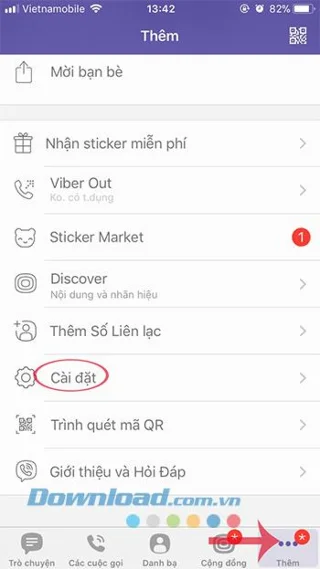


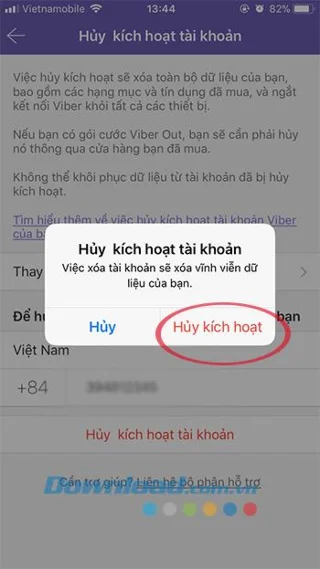
In the Deactivate account interface, enter your phone number, then press the red Deactivate button at the bottom. Confirm by clicking Deactivate.

In the main interface of Viber for PC, click the gear icon in the top right, then select Settings.
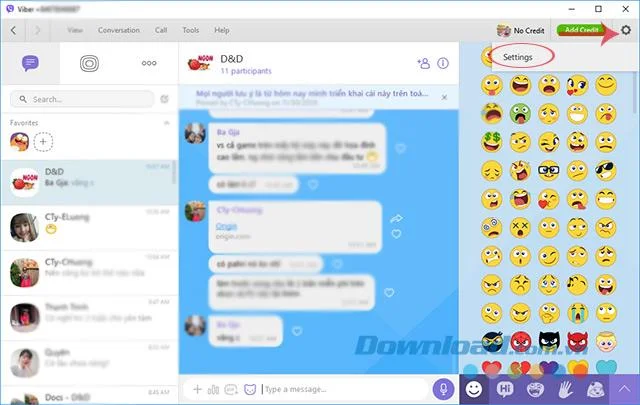
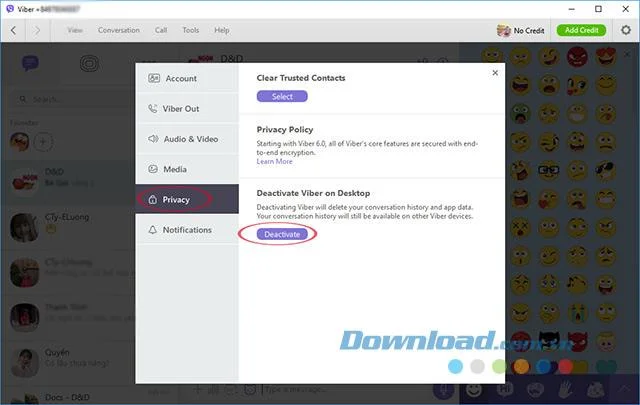
Next, click on the Privacy tab and under Deactivate Viber on Desktop, click Deactivate.
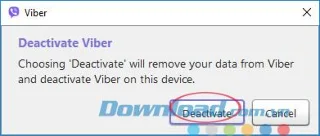
A confirmation window will appear; click Deactivate to finalize your sign out from the Viber account on your computer.
By following these straightforward instructions, you will successfully sign out of your Viber account on your phone or PC. It’s quite simple, isn’t it?
I wish you all success!
Learn how the Gravity Falls-inspired summer Halloween works, choose a date and celebration style, and plan a low-stress Summerween party.
Plan an inclusive virtual Halloween party for remote teams with time-zone-friendly scheduling, simple games, accessible options, and a practical hosting checklist.
Explore seven Halloween team building games for the workplace, with quick rules, hybrid-friendly options, accessibility tips, and practical safety guidance.
Mix a glossy prop-only fake blood batch, choose safer products for skin and costumes, and test cleanup before Halloween night.
Create a gentle Halloween look with pastel colors, friendly ghosts, easy no-carve accents, and practical safety tips for your home.
Create a spooky office cubicle with Halloween desk decor ideas that keep your workspace usable, tidy, and mindful of workplace safety.
Plan a recognizable Halloween 2026 look with pop culture costumes inspired by Spider-Man, Supergirl, Toy Story 5, Moana, Mario, and Wednesday.
Sort leftover Halloween candy safely, share or repurpose sealed treats, and choose food use or compost for pumpkins based on their condition.
Compare workplace Halloween costume choices by respect, dress code, mobility, and safety—and learn when a subtle accessory or a policy check is the better option.
Find a couples costume that fits your style, budget, and comfort level, from Addams Family classics to original inside-joke duos.