Hiren's BootCD PE 2024/2025 Update – The Ultimate Multifunctional Boot CD for Windows

Hiren's BootCD is a bootable CD that encompasses a variety of diagnostic programs such as partition monitoring, system performance measurement, disk cloning, and imaging tools, as well as data recovery tools, MBR tools, and BIOS utilities designed to rectify various computer errors. The Hiren's BootCD PE is a bootable environment that is invaluable when the primary operating system fails to boot.
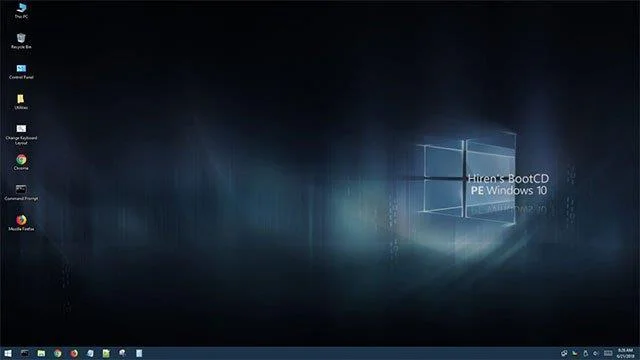
Hiren's BootCD PE Latest Version

In addition to the traditional Hiren's BootCD version, users can access the Hiren's BootCD PE which is compatible with next-generation computers, supporting UEFI standard boot for devices with 2GB RAM or more.

Hiren's BootCD PE represents an innovative boot CD software that serves as both a professional and emergency PC rescue tool based on a Windows 10 PE x64 platform.

The latest version of Hiren's BootCD PE is completely free, legal, and devoid of any pirated software. It can be effortlessly installed on a 64-bit Windows 10 PE computer, auto-detecting and installing essential drivers like graphics, sound, Wi-Fi, and Ethernet cards. Consequently, users can connect their computers to Wi-Fi or Ethernet networks seamlessly. Overall, Hiren's BootCD PE stands as a comprehensive and effective computer protection tool.

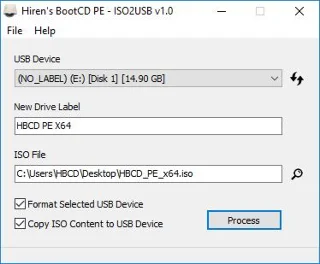
Hiren's BootCD PE features support for UEFI booting from DVDs and USB drives, disk formatting, partitioning, and ISO content copying to USB or DVD drives.

Hiren's BootCD PE Interface

Following a period of inactivity, the developers relaunched Hiren's BootCD PE (Preinstallation Environment), offering a recovery platform based on Windows 10 PE x64. This PE version is fully developed by the Hiren's BootCD community and includes the latest tools within the Hiren's BootCD suite.

The Essential Programs in Hiren's BootCD PE x64

Category Program Description
Antivirus Tools Avira AntiVir Personal A robust virus and spyware scanner capable of detecting and removing over 5000 viruses and trojans.
Antivirus Tools Malwarebytes Anti-Malware An advanced anti-malware application designed to remove even the most advanced malware threats.
Backup Tools CloneDisk A comprehensive tool for backing up MBR, partitions, and disks, including VMWare disks.
Data Recovery Recuva Recovers deleted files from various storage devices, including hard drives and USB flash drives.
Disk Utilities GSmartControl A tool for monitoring hard drive health, providing basic information and monitoring SMART values.

Enhancements in the 2024/2025 Update

The 2024/2025 updates of Hiren's BootCD PE have included numerous improvements:

  1. Enhanced user interface for easier navigation and accessibility.
  2. Improved driver support for the latest hardware configurations.
  3. Additional recovery and diagnostic tools to support the latest standards in data recovery.

For anyone seeking to maintain their computer's performance and safeguard against potential issues, the updated Hiren's BootCD PE serves as an invaluable tool, ensuring effective recovery, data protection, and performance optimization.

For additional guidance on using Hiren's BootCD PE, check out:

Alternative Applications

If you're looking for alternative applications, consider:

In summary, the Hiren's BootCD PE has proven to be an essential tool for computer technicians and users alike, ensuring that critical recovery methods are always at one's fingertips, especially in the light of evolving technological requirements and systems.

Tags: #Hiren

Leave a Comment

Fixing Microsoft Teams Vcruntime140.dll Missing Error

Fixing Microsoft Teams Vcruntime140.dll Missing Error

Tired of the frustrating Microsoft Teams Vcruntime140.dll missing error crashing your meetings? Discover proven, step-by-step fixes to resolve it fast and restore smooth teamwork. No tech skills needed!

How to Fix Microsoft Teams Undefined Error (2026)

How to Fix Microsoft Teams Undefined Error (2026)

Struggling with Microsoft Teams 'Undefined Error' (2026)? Discover proven, step-by-step fixes like clearing cache, updating the app, and more. Get back to seamless collaboration fast!

How to Disable Microsoft Teams at Startup for Better PC Performance

How to Disable Microsoft Teams at Startup for Better PC Performance

Discover simple, step-by-step methods to disable Microsoft Teams at startup and unlock better PC performance. Faster boot times, less resource drain—perfect for Windows users seeking smooth operation.

How to Fix Microsoft Teams Network Error Offline

How to Fix Microsoft Teams Network Error Offline

Stuck with Microsoft Teams "Network Error" offline? Discover proven, step-by-step solutions to fix Microsoft Teams network error offline quickly. Get back online fast—no tech skills needed!

Solving Microsoft Teams Error 4oggx

Solving Microsoft Teams Error 4oggx

Struggling with Microsoft Teams Error 4oggx? Discover proven fixes to resolve sign-in failures, crashes, and connectivity issues fast. Get back to productive calls without frustration!

How to Fix Microsoft Teams Remove Account Data Error

How to Fix Microsoft Teams Remove Account Data Error

Encountering the frustrating Microsoft Teams "Remove Account" Data Error? Discover quick, reliable fixes like clearing cache, resetting the app, and more to get back to seamless collaboration without losing data. Updated with the latest solutions.

Troubleshooting Microsoft Teams Layout Error Sidebar

Troubleshooting Microsoft Teams Layout Error Sidebar

Tired of the frustrating Microsoft Teams "Layout Error" Sidebar? Follow our proven, step-by-step troubleshooting guide with the latest fixes to get your Teams sidebar working smoothly again. No tech skills needed!

Troubleshooting Microsoft Teams Offline Error in 2026

Troubleshooting Microsoft Teams Offline Error in 2026

Stuck with Microsoft Teams offline error in 2026? Discover proven troubleshooting steps, common causes, and quick fixes to restore your connection fast. No tech skills required!

How to Fix Microsoft Teams Error M Memory

How to Fix Microsoft Teams Error M Memory

Tired of Microsoft Teams crashing with "Error M" memory issues? Follow our step-by-step guide to fix Error M in Teams, clear cache, update software, and boost performance—no tech skills required!

Step-by-Step: Setting Up Microsoft Teams Town Hall Events

Step-by-Step: Setting Up Microsoft Teams Town Hall Events

Discover the easiest step-by-step guide to setting up Microsoft Teams Town Hall events. Host massive virtual gatherings effortlessly with pro tips for seamless execution. Perfect for leaders and organizers!

How to Fix Microsoft Teams Download Error for PC

How to Fix Microsoft Teams Download Error for PC

Struggling with Microsoft Teams "Download Error" on PC? Discover proven, step-by-step fixes to resolve download failed issues quickly. Get back to seamless collaboration in minutes—no tech skills needed!

Troubleshooting Microsoft Teams Error L License

Troubleshooting Microsoft Teams Error L License

Stuck with Microsoft Teams "Error L" License error? Follow this step-by-step troubleshooting guide to resolve licensing issues quickly, restore access, and boost productivity without IT hassle. Updated with latest fixes.

Troubleshooting Microsoft Teams Video Call Freezing

Troubleshooting Microsoft Teams Video Call Freezing

Tired of Microsoft Teams video call freezing mid-meeting? Follow this proven troubleshooting Microsoft Teams video call freezing guide with quick fixes, advanced tips, and real solutions to restore smooth video instantly.

How to Fix Microsoft Teams Download Failed Due to Unexpected Error

How to Fix Microsoft Teams Download Failed Due to Unexpected Error

Frustrated by Microsoft Teams 'Download Failed Due to Unexpected Error'? Discover proven, step-by-step solutions to fix this common issue quickly and get back to seamless collaboration. Updated with the latest fixes for peak performance.

Why Did My Microsoft Teams Recording Fail? Common Reasons

Why Did My Microsoft Teams Recording Fail? Common Reasons

Frustrated because your Microsoft Teams recording failed? Uncover the top common reasons like permissions issues, storage limits, and network glitches, plus step-by-step fixes to prevent future failures and record flawlessly every time.








