20 Easy College Halloween Costumes You Can Make from Your Closet

Need a last-minute college Halloween costume? Try 20 easy, budget-friendly looks built from closet staples, plus quick styling and safety tips.
Building a personal brand on LinkedIn in 2026 is less about chasing a secret algorithm and more about making your expertise easy to understand, easy to verify, and consistently useful to the people you want to reach. Several old pieces of LinkedIn advice are now outdated: the Creator Mode toggle is gone, newsletters are available to all members, creator analytics are available to all members, and the old Creator Mode profile hyperlink has been replaced by a Premium custom-button model for eligible subscriptions.
Those changes matter because they shift the practical question from “Which creator feature do I need?” to “What evidence should a visitor see, what should I publish, and how will I know whether the right audience is finding me?” As of September 2026, the most dependable answers come from LinkedIn’s own current help documentation rather than from viral claims about posting times, hashtag counts, or guaranteed reach.
| Claim | Status in 2026 | What to do |
|---|---|---|
| You need Creator Mode to build an audience | Outdated. LinkedIn removed the Creator Mode on/off toggle while keeping creator tools available through other parts of the product. | Optimize your profile and use the tools you actually have instead of looking for a Creator Mode switch. |
| You need Premium to publish seriously | Mostly false. Core publishing and analytics are available to regular members, while some profile conversion features are Premium-only. | Build a free-profile system first; pay only if a specific Premium feature solves a real need. |
| There is one best posting time, hashtag count, or content format | Not established by current LinkedIn help documentation as a universal rule. | Use your own post and audience analytics to compare patterns. |
| A large follower count means a strong brand | Context-dependent. Follower growth is useful, but it does not show whether the right people are viewing, engaging with, or acting on your work. | Track audience fit, profile activity, and content performance alongside follower count. |
| Verification automatically creates authority | Too strong. Verification can signal authenticity, but expertise still has to be demonstrated. | Verify when eligible, then support the badge with specific work, recommendations, and useful content. |
Action: Treat any LinkedIn “hack” as unproven unless you can trace it to current product documentation or reproduce it in your own analytics.
This is one of the clearest outdated ideas. LinkedIn’s official Creator Mode update explains that the Creator Mode on/off toggle was removed, while creator capabilities such as analytics and eligible publishing tools continue through the normal LinkedIn experience.
That means your brand should not depend on finding a special creator setting. Your first priority is still the profile itself. LinkedIn’s current profile guidance recommends using a professional photo, a clear headline, an About section, relevant work and education, skills, and work samples. Its official profile guidance also notes that a profile photo can increase profile views and that a strong headline can communicate expertise or personality.
A practical profile should answer three questions quickly: What do you do? Who do you help or what problems do you solve? What evidence supports that claim?
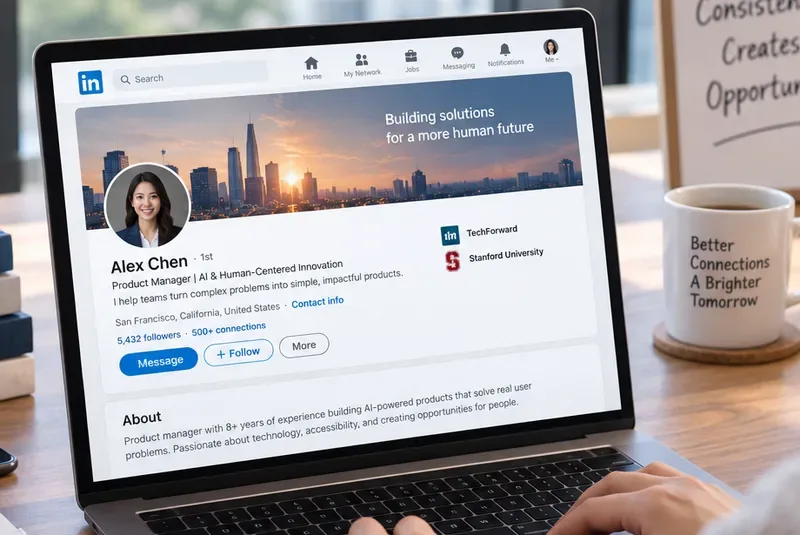
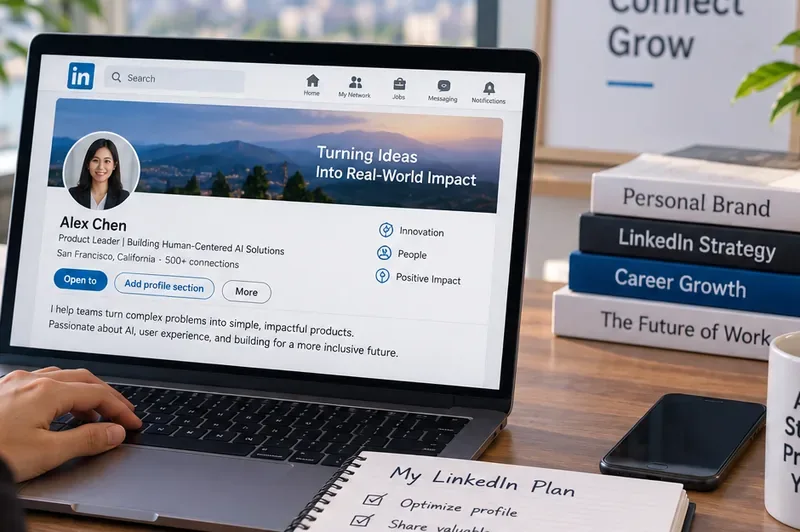
A strong LinkedIn profile gives visitors a fast explanation of your role, area of expertise, and professional direction before they reach your individual posts.
Action: Rewrite your headline so it communicates more than a job title. Then make the first two or three lines of your About section support the same positioning with concrete expertise, audience, or outcomes.
Premium can add useful conversion features, but it is not a prerequisite for publishing or measurement. LinkedIn says all members have access to creator analytics, including combined post analytics and audience analytics. Current documentation for creator analytics shows that members can review impressions, engagements, follower growth, and follower demographics such as job title, location, industry, seniority, company size, and company.
Premium becomes relevant when a particular feature has business value. For example, LinkedIn’s current custom-button documentation says the profile custom button is available only to a select group of Premium Business, Sales Navigator, and Recruiter Lite subscribers. LinkedIn also states that the older Creator Mode website hyperlink was removed and that website linking is now supported through the Premium custom-button experience.
That distinction matters. If your objective is thought leadership, recruiting visibility, or professional credibility, the free profile plus regular publishing may be enough. If your objective is converting profile traffic into portfolio visits, service inquiries, appointments, or newsletter traffic, a custom button may be more valuable.
Action: Write down the exact conversion you want from LinkedIn—job interview, inbound client, newsletter subscriber, speaking request, or professional introduction. Pay for a Premium feature only if it removes friction from that conversion.
A personal brand becomes recognizable when your profile, content, proof, and network activity point in the same direction. A simple system can have four parts:
For example, a cybersecurity consultant might choose “cloud identity and access security” as the central territory. A product leader might focus on “turning AI prototypes into measurable product outcomes.” A finance professional might focus on “FP&A systems for faster operating decisions.” Narrow enough to be memorable is usually more useful than trying to appear expert in everything.
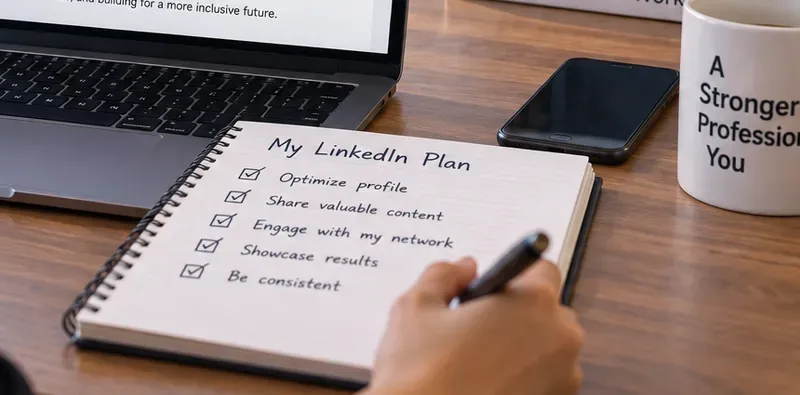
A repeatable LinkedIn plan is easier to maintain when profile optimization, content, network activity, proof, and consistency are treated as one system.
Action: Choose three content pillars that all support the same professional positioning. If a post idea does not fit one of those pillars, ask whether it strengthens the brand you actually want to build.
Follower count is visible and easy to compare, which makes it tempting to treat it as the score. But LinkedIn now exposes several more useful signals. Its current post analytics documentation includes impressions, members reached, in-network versus out-of-network discovery, profile activity, social engagement, and additional metrics depending on the content type. LinkedIn notes that analytics figures are estimates and may not be precise.
LinkedIn also distinguishes profile appearances from profile views. An appearance can happen when your name and headline show in search, posts, comments, or network recommendations; a profile view reflects someone actually opening the profile. Those signals answer different questions.
If your goal is consulting leads, 500 highly relevant followers in your market may be more useful than 20,000 followers who rarely need your expertise. If your goal is industry visibility, out-of-network reach and profile appearances may matter more. If your goal is hiring, profile views from relevant companies or job functions may be the stronger signal.
Action: Pick one primary metric and two supporting metrics based on your goal. Review them monthly rather than optimizing every post for raw impressions.
There is no current LinkedIn help document that establishes a universal best posting time, mandatory number of weekly posts, or guaranteed hashtag formula for every member. Audience behavior, geography, role, content topic, and network composition all vary. Recommendations that present one fixed cadence as a platform law should therefore be treated as contextual advice, not verified LinkedIn policy.
What is verified is that LinkedIn gives members enough analytics to test their own publishing choices. Combined post analytics can compare impressions or engagements across date ranges, and audience analytics can show follower growth and demographics. LinkedIn also allows analytics export to an XLSX file, which is useful if you want to review longer-term patterns.
A reasonable starting cadence is simply one you can sustain without lowering quality. For one person that may be one substantial post a week; for another it may be three shorter posts plus regular comments. Consistency matters because it creates more opportunities to learn what resonates, not because LinkedIn publicly guarantees a reward for a particular schedule.
Action: Run a six- to eight-week test. Keep your topic pillars stable, vary one factor at a time—format, posting day, depth, or opening style—and compare the results in your own analytics.
A professional brand is also built through who you engage with and how you participate in conversations. LinkedIn lets members decide whether Follow or Connect is the primary action on their profile. Its follower settings documentation explains that anyone can follow you if your settings allow it, and that you can make Follow the primary profile action instead of Connect.
The right choice depends on your objective. If you want broad audience growth, making Follow primary can reduce the pressure to turn every reader into a connection. If you rely on relationship-based selling, recruiting, partnerships, or a smaller peer network, Connect may fit better.

Personal branding on LinkedIn is partly a publishing system and partly a relationship system; the right balance depends on whether you want audience scale or closer professional connections.
Action: Review your follower setting and choose the primary action that matches your business or career model. Then spend part of your weekly LinkedIn time contributing useful comments to people in the network you want to be known within.
That is outdated for personal profiles. LinkedIn’s current newsletter FAQ says all LinkedIn members have access to create a newsletter. Subscribers can receive notifications when a new edition is published, while following a person is separate from subscribing to that person’s newsletter.
A newsletter is worth considering when your expertise benefits from a recurring format: a monthly market briefing, weekly engineering lesson, quarterly leadership memo, product teardown, regulatory update, or case-study series. It is less useful if you cannot sustain a clear topic or publishing rhythm.
LinkedIn also confirms that all members can publish articles, although its current article-publishing documentation says article creation is not available in the mobile app and is done from the desktop publishing experience.
Action: Do not launch a newsletter just because the feature exists. First write down a one-sentence promise: “Every [frequency], I help [audience] understand or do [specific outcome].” If that promise is clear and sustainable, the newsletter has a reason to exist.
LinkedIn verification is useful, but it verifies specific information rather than professional excellence. LinkedIn’s current verification documentation says members may be able to verify identity, workplace, or educational institution information and display a verification badge. LinkedIn reports that verified members see more profile views and engagement on average, but that should not be read as a guarantee that verification itself will create those outcomes.
Availability also varies. Workplace verification can depend on a participating company, a supported work email, LinkedIn Learning access, or other supported methods. Some verification routes are not available to every member or institution.
The better interpretation is: verification can reduce uncertainty about who you are, while your work samples, recommendations, content, and track record explain why someone should trust your expertise.
Action: Check the “About this profile” or verification area of your account. If you are eligible, complete a relevant verification; then make sure the rest of the profile contains evidence that supports your professional claims.
A personal brand becomes more credible when other people can describe your contribution. LinkedIn allows members to request recommendations from first-degree connections they work with or have worked with. The current recommendation request guidance lets you specify the relationship and position and include a personalized message.
Generic praise is less informative than evidence. When asking for a recommendation, remind the person of the project, your role, and the kind of result or working style that would be useful to describe. Do not script praise for them; provide context so they can write their own accurate account.
Action: Ask two or three people who have directly seen your work for recommendations tied to different strengths—for example technical depth, leadership, customer impact, or cross-functional execution.
Visibility is part of brand strategy, but it is also a privacy decision. LinkedIn states that portions of a public profile can appear in search tools such as Google or Bing and in certain approved services. Its visibility documentation explains that members can control public-profile sections, off-LinkedIn visibility, and discoverability settings.
If you are actively job hunting, consulting, recruiting, speaking, or selling professional services, broader discoverability may be valuable. If you work in a sensitive role or prefer a narrower footprint, you may choose more restrictive settings. LinkedIn also notes that changes to public-profile visibility can take weeks or months to be reflected by external search engines because LinkedIn does not control their refresh timing.
Action: Open Settings & Privacy, review Visibility, public profile, off-LinkedIn visibility, and discoverability by email or phone. Make those settings a deliberate choice rather than accepting defaults without checking them.
You do not need to rebuild everything at once. Use a four-week sequence:
The most durable LinkedIn personal brand is a repeatable workflow: clarify positioning, show proof, publish useful expertise, build relationships, and measure the response.
Action: Repeat the cycle quarterly. Keep what is producing the right audience and opportunities; remove profile claims, content formats, or routines that no longer support your goal.
LinkedIn does not publicly document every feed-ranking signal, every experiment, or a permanent formula for reach. Features also change over time and may roll out gradually by account, subscription, geography, or product test. That uncertainty is not a reason to avoid the platform; it is a reason to build a strategy that survives product changes.
The durable assets are your expertise, proof of work, professional relationships, and ability to explain useful ideas clearly. Profile features can make those assets easier to discover, but they should not become the brand itself.
Action: When you see a new LinkedIn tactic in 2026, ask three questions: Is it documented by LinkedIn? Is it available on my account? Does my own data show that it helps the outcome I care about? If the answer to any of those is no, treat the tactic as an experiment—not a rule.
Need a last-minute college Halloween costume? Try 20 easy, budget-friendly looks built from closet staples, plus quick styling and safety tips.
Learn what the Teal Pumpkin Project means in 2026, how hosts can offer separate non-food treats, and how families can plan routes and review candy safely.
See what the latest 2026 Halloween survey says about trick-or-treating, community events, and practical ways to plan a safer neighborhood outing.
Plan a thoughtful Halloween moon party with optional reflection, simple stargazing, accurate 2026 sky notes, respectful spiritual framing, and safe lighting.
Build a comfortable cottagecore witch costume with beginner-friendly layers, thrifted pieces, simple makeup, practical accessories, and Halloween safety checks.
Explore BookTok-inspired horror books and Halloween decor, comparing gothic, cozy, and slasher styles with practical tips for a safe reading nook.
See the biggest Halloween 2026 trends in costumes, décor, shopping, pets, and party planning—with survey data, dates, and practical ways to choose.
Host an affordable Halloween party with a clear spending cap, DIY decorations, simple food, free games, and practical safety tips.
Choose Halloween party games by group size, experience, and mood, with simple ways to make tarot and mahjong welcoming for every guest.
Compare 2026 dog Halloween costume trends by search interest, fit, comfort, and mobility—from hot dog and shark looks to simple bandanas.