How to open and extract RAR files on Mac

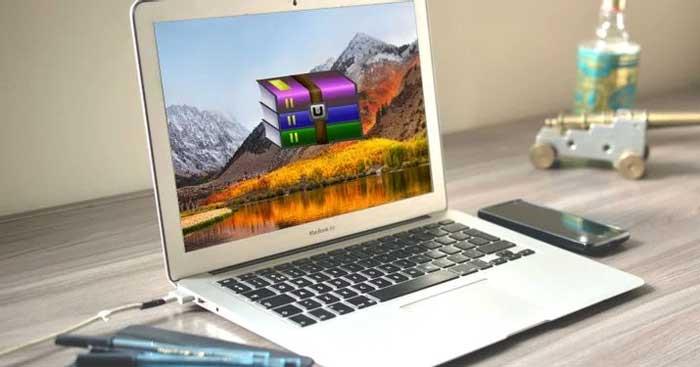
Here's everything you need to know about RAR files and how to extract the contents of RAR files on Mac.
How to open and extract RAR files on Mac

What are RAR files?

RAR files are similar to ZIP files. Both are file formats that store multiple files compressed into one. This way, you only need to upload that one compressed file and the recipient only needs to download it instead of many individual files.

RAR is the abbreviation for Roshal ARchive, named after the Russian software engineer who created it. The RAR format was created to overcome some of the flaws in the ZIP format and gives users a number of benefits, including: smaller file size, easier splitting of files into parts and error recovery.

How to open and extract RAR files on Mac

Mac systems do not have their own tools to handle this file format. However, you can easily use a third-party app to open RAR files on Mac.

Open RAR files with Keka
How to open and extract RAR files on Mac

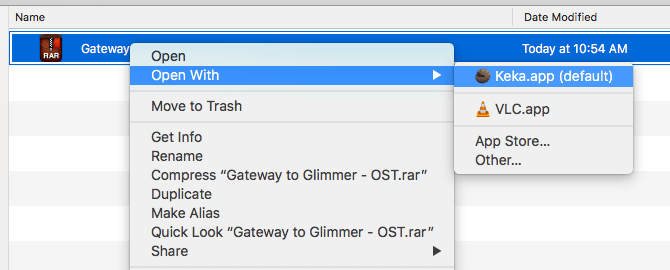
Keka is a compression and decompression tool available on the Mac App Store and works as a standalone installation. Once installed, all you have to do is double-click on the RAR file to extract it or right-click on a file, then select Open.

Note, Keka can create its own compressed files but does not support the RAR format. You can only compress files in ZIP, 7-Zip, TAR, GZIP, BZIP2 formats.

  • Download Keka for Mac

Use unRAR on Mac Terminal

To extract RAR files using Terminal, you need to install Homebrew - an "all in one" tool to install other tools.

For example, using Homebrew, you can install RAR file compression software with one command:

brew install unrar

You must enter the above command into Terminal. You can access it by opening Spotlight (use the keyboard shortcut Cmd + Spacebar), typing terminal , and opening Terminal.app .

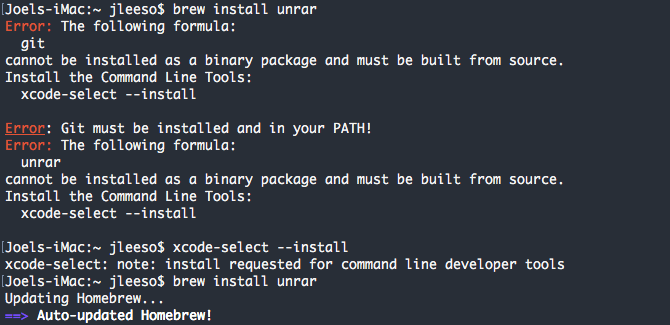
If you receive a message UnRAR needs to be created from the following source:
How to open and extract RAR files on Mac

First, you must install the Xcode command line tools with the command:

xcode-select --install

Once UnRAR is installed, you can extract the RAR file by navigating to it in Terminal and entering the command:

unrar x example_file.rar

Use The Unarchiver to extract RAR files
How to open and extract RAR files on Mac

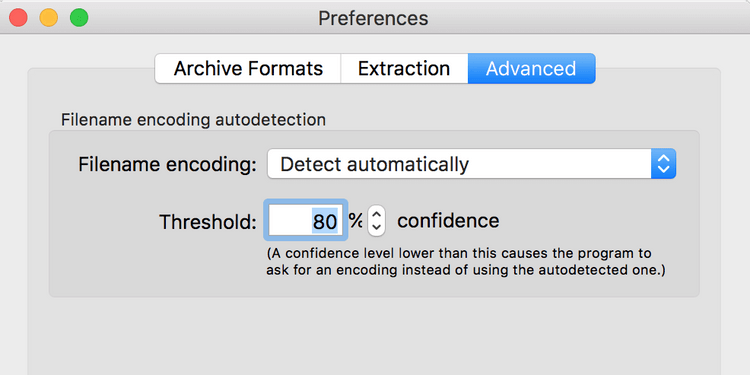
The Unarchiver is a free RAR file decompression software on macOS. You can use it to open any RAR archive with one click. Like Keka, The Unarchiver does not allow you to view the content inside files before extracting them. However, this tool has many customization options so you can extract them the way you want.

Another useful feature is that it supports non-Latin characters for archive names. Thanks to that, you can extract RAR files with foreign names.

The Unarchiver supports many different compressed file formats, including ZIP, 7Z, GZIP, CAB…

  • Download The Unarchiver

Above are some ways to open RAR files on Mac . Hope the article is useful to you.

Leave a Comment

Solving Microsoft Edge Core Isolation Not Turning On

Solving Microsoft Edge Core Isolation Not Turning On

Struggling with Microsoft Edge Core Isolation not turning on? Discover step-by-step fixes for Core Isolation issues, including BIOS tweaks, driver updates, and Windows repairs to boost your security instantly.

Troubleshooting Game Bar Party Chat Audio Not Working

Troubleshooting Game Bar Party Chat Audio Not Working

Struggling with Game Bar Party Chat audio not working? Discover step-by-step troubleshooting for Xbox Game Bar voice chat issues. Quick fixes for no sound, mic problems, and more on Windows. Get back to gaming!

How to Fix Microsoft Edge Update Error 0x80073712

How to Fix Microsoft Edge Update Error 0x80073712

Struggling with Microsoft Edge Update Error 0x80073712? Discover step-by-step fixes like SFC scan, DISM repair, and Edge reset to resolve it fast. No tech skills needed!

Solving Microsoft Edge Private Connection Warnings

Solving Microsoft Edge Private Connection Warnings

Tired of Microsoft Edge "Private Connection" warnings blocking your browsing? Get step-by-step solutions to solve Microsoft Edge Private Connection errors fast. Secure, updated fixes for seamless surfing.

How to Fix Microsoft Edge Result_Code_Hung Error

How to Fix Microsoft Edge Result_Code_Hung Error

Struggling with Microsoft Edge "Result_Code_Hung" Error? Discover proven, step-by-step fixes to resolve hangs and crashes instantly. Get smooth browsing back today!

How to Delete Microsoft Edge History, Cache, and Cookies Completely

How to Delete Microsoft Edge History, Cache, and Cookies Completely

Learn how to delete Microsoft Edge history, cache, and cookies completely with this step-by-step guide. Clear your browsing data fast and securely in the latest Edge version for ultimate privacy.

Solving Edge Browser Profile Error on Every Launch

Solving Edge Browser Profile Error on Every Launch

Tired of the frustrating Edge Browser "Profile Error" popping up every launch? Follow our step-by-step guide to solving Edge Browser "Profile Error" permanently with quick, reliable fixes for the latest versions. No tech skills needed!

Solving Microsoft Edge Precision Driver Compatibility

Solving Microsoft Edge Precision Driver Compatibility

Tired of Microsoft Edge Precision Driver compatibility glitches? Get step-by-step solutions to restore smooth performance, fix lag, and optimize your setup. Proven fixes for the latest Edge versions.

How to Customize the Microsoft Edge New Tab Page

How to Customize the Microsoft Edge New Tab Page

Discover step-by-step ways to customize the Microsoft Edge new tab page. Personalize shortcuts, backgrounds, content, and more for a tailored browsing experience. Boost productivity today!

How to Fix Microsoft Edge Youtube Error: Black Screen and Lag

How to Fix Microsoft Edge Youtube Error: Black Screen and Lag

Struggling with Microsoft Edge YouTube error like black screen and lag? Discover step-by-step fixes for smooth playback. Clear cache, toggle hardware acceleration, and more – ultimate guide to resolve black screen and lag issues fast.

How to Completely Uninstall Microsoft Edge from Windows 11 in 2026

How to Completely Uninstall Microsoft Edge from Windows 11 in 2026

Master how to completely uninstall Microsoft Edge from Windows 11 in 2026. Step-by-step, no-trace removal for gamers seeking max performance. Say goodbye to bloatware!

How to Reset Microsoft Edge to Default Settings in 2026

How to Reset Microsoft Edge to Default Settings in 2026

Discover how to reset Microsoft Edge to default settings in 2026 effortlessly. Fix crashes, slowdowns, and pop-ups with proven step-by-step methods for a fresh, blazing-fast browser.

Troubleshooting Microsoft Edge Certificate Not Trusted Warnings

Troubleshooting Microsoft Edge Certificate Not Trusted Warnings

Tired of Microsoft Edge "Certificate Not Trusted" warnings blocking your browsing? Discover proven troubleshooting Microsoft Edge "Certificate Not Trusted" warnings steps to resolve SSL errors securely and regain smooth access. Works on latest Edge versions.

Removing Your Microsoft Edge Profile and Personal Data Safely

Removing Your Microsoft Edge Profile and Personal Data Safely

Discover how to safely remove your Microsoft Edge profile and personal data without risks. Our expert guide ensures a clean slate while protecting your important info – perfect for privacy pros!

How to Change Microsoft Edge Home Page and Startup Settings

How to Change Microsoft Edge Home Page and Startup Settings

Discover simple, step-by-step instructions on how to change Microsoft Edge home page and startup settings. Customize your browser for a faster, personalized experience today!