Device Links
Spotify made it easy for you to share playlists with your family and friends – there’s a Share button right in the app.

Also, you have the options to do it via email, social media, and even text messages. Plus, you can always just copy-paste the playlist link anywhere you want. Now, the steps to sharing the list from different devices are pretty similar. And the same goes for sharing on social media.
But certain features make the job much easier, and you may see different sharing suggestions depending on the device you’re using. Without much further ado, let’s jump right into the quick tutorials.
Where Can You Share Your Playlists to?
Before we dive into our tutorials, let’s first discuss the options that Spotify gives you for sharing your playlists. The music service is great because it’s so versatile, and it cooperates well with other platforms.
Here’s where you can quickly share your Spotify playlist from within the Spotify app:
- WhatsApp
- Instagram
- Facebook Messenger
- Facebook’s News Feed
- Facebook’s Stories
- Snapchat
- Line
- SMS
Of course, you aren’t limited to just those platforms. Spotify offers its users a Copy Link option under the share menu too.
Now that you know where you can send your favorite playlists, let’s review how to do it. We will cover how to share a Spotify playlist using iOS, macOS, Android, PC, and the web browser below.
How to Share Your Spotify Playlist on an iPhone
Once you become familiar with the steps to share a playlist, you’ll see that it’s actually quite simple. Here’s how to share the playlist from the Spotify app on an iPhone:
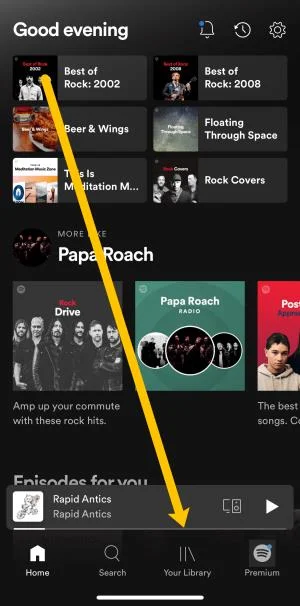
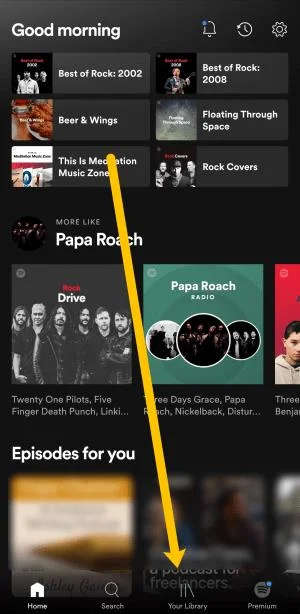
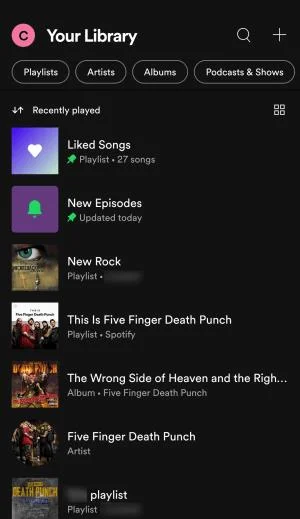
- Open Spotify and tap on Your Library at the bottom.

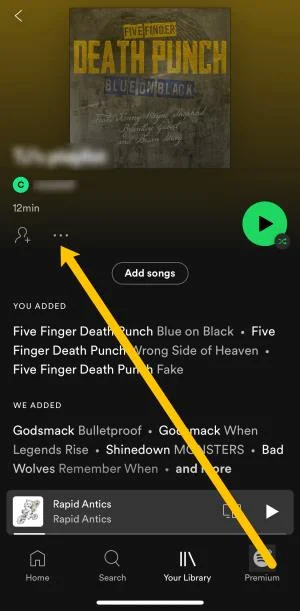
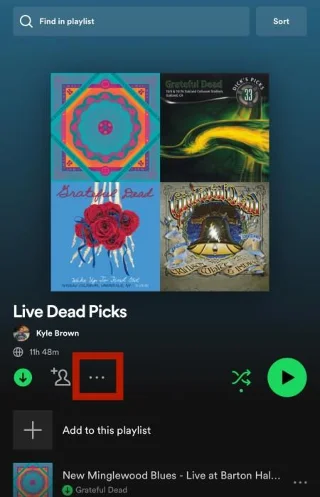
- Select the playlist you’d like to share. Then, tap on the three hoizontal dots on the left-hand side.

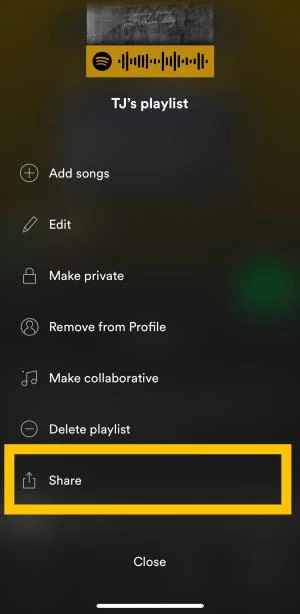
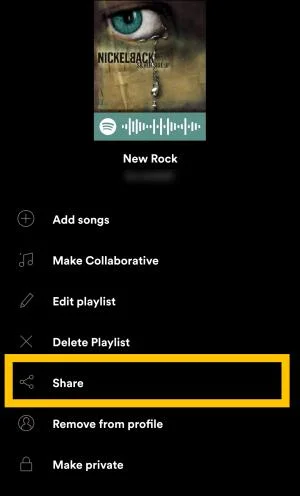
- Scroll down the menu and select Share.

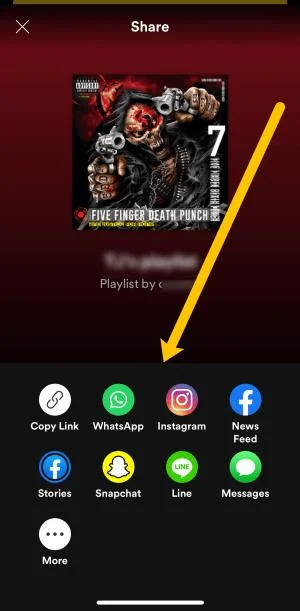
- Select one of the options in the list to share your Spotify playlist.

- Follow the steps on the screen to send your Playlist. You may need to log into the platform you’ve chosen before you can complete the process.
Note: If you click the ‘More’ icon, you can Airdrop your playlist or send it using other apps that do not appear in the Spotify Share menu.
Expert Tip
Tap on the iPhone Share sheet if you want to add/share the playlist to supported apps. For example, Spotify provides third-party support for Google Hangouts, Slack, and a few more apps. If you want to share using your iPad, the same steps apply as previously described.
How to Share Your Spotify Playlist from the Android App
Sharing a Spotify playlist from the Android app is almost the same as with the iPhone app. But it wouldn’t hurt to take a slightly different route to the same destination.
- Open Spotify and tap on Your Library at the bottom.

- Tap on the playlist that you’d like to share.

- To the left of the green play button there are three horizontal dots. Tap the dots.

- Scroll down the menu and tap on Share.

- Tap on the option that correlates with the platform where you’d like to share your playlist. Or, you can tap Copy Link and share the link to your playlist anywhere.

Important Notes:
Like the iPhone app, Spotify for Android has a Share button to send the playlist via social media. You should know that these options differ based on the Android device you’re using. For example, they aren’t exactly the same on Samsung and Xiaomi smartphones. But this isn’t a deal-breaker by any means.
Another thing is that sharing to different platforms isn’t the same. This applies to both Android and iOS.
If you share with Twitter, there’s a link, and your tweet is pre-populated with the URL. When sharing on Facebook, you end up with an image and a “Play on Spotify” option. This applies to both your Facebook Feed and Stories.
The downside of this is that clicking on “Play on Spotify” takes a person to a web-based player. But you could get asked to open it via the app if you’re on iPhone.
How to Share Your Spotify Playlist from the Mac App
Spotify made the app UI appear roughly the same as on your mobile app. It takes advantage of the bigger screen real estate, making it easy to navigate, but the actions are the same. Here’s what to do:
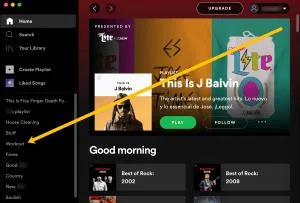
- Open Spotify on your Mac and tap on the playlist you’d like to share in the menu on the left.

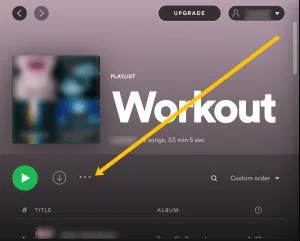
- Click on the three vertical dots to the right of the green play button.

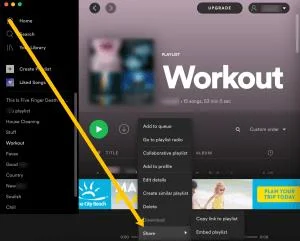
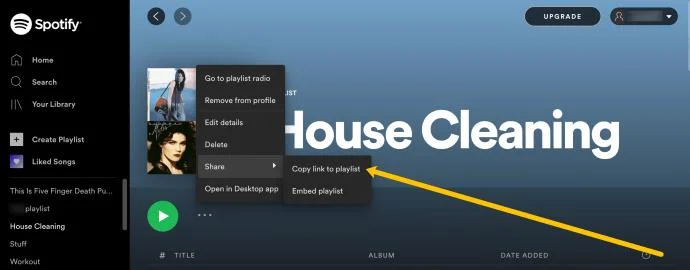
- Click on Share and copy the link to your playlist. Then, you can share or upload your playlist to any platform.

You can also take a shortcut and right-click on the playlist in the left-hand menu. Then, click Share to copy the link.
How to Share Your Spotify Playlist from the Windows App
There’s no difference in UI and layout between Windows and macOS Spotify app. So, feel free to use the steps described above. However, there is another somewhat faster way to share the playlist. And there’s no need to list the steps because you’re already familiar with the actions.
In the menu on the right of the screen, right-click on the playlist you’d like to share. The action reveals a contextual menu featuring a Share option at the bottom. When you hover your cursor over the option, you’ll reveal the sharing menu. Choose where you want to send your playlist, and you’re good to go.
How to Share a Spotify Playlist From a Web Browser
If you prefer Spotify’s web browser version, the instructions are much like every other method in our tutorial. All you need to do is click on your playlist in the menu to the left. Then, click on the three horizontal dots next to the play button. From here, you can click Share and copy the link.

Then, you can share it anywhere you’d like.
Making a Playlist Public
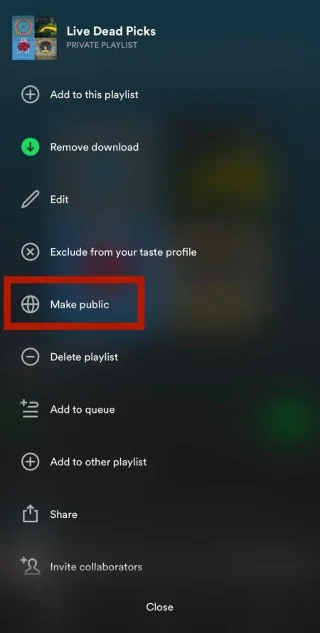
Besides your friends and family, the rest of the world can enjoy your playlists. All you need to do is share the list publicly via Spotify.
1. Click on the three horizontal or vertical dots

2.Choose “Make Public.”

From then on, the playlist will appear on Spotify when people search for music. The downside is that Spotify isn’t really geared for finding playlists; instead, it prioritizes artists and songs. But there are some third-party portals that feature Spotify playlists only.
Bonus Tips and Tricks
As opposed to going public, you can make a playlist a secret, but this doesn’t mean you can’t share it. The actions are the same, and the recipient can follow, play, and view the playlist. And if you set it to collaborative playlists, the recipients can edit it as well.
When you want to find a playlist someone shared with you, go to Your Library. Under Playlists, search for the one featuring your friend’s name. You’ll see the Playlist name and “by + nickname” underneath. Now, tap on it and enjoy.
Dare to Share
Do you remember the time when people created mixtapes and burned CDs with their favorite playlists? Then, they’d have to meet the recipient and hand the tape or CD over to them physically. Some would argue that sharing is much less romantic now, but that’s a topic for a different article.
As for playlist sharing via Spotify, you can pretty much share anywhere and everywhere. In fact, you’re always three to five clicks or taps away from completing the action. And it’s really cool that you can get the graphic code, scan it, and instantly launch the playlist.
Which sharing option do you prefer the most? Is there a playlist that you’ve shared with a lot of your friends? Give us your two cents in the comments below.