Home
» Today
»
Did the Clocks Go Back? How to Check Your Phone, Computer, and Smart Devices
Did the Clocks Go Back? How to Check Your Phone, Computer, and Smart Devices
Yes—the clocks went back in the United Kingdom on Sunday, October 25, 2026. At 2:00 a.m. British Summer Time (BST, UTC+01:00), the clock moved back to 1:00 a.m. Greenwich Mean Time (GMT, UTC+00:00). The change happened at 01:00 UTC, and the 1:00 to 1:59 a.m. hour occurred twice.
Phones and computers should make the change automatically when their date, time, and time-zone settings are automatic and the device can connect to its time service. If a phone still shows BST, a computer is an hour ahead, or a smart device has the wrong schedule, check its time zone and synchronization settings before setting the clock by hand.
Start with the UK time change
The UK returns to GMT in late October and moves back to BST in late March. The GOV.UK clock-change page confirms the 2026 date and the rule: clocks go back at 2:00 a.m. on the last Sunday in October. The National Physical Laboratory (NPL) explains that UK standard time is UTC in winter and UTC+1 during BST.
That repeated 1:00 a.m. hour is why a timestamp from the changeover can be ambiguous without its time-zone label. For everyday use, the important check is that a device now identifies UK time as GMT (UTC+00:00), not BST (UTC+01:00). Keep automatic time-zone settings on if you travel; your device should then follow the zone where you are.
Check your phone
iPhone
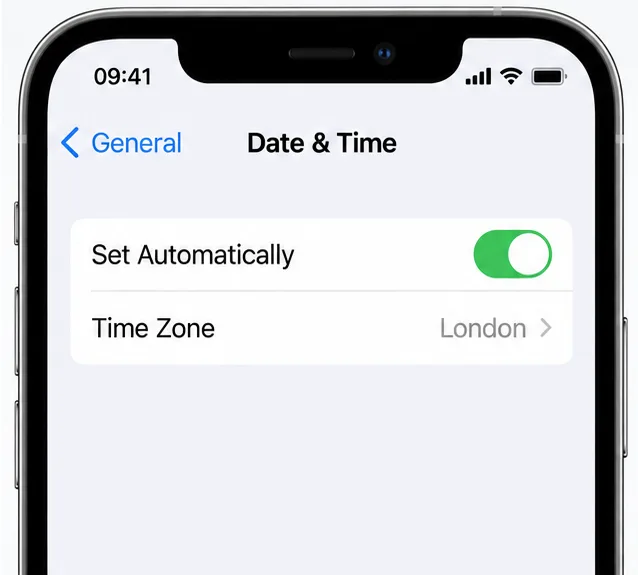
Open Settings > General > Date & Time and turn on Set Automatically. Check that the displayed time zone is London when you are in the UK. For automatic time-zone detection, the phone needs an internet connection and permission to use location for time-zone settings. Apple’s current steps are under Settings > Privacy & Security > Location Services > System Services > Setting Time Zone. If iOS says updated time-zone information is available, restart the phone and any paired Apple Watch.
On iPhone, confirm that automatic time is on and the time zone is London.
Android
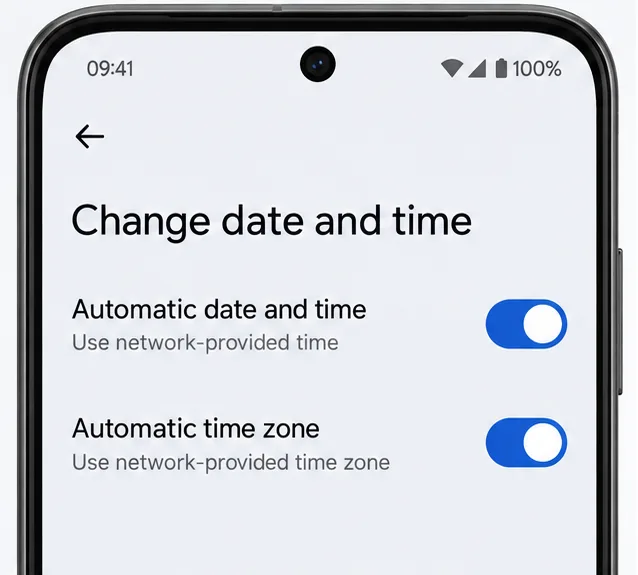
On Android, open the Clock app, tap More > Settings > Change date and time, then turn on Automatic date and time and Automatic time zone. Google notes that only some devices support automatic time-zone selection, and menu names can vary by manufacturer. If the phone cannot detect the zone automatically, choose the London or UK time zone in its date-and-time settings rather than entering a one-hour correction and leaving automatic updates off.
On Android, check both automatic date and time and automatic time zone.
Check your computer
Windows 11 or Windows 10
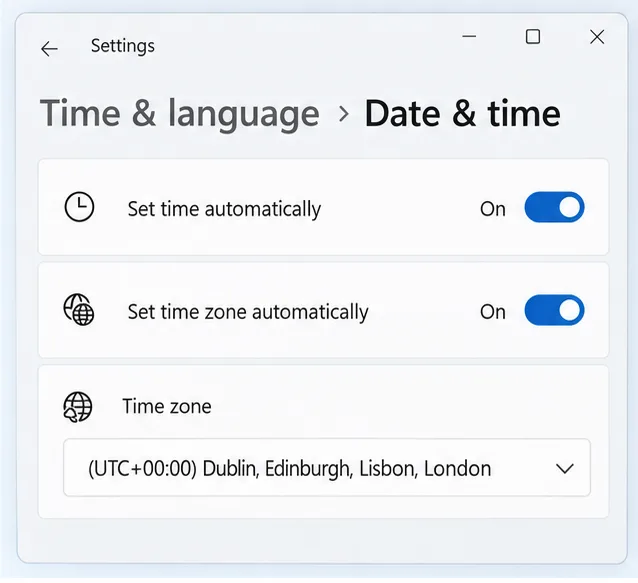
Open Start > Settings > Time & language > Date & time. Turn on Set time automatically and Set time zone automatically. If automatic time-zone detection is off, confirm that the selected zone is the UK’s London setting and that Adjust for daylight saving time automatically is on. If the clock still looks wrong, connect to the internet and use Sync now under Additional settings when that option is available.
Windows lists London in the UTC+00:00 time-zone group during winter.
Mac
On a Mac, open System Settings > General > Date & Time. Enable Set time and date automatically and Set time zone automatically using your current location. If the time zone does not update, check that the Mac is online and that Location Services allows time-zone detection, then restart it. Apple documents these controls in its Date & Time support guide.
Check smart speakers, home controls, and other devices
Smart speakers, watches, security cameras, thermostats, and heating controls do not all get their time the same way. Some sync over the internet; radio-controlled clocks can receive the UK time signal. NPL describes both radio and network time as ways devices can receive accurate time, but not every household device updates itself.
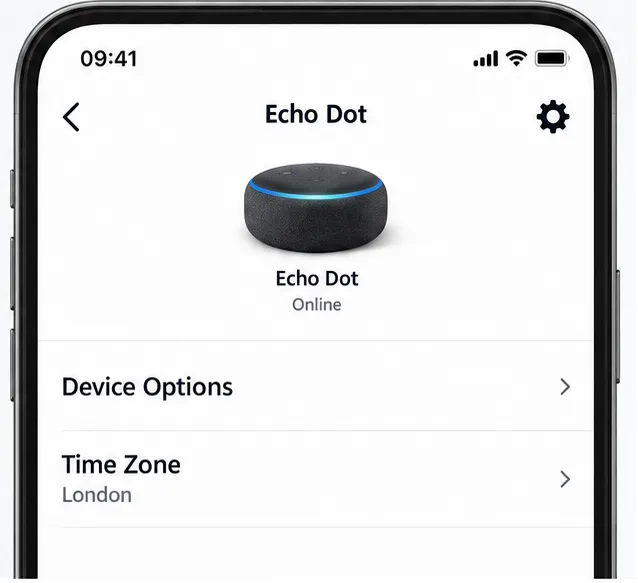
For an Amazon Echo, open the device settings in the Alexa app and check Device Options > Time Zone. If the Echo has moved, update its device location as well. For a thermostat or heating and hot-water timer, verify the time shown on the unit and check that a weekday schedule still starts at the intended UK time. Also inspect routines or alarms scheduled during the repeated 1:00 a.m. hour; behavior depends on the device or service, so check its own settings.
For an Echo, verify the device’s time zone and location in its settings.
Manual clocks, car dashboards, ovens, and older heating timers may need to be reset. Northern Ireland’s public guidance specifically recommends checking household clocks and time-based equipment that do not change automatically.
If a device is still one hour wrong
Check the time zone, not just the hour. A device set to BST or another region can remain one hour ahead even when its clock is running accurately.
Restore automatic updates. Turn on automatic date and time and automatic time zone, then reconnect to Wi-Fi or mobile data. Confirm location permission if the device uses location to identify the zone.
Restart or sync. Restart a phone or computer after enabling the setting; on Windows, use Sync now if available. Check for a pending software update if the time-zone rules appear stale.
Use a location-based zone for manual setup. If automatic detection is unavailable, choose London or the UK region. A fixed GMT/UTC offset may not switch to BST next March.