Couples Costume Ideas for 2026: Iconic Pairs and Clever Tropes

Find a couples costume that fits your style, budget, and comfort level, from Addams Family classics to original inside-joke duos.
Recently, Mark Zuckerberg posted a photo showing himself sitting working on a laptop, surrounded by McDonald's fast food to congratulate the famous American fast food brand on using Workplace - a business collaboration software developed by Meta.
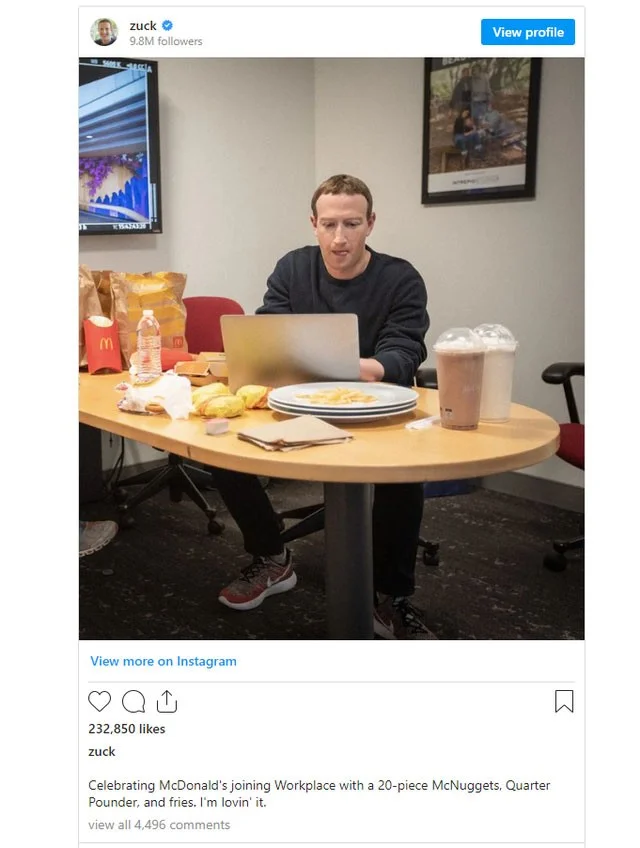
However, some sharp-eyed netizens have discovered something strange in this photo. It is a laptop (believed to be a MacBook) but the "bitten apple" logo is nowhere to be seen.
According to PetaPixel, a member of Zuckerberg's PR team, or even Zuckerberg himself, used photo editing software to completely remove the Apple logo on the MacBook in the photo. The reason for this is said to stem from a conflict between the two major technology companies.
In fact, since 2019, Apple and Facebook have been rumored to be at odds with each other when Apple CEO Tim Cook had provoking reactions towards Mark about the Cambridge Analytica data scandal.
At that time, Mark was said to have asked Cook how to handle the fallout from this scandal. And Cook advised Mark that the company should delete all information collected about people outside of its core applications. Obviously, Mark could not accept Cook's idea and a war against Apple and Cook was formed.
Since then, Zuckerberg has reportedly asked Facebook executives to switch to Android phones.
Cook then continued to "fan" the flames of "war" between the two giants by saying that this social network prioritizes interaction over privacy, leading to "polarization and violence".
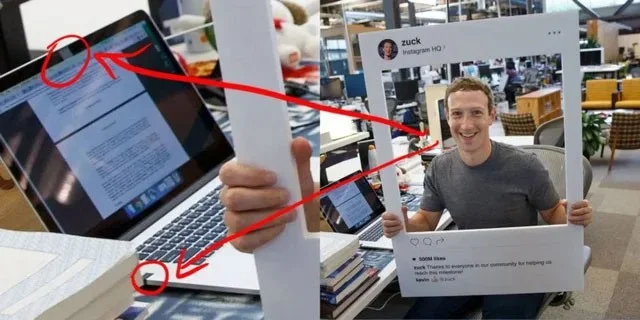
This isn’t the first time Mark Zuckerberg has shown his distaste for Apple. In 2016, he was photographed with tape over his MacBook’s webcam and microphone, which some speculated was done to avoid eavesdropping.
After 6 years, Mark still uses Apple devices no matter how much he 'dislikes' Apple.
Find a couples costume that fits your style, budget, and comfort level, from Addams Family classics to original inside-joke duos.
Need a last-minute high school Halloween costume? Compare 10 easy closet-based ideas by prep time, comfort, school-day practicality, and simple safety checks.
Use a simple 2026 Halloween decorating timeline for indoor décor, outdoor displays, and fresh pumpkins, with practical adjustments for weather and events.
Mix five vivid, approachable Halloween cocktails with measured recipes, simple prep tips, and an alcohol-free option for your party guests.
Find 15 office-friendly Halloween costume ideas for 2026, with practical checks for dress codes, respectful themes, comfort, and workplace safety.
Plan a fun elementary school Halloween party with easy crafts, games, inclusive treats, costume tips, and a sample 75-minute classroom schedule.
Compare realistic side hustles for 2026 by startup cost, fees, flexibility, and income control, with current tax and scam guidance from official sources.
Upgrade your home office ergonomics with current OSHA and NIOSH guidance on chair fit, monitor height, laptop setup, lighting, and movement.
Learn why emotional intelligence matters in leadership, where it helps most, how to strengthen it, and how to tell whether your approach is working.
A practical roadmap for moving into tech without a degree: choose an accessible role, build job-ready skills, prove them with projects, and use hiring feedback to improve.








