Home
» Today
»
How Tesla Autopilot Works: Features, Limitations, and Driver Responsibilities
How Tesla Autopilot Works: Features, Limitations, and Driver Responsibilities
How Tesla Autopilot Works: Features, Limitations, and Driver Responsibilities
A current safety issue makes one distinction especially important. On July 2, 2026, the National Highway Traffic Safety Administration (NHTSA) said it had upgraded its Tesla Full Self-Driving investigation to an Engineering Analysis. The agency is examining whether FSD can recognize reduced-visibility conditions such as glare, fog, and airborne dust and warn drivers in time. Its request refers to nine known crashes and asks Tesla for more information; it is an ongoing investigation, not a final defect finding. The investigation concerns FSD-equipped vehicles and should not be described as a finding about basic Autopilot alone. Read the NHTSA’s July 2, 2026 information request.
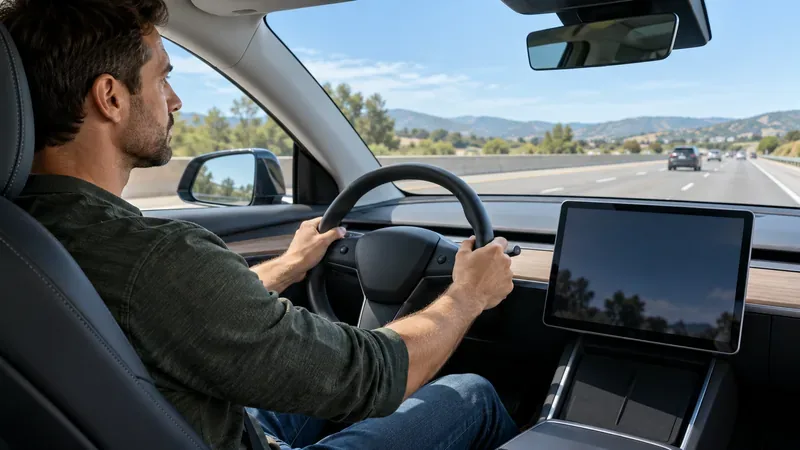
Tesla Autopilot is driver assistance, not a self-driving system. In broad terms, Traffic-Aware Cruise Control can manage speed and following distance, while Autosteer can help keep a compatible Tesla in its lane. The driver must continue watching the road, remain ready to steer or brake, and take over immediately when conditions or vehicle behavior require it.
Driver assistance can help with parts of the driving task, but the person at the wheel must stay alert and ready to take control.
What Tesla Autopilot does
The name can refer to a set of assistance features, and the exact features available depend on the vehicle, options, hardware, software, and market. Tesla’s current U.S. support page lists Traffic-Aware Cruise Control and active-safety features as standard; check your vehicle’s touchscreen manual and settings to confirm which steering or navigation features are installed and enabled.
Feature
What it assists with
What the driver still does
Traffic-Aware Cruise Control (TACC)
Maintains a set speed and can slow down or accelerate to maintain a selected gap from a vehicle ahead.
Steers, chooses a safe speed and following distance, watches traffic, and brakes or accelerates when needed.
Autosteer
Assists steering to keep the car within a detected lane while TACC manages speed and following distance.
Keeps hands on the wheel, monitors the lane and surrounding road users, and takes over when needed.
Other available features
Depending on the car and package, options may include lane-change assistance, Navigate on Autosteer, Autopark, Summon, or traffic-light and stop-sign control.
Checks every maneuver, watches for hazards, and follows the vehicle’s current manual and prompts.
Tesla’s U.S. support page for active safety and TACC explains that cruise control assists with speed and the gap to the vehicle ahead, but the driver remains responsible for steering. Tesla’s current Model 3 owner’s manual describes additional features and emphasizes that availability varies by model, configuration, software, region, and hardware. Other Tesla models have their own manuals.
How the system works
When a driver activates an available feature, vehicle cameras and other equipment fitted to that model provide information about lane markings, road edges, vehicles, and objects. Software uses that information to estimate what is happening around the car. TACC can adjust acceleration and braking to follow traffic; Autosteer can apply steering input to help the car stay in its lane. The car may show visual indicators or issue alerts when assistance is unavailable, when the driver needs to respond, or when the system disengages.
These functions share parts of the driving task, but they do not understand every scene as a careful human driver would. Tesla says its assistance features do not make a vehicle fully autonomous or replace the driver. NHTSA describes Level 2 assistance generally as a system that can provide both steering and speed control while the driver remains fully engaged and attentive. Its consumer guidance is available on the NHTSA automated-vehicle safety page.
Important Autopilot limitations
Assistance can be less reliable when the road or camera view is difficult to interpret. Tesla’s owner-manual warnings identify situations such as faded, confusing, or changing lane markings; road construction; sharp curves or hills; dirty or obstructed cameras; poor visibility; rain, snow, or fog; and glare or strong shadows. Availability and exact behavior vary by car, so use the manual for your specific model and software.
TACC may not judge speed or distance appropriately. It can miss a partially obstructed or stationary object, react to an object outside the lane, brake unexpectedly, or fail to slow enough for a curve, hill, or changing road condition.
Autosteer may not follow the lane you expect. Worn paint, temporary markings, shadows, merges, and work zones can make lane position ambiguous. Tesla warns drivers not to use Autosteer in construction zones or where pedestrians and bicyclists may be present.
Warnings are not a substitute for attention. Assistance can stop unexpectedly, and a warning is not a guarantee that the system can respond in time. Do not wait for the system to tell you that a situation is unsafe.
Driver-assistance features are not guaranteed collision avoidance. Keep a safe following distance and be prepared to brake yourself. Online navigation, traffic signals, emergency vehicles, and unusual road users can create situations the system handles imperfectly.
For feature-specific cautions, consult Tesla’s Autopilot and self-driving limitations and warnings. The manual says Autosteer is a hands-on assistance feature and that drivers must stay aware of road conditions and surrounding traffic.
Driver responsibilities in the United States
Using Autopilot does not hand the driving job to the car. The driver remains responsible for operating the vehicle safely and complying with traffic laws. Treat the system as help with specific tasks, not as permission to look away or stop supervising.
Keep your attention on the road. Watch the lane, vehicles ahead, mirrors, blind spots, cyclists, pedestrians, signs, and signals continuously.
Keep your hands on the steering wheel when Autosteer is active. Respond to steering-wheel reminders and other prompts. Do not use a phone or another handheld device while driving.
Maintain a safe speed and following distance. Adjust for weather, visibility, traffic, road surface, and posted limits even if the system is controlling speed.
Take over early. If the car steers, brakes, accelerates, or changes lanes in a way you do not expect, intervene immediately. Know how to cancel assistance and use the brake before you need to.
Do not activate it when conditions are unsuitable. If markings are unclear, visibility is poor, cameras are obstructed, or a road layout is complex, drive manually.
Read your own vehicle’s manual. Feature names, operating limits, controls, and driver-monitoring behavior can differ by model year, hardware, and software version.
Autopilot versus Full Self-Driving (Supervised)
Autopilot’s familiar functions center on speed, following distance, and lane steering when equipped. Full Self-Driving (Supervised) is a separate, more expansive driver-assistance package that may attempt additional tasks such as following a route, navigating intersections, or making turns, depending on the vehicle and software. The word “Supervised” matters: Tesla still requires the driver to pay attention and take control when necessary. It is not an autonomous ride service or a license to sleep, text, or sit in the back seat.
The 2026 NHTSA analysis discussed above concerns FSD systems and their response to reduced visibility. It should inform how drivers think about supervision and sensor limits, but it does not establish that every Tesla assistance feature has the same issue. For FSD-specific feature details, consult Tesla’s Full Self-Driving (Supervised) manual and current vehicle display.
What to remember
Tesla Autopilot can reduce some routine workload by helping manage speed, distance, and lane position. Its usefulness depends on the vehicle, the feature selected, software, and road conditions. It cannot replace an attentive driver. Keep your eyes on the road, follow the instructions for your exact Tesla, and be ready to steer or brake at once.