How to Use the BoM Melbourne Radar Before You Travel
Use the Bureau of Meteorology’s Melbourne radar to locate your route, read rain layers, track approaching echoes, and check warnings before departure.
Rain can change quickly across Melbourne, and a radar image can be hard to read if you have never used one. The Bureau of Meteorology’s (BoM) Melbourne radar helps you see where precipitation has recently been detected, but it does not promise that rain will reach a particular street or tell you whether a road is safe. Use it as one part of a travel check: locate your route, compare recent observations, then check forecasts, warnings, and road disruptions.
This guide follows the current BoM website map and its documented controls. The interface was checked against BoM guidance on October 25, 2026. The colored echoes in the screen mockups below are illustrative only; they are not live radar data or screenshots of a current weather situation.
Weather radar sends out pulses and maps the energy that returns from precipitation. BoM’s interactive rain map can display past rainfall in different ways. Its default rain-reflectivity view uses dBZ, short for decibels of reflectivity, a measure of the returned radar signal. A stronger color does not translate directly into a precise amount of water at your destination. Drop size, ice, distance, terrain, and radar processing all affect the echo.
The national weather map combines observations from multiple radar sites in a mosaic. Choosing a Melbourne radar view helps center the map on the local area; it does not necessarily mean every pixel comes only from that single radar. BoM lists the Melbourne radar as Melbourne (Laverton). It is about 19 kilometers west-southwest of Melbourne’s central business district and provides good coverage for the metropolitan area.
A radar image is an observation of recent conditions, not a forecast. BoM says it produces a new radar image every five minutes, but image availability and map loading can vary. For an estimate of what may happen later, switch to a forecast product and read its time period and probability. Do not assume that a rain band will keep moving in a straight line at the same speed.
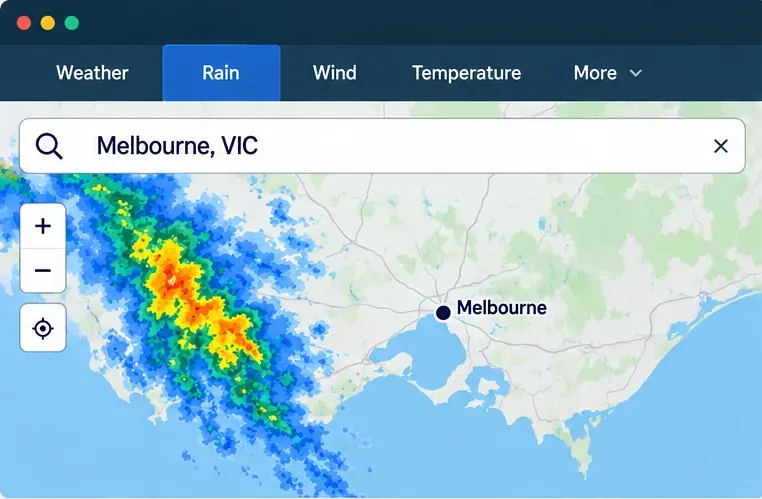
Go to the official BoM rain radar and weather maps page. You can also open a location page for a city or town and use its weather map. Search for “Melbourne, VIC” or enter a suburb or destination. Allowing the site to use your device location is optional; searching manually works when you prefer not to share it.
Select Rain at the top of the map if it is not already selected. Zoom with the plus and minus controls, drag or pan to follow your trip, and keep enough surrounding area visible to see rain approaching. On a phone or tablet, BoM documents touch and pinch controls. A search pin marks the selected location, while roads, towns, and other map features can help you orient yourself.
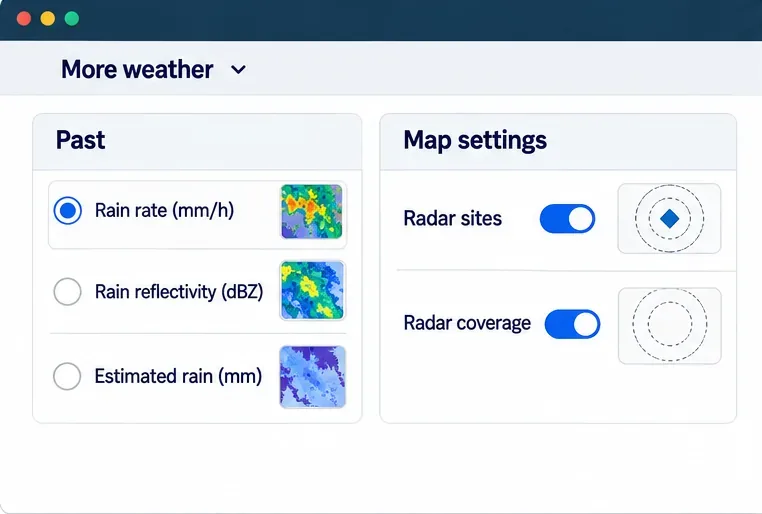
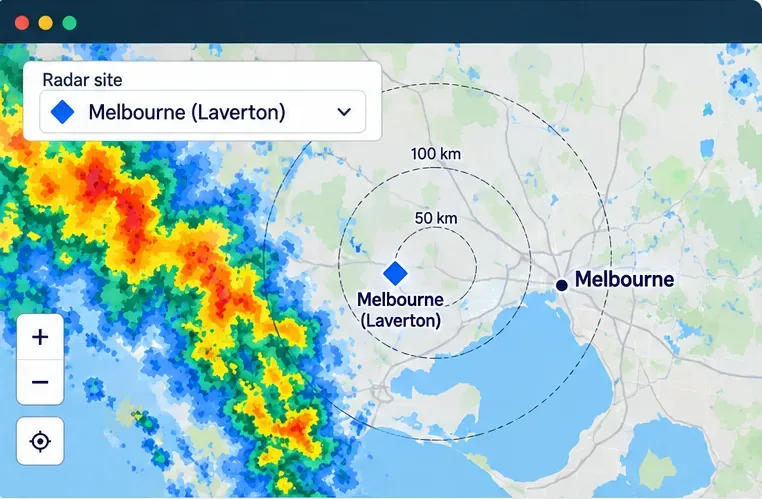
For a Melbourne-specific view, choose the Radars shortcut on the map if it appears, then select Melbourne (Laverton). BoM’s September 16, 2026 website release says selecting a radar site centers and zooms the map on that site. You can also open More weather, look under Map settings, and turn on Radar sites or Radar coverage. Select the Melbourne radar marker to view its range rings.
Range rings are a distance reference, not a guarantee that the radar can detect every shower equally well. BoM describes an optimal radar range of about 5 to 200 kilometers in general. Beyond that, the beam can pass above lower rain; nearer or farther echoes may also be affected by terrain and precipitation intensity. Pan back to your route after centering the radar if your trip extends beyond the inner map area.
Open More weather and look under Past for the rainfall display options. BoM documents rain rate in millimeters per hour (mm/h), rain reflectivity in dBZ, and estimated rain in millimeters over the past 60 minutes. Depending on the map view, not every option may appear in the same menu.
Check the legend rather than memorizing colors: palettes and intensity ranges matter. The map’s past-rain layers are observations. If you need a future outlook, choose the separate forecast layer and read its time window instead of treating the observed echo as a prediction.
Compare time-stamped observations rather than relying on a single frame. Note whether a band is getting closer to the route, weakening, or changing shape. If the page is slow or an image looks old, check its displayed time and refresh before drawing a conclusion. A break in the colored echo is not proof that the road is dry.
Melbourne’s radar has local limitations worth knowing. BoM says higher ground to the east, north, and southwest can obscure shallow rain farther away. Permanent echoes may occasionally remain near ridges and peaks, including around the Yarra Ranges and Mount Macedon. Over Port Phillip Bay, strong winds can produce sea clutter: echoes that do not move like rain and stop abruptly at the shoreline. More generally, drizzle can be difficult to detect, and rain aloft may evaporate before reaching the ground.
Before leaving, check the BoM Victorian Warnings Summary and the forecast for the places along your route. A warning takes priority even if the radar appears quiet. For closures, incidents, and other road disruptions, check the Victorian Government’s VicTraffic service. Radar shows weather echoes; it does not show whether a road is open, flooded, or safe to cross. If conditions become dangerous, delay the trip or follow official emergency advice. Do not check the map while driving; pull over safely or ask a passenger to review it.
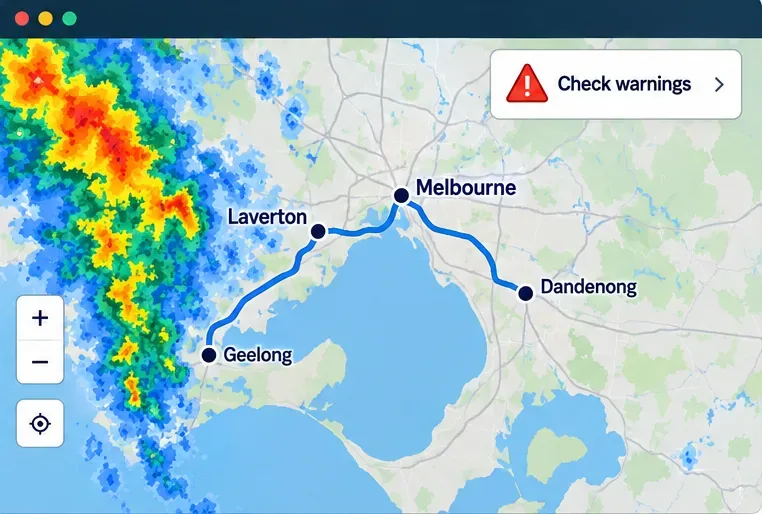
Search your starting point and destination, select Rain, center the view on Melbourne (Laverton), and compare the most recent time-stamped echoes with earlier observations. Read the legend, then switch to a forecast if you need to know what may happen later. Finish by checking BoM warnings and VicTraffic. This sequence gives you a clearer picture of rain risk without mistaking radar for a guarantee about conditions at street level.
Official sources: BoM rain radar and weather maps; BoM radar and map functions; BoM website release, September 16, 2026; BoM guide to rain radar and weather maps; BoM weather radar overview; BoM Victorian radar information; and Transport Victoria’s VicTraffic information.
Use the Bureau of Meteorology’s Melbourne radar to locate your route, read rain layers, track approaching echoes, and check warnings before departure.
A practical Queensland flood guide: check BoM radar, read warnings, verify local roads and council updates, and know what to do if conditions worsen.
Two poultry cases have been confirmed in Great Britain this season. Here is what UK residents, bird keepers, and consumers need to know about health risks, reporting, and food safety.
The UK’s Be Ready campaign recommends three days of emergency essentials. Learn why it launched, what to keep at home, and how to prepare without panic buying.
DVLA’s October warning does not mean new tests have started. Learn the current age-70 renewal rules, eyesight and medical checks, and what remains a proposal.
Get the Iowa vs. Minnesota game guide: Oct. 24 kickoff in Minneapolis, CDT and UTC times, Huntington Bank Stadium, FS1, FOX One, radio, and Floyd of Rosedale storylines.
Tennessee visits South Carolina on Oct. 24 at Williams-Brice Stadium. Check the 3:30 p.m. EDT kickoff, ESPN coverage, key players and game-day basics.
Texas A&M vs. Alabama is set for Saturday, October 24, at 2:30 p.m. CDT (UTC−05:00). Find the ABC broadcast, ESPN app, official live stats, and radio options.
Learn about Daniel Stewart’s Port Adelaide career, path to the AFL, key statistics, and what the club has confirmed in its latest announcement.
Queensland Police say four people were injured in a Loganholme shooting on October 24, 2026. Review confirmed details and official update channels.