Home
» Wiki
»
How to write square meter (m²), cubic meter (m³) on phone, computer
How to write square meter (m²), cubic meter (m³) on phone, computer
Previously, WebTech360 has guided you through many articles on how to write superscript in Word using shortcut keys, or how to write the degree C symbol in Word . So what if you want to write superscripts like square meters (m²), cubic meters (m³) for example on Facebook? Using shortcut keys when writing superscript in Word will not be applicable when you write on a computer. The following article will guide you to write m², m³ on your phone or computer very simply.
Instructions for writing square meter (m²), cubic meter (m³) on PC
Step 1:
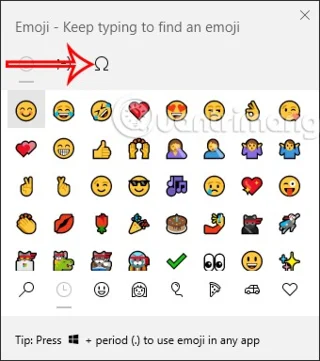
On Windows computers, press the Windows + “.” key combination to display the symbol table available on Windows 10. Next, click on the Symbols icon as shown below.
Step 2:
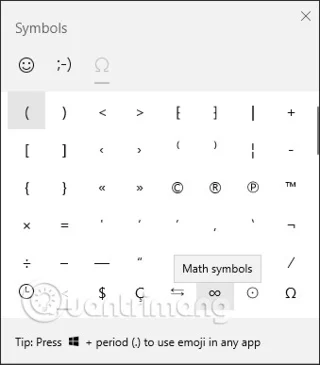
Then at the icons interface, we click on the infinity icon in the Math symbols group to find icons dedicated to Math.
Step 3:
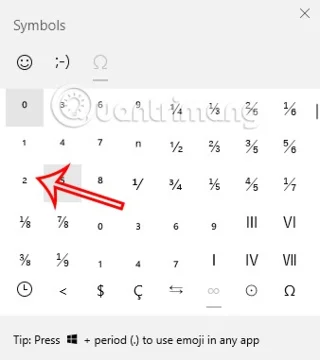
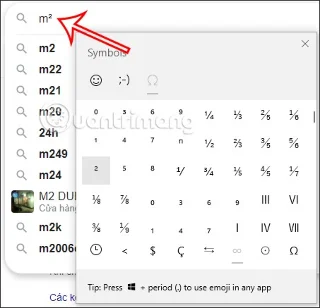
You will then see commonly used symbols in Maths to use, including the indices m² and m³ .
Now you just need to click on the above index to use it.
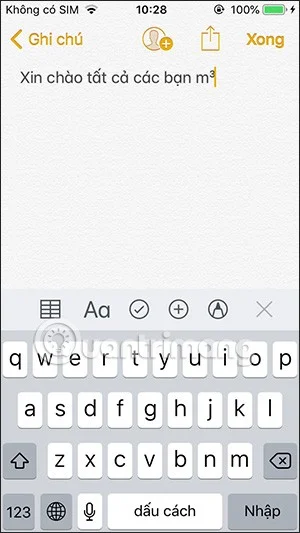
How to write square meters, cubic meters on the phone
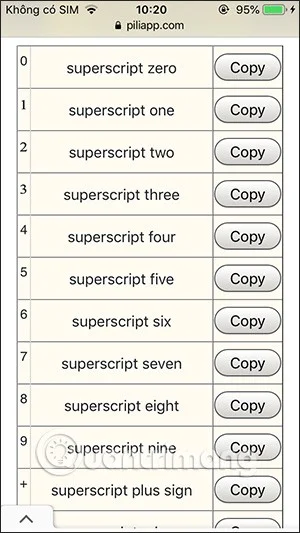
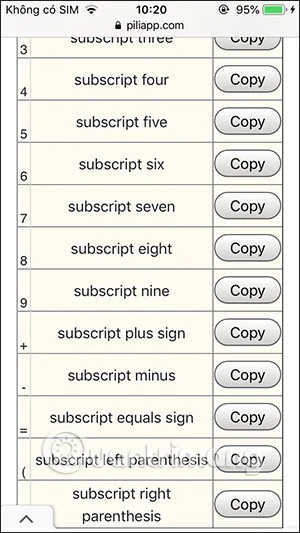
By default, the phone will not have an icon table like on Windows 10, or lower versions of Windows do not have that icon table, then we can use the piliapp website with the available superscript writing section.
Step 1:
On your phone or on Windows 7 or lower, access the link below to access the upper and lower index usage section of the piliap website:
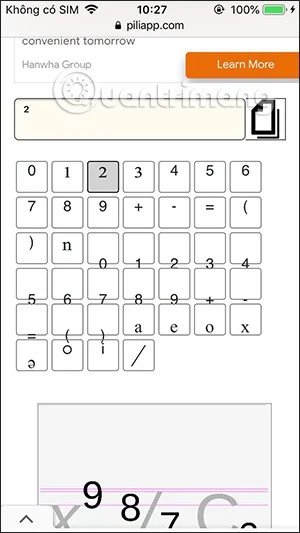
In this interface you will see the superscript and subscript options, along with other symbols commonly used in Math for us to use.
Step 3:
It's very simple, if you want to use any index, just click to copy .
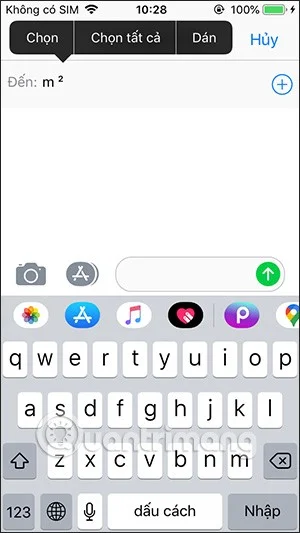
Then open the interface on your phone and paste the content you just copied.
(25) Comments
Cún con -
This is gold. I've been using ^2 forever, but now m³ looks pro. Sharing on FB
Rồng Vàng -
LOL, me typing m2 with space before, now real m². Upgrade complete! 😂
Sơn Pro -
Excellent breakdown. For those on Chromebook, search "superscript" in special characters menu. Complements the post well. Been using it daily now
Mai Gấu -
I tried on Samsung keyboard, long press 2 and swipe up for superscript ². Works like charm! Thanks author
Tâm Designer -
For graphic design in Photoshop, insert symbol palette has them. But for text editors, your computer tips rock. Thanks for covering both devices comprehensively.
Mèo con -
Great tutorial. On Windows, Alt+0178 for ² and Alt+0179 for ³ is the best shortcut. Thanks!
Linh mèo -
OMG, the superscript trick works perfectly on Android! No more ugly m^2. You're a lifesaver! 🎉
Duy Sinh 6789 -
Finally! Been struggling with cubic meter m³ on my laptop. Unicode method fixed it instantly.
Việt 2000 -
Does it work on iPad? Trying now... yes! Awesome guide
Hương KT -
As an accountant, I use m² for floor space calcs. This post saved me time. Thumbs up
Hương Đà Nẵng -
Love this! Shared with my construction group. Everyone needs to know about keyboard shortcuts for m².
Phúc IT -
On Linux, compose key + m > 2 gives m². Bonus tip for fellow devs. Article is spot on otherwise
Quang vn -
yes, works on phone too. just hold 2 and select superscript. easy peasy.
Long Gaming -
As a gamer who mods Minecraft builds, cubic meter m³ notation is key for volume calcs. This post nailed it across platforms. Quick, simple, and effective—bookmarked for life. Cheers
Phương Anh -
I've always copied from Google, but learning the shortcuts is way better. On phone: hold number, select variant. On PC: Char Map or Alt codes. This guide made it clear and easy. No more hassle
Anh Tuan -
Question: what about m⁴ or higher powers? Same method
Huyền Lizzie -
How do you do it on Mac? The article mentions Option key but doesn't specify. Help pls
Minh Hà Nội -
haha no more typing m squared like a noob. thanks for the laugh and the fix
Hoa xinh -
thanks nhé! now my real estate listings look professional with proper m².
Bình Dev -
In coding, we use HTML entities like ² for web. But for docs, your tips are perfect. Great resource!
Lân IT -
Perfect timing! Just needed this for a report. The copy-paste Unicode is genius for quick use. Will bookmark.
Thùy Linh -
Thanks a lot! This is super helpful for my engineering notes. Finally got m² right on my iPhone.
Ngọc Sài Gòn -
yay! found this after googling for hours. m² and m³ done. feeling smart now lol
Kiên 99 -
Super useful for students. My kid was struggling in physics homework. Problem solved! Highly recommend
Uyên Ú -
anyone know for excel? inserting superscript manually is pain










Cún con -
This is gold. I've been using ^2 forever, but now m³ looks pro. Sharing on FB
Rồng Vàng -
LOL, me typing m2 with space before, now real m². Upgrade complete! 😂
Sơn Pro -
Excellent breakdown. For those on Chromebook, search "superscript" in special characters menu. Complements the post well. Been using it daily now
Mai Gấu -
I tried on Samsung keyboard, long press 2 and swipe up for superscript ². Works like charm! Thanks author
Tâm Designer -
For graphic design in Photoshop, insert symbol palette has them. But for text editors, your computer tips rock. Thanks for covering both devices comprehensively.
Mèo con -
Great tutorial. On Windows, Alt+0178 for ² and Alt+0179 for ³ is the best shortcut. Thanks!
Linh mèo -
OMG, the superscript trick works perfectly on Android! No more ugly m^2. You're a lifesaver! 🎉
Duy Sinh 6789 -
Finally! Been struggling with cubic meter m³ on my laptop. Unicode method fixed it instantly.
Việt 2000 -
Does it work on iPad? Trying now... yes! Awesome guide
Hương KT -
As an accountant, I use m² for floor space calcs. This post saved me time. Thumbs up
Hương Đà Nẵng -
Love this! Shared with my construction group. Everyone needs to know about keyboard shortcuts for m².
Phúc IT -
On Linux, compose key + m > 2 gives m². Bonus tip for fellow devs. Article is spot on otherwise
Quang vn -
yes, works on phone too. just hold 2 and select superscript. easy peasy.
Long Gaming -
As a gamer who mods Minecraft builds, cubic meter m³ notation is key for volume calcs. This post nailed it across platforms. Quick, simple, and effective—bookmarked for life. Cheers
Phương Anh -
I've always copied from Google, but learning the shortcuts is way better. On phone: hold number, select variant. On PC: Char Map or Alt codes. This guide made it clear and easy. No more hassle
Anh Tuan -
Question: what about m⁴ or higher powers? Same method
Huyền Lizzie -
How do you do it on Mac? The article mentions Option key but doesn't specify. Help pls
Minh Hà Nội -
haha no more typing m squared like a noob. thanks for the laugh and the fix
Hoa xinh -
thanks nhé! now my real estate listings look professional with proper m².
Bình Dev -
In coding, we use HTML entities like ² for web. But for docs, your tips are perfect. Great resource!
Lân IT -
Perfect timing! Just needed this for a report. The copy-paste Unicode is genius for quick use. Will bookmark.
Thùy Linh -
Thanks a lot! This is super helpful for my engineering notes. Finally got m² right on my iPhone.
Ngọc Sài Gòn -
yay! found this after googling for hours. m² and m³ done. feeling smart now lol
Kiên 99 -
Super useful for students. My kid was struggling in physics homework. Problem solved! Highly recommend
Uyên Ú -
anyone know for excel? inserting superscript manually is pain