How to Use Google Lens on Chromebook

How to Use Google Lens on Chromebook lets you scan objects, translate text, and solve problems directly from your device. Follow these steps to get started quickly.
In the BlueStacks emulator , there are many games that require you to use the mouse cursor to move instead of the first-person perspective. It would be troublesome if during an intense battle your mouse pointer flew out of the simulation window, wouldn't it? In the following article, WebTech360 will guide you how to lock the mouse cursor in the BlueStacks emulator within the application window.

Instructions for locking the mouse cursor when playing games on BlueStacks
Note: This method applies to BlueStacks versions from 4.90.0.1046 and above.
First, open BlueStacks, open the game you want to lock the cursor, then click the cursor lock button in the right menu bar. Additionally, you can also press the key combination Ctrl + Shift + F8 on the keyboard to enable this feature.
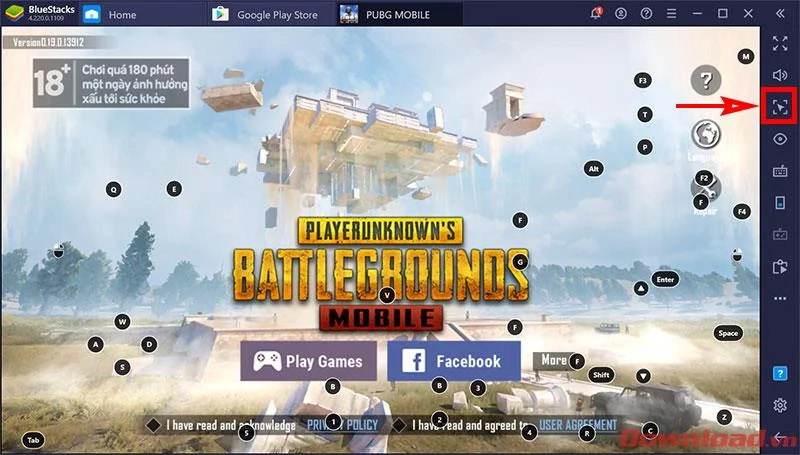
At this point, you will see the cursor lock icon with a red border around it, meaning you have successfully locked it. Now, you can move the mouse freely without fear of it falling out of the game. The mouse pointer will only move within the game frame, not outside.
If you want to remove the cursor lock to use the device as normal, continue pressing the key combination Ctrl + Shift + F8 again.
Tip: In addition to pressing the above key combination to turn off cursor lock, you can also use pressing Alt + Tab to switch to another window, then return to BlueStack. At this point the cursor lock command will also be canceled, you can use it as usual.
Wishing you success!
How to Use Google Lens on Chromebook lets you scan objects, translate text, and solve problems directly from your device. Follow these steps to get started quickly.
Learn how to clean a dehumidifier filter safely, when to use water or soap, how long to dry it, and when model-specific instructions matter.
Learn when cast iron grill grates need seasoning, how to clean, oil, heat, and maintain them, and when porcelain-coated grates should not be seasoned.
Learn how to clean a down or synthetic puffer jacket, restore loft, avoid heat damage, check the result, and know when professional care is safer.
Clean purse linings safely by identifying the material, removing debris, spot-cleaning carefully, drying fully, and knowing when to stop.
Learn how to clean a GE dishwasher filter, identify removable filter types, avoid damaging the mesh, and know when to check your model manual.
Learn how to clean oven trays safely, from fresh grease to burnt-on residue, with separate guidance for natural aluminum and nonstick bakeware.
Let nail glue dry, lift off the excess, then use acetone only on compatible, colorfast fabric. Learn safer alternatives, washing steps, and when to stop.
Learn how to zoom on Chrome with keyboard shortcuts, menu options, and touch gestures to improve readability on any webpage in seconds.
Discover how to drive work with clear processes that keep projects moving and teams aligned. This guide covers practical steps to improve output and reduce delays across any workplace.