Troubleshoot Nextcloud App Installs That Report No Internet
Trace App Store installation failures to DNS, HTTPS, proxy, TLS, or configuration issues from the Nextcloud server itself.
Since Nextcloud 33, the App Store metadata request timeout defaults to 120 seconds and can be adjusted with occ. That helps with a slow response, but the message “App couldn’t be installed because the server has no internet” should first be checked from the server or container running Nextcloud—not from your browser.
Test the App Store endpoint from Nextcloud’s own runtime, then fix the specific failure: DNS, outbound HTTPS, proxy configuration, certificate trust, or an App Store setting. The message is generic; it does not prove the whole server is offline.
Check whether every app or only one fails. If the catalogue loads but one app does not install, check its Nextcloud-version compatibility and app-directory permissions; that is not necessarily a network problem.
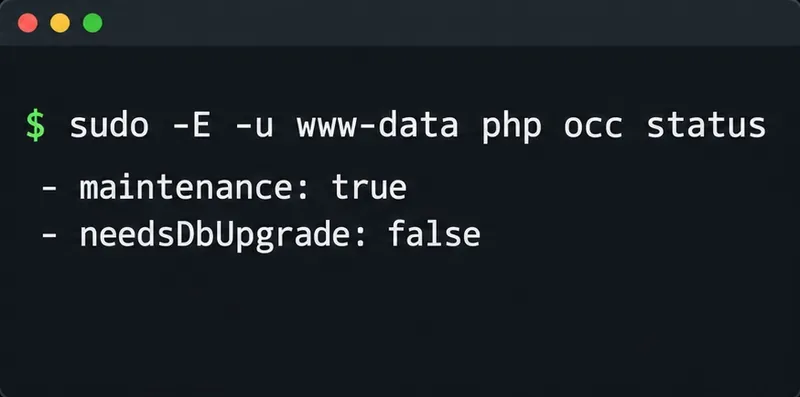
For a clearer error, try the installation from the command line. It will install the app if successful, so use the intended app ID. Run it as the HTTP user to preserve file ownership. On Debian or Ubuntu:
sudo -u www-data php /var/www/nextcloud/occ app:install newsReplace news with the app ID you need. In Docker, run the command inside the Nextcloud app container as its web user. Compare the full output with nextcloud.log; compatibility or permission errors need a different fix than DNS failures.
Run these checks where Nextcloud’s PHP process runs. A successful request from your laptop or Docker host does not prove the app container has the same network access.
getent ahosts apps.nextcloud.com
curl -sS --connect-timeout 10 --max-time 30 -o /dev/null -w 'HTTP %{http_code}' https://apps.nextcloud.com/api/v1/categories.json
The default App Store URL is https://apps.nextcloud.com/api/v1; Nextcloud fetches metadata such as categories.json from it. DNS should return an address and HTTPS should return a response. Name-resolution errors or timeouts point to DNS, routing, firewall, or proxy; TLS errors point to certificate trust or system time. An HTTP error means a server answered, so inspect the URL and proxy response.
In Docker, run the checks in the Nextcloud application container. Confirm DNS works and outbound TCP 443 is allowed. If a proxy filters destinations, inspect Nextcloud logs for any App Store download hostnames as well as the catalogue host.
If outbound traffic requires a proxy, configure it for Nextcloud’s PHP/HTTP client, not just the administrator’s browser or shell. Nextcloud supports proxy, optional proxyuserpwd, and proxyexclude settings. Keep proxy credentials private. Check whether PHP-FPM and CLI inherit the same HTTPS_PROXY or NO_PROXY environment.
For TLS errors, check the server clock and update the OS CA bundle. If an approved corporate inspection proxy is used, add its trusted CA to the PHP runtime. Do not disable TLS verification or use curl -k for the App Store request; that weakens protection against an impersonated download host.
The App Store is enabled by default, and its default URL is https://apps.nextcloud.com/api/v1. Check config/config.php or query the effective values with occ:
sudo -u www-data php /var/www/nextcloud/occ config:system:get appstoreenabled
sudo -u www-data php /var/www/nextcloud/occ config:system:get appstoreurl
If appstoreenabled is explicitly false, turn it on only if your policy allows the public store. If appstoreurl points to an old or unreachable custom store, restore the default only if you intend to use Nextcloud’s public App Store. Organizations using a self-hosted App Store should keep that URL and repair its DNS, certificate, or access path instead.
If the catalogue loads but installation still fails, check the apps_paths entries in the effective configuration. At least one configured app directory must be writable by the Nextcloud web-server user. Correct the directory owner or group and its intended write permissions; do not make the directory world-writable. An app that is blocked by an organizational allow-list or is incompatible with your Nextcloud release also needs an administrator policy or version decision, not a network change.
After DNS, HTTPS, proxy, TLS, and configuration checks pass, retry the installation from the Apps page or with the same occ app:install command. If the request is reachable but consistently takes longer than the configured metadata timeout, Nextcloud 33 and later can set it higher. For example:
sudo -u www-data php /var/www/nextcloud/occ config:app:set settings appstore-timeout --value=180This raises the wait to 180 seconds; it does not repair blocked egress, a bad certificate, or an incorrect store URL. The documented default is 120 seconds in Nextcloud 33 and later. To remove an override and return to the default:
sudo -u www-data php /var/www/nextcloud/occ config:app:delete settings appstore-timeoutFor an intentionally air-gapped server, an approved self-hosted App Store is the supported configuration route. Do not try to solve the outage by downloading an arbitrary app ZIP and placing it in the apps directory; use a trusted source and verify that the release matches your server.
Confirm that the App Store catalogue loads, the intended app installs and appears in the enabled-app list, and the log no longer records a connection, TLS, or timeout error for the attempt. If the endpoint responds from Nextcloud’s runtime but the UI still says there is no internet, compare the App Store URL and settings, review proxy environment differences between PHP-FPM and CLI, and check whether only one app is blocked or incompatible.
References: Nextcloud app management and App Store settings; Nextcloud OCC app and configuration commands; Nextcloud configuration parameters for proxies; Nextcloud App Store metadata endpoint.
Trace App Store installation failures to DNS, HTTPS, proxy, TLS, or configuration issues from the Nextcloud server itself.
Move thumbnail work to a controlled background schedule, trim unused preview sizes, and verify the queue without overwhelming your Nextcloud server.
Find the file, exclusion rule, connection issue, or client database state holding up Nextcloud sync, then verify uploads and downloads safely.
Find the PHP OPcache limit triggering Nextcloud’s warning, update the correct web PHP configuration, restart safely, and verify the result.
Compare built-in and Docker-based CODE, then connect Collabora Online to Nextcloud through a secure HTTPS reverse proxy.
Plan a reliable Nextcloud HA deployment with shared storage, Redis locking, quorum-aware MariaDB routing, and practical failover checks.
Configure and verify a reachable TURN relay for Nextcloud Talk when firewalls or restrictive NAT block direct call media.
Use the invalid-file report to identify changed, missing, or extra Nextcloud code, restore trusted files safely, and verify the result.
Set up OAuth2 for Nextcloud Mail with Gmail or Microsoft 365, verify receiving and sending, and resolve common consent and SMTP failures.
Use OCC to restore Nextcloud access, verify database migration status, and choose the right command for archive, Docker, or Snap installs.