Get Nextcloud Talk Calls Through When Direct Media Fails
Configure and verify a reachable TURN relay for Nextcloud Talk when firewalls or restrictive NAT block direct call media.
To fix a Nextcloud Talk call that cannot connect or has one-way media, configure a reachable TURN relay, enter its hostname, port, and shared secret in Talk settings, and allow traffic through both the TURN listener and its relay ports. TURN gives WebRTC a relayed route when a direct connection fails; it does not repair weak Wi-Fi, packet loss, or an overloaded network.
Illustrative example: Imagine a small organization whose staff can join a Talk call from the office but cannot reliably send video from a hotel network. The hotel firewall may block the direct media path. The example below follows its administrator as they check the route, configure coTURN, and test the change; it is not a report of a real deployment or test.
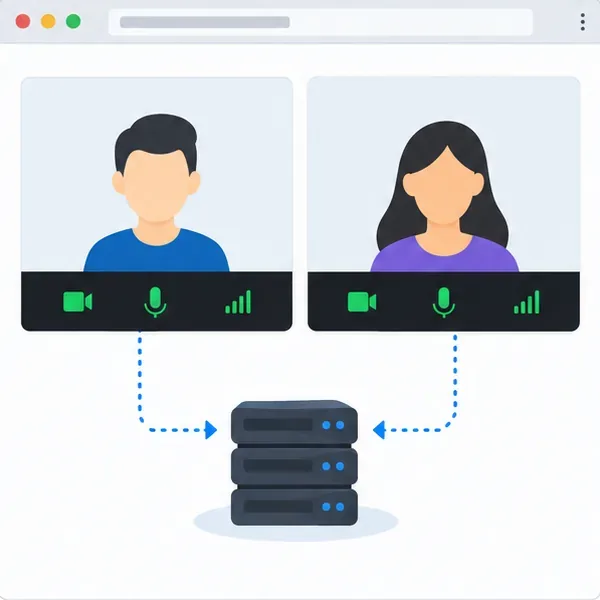
Nextcloud Talk first tries to connect participants directly. STUN helps devices discover the public-facing address and port created by a router. When a firewall or restrictive NAT still prevents a direct path, TURN relays the media. A STUN server alone cannot provide that relay.
Compare a call on the office network with one from a separate network, such as a phone hotspot. If the call connects in one place but repeatedly fails to establish audio or video in the restrictive location, TURN is a reasonable next check. If the call connects but remains blurry or choppy on every network, measure bandwidth, packet loss, Wi-Fi quality, and CPU load first; routing more media through a relay may add load and will not create capacity.
Record the Talk version, TURN hostname and port, whether the TURN host sits behind NAT, and whether a High Performance Backend (HPB) is installed. Keep the secret private. Commands below assume Linux with systemd; package paths vary.
Nextcloud’s Talk documentation recommends coTURN 4.5.0.8 or later because older releases have an IPv6 UDP socket issue. Install it from your distribution’s repository and locate its active configuration file (often /etc/turnserver.conf). Generate a random secret on the TURN host:
openssl rand -hex 32Store that value in a password manager or protected configuration store. In the active coTURN configuration, set the listener, shared-secret authentication, and realm. Replace the example hostname and secret with the real values:
listening-port=3478
fingerprint
use-auth-secret
static-auth-secret=REPLACE_WITH_RANDOM_SECRET
realm=turn.example.org
total-quota=0
bps-capacity=0
stale-nonce
no-multicast-peers
The Talk documentation lists lt-cred-mech only for coTURN versions earlier than 4.5.0.8; upgrade older installs rather than copying legacy settings blindly. If coTURN is behind NAT, configure its public and relay addresses as required by the deployment guide, and make sure the DNS name resolves to a participant-reachable address.
Allow the TURN listener port (3478 in this example) through the host and upstream firewalls for UDP and TCP. For TLS, coTURN also needs a valid certificate and private key, and Talk must use turns:. Port 443 can reach more restrictive networks, but check for conflicts: an HPB may also need that port, requiring separate IP addresses or hosts.
Media uses relay ports too. Allow the coTURN relay UDP range in the host firewall, cloud security group, and router. If you set min-port and max-port, open that exact range; allowing only the listener is insufficient. For a TURN host behind NAT, forward both the listener and relay range and configure its public/relay addresses. Retain coTURN peer restrictions to prevent access to unrelated internal services.
Restart coTURN after editing and check that the service is active. For example, on a systemd host:
sudo systemctl restart coturn
sudo systemctl status coturn --no-pager
Service status confirms that the process started; it does not prove that a remote browser can reach the relay. Check the host and provider firewalls separately, and review coTURN logs for bind errors, authentication failures, or allocation-quota messages.
As an administrator, open Administration settings > Talk. Enter the TURN hostname and port, such as turn.example.org:3478, and the same secret as static-auth-secret. Do not include https://, turn:, or turns: in the hostname field; choose the scheme in Talk’s controls. Keep UDP and TCP enabled when possible. Use turns: only after configuring TLS in coTURN.
Save and run Talk’s built-in TURN check if available. Then call from the restrictive network to a different network and verify two-way audio and video. Check coTURN logs during the call for allocations or authentication failures. In the example, the administrator compares the hotel-like connection with the office call.
If the check fails, compare the hostname, port, and secret, then verify DNS, firewall rules, relay UDP range, NAT forwarding, and service logs. A basic check may miss a relay-path problem, so test from an external network. For a TURN-only diagnostic, follow Talk’s browser-specific procedure; its console method is temporary and browser behavior differs.
TURN does not scale group calls. For larger groups, Nextcloud says calls with more than about 5–10 users require the HPB. If TURN connects but video remains poor, check bandwidth, packet loss, Wi-Fi interference, and server load before changing relay quotas.
The fix is supported by three observable signs: Talk accepts the TURN configuration, coTURN logs show relay allocations during a call, and participants on different networks can exchange audio and video in both directions. If only the office call works, or logs show no incoming request, the public route is still blocked or the configured host and port do not match. If media flows but quality remains poor, TURN connectivity is working and the remaining issue is likely elsewhere in the network or call infrastructure.
References: Nextcloud Talk TURN server configuration; Nextcloud Talk coTURN configuration; coTURN configuration wiki.
Configure and verify a reachable TURN relay for Nextcloud Talk when firewalls or restrictive NAT block direct call media.
Use the invalid-file report to identify changed, missing, or extra Nextcloud code, restore trusted files safely, and verify the result.
Set up OAuth2 for Nextcloud Mail with Gmail or Microsoft 365, verify receiving and sending, and resolve common consent and SMTP failures.
Use OCC to restore Nextcloud access, verify database migration status, and choose the right command for archive, Docker, or Snap installs.
Connect Nextcloud to LDAP or Active Directory, limit access with user and group filters, and verify secure authentication before rollout.
Enable a supported 2FA provider, prepare account recovery, then require two-factor authentication for everyone or selected Nextcloud groups.
Secure files edited in Collabora CODE by encrypting the storage layer, protecting temporary data, and verifying encryption and recovery.
Check your host architecture, confirm the CODE tag publishes ARM64, remove forced AMD64 settings, and separate image errors from permissions or memory issues.
Set up the WOPI connection between Collabora Online and ownCloud Infinite Scale, configure the right service URLs, and verify document edits save.
Prevent document exports in Collabora Online CODE by setting the WOPI DisableExport permission, then verify the host and editor enforce it.