Connect Gmail or Microsoft 365 to Nextcloud Mail Using OAuth2
Set up OAuth2 for Nextcloud Mail with Gmail or Microsoft 365, verify receiving and sending, and resolve common consent and SMTP failures.
To clear Nextcloud’s “Some files have not passed the integrity check” warning, first open Administration settings → Overview → List of invalid files…, then restore or remove only the files identified in the report. Do not edit signature.json or suppress the check: integrity errors can indicate an incomplete update, an accidental customization, or an unexpected file that needs investigation.
The warning appears on the admin Overview page. Nextcloud’s code-signing documentation describes two useful actions there: view the invalid-file list and trigger a rescan. The report groups issues by component, such as core or an app, and gives an error type and file path. The current Nextcloud 35 administration manual documents these same actions and the occ integrity commands.
INVALID_HASH: a file differs from the hash recorded in its signature. A local edit, incomplete replacement during an upgrade, or unexpected modification may explain it.MISSING_FILE: a signed file is absent. It may have been removed accidentally or left out during an update.EXTRA_FILE: a file exists in the installation but is not part of the signed set. It may be a local file, a leftover from an old release, or something that requires security review.EXCEPTION: the verifier could not validate a signature, for example because required signature data is missing or invalid. Check the named app and its source.These labels describe the check result, not the cause. An extra file is not automatically malicious, and a hash mismatch is not proof of compromise. Record the component, path, and error, and compare them with your deployment method and recent changes.
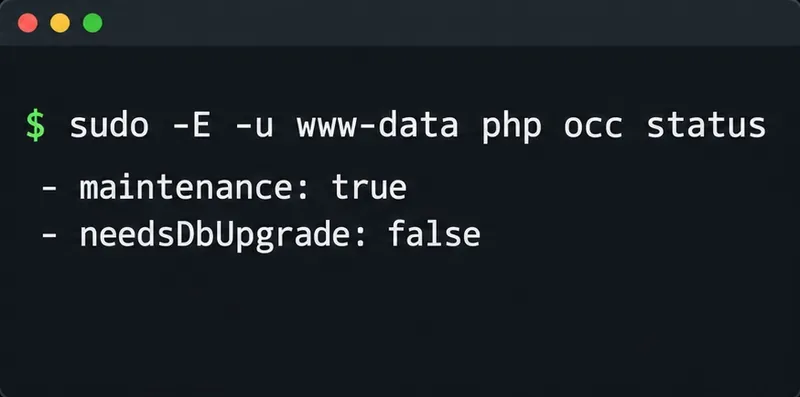
If you have shell access, run occ as the web server’s user from the Nextcloud installation directory. The correct account and PHP command can vary by operating system, container image, Snap, or hosting provider. On a common Debian or Ubuntu Apache installation, with Nextcloud at /var/www/nextcloud and the web user www-data, use:
cd /var/www/nextcloud
sudo -E -u www-data php occ integrity:check-core
sudo -E -u www-data php occ integrity:check-app calendar
Replace calendar with the app identifier shown in your report. The core check verifies Nextcloud server files; the app check verifies one named app. The Nextcloud 35 manual also documents occ integrity:check-app --all for checking installed apps. A successful check may produce no output; use -v when you need confirmation. If your installation is containerized or managed by a package, use its documented way to invoke occ and its actual web user rather than copying these paths blindly.
For INVALID_HASH or MISSING_FILE under core, use the exact Nextcloud release currently installed. Obtain a clean archive from the official download source or restore the matching files from a known-good backup or deployment artifact. Compare the installed version before replacing files, and preserve site-specific configuration and the data directory. If several core files fail after an interrupted upgrade, repair the deployment or rerun the supported upgrade process for that installation type instead of replacing individual files at random.
For EXTRA_FILE, inspect the path and establish who created it. Move an understood local file outside the Nextcloud code directory if it is not part of the installation; preserve a copy first if it may contain needed custom work. If the file is unfamiliar or suspicious, preserve it for investigation and review access logs and deployment history before removing it. Do not delete arbitrary files just to make the warning disappear.
For a signed app with modified or missing files, reinstall the same compatible app version from the official Nextcloud app store or the app maintainer’s trusted release channel. Back up the app directory first if it contains local changes. If it is a custom or unsigned app, an integrity message can reflect its signing status or implementation; check with its developer rather than manufacturing signature data. Nextcloud’s documentation says not to modify the app’s signature.json. Code signing for core and apps provides a way to detect changes and incomplete upgrades, so changing the recorded hashes defeats that purpose.
When transferring replacement files with FTP, Nextcloud specifically advises binary transfer mode. Text-mode conversion can alter bytes and create a fresh hash mismatch.
If the same error returns immediately, investigate whether your deployment process, customization, or a mounted volume is restoring the changed file. For signature exceptions, check the app’s supported release and consult its maintainer. If the report identifies a core file you cannot account for, treat it as a security and deployment issue and review trusted backups and server logs before proceeding.
See the official Nextcloud code-signing and integrity documentation, the Nextcloud 35 integrity command reference, and the official Nextcloud server release archive.
Set up OAuth2 for Nextcloud Mail with Gmail or Microsoft 365, verify receiving and sending, and resolve common consent and SMTP failures.
Use OCC to restore Nextcloud access, verify database migration status, and choose the right command for archive, Docker, or Snap installs.
Connect Nextcloud to LDAP or Active Directory, limit access with user and group filters, and verify secure authentication before rollout.
Enable a supported 2FA provider, prepare account recovery, then require two-factor authentication for everyone or selected Nextcloud groups.
Secure files edited in Collabora CODE by encrypting the storage layer, protecting temporary data, and verifying encryption and recovery.
Check your host architecture, confirm the CODE tag publishes ARM64, remove forced AMD64 settings, and separate image errors from permissions or memory issues.
Set up the WOPI connection between Collabora Online and ownCloud Infinite Scale, configure the right service URLs, and verify document edits save.
Prevent document exports in Collabora Online CODE by setting the WOPI DisableExport permission, then verify the host and editor enforce it.
Configure Nginx TLS termination, Collabora routes, and WebSocket headers, then test the public endpoints before opening real documents.
Trace a 10-minute CODE disconnect to its proxy, load balancer, or WebSocket path, then correct the timeout and verify the session stays connected.