Currently, all quality monitors have integrated a technology called V-Sync, FreeSync, G-Sync, ... so is this technology important to the monitor? Why are so many screens now equipped with such a series of technologies? What role do they play? Let WebTech360 explain to you what is V -Sync, FreeSync,....
Learn what tearing is
Before learning about V-Sync, we need to learn about tearing, tearing as the name implies, the phenomenon of frames being torn into many pieces, creating imperfect frames, making people users are uncomfortable because of broken parts.
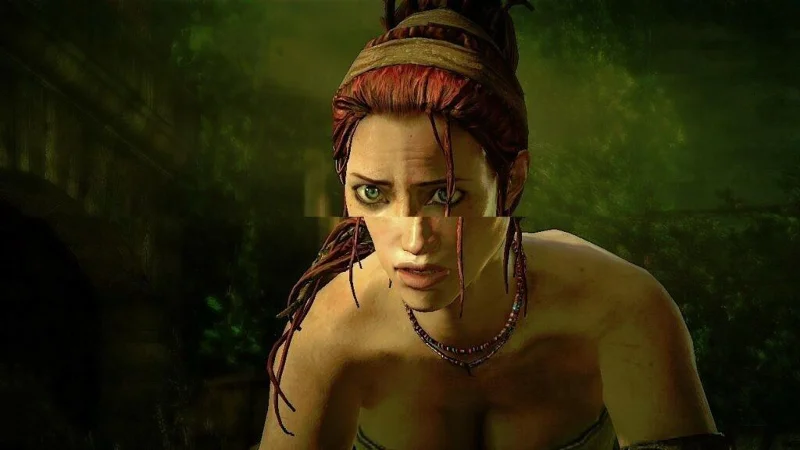
Screen tearing usually occurs when the FPS (Frame Per Second) in the game is too high or lower than your monitor's refresh rate. Frame tearing is mainly due to the fact that the image does not display in time or is slower, leading to the new and old frames being overlapped, creating broken images.
That's why V-Sync, FreeSync... are the saviors for minimizing screen tearing to help overcome problems related to slow display of images that cause phenomenon like tape rewind.
So what is V-Sync?
V-Sync stands for Vertical Synchronization - vertical synchronization, we can understand this is a technology that synchronizes FPS with the refresh rate of the screen, this helps to reduce or completely eliminate screen tearing as well as optimization. visual experience for users. The core word is V-Sync , the terms related to the ability to eliminate screen tearing are FreeSync, G-Sync,... . also appeared.

So what is FreeSync, G-Sync,...?
In essence, they are still identical to V-Sync , only about an action that is to synchronize FPS with the screen's refresh rate to minimize screen tearing. Their only difference is probably from the Source Code, or the companies themselves set up to market their monitors and graphics cards.
So depending on the hardware you are using, we will have the following types of Sync:
NVIDIA G-Sync: Frame sync technology developed by NVIDIA.
AMD FreeSync: This is AMD's FPS sync technology with refresh rate, with the aim of competing directly with NVIDIA's G-Sync.
VESA Adaptive Sync : Or often called Adaptive Sync and not as popular as the two names mentioned above. Adaptive Sync is a frame synchronization standard established by the Video Electronics Standards Association (VESA) as a standard for electronic companies to follow.
In addition, the names Apple ProMotion or Qualcomm Q-Sync are also related to the above definition. Maybe we do not see their appearance often or in today's popular screens.
So is it necessary to enable and use V-Sync?
At the present time, turning on V-Sync is no longer as necessary as it was a few years ago, inherently the software and hardware have been significantly upgraded, so that the gaming ability of the machines has also improved. more enhanced. So the story of tearing the picture seems to be forgotten. However, the role of V-Sync is still necessary in some cases, specifically for those of you who play games at too low FPS compared to the refresh rate. With V-Sync enabled, the graphics card will synchronize the fps with the monitor by repeating the same frame several times. Of course, gaming performance will not improve, but you will not experience screen tearing anymore.
Should choose G-Sync, FreeSync?
At the present time, FreeSync and G-Sync are both introduced a lot on monitors, especially AMD's FreeSync monitors. The reason why FreeSync is more popular is that this technology is provided by AMD for free to manufacturers, which helps any monitor from low to high have AMD Free Sync technology integrated to avoid screen breakage. . Meanwhile, models equipped with G-Sync will only be suitable for users who trust NVIDIA graphics cards and at the time of their launch, G-Sync monitors are often very expensive and difficult to reach people. common use.
So if you are a user who likes an affordable experience, FreeSync is definitely a very reasonable choice because they are available on almost all monitors at a variety of prices, while G-Sync will suitable for NVIDIA graphics cards and will also be suitable for those who use high-end devices because a G-Sync monitor model has an extremely expensive price of at least 10 million.

summary
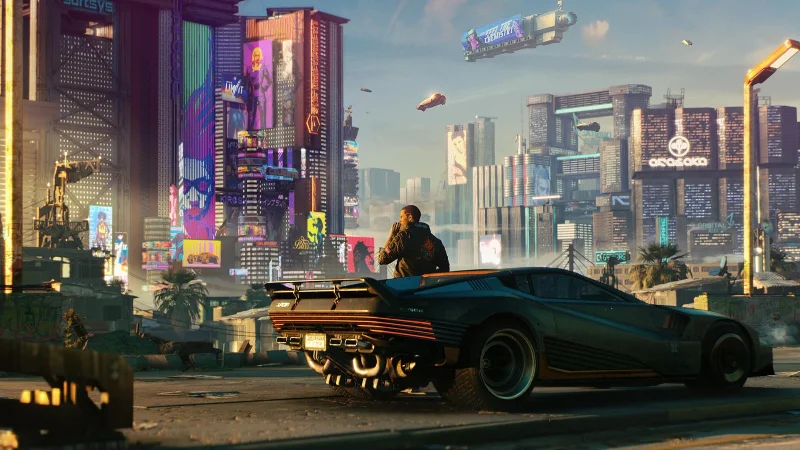
The above article has shown you the basics of V-Sync, FreeSync,.... Most games now have V-Sync in configuration options, which will give you more flexibility. in screen selection as well as providing a better game experience. As the writer now had to turn on V-Sync after playing Cyberpunk 2077, a heavy game that consumes a lot of data and the writer's machine does not exceed 60 fps.

Obviously experiencing V-Sync or G-Sync, Freesync, .... will bring smoothness in motion, you don't have to turn on this feature, but certainly turning it on will bring an experience. Better gaming experience, more stable and more comfortable and no freeze phenomenon.