Home
» How to
»
How To Delete Your Spotify Account: Cancel Your Spotify Subscription And Close Your Spotify Account For Good
How To Delete Your Spotify Account: Cancel Your Spotify Subscription And Close Your Spotify Account For Good
Spotify is still a poster-child for the music streaming industry; with 182+ million paying subscribers, it’s a leading music service used around the globe. The Swedish firm is holding its own in the industry but has taken many steps to publicize the company and increase revenue. This, coupled with growing competition from the similarly priced Apple Music, Amazon Music Unlimited, Tidal, and more, is causing some users to switch allegiances.
In an attempt to attract more people to the service, supposedly in the hope they’ll upgrade to the paid-for plan, Spotify launched a new free tier. Before the launch, Spotify offered two tiers – an ad-free one for $9.99 per month and a free, ad-funded tier. The former lets you download songs to listen to offline and doesn’t restrict access; the latter restricts how many songs you can access, popular playlists, and only on shuffle. Under the new Spotify Free tier, you can listen to any song from 15 Discovery playlists, on-demand.
Spotify also offers Student accounts, Family accounts, and Spotify Duo (for two people at a discounted price). Each tier is priced competitively with others on the market. But, if you’re ready to save some money each month, it may be time to cancel your subscription.
In this article, we’ll walk you through how to cancel your Spotify Premium account.
Things to Know Before Your Cancel
If you’re a Spotify Premium customer, you’ll need to cancel your Spotify subscription before closing your account. With that, any playlists you’ve downloaded for offline listening will be removed; you don’t own that music, and as soon as you end your subscription, you’ll lose those locally stored playlists.
If you unsubscribe but continue to use Spotify Free, you will still be able to stream those playlists, and they’ll be in your listening history. However, if you proceed to delete Spotify completely, you’ll lose access to those playlists both on and offline.
Additionally, deleting your Spotify account will mean you lose your username. Plus, if you have a student discount, you won’t be able to apply it to another account until a year after you first signed up for it if you decide to return to Spotify.
How to Cancel Your Spotify Subscription
Before you delete your account, you’ll need to cancel any paid subscriptions you have with the service. This may seem straightforward enough, but there is one hiccup you may run into; where do you cancel it?
Simply going to the Spotify website to cancel your account only works if you set up the service through Spotify. Some users signed up through an iTunes subscription, while others may have used their Google Play subscription or another service. The first thing you’ll need to do is figure out where you’re paying for the service and cancel it accordingly.
Cancel the Subscription – Spotify Website
If you’ve signed up for the Premium service directly through Spotify, do this to cancel the service:
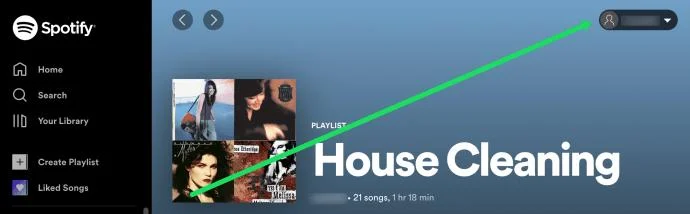
Visit the Spotify website, login and click on your profile in the upper right-hand corner.
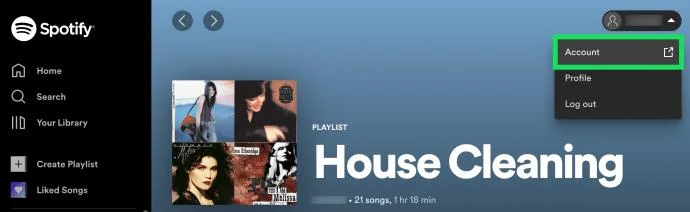
Click on Account in the menu that appears.
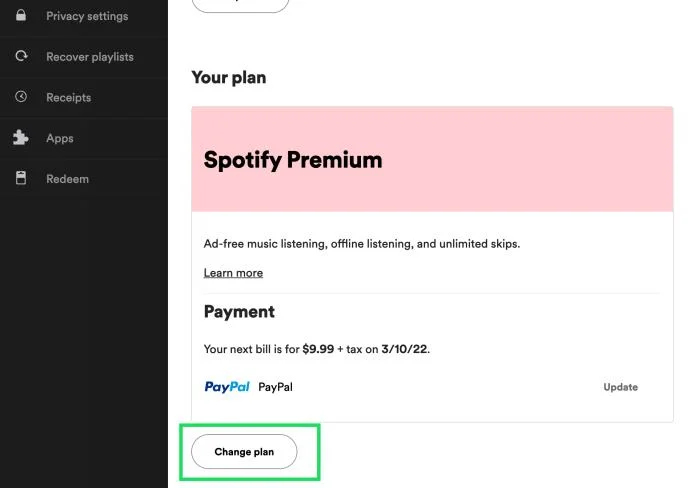
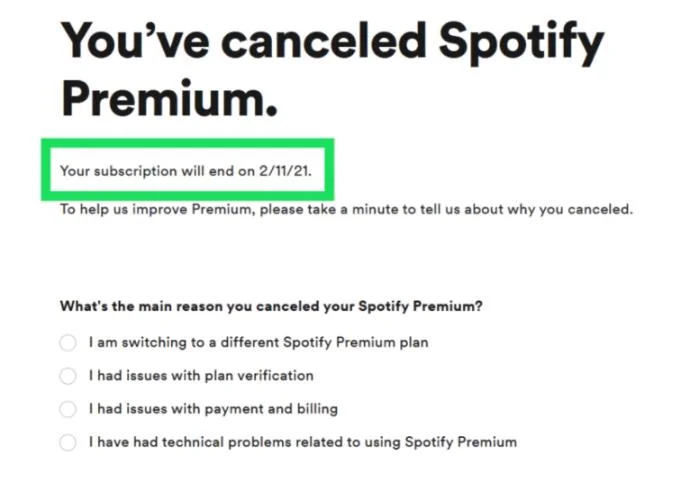
A new window will open. Scroll down and click on Change Plan. Note: Notice the date in the screenshot above. You will still have access to the Premium service until that date.
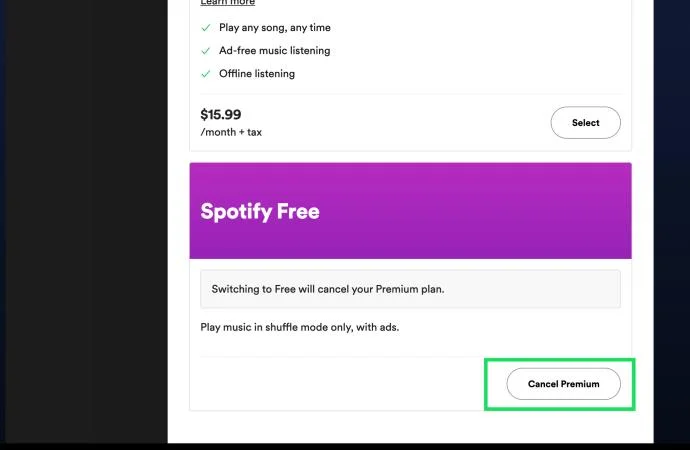
Then, scroll down to the Free section and click Cancel Premium. Follow the preceding prompts to complete your cancellation.
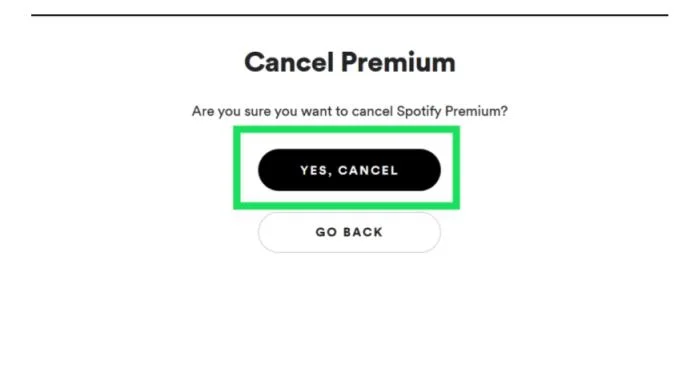
Now, the website will ask you to confirm your cancellation; click Yes, Cancel.
You’ll now go to a cancellation page that shows you the end date of your subscription as well as the option to provide feedback, populate the best answers and click Submit at the bottom.
Cancel the Subscription – iTunes
iTunes is a service that allows you to sign-up for other subscriptions using your Apple ID payment methods. If you’ve done this, follow these steps to cancel your subscription:
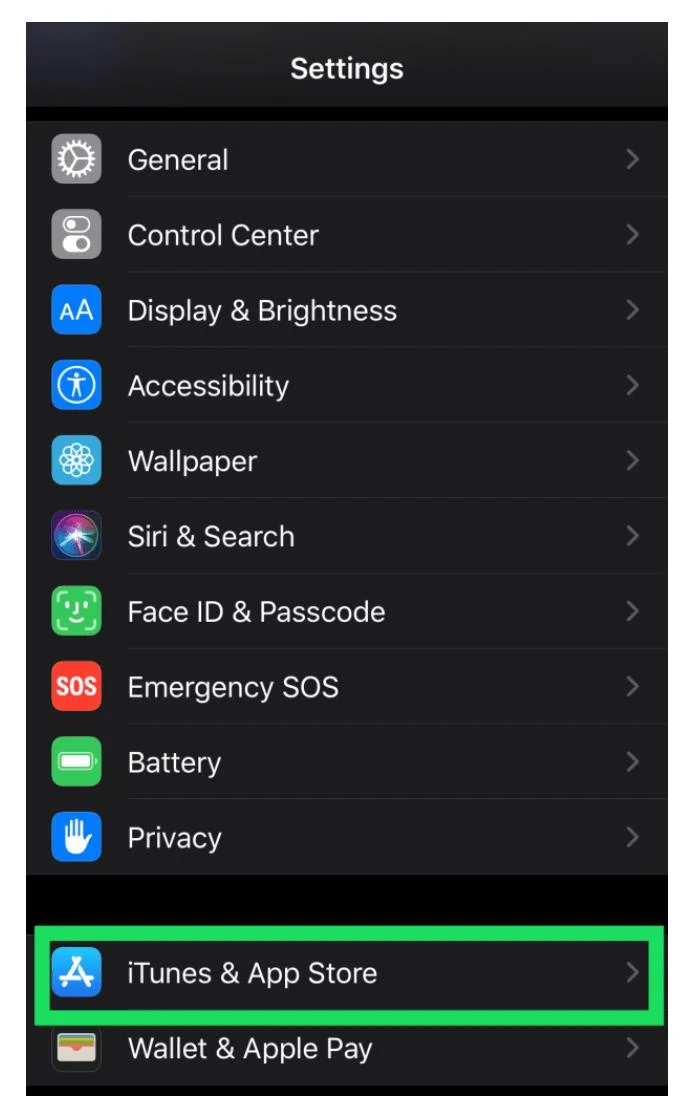
On your iPhone open Settings and tap iTunes & App Store.
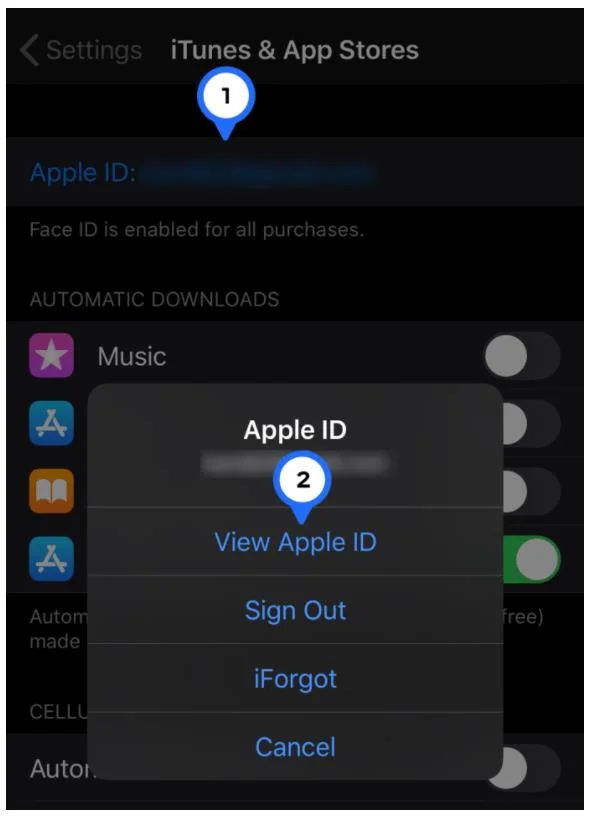
Next, tap on your Apple ID at the top and then tap on View Apple ID in the pop-up window that appears.
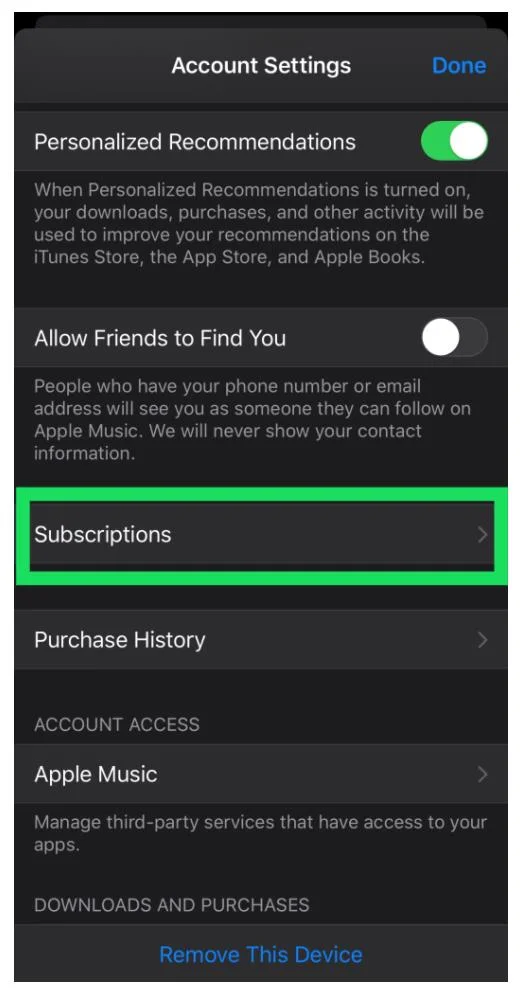
From here, tap on Subscriptions.
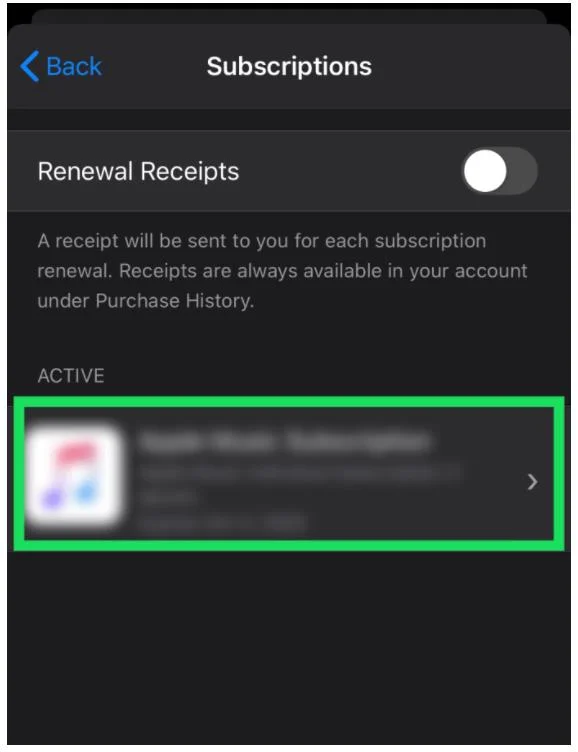
Locate and tap on your Spotify Subscription, which will be listed on the screen below.
Then, tap Cancel Subscription. As stated above, you will still have access to the Premium service until the next billing date.
If you signed up for the service using another partner (i.e., your cell phone provider, TV provider, or another service), you would need to cancel using that outlet’s instructions.
How to Delete Your Spotify Account
Once you’ve canceled your subscription, you will need to contact Spotify to delete your account permanently. As mentioned above, there is no way to recover your account once it is closed. Also, if you choose to reopen your account, you will need to choose a different username according to Spotify. The same username cannot be used more than once.
Here is how to delete Spotify:
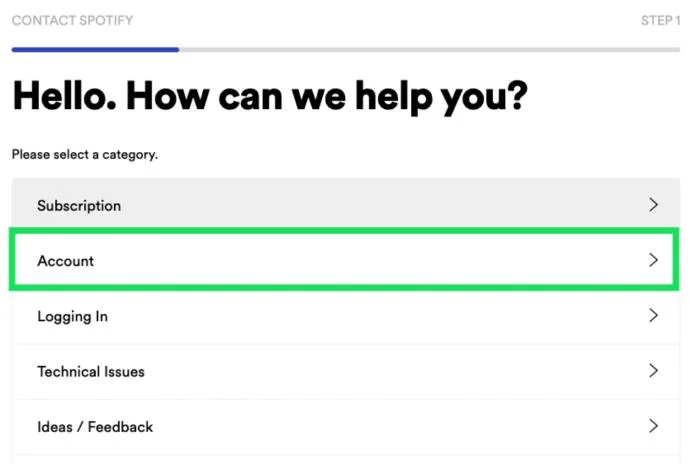
Visit the Spotify cancellation page and click on Account.
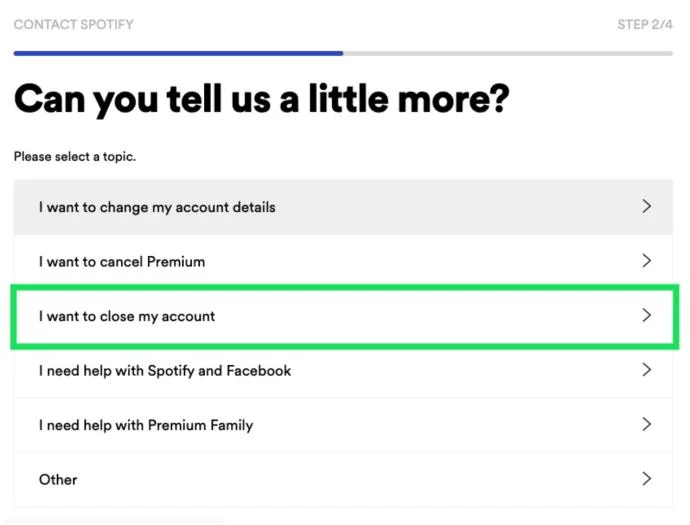
Now, click I want to close my account.
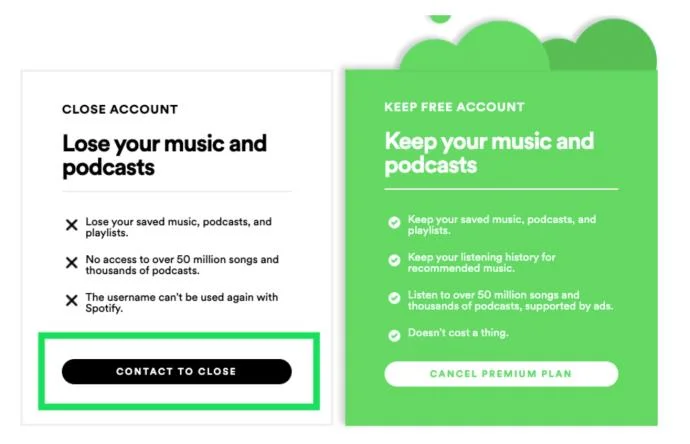
Click Contact to Close.
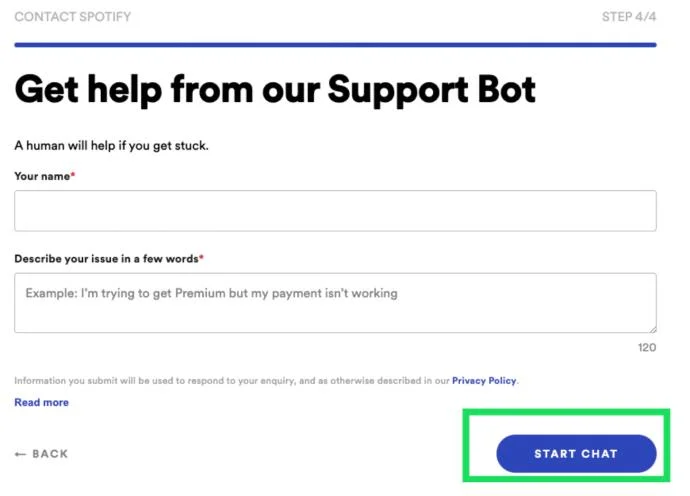
Fill out the information form and click Start Chat.
A Spotify representative will begin typing, explain that you’d like to permanently close your account. The representative will send you an email confirmation once done.
Frequently Asked Questions
There are a few more things you should know about Spotify account cancellation. See our FAQs below:
I canceled my account, but I was billed again. What happened?
Assuming you canceled your Premium subscription, the only reason you would’ve been billed again is that the cancellation wasn’t set before the renewal date.
If you’ve been charged for a Spotify subscription after cancellation, the first thing you should do is to check your email for confirmation. It should have the cancellation date set on it. If that all checks out and the charge was an error, contact Spotify support.
Can I reactivate a closed account?
First, it’s important to note that you can reactivate your paid subscription (along with all playlists and benefits) if your account is still open.
Once you’ve opted to close your account, there aren’t any options for recovery. The account and all of its data are gone when you close the account. Your only option will be to open a new account and create new playlists.
I signed up for Spotify using Facebook. Can I just disconnect it?
Unfortunately, no. Spotify gives its users several different sign-in options, and if Facebook is yours, you’ll need to close your account per the instructions above and start over with a new account.
Once you’ve canceled your account, use your email and a unique password to create the new account. Just beware; all of your previous music, playlists, and downloads will not be available if you do this. You will have to curate all of your content again.
However, if you set up your Spotify account with an email and password then later connect it to Facebook, you can disconnect your accounts.
1. All you need to do is open Spotify on a web browser and go to the Settings.
2. Then, click Disconnect from Facebook when the option appears.
What can I do if I can’t log in?
If you can’t log into your Spotify account, you’ll have some difficulty getting the service canceled. Of course, you could always contact your financial institution to put a stop to future payments (this may or may not be the best solution depending on how you’re paying for the service), or you can fill out Spotify’s Contact Us form for more help.
If, for some reason, you can’t cancel via the website, iTunes, or wherever you started the service (even in the case of fraud), contact the company for further assistance.
I don’t have the option to cancel Spotify from the website. What’s happening?
If you can’t cancel Spotify using Spotify directly, you likely signed up for the service through a third party. This could be Apple, Google Play (at one time), or even a service bundle like Hulu. The fastest way to track down who you signed up for the service with is by checking your email (look for the confirmation email when you first signed up) or your bank statements.
Then, log in to that service and follow the cancellation steps.
Spotify Account No More
Regardless of your reasons for canceling your Spotify subscription and deleting your account, you now know the steps involved to do so. As with many services, there are many steps to ensure that the account holder truly wants to delete their account.