US successfully transmits 1.6 kW of wireless power over a distance of 1 km using microwaves

The US Naval Research Laboratory (NRL) has successfully transmitted 1.6 kW of wireless power over a distance of 1 km using microwaves.

The idea of ​​wireless power transmission has been around for a long time. The principle of wireless power transmission is quite simple. Electricity is converted into microwaves, then focused into a beam and “shot” to the receiver, a device made of components called rectenna (rectifier antenna). When microwaves are “shot” and affect the rectenna, the elements will create a DC current.
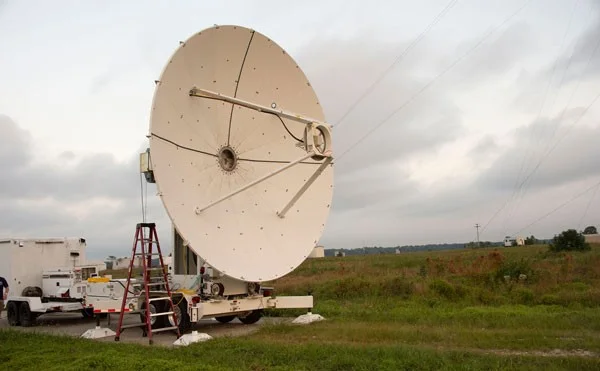
US successfully transmits 1.6 kW of wireless power over a distance of 1 km using microwaves
Microwave transmitter pointed towards receiving antenna. Photo: NRL

The NRL team used a 10 GHz microwave beam and set up wireless power transmission testbeds at two locations: the US Army Research Field in Blossom Point, Maryland and HUSIR (Haystack Ultra Wideband Satellite Imaging Radar) at MIT in Massachusetts.

The 10 GHz frequency was chosen because it can transmit in heavy rain conditions with less than 5% energy loss, and is safe to use around animals or humans.

The NRL's wireless power transmission test in Maryland reached 60% efficiency. The Massachusetts test had lower power levels than Maryland, but had a higher average power, so it transmitted more energy.

Wireless power transmission technology could now be used by the US Department of Defense to deliver electricity to soldiers in the field, eliminating the need for fuel transport, which is vulnerable to attack.

In the future, this technology could be used to transmit electricity on the ground, or from space back to earth, providing electricity 24/7/365.

Leave a Comment

Solving Microsoft Teams Password Error Recovery

Solving Microsoft Teams Password Error Recovery

Tired of Microsoft Teams password error blocking your work? Master solving Microsoft Teams "Password Error" recovery with proven, step-by-step fixes. Regain access fast and frustration-free!

Troubleshooting Microsoft Teams Installation Errors on Windows 11

Troubleshooting Microsoft Teams Installation Errors on Windows 11

Struggling with Microsoft Teams installation errors on Windows 11? Get step-by-step fixes for common issues like 0x80070005, 80070422, and more. Quick, effective troubleshooting to get you back to collaborating seamlessly.

Troubleshooting Microsoft Teams Screen Error Black Screen

Troubleshooting Microsoft Teams Screen Error Black Screen

Tired of Microsoft Teams "Screen Error" black screen ruining your meetings? Discover proven, step-by-step troubleshooting fixes for Teams black screen issues, screen sharing errors, and more. Get back to seamless collaboration fast!

How to Fix Microsoft Teams Update Error Loop

How to Fix Microsoft Teams Update Error Loop

Frustrated with the endless Microsoft Teams Update Error loop? Discover step-by-step fixes to resolve stuck updates, clear cache, reinstall, and more. Get back to seamless collaboration fast!

How to Fix Microsoft Teams Download Error on Phone

How to Fix Microsoft Teams Download Error on Phone

Encountering Microsoft Teams "Download Error" on your phone? Get instant fixes for Android & iOS. Clear cache, update apps, and more—back to chatting in minutes without frustration!

Solving Microsoft Teams VOIP Connection Error

Solving Microsoft Teams VOIP Connection Error

Struggling with Microsoft Teams VOIP connection error? Discover step-by-step fixes to solve Microsoft Teams VOIP connection error instantly. Network tweaks, cache clears, and more for seamless video calls.

Solving Microsoft Teams Unexpected Error on Startup

Solving Microsoft Teams Unexpected Error on Startup

Tired of the frustrating Microsoft Teams 'Unexpected Error' on startup? Discover step-by-step fixes, from clearing cache to advanced resets, to get Teams running smoothly again. Quick, reliable solutions for Windows and Mac users.

How to Fix Microsoft Teams Download Error Unexpected

How to Fix Microsoft Teams Download Error Unexpected

Tired of Microsoft Teams "Download Error" Unexpected blocking your workflow? Follow our expert, step-by-step guide with quick fixes and advanced tips to resolve it instantly. No reinstall needed!

Causes of oil heater noise, oil leakage and no heating when in use

Causes of oil heater noise, oil leakage and no heating when in use

Oil heaters make noise, leak oil, and do not heat up. These are all problems that arise when using a heater. So what are the causes of these problems? Read our article below!

How to Assign Participants to Breakout Rooms in Microsoft Teams

How to Assign Participants to Breakout Rooms in Microsoft Teams

Master how to assign participants to breakout rooms in Microsoft Teams with this step-by-step guide. Boost meeting engagement, automate assignments, and troubleshoot like a pro for seamless virtual collaboration.

How to Fix Microsoft Teams Giá Error Pricing Update

How to Fix Microsoft Teams Giá Error Pricing Update

Struggling with Microsoft Teams "Price Error" after the latest pricing update? Discover step-by-step fixes to resolve it quickly, restore seamless collaboration, and avoid subscription headaches. Updated with the newest solutions.

Solving Microsoft Teams Background Error Transparency

Solving Microsoft Teams Background Error Transparency

Struggling with Microsoft Teams Background Error Transparency? Discover proven step-by-step fixes for blurry, glitchy virtual backgrounds. Restore perfect transparency in Teams meetings effortlessly. Updated with the latest solutions.

How to Fix Microsoft Teams Đăng nhập Error (Login)

How to Fix Microsoft Teams Đăng nhập Error (Login)

Struggling with Microsoft Teams "Đăng nhập" login error? Discover step-by-step fixes for smooth sign-in. Clear cache, update app, and more – no tech skills needed! Works on Windows, Mac, and web.

Solving Microsoft Teams Web Error 503 Service Unavailable

Solving Microsoft Teams Web Error 503 Service Unavailable

Tired of Microsoft Teams Web Error 503 Service Unavailable blocking your meetings? Discover quick, step-by-step fixes to resolve the 503 error fast – no tech skills needed! Clear cache, check status, and get back to collaborating seamlessly.

Troubleshooting Microsoft Teams Update Error 0x80070002

Troubleshooting Microsoft Teams Update Error 0x80070002

Stuck with Microsoft Teams Update Error 0x80070002? Discover proven troubleshooting steps to resolve this frustrating issue quickly and get your Teams app updated seamlessly for uninterrupted collaboration.









