Couples Costume Ideas for 2026: Iconic Pairs and Clever Tropes

Find a couples costume that fits your style, budget, and comfort level, from Addams Family classics to original inside-joke duos.
If you’re interested in or have ever used Google hardware products, you’re probably familiar with the Google Store. This is an “online supermarket” where Google sells its hardware products as well as its service subscriptions. This may sound boring and nothing special, but the Google Store has an interesting history.
The predecessor of the Google Store was a small tab
Google’s first “online store” was the Android market. This store existed only on Android devices and was a place to sell apps and games for the platform. Over time, Google gradually added more items to the Android Market, which necessitated a rebranding to the more universal “Google Play.”
You can find a wide variety of digital goods on the Google Play Store. In addition to software, Google also sells its own phones and tablets (like the Nexus and Pixel), as well as hardware like Chromecasts and Chromebooks. All of these hardware products are listed under the “Devices” tab on the Google Play Store.
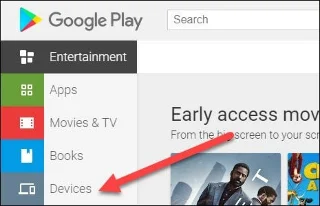
However, Google's rapid growth and increasing investment in hardware made it necessary to launch a separate store platform. Therefore, Google decided to separate the "Devices" tab from the Play Store and build it into the Google Store as it is today.
It can be said that the rise of “made by Google” hardware products has made a very important contribution to the development and expansion of the Google Store that we know today.
“Made by Google”
The first hardware device that Google developed entirely in-house was the Nexus Q media device in 2012. At that time, the only hardware products sold on the Play Store were also Nexus devices, manufactured by Google itself.
The Nexus Q ultimately flopped, but it laid a solid foundation for the launch of the Chromecast in 2013—a huge success to this day. It was just the beginning of Google's interest in developing its own hardware products and acquiring related companies.
The Google Store officially launched in March 2015. At that time, Google was only developing limited hardware devices. However, the launch of the Google Store was an important and fundamental step.
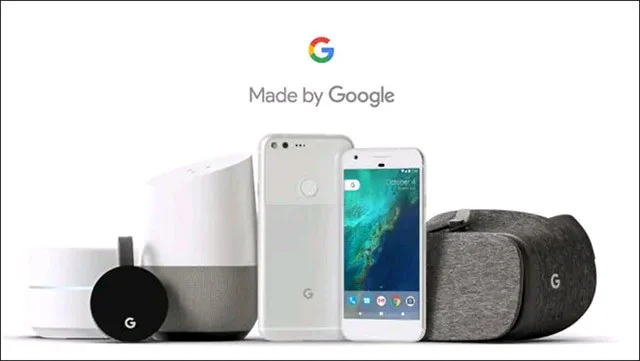
The following year, Google introduced the first Pixel phone and the first-generation Google Home smart speaker—officially kicking off the “Made by Google” initiative. Since then, dozens of products have been launched in the Google Store, which is now where you can find Pixel phones, Nest smart devices, Chromecasts, Chromebooks, and accessories.
What can you buy in the Google Store?
Google distributes digital products (software) on the Play Store, while the hardware side of things falls under the Google Store. As mentioned, hardware devices available for sale on the Google Store include Pixel phones, Chromebooks, Chromecasts, Nest devices, and some products from Google partners.
Of course, the Google Store isn’t the only place to buy Google hardware. Many of its products are available at retailers around the world. However, if you buy a Google product from the Google Store itself, you’ll often get better customer service and support.
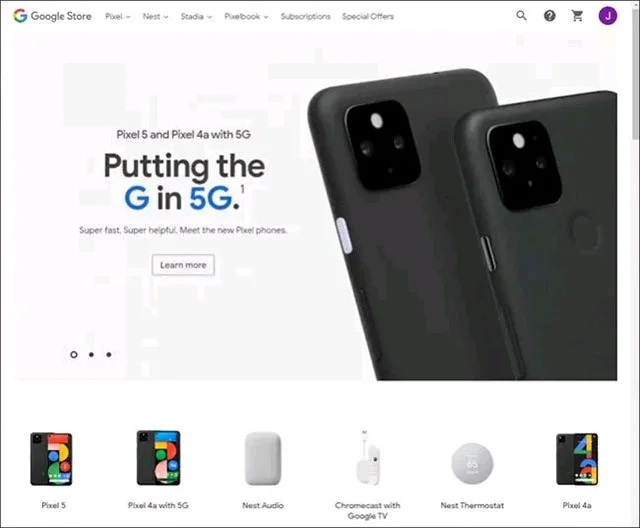
The equivalent of the Google Store is the Apple Store. On both of these online hardware stores, you can still find some products from third parties, but the majority of items belong to the platform owners.
Unlike the Apple Store, the Google Store is an online store only. There are no Google Stores on the streets or shopping malls. But that could change in the future, as Google's hardware division grows.
Notably, in addition to hardware products, you can also buy subscription packages for services on the Google Store. For example, you can buy subscription packages for services like Google One, Stadia Pro, and YouTube Premium. These are subscription packages that often come with hardware products.
Find a couples costume that fits your style, budget, and comfort level, from Addams Family classics to original inside-joke duos.
Need a last-minute high school Halloween costume? Compare 10 easy closet-based ideas by prep time, comfort, school-day practicality, and simple safety checks.
Use a simple 2026 Halloween decorating timeline for indoor décor, outdoor displays, and fresh pumpkins, with practical adjustments for weather and events.
Mix five vivid, approachable Halloween cocktails with measured recipes, simple prep tips, and an alcohol-free option for your party guests.
Find 15 office-friendly Halloween costume ideas for 2026, with practical checks for dress codes, respectful themes, comfort, and workplace safety.
Plan a fun elementary school Halloween party with easy crafts, games, inclusive treats, costume tips, and a sample 75-minute classroom schedule.
Compare realistic side hustles for 2026 by startup cost, fees, flexibility, and income control, with current tax and scam guidance from official sources.
Upgrade your home office ergonomics with current OSHA and NIOSH guidance on chair fit, monitor height, laptop setup, lighting, and movement.
Learn why emotional intelligence matters in leadership, where it helps most, how to strengthen it, and how to tell whether your approach is working.
A practical roadmap for moving into tech without a degree: choose an accessible role, build job-ready skills, prove them with projects, and use hiring feedback to improve.








