Pop Culture Costume Ideas That Will Dominate Halloween 2026

Plan a recognizable Halloween 2026 look with pop culture costumes inspired by Spider-Man, Supergirl, Toy Story 5, Moana, Mario, and Wednesday.
What are the evening star and the morning star? Here's what you need to know about the evening star and the morning star .
Originally, the terms “morning star” and “evening star” were applied only to the brightest planet of all, Venus. It was much brighter than any actual star in the sky and did not appear to twinkle. Instead, it shone with a steady silvery light. The fact that Venus was a wandering star soon became apparent to ancient skywatchers, who noticed its shift back and forth from the early morning of the eastern sky to the early evening of the western sky. Nicolas Camille Flammarion, a prominent French astronomer of the late 19th and early 20th centuries, called Venus the “Shepherd’s Star.” Many people preferred to call Venus the “night light of the sky.” So one can easily understand the origin of the terms evening star and morning star if one considers Venus alone.
Venus is closer to the Sun than the Earth, so there are times when it will be located to the west of the Sun. At that time, we will observe from Earth that the hottest planet in the solar system will rise in the east at dawn, earlier than the Sun, and people still call it the Morning Star.
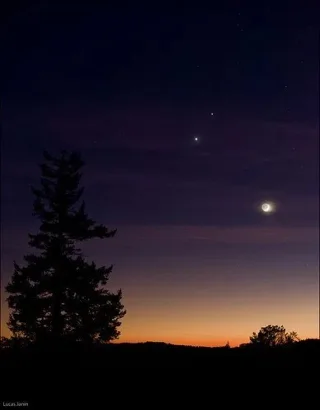
On the contrary, there are times when Venus is located to the East of the Sun. At that time, if we observe to the West at a time after the Sun has set for a while, we will see this planet appear and people call it the Evening Star.
In addition to Venus, the phenomenon of a planet appearing alternately at dawn for several months, disappearing for a while, and then reappearing also occurs with Mercury, the planet closest to the Sun. However, because Mercury is farther from Earth, smaller than Venus, and obscured by sunlight, it is more difficult to observe and is less noticed.

Venus is the second planet in the Solar System and also the hottest planet. Venus is almost the same size and mass as Earth. The diameter of the hottest planet in the Solar System is 12,092 km (just 650 km less than Earth's) and its mass is 81.5% of Earth's mass.
The distance from Earth to Venus is 2.3 light minutes, about 41 million km.
With Mercury and Venus, however, there was never any such ambiguity, since they were never very far from the Sun. Because they orbited the Sun closer than Earth, Mercury and Venus were called the “lower” planets. In fact, in pre-Christian times, both planets had dual identities—two names—because people did not initially realize that they appeared on one side of the Sun and then the other. Mercury was called “Apollo” when it shone in the morning and “Hermes” when it appeared in the evening sky; Venus was “Phosphorus” in the morning and “Hesperus” in the evening. We can thank Pythagoras around the 5th century BC for showing that the latter two objects were actually one.
So, in general, when either of these planets is elongated westward from the Sun, it is a "morning star"; when elongated eastward, it is an "evening star". When they are more or less aligned with the Sun as seen from our Earthly perspective, they will transition from evening to morning, or vice versa:
When Mercury or Venus pass between the Sun and Earth, we say they are in their lower conjunction and move from “evening star” to “morning star”. When the stellar alignment is such that they appear almost in a straight line beyond the far side of the Sun as seen from Earth, we say they are in their higher conjunction; that is, when they move from “morning star” to “evening star”.
Plan a recognizable Halloween 2026 look with pop culture costumes inspired by Spider-Man, Supergirl, Toy Story 5, Moana, Mario, and Wednesday.
Sort leftover Halloween candy safely, share or repurpose sealed treats, and choose food use or compost for pumpkins based on their condition.
Compare workplace Halloween costume choices by respect, dress code, mobility, and safety—and learn when a subtle accessory or a policy check is the better option.
Find a couples costume that fits your style, budget, and comfort level, from Addams Family classics to original inside-joke duos.
Need a last-minute high school Halloween costume? Compare 10 easy closet-based ideas by prep time, comfort, school-day practicality, and simple safety checks.
Use a simple 2026 Halloween decorating timeline for indoor décor, outdoor displays, and fresh pumpkins, with practical adjustments for weather and events.
Mix five vivid, approachable Halloween cocktails with measured recipes, simple prep tips, and an alcohol-free option for your party guests.
Find 15 office-friendly Halloween costume ideas for 2026, with practical checks for dress codes, respectful themes, comfort, and workplace safety.
Plan a fun elementary school Halloween party with easy crafts, games, inclusive treats, costume tips, and a sample 75-minute classroom schedule.
Compare realistic side hustles for 2026 by startup cost, fees, flexibility, and income control, with current tax and scam guidance from official sources.








