Desk Decorating Ideas for a Spooky Office Cubicle

Create a spooky office cubicle with Halloween desk decor ideas that keep your workspace usable, tidy, and mindful of workplace safety.
If you’ve ever owned a power bank, you’ve probably noticed that they don’t offer the advertised capacity. In theory, a 10,000mAh power bank should be able to fully charge a 5,000mAh phone twice, but in reality, it never does. Why?
Why can't the backup battery reach 100% capacity as advertised?
The manufacturer isn't lying to you; at least technically. The power bank you buy does indeed contain lithium batteries with the advertised capacity, but unfortunately, not all of that capacity translates into usable capacity, or "rated capacity." There are a number of factors that cause this.
Voltage conversion efficiency
Power banks typically output 5V, but the lithium batteries inside them naturally store energy at a lower voltage (usually 3.7V). Power banks use what’s called a boost converter to convert this energy from the battery to the required 5V. This converter isn’t completely efficient, so some energy is lost in the conversion process, resulting in what you’ll see as a lower capacity.
Spare buffer reduces usable capacity
Smartphones and power banks both reserve a portion of their battery as a buffer to prevent overcharging and overdischarging. This helps prevent permanent damage to the battery and prolongs its lifespan. However, since smartphone batteries are non-removable and optimized for everyday use, the buffer they require is relatively small.
Power banks require more power because they operate independently and store more energy. In the worst case, a complete discharge can cause the power bank to become unresponsive and not accept a charge.
Weaker thermal management
Heat is bad for any battery, which is why smartphones go to all sorts of lengths to reduce the heat generated during charging and discharging.
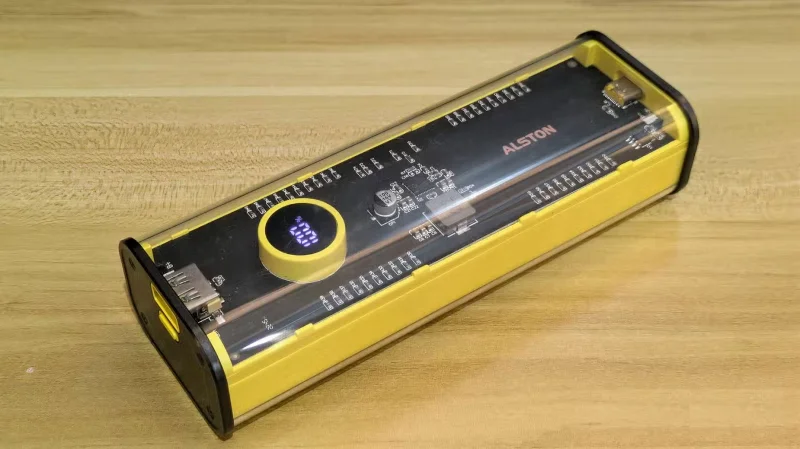
Power banks do the same, but their heat management hardware is often not as good as that of smartphones, especially on low-cost models. This results in more power loss, reducing usable capacity.
Battery degradation
Unlike smartphones, power bank companies don't come out with new models every year, and many sit in storage for years before being released.
By that time, the battery inside the power bank has worn out slightly, resulting in a reduction in capacity.
Note : Of course, manufacturers do their best to protect the health of their batteries, but even if you do everything right, lithium batteries are still subject to degradation over time.
How to find a good backup battery
Manufacturers rarely mention the rated capacity of power banks due to market competition, but it’s common to see them at just over 60% of the advertised capacity. For example, a 20,000 mAh power bank will provide around 12,000 mAh of usable capacity. That’s enough to charge your 5,000 mAh phone nearly two and a half times.
A more accurate way to judge the rated capacity is to check whether the marketing materials mention the number of charge cycles for specific phone models, then calculate it yourself. As long as the rated capacity is above 60%, you won't be fooled. The higher the number, the better.
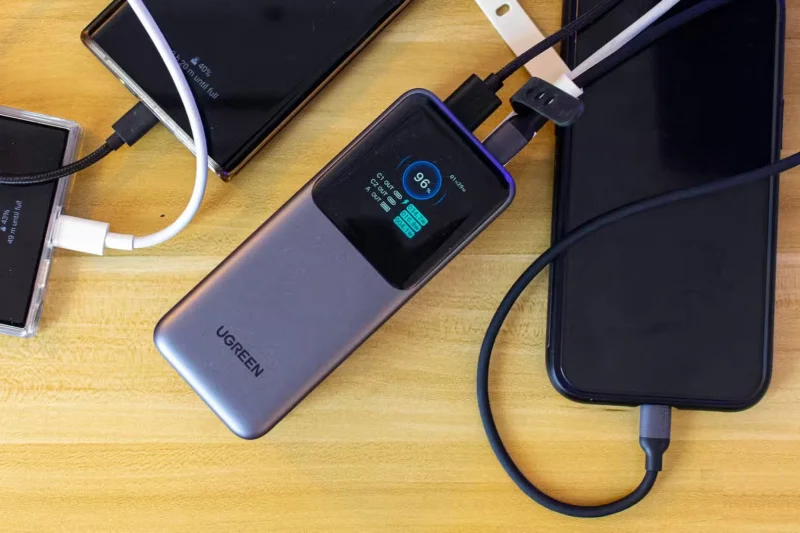
For example, the Ugreen Nexode 20,000mAh power bank claims to be able to charge the Galaxy S24 Ultra three times. The phone has a 5,000mAh battery, so the rated capacity of the power bank would be around 75%, which is impressive.
Of course, nothing beats reading product reviews and checking out the actual performance. Try to avoid no-name brands and only buy from trusted manufacturers, as older brands sometimes cut corners on necessary protection mechanisms and tend to use cheaper materials that compromise durability.
You should also use a wired power bank instead of a magnetic one. That's because wireless charging is inefficient and generates more heat, so you lose more power during charging. And on top of that, magnetic power banks are also more expensive. The convenience they provide is simply not worth it.
Create a spooky office cubicle with Halloween desk decor ideas that keep your workspace usable, tidy, and mindful of workplace safety.
Plan a recognizable Halloween 2026 look with pop culture costumes inspired by Spider-Man, Supergirl, Toy Story 5, Moana, Mario, and Wednesday.
Sort leftover Halloween candy safely, share or repurpose sealed treats, and choose food use or compost for pumpkins based on their condition.
Compare workplace Halloween costume choices by respect, dress code, mobility, and safety—and learn when a subtle accessory or a policy check is the better option.
Find a couples costume that fits your style, budget, and comfort level, from Addams Family classics to original inside-joke duos.
Need a last-minute high school Halloween costume? Compare 10 easy closet-based ideas by prep time, comfort, school-day practicality, and simple safety checks.
Use a simple 2026 Halloween decorating timeline for indoor décor, outdoor displays, and fresh pumpkins, with practical adjustments for weather and events.
Mix five vivid, approachable Halloween cocktails with measured recipes, simple prep tips, and an alcohol-free option for your party guests.
Find 15 office-friendly Halloween costume ideas for 2026, with practical checks for dress codes, respectful themes, comfort, and workplace safety.
Plan a fun elementary school Halloween party with easy crafts, games, inclusive treats, costume tips, and a sample 75-minute classroom schedule.








