Troubleshooting Microsoft Teams Video Error Green Screen
Struggling with Microsoft Teams "Video Error" green screen? Discover proven, step-by-step troubleshooting fixes for seamless video calls. Quick solutions inside!
PC CMOS Cleaner 2.0 is the best BIOS password removal tool for all personal computers, servers, and laptops. This powerful tool can recover, erase, decrypt, and display supervisor passwords saved in the BIOS, irrespective of the motherboard you are using.
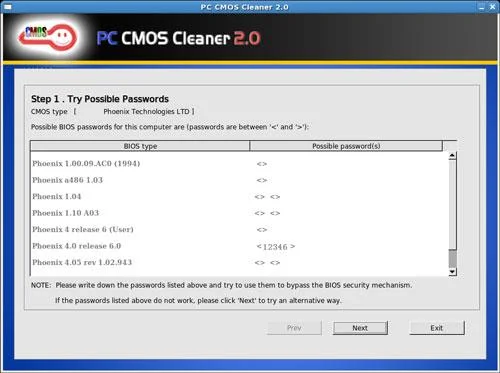
PC CMOS Cleaner is exceptionally user-friendly, designed to recover, delete, decrypt, and display passwords stored in the BIOS of various manufacturers such as AWARD, AMI, Compaq, Phoenix, Samsung, IBM, Compaq, DTK, Thinkpad, Sony, and Toshiba.
Upon booting the software, it displays the password of any BIOS or allows you to set the BIOS to default. This feature is crucial for users who forget their BIOS password or need to clear the BIOS password from previously owned computers.
| Feature | Description |
|---|---|
| Compatibility | Supports all personal computers, operating systems: x86; x64. |
| BIOS Support | Compatible with most BIOS types including AWARD, AMI, Compaq, Phoenix, Samsung, IBM, DTK, Thinkpad, Sony, Toshiba, etc. |
| Password Recovery | Displays the BIOS supervised password. |
| Password Removal | Removes BIOS passwords (defaults will be set, and a reset date is required). |
| Default Reset | Allows setting the BIOS to default settings. |
Struggling with Microsoft Teams "Video Error" green screen? Discover proven, step-by-step troubleshooting fixes for seamless video calls. Quick solutions inside!
Struggling with the Microsoft Teams "How Teams Works" Tutorial Error? Discover proven, step-by-step fixes to resolve it quickly. Clear cache, update, and more for seamless onboarding. Works on latest versions!
Tired of the frustrating Microsoft Teams "Error Today" on Windows 10? Discover proven, step-by-step fixes to resolve it quickly and restore smooth teamwork. No tech skills needed!
Struggling with Troubleshooting Microsoft Teams Room Basic vs Pro Errors? Get step-by-step fixes for common issues, comparisons, and pro tips to resolve connectivity, licensing, and setup problems fast in both versions.
Tired of Microsoft Teams screen sharing lag ruining your 2026 meetings? Get instant fixes for lag, freezes, and poor quality. Proven steps to optimize performance and share screens flawlessly. Boost productivity today!
Struggling with Microsoft Teams installation errors on macOS? This ultimate guide provides proven, step-by-step fixes for common issues like Gatekeeper blocks, permission errors, and download failures to get Teams running smoothly on your Mac. Updated with the latest solutions.
Master how to create and manage a bot in Microsoft Teams (2026) with this expert guide. From setup to advanced management, unlock productivity boosts using the latest Bot Framework and Azure tools.
Tired of Microsoft Teams "Remote Control" Request Error blocking your meetings? Follow our proven, step-by-step troubleshooting guide with the latest fixes to restore seamless remote control and boost productivity instantly.
Struggling with Microsoft Teams Planner error where tasks not loading? Discover step-by-step fixes for Microsoft Teams Planner Error: Tasks Not Loading. Quick solutions for instant relief in Teams Planner. Updated with latest troubleshooting tips.
Tired of Microsoft Teams version history errors disrupting your workflow? This step-by-step troubleshooting guide covers common issues, quick fixes, and pro tips to restore seamless file versioning in Teams. Updated with the latest solutions!
Tired of Microsoft Teams Error 2400 blocking your connection? Follow our proven, step-by-step fixes to solve "Unable to Connect to Servers" and get back to productive meetings fast.
Struggling to locate your Microsoft Teams recording? Discover exactly where Teams saves meeting files in OneDrive or SharePoint, plus quick steps to find and access them instantly. No more lost recordings!
Struggling with Microsoft Teams "Error G" audio? Discover step-by-step fixes for microphone and speaker issues. Quick, easy solutions to get back to seamless meetings without frustration. Works on Windows, Mac & more!
Tired of the frustrating Microsoft Teams Vcruntime140.dll missing error crashing your meetings? Discover proven, step-by-step fixes to resolve it fast and restore smooth teamwork. No tech skills needed!
Struggling with Microsoft Teams 'Undefined Error' (2026)? Discover proven, step-by-step fixes like clearing cache, updating the app, and more. Get back to seamless collaboration fast!









