Vipid Basic - Latest Version 2024 and 2025: Create Video Intros Online

You are a movie fanatic and always fascinated by the trailers right at the beginning of the movie. You have always wondered how to make such good short films? Vipid is one of the best answers to your questions. Vipid is an online application that allows users to create animated videos from images, clips, and content available.

The Outstanding Features of Vipid

1. Themes

Vipid supports dozens of different themes that users can choose from. There are three main types of themes:

Theme Type Description
Famous Themes Themes from famous movie intros.
Original Themes Topics gathered from online ID channels or business presentations.
Parody Themes Parody themes often used for giveaways or home videos.

2. Sharing Capabilities

After completing your work, users can easily share videos via Facebook, YouTube, Twitter, or Email. Additionally, you can embed Vipid videos in your website or blog by clicking My Video and choosing the video you want to share or download to your computer.

Vipid Basic - Application to create video intro online

3. Advanced Technology

With Vipid, users access the most advanced technology platforms, popular in Hollywood movies. Vipid has simplified and integrated these technologies on a user-friendly and attractive web interface, making it accessible without the need for extensive knowledge or costly classes.

4. High Quality Videos

Videos created using Vipid boast the best quality, with resolutions ranging from 270p to 1080p. This caters to various viewing devices and user preferences:

Resolution Use Case
360p Ideal for embedding and sharing on social networks or mobile viewing.
720p Perfect for viewing on TVs.
1080p High-definition viewing across multiple devices.

Instructions for Making Video Intros on Vipid

Step 1: Create an Account

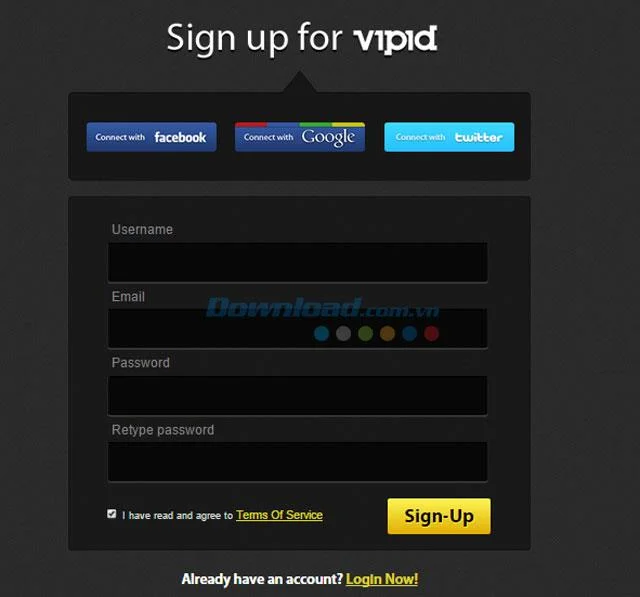
Access ivipid.com and create an account (free). Users can also log in using their Facebook, Twitter, or Google accounts; just fill in the required information.

Vipid Basic - Application to create video intro online

Step 2: Main Interface

Upon logging in, the main interface of Vipid will appear, showcasing a Preview box that allows you to preview available advertisement clips. Users can only use free clips unless a fee is paid for premium clips.

Vipid Basic - Application to create video intro online

Step 3: Select a Clip

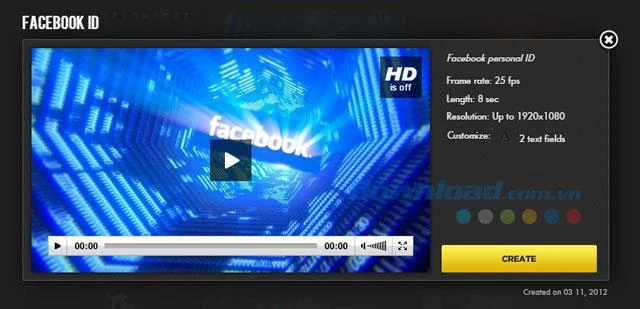
After selecting your favorite clip, click the Create button to start forming your video. The Theme description interface will display information relevant to video frame rate, runtime, resolution, and text insert positions.

Vipid Basic - Application to create video intro online

Step 4: Text Input

After clicking Create, a new window will prompt you to enter the desired text (from 3-15 characters) and the Address. Once these steps are complete, Vipid allows you to preview or create the video clip with the entered content.

Vipid Basic - Application to create video intro online

Explore More Options

Additional Tools
Leave a Comment

Troubleshooting Microsoft Teams Breakout Rooms License Errors

Troubleshooting Microsoft Teams Breakout Rooms License Errors

Master troubleshooting Microsoft Teams Breakout Rooms license errors with this step-by-step guide. Quick fixes for common license issues, admin checks, and prevention tips to get your meetings running smoothly.

How to Fix Microsoft Teams Version History Error

How to Fix Microsoft Teams Version History Error

Struggling with Microsoft Teams "Version History" Error? Discover proven, step-by-step fixes to restore access instantly. Clear cache, update Teams, and more—no tech skills needed!

Solving Microsoft Teams Joining Error: Meeting ID Not Found

Solving Microsoft Teams Joining Error: Meeting ID Not Found

Tired of the frustrating Microsoft Teams Joining Error: Meeting ID Not Found? Get step-by-step fixes to rejoin meetings fast. Updated with the latest Teams patches for seamless collaboration. Solve it now!

Troubleshooting Microsoft Teams Video Error Green Screen

Troubleshooting Microsoft Teams Video Error Green Screen

Struggling with Microsoft Teams "Video Error" green screen? Discover proven, step-by-step troubleshooting fixes for seamless video calls. Quick solutions inside!

How to Fix Microsoft Teams How Teams Works Tutorial Error

How to Fix Microsoft Teams How Teams Works Tutorial Error

Struggling with the Microsoft Teams "How Teams Works" Tutorial Error? Discover proven, step-by-step fixes to resolve it quickly. Clear cache, update, and more for seamless onboarding. Works on latest versions!

How to Fix Microsoft Teams Error Today on Windows 10

How to Fix Microsoft Teams Error Today on Windows 10

Tired of the frustrating Microsoft Teams "Error Today" on Windows 10? Discover proven, step-by-step fixes to resolve it quickly and restore smooth teamwork. No tech skills needed!

Troubleshooting Microsoft Teams Room Basic vs Pro Errors

Troubleshooting Microsoft Teams Room Basic vs Pro Errors

Struggling with Troubleshooting Microsoft Teams Room Basic vs Pro Errors? Get step-by-step fixes for common issues, comparisons, and pro tips to resolve connectivity, licensing, and setup problems fast in both versions.

How to Fix Microsoft Teams Screen Sharing Lag in 2026

How to Fix Microsoft Teams Screen Sharing Lag in 2026

Tired of Microsoft Teams screen sharing lag ruining your 2026 meetings? Get instant fixes for lag, freezes, and poor quality. Proven steps to optimize performance and share screens flawlessly. Boost productivity today!

Troubleshooting Microsoft Teams Installation Errors on macOS

Troubleshooting Microsoft Teams Installation Errors on macOS

Struggling with Microsoft Teams installation errors on macOS? This ultimate guide provides proven, step-by-step fixes for common issues like Gatekeeper blocks, permission errors, and download failures to get Teams running smoothly on your Mac. Updated with the latest solutions.

How to Create and Manage a Bot in Microsoft Teams (2026)

How to Create and Manage a Bot in Microsoft Teams (2026)

Master how to create and manage a bot in Microsoft Teams (2026) with this expert guide. From setup to advanced management, unlock productivity boosts using the latest Bot Framework and Azure tools.

Troubleshooting Microsoft Teams Remote Control Request Error

Troubleshooting Microsoft Teams Remote Control Request Error

Tired of Microsoft Teams "Remote Control" Request Error blocking your meetings? Follow our proven, step-by-step troubleshooting guide with the latest fixes to restore seamless remote control and boost productivity instantly.

How to Fix Microsoft Teams Planner Error: Tasks Not Loading

How to Fix Microsoft Teams Planner Error: Tasks Not Loading

Struggling with Microsoft Teams Planner error where tasks not loading? Discover step-by-step fixes for Microsoft Teams Planner Error: Tasks Not Loading. Quick solutions for instant relief in Teams Planner. Updated with latest troubleshooting tips.

Troubleshooting Microsoft Teams Version History Errors

Troubleshooting Microsoft Teams Version History Errors

Tired of Microsoft Teams version history errors disrupting your workflow? This step-by-step troubleshooting guide covers common issues, quick fixes, and pro tips to restore seamless file versioning in Teams. Updated with the latest solutions!

Solving Microsoft Teams Error 2400: Unable to Connect to Servers

Solving Microsoft Teams Error 2400: Unable to Connect to Servers

Tired of Microsoft Teams Error 2400 blocking your connection? Follow our proven, step-by-step fixes to solve "Unable to Connect to Servers" and get back to productive meetings fast.

Where is My Microsoft Teams Recording Saved? Find Your Files Fast

Where is My Microsoft Teams Recording Saved? Find Your Files Fast

Struggling to locate your Microsoft Teams recording? Discover exactly where Teams saves meeting files in OneDrive or SharePoint, plus quick steps to find and access them instantly. No more lost recordings!