WebTech360 invites you to explore the efficient use of Sharp J-Tech inverter remote control.
1. Overview of Sharp Air Conditioner Remote Control
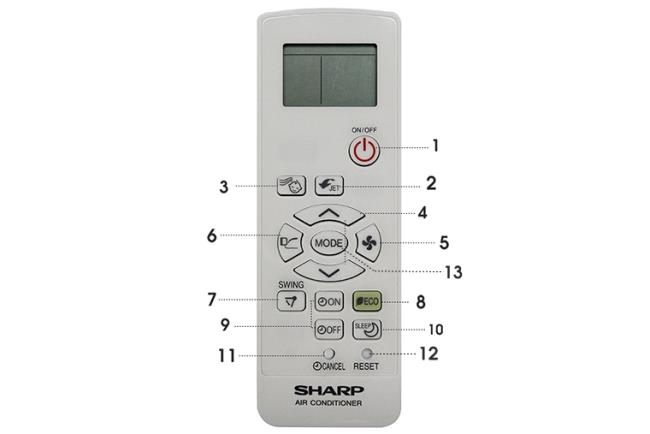
Control of Sharp air conditioning.
Remote Control Button Panel
| Button |
Function |
| Power Button (ON/OFF) |
Starts or stops the air conditioner. |
| Powerful Jet |
Operates at maximum capacity for quick cooling. |
| Baby Mode |
Adjusts temperature for children’s comfort, ensuring a balanced environment. |
| Thermostat |
Allows temperature adjustment within ±0.5°C. |
| Fan Speed |
Set fan speed with four options: Auto, Low, Medium, High. |
| Gentle Cool Air |
Blows air upward to provide indirect cooling. |
| Swing |
Adjusts the wind direction as per your requirement. |
| Eco Mode |
Operates with reduced power consumption. |
| Timer (ON/OFF) |
Schedules the air conditioner to turn on/off at specified times. |
| Sleep Mode |
Optimizes temperature and fan speed for a restful sleep. |
| Mode Selection |
Choose between Auto, Cool, or Dry modes. |
2. The Display Screen of the Air Conditioner Remote
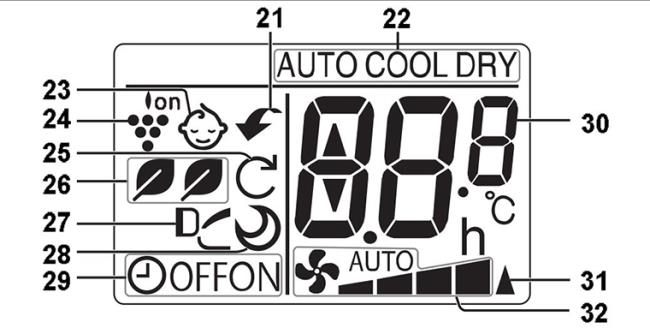
Sharp air conditioner remote display screen.
Features on the display:
- Strong refrigerant function designation
- Mode symbols: Auto / Cool / Dehumidify
- Baby Mode symbols
- Eco Mode indication
- Gentle Cool Air symbol
- Best Sleep indication
- Turn off timer indication
- Temperature alarm
- Signal transmission indication
- Fan speed indication
3. Operating the Remote Control
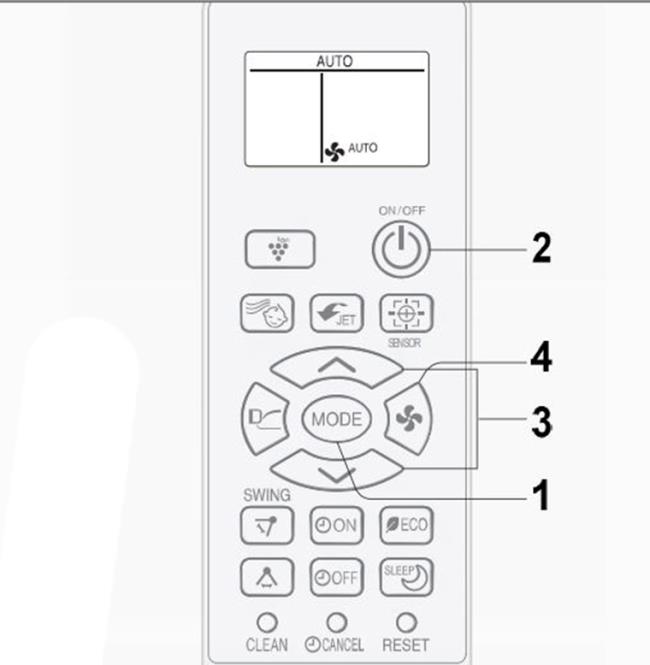
Remote operation diagram.
- Press the Mode button to select the desired operation mode.
- Press the ON/OFF button to start or stop the air conditioner.
- Use the Thermostat button to set the desired temperature (±2°C for Auto/Dry mode, 16-30°C for Cooling mode).
- Set the fan speed using the Fan button.
Note:
The air conditioner remembers your settings in case of a power failure, except for timer settings and special modes.
4. Additional Features
Strong Cooling Mode
The air conditioner operates at maximum capacity for rapid cooling.
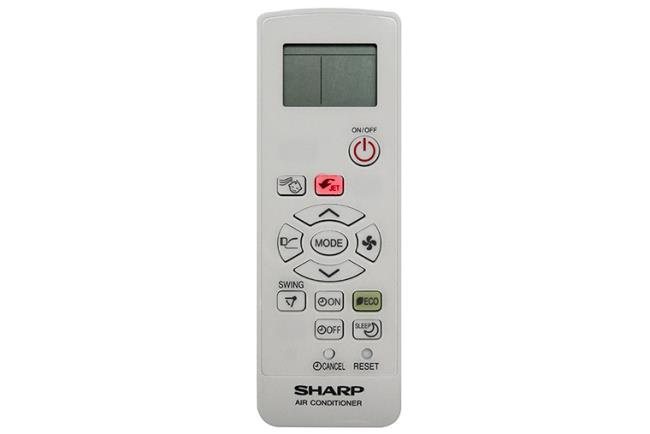
Activate this by pressing the Powerful Jet button.
Wind Direction Adjustment
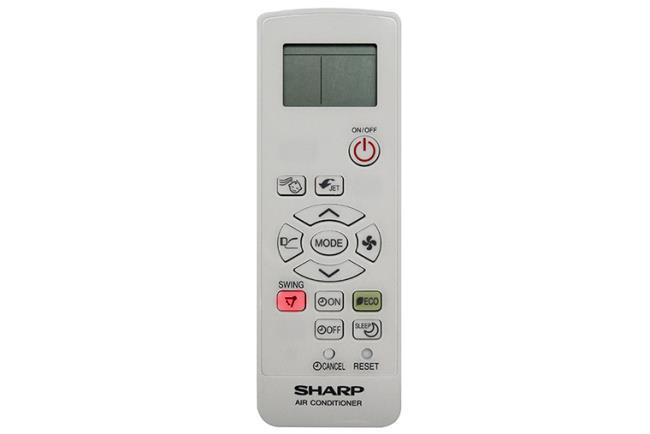
Press the Swing button to control wind direction.
Timer Functions
Set timer for shutting down or starting the unit.
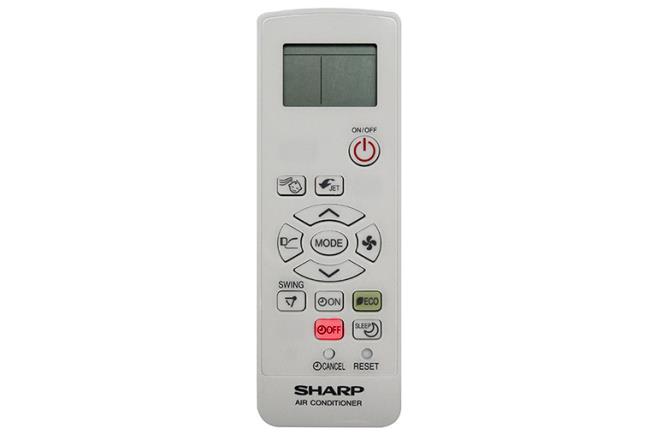
Press the Time Off button to set the timer.
Important Notes:
Timer settings range from 30 minutes to 12 hours, and only one timer can be set at a time. All settings will be canceled if power is lost.
WebTech360 encourages you to apply these tips for an efficient and enjoyable experience with your Sharp air conditioning unit!
WebTech360


Cathy Wood -
I just discovered the j-tech feature and it's a total game changer. Thanks for the tips!
Sophie Taylor -
This kind of remote is way too complicated for me. I wish they had an easier version!
Mark Davis -
Just tried out the sleep mode last night and woke up refreshed! Definitely a game changer
Grace Hall -
I appreciate the clear instructions! I feel like a pro now, and the cooling is so much better
Lucy Adams -
If you could add a section on troubleshooting common issues, it would be even better
Walter Snow -
This article really shines! I'm saving it for future reference for sure!
Pet Cat -
My cat always sits on the remote, I think it’s plotting against me during hot days!
Emily Brown -
Wow, I didn’t know there were so many features! I’ve been using mine for a year and only discovered the timer function today. Great article!
Maria Black -
Any chance for a video tutorial? I learn better with visuals
Rita Heart -
This info is gold! I never knew I could control the AC from my phone
Steve Gray -
I swear my kids always mess with the settings! I need to hide this remote
Nancy Green -
My remote sometimes feels unresponsive. Is this a common issue
Duy Sinh 6789 -
I love the advanced cooling technology in these models. It really makes a difference during the summer months
Ben Black -
Thanks for breaking it down step by step! I've had this AC for a while but never knew how to use all its features
John Smith -
This guide on controlling the Sharp air conditioner remote for the J-tech inverter series is super helpful! I always struggled with the settings, but now I feel more confident. Thanks
Nick Carter -
Great guide! But what’s the best way to clean the remote control? Any tips
Elaine King -
Really helpful article! I thought I was the only one who struggled with this remote. Glad to know I’m not alone
Megan Rose -
This post really helped me understand all the features! I’m now officially a Sharp fan.
Jessica Crush -
Finally understanding how to tweak the humidity settings! Thanks so much
Hương Đà Nẵng -
After reading this info, I successfully set the temperature for the first time! Such a relief
Sam Joy -
We love our Sharp! Anyone else notice how fast it cools down a room? It’s impressive!
Brenda Joy -
Have you noticed any differences in energy efficiency with the J-tech inverter? It’d be fun to discuss
Mike Green -
Can this remote work with other air conditioning brands? I’m curious because my friend has a different model
Mèo con -
Yesss! Finally learned how to change the fan speed without freaking out! This is a lifesaver
Huyền Lizzie -
Thanks for sharing this! Just got a Sharp J-tech inverter, and this is a great starting point for me
Quang vn -
Does anyone find the remote a bit confusing at first? I'm getting the hang of it, but some buttons still puzzle me!
Leo King -
I laughed so hard at the cat comment! Mine does the same while I’m trying to cool down
David Wilson -
I can’t get the remote to connect to the Wi-Fi! Any tips on that
Sara Johnson -
I’m really impressed with how quiet the J-tech inverter runs compared to my old unit
Amy Scott -
I’d love to know what you think about energy savings in J-tech models! Is it really worth it?
Anna White -
My husband and I love our Sharp AC. We use the J-tech inverter mode all summer long to save on energy bills
Thomas Wright -
What a life-saver! Just used the app and now my AC is set up to cool down before I get home. Genius!
Alice Blue -
Is it normal for the remote to lag a bit? Sometimes it takes a second to respond!
Brian King -
The best part of my day is coming home to a cool house! Thanks for the guidance
Phúc IT -
This post is really informative! I appreciate the detailed steps you provided for setting up the remote.
Jerry Blue -
This is exactly what I needed! I struggled with my remote settings for weeks
Oliver White -
The remote looks a bit outdated, can someone confirm that the functionality is still top-notch
Meow Meow -
Every time I push a button, my cat runs away! Anyone else’s pets do this? 😂
Thùy Linh -
Can anyone explain how the eco mode works in this model? I’m really curious about its energy efficiency
Linda Lee -
I’m planning to buy one for my office. Does anyone have tips on placement for the best cooling effect?