How To Enable JavaScript In Google Chrome, Firefox, Microsoft Edge, And Safari

JavaScript is one of the most powerful dynamos behind the interactive web. This programming language lets web pages respond to your actions in real time. It’s why you can play videos, fill out forms, and engage in the myriad activities that make the World Wide Web so versatile and interactive.

How To Enable JavaScript In Google Chrome, Firefox, Microsoft Edge, And Safari

If JavaScript is turned off in your browser, you’re not just missing out on flashy animations or convenient auto-fill forms; you’re opting out of the full, rich functionality modern web developers work so hard to create.

How to Enable JavaScript

Each web browser will be slightly different regarding how to enable JavaScript. However, there are many common threads that will be similar no matter which browser you use.

Google Chrome

If Google Chrome is your default browser, its important that you enable JavaScript on it for the best browsing experience. 

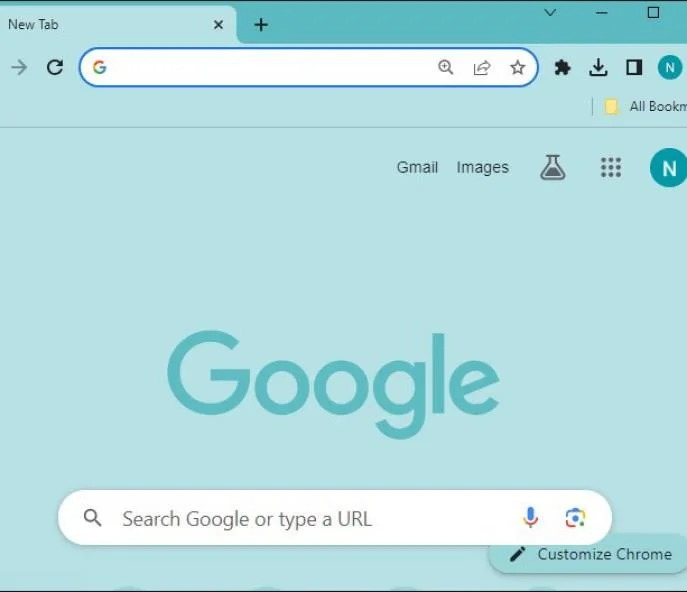
  1. Click the Menu icon in Chrome.
    How To Enable JavaScript In Google Chrome, Firefox, Microsoft Edge, And Safari
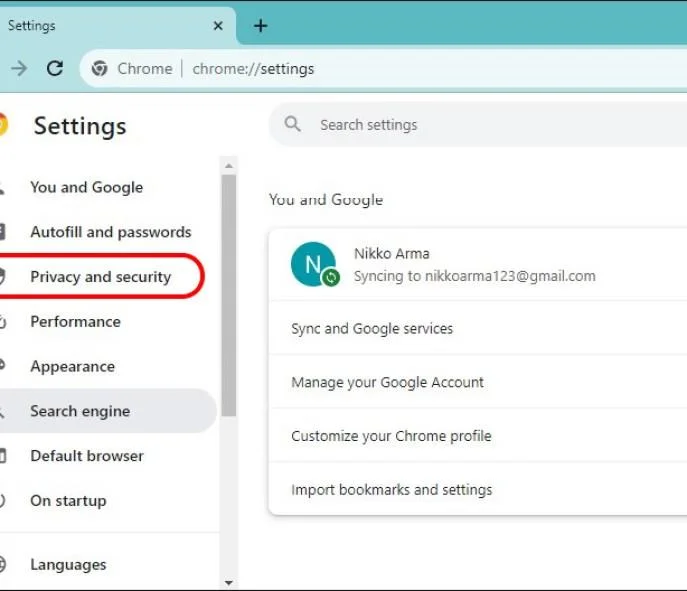
  2. Select Settings, then go to Privacy and Security.
    How To Enable JavaScript In Google Chrome, Firefox, Microsoft Edge, And Safari
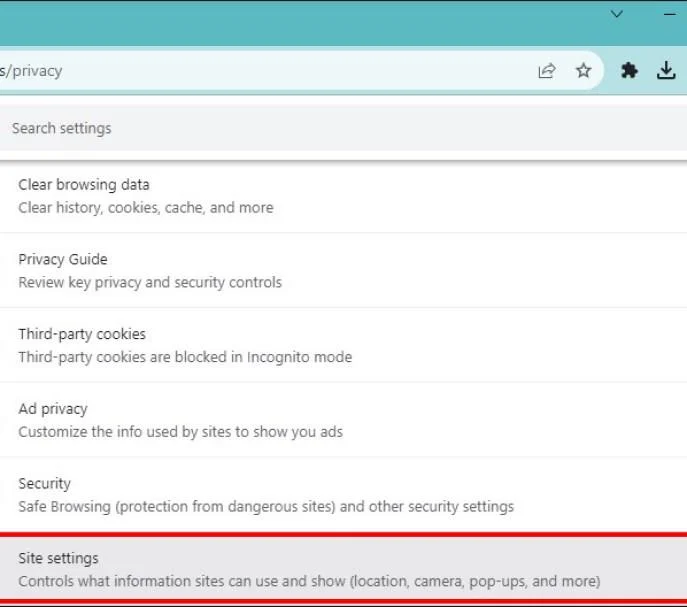
  3. Find Site Settings.
    How To Enable JavaScript In Google Chrome, Firefox, Microsoft Edge, And Safari
  4. Scroll down and click on JavaScript, then click Sites can use JavaScript to enable.
    How To Enable JavaScript In Google Chrome, Firefox, Microsoft Edge, And Safari

Mozilla Firefox

Enabling JavaScript support in Firefox is also easy. 

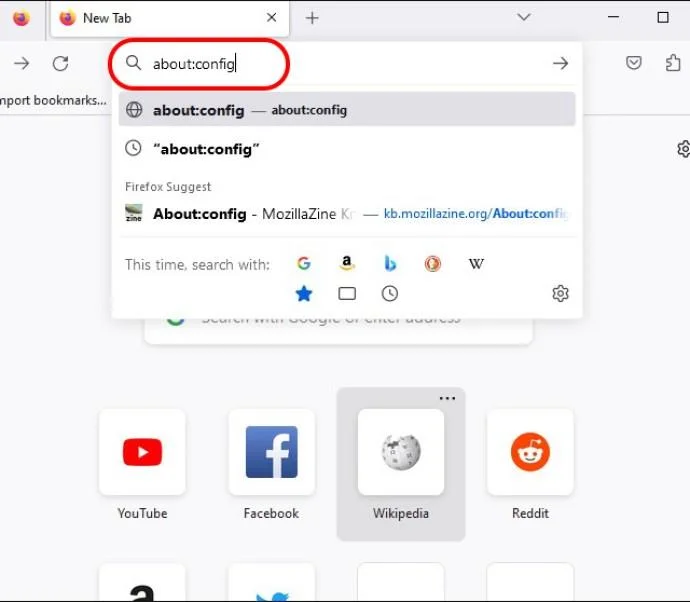
  1. Input about:config in the Firefox address bar.
    How To Enable JavaScript In Google Chrome, Firefox, Microsoft Edge, And Safari
  2. Click Accept the Risk
    How To Enable JavaScript In Google Chrome, Firefox, Microsoft Edge, And Safari
  3. The search for javascript.enabled.
  4. Toggle the setting to true to enable JavaScript.
    How To Enable JavaScript In Google Chrome, Firefox, Microsoft Edge, And Safari

Remember that incognito tabs in Firefox have JavaScript enabled by default.

Microsoft Edge

JavaScript is enabled by default in Microsoft Edge. You can still verify this by following the below steps.

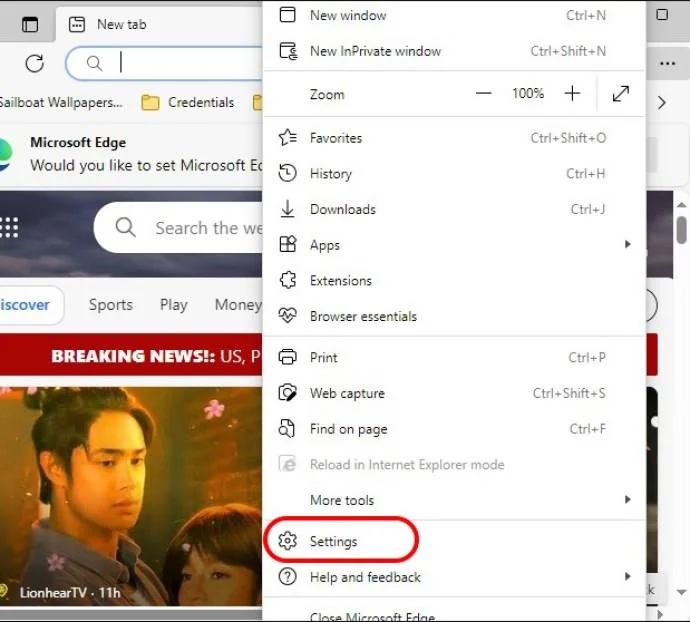
  1. Click on the Menu icon in Edge and go to Settings.
    How To Enable JavaScript In Google Chrome, Firefox, Microsoft Edge, And Safari
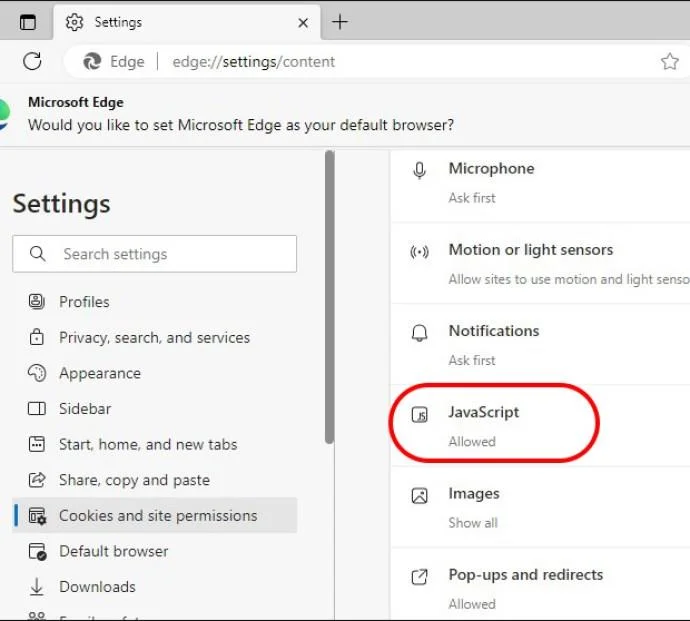
  2. Select Cookies and site permissions and JavaScript.
    How To Enable JavaScript In Google Chrome, Firefox, Microsoft Edge, And Safari
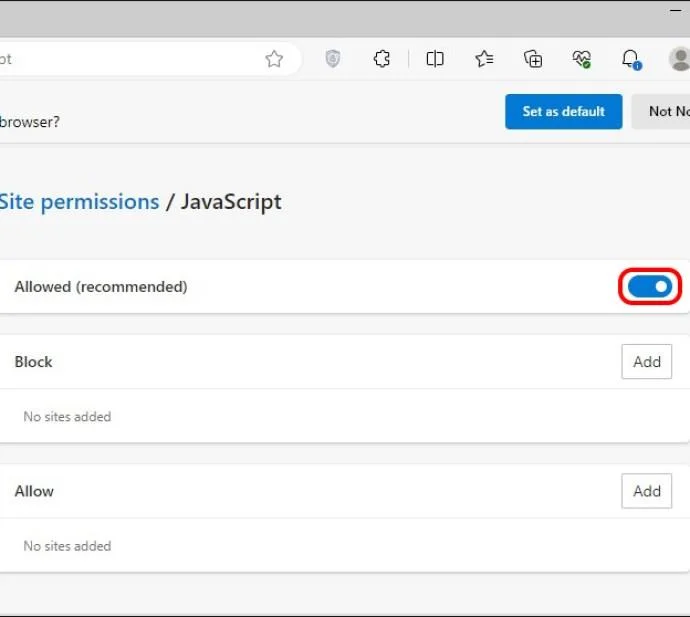
  3. Switch the toggle to On.
    How To Enable JavaScript In Google Chrome, Firefox, Microsoft Edge, And Safari

While JavaScript can enhance a webpage, it can also be the cause of its unresponsiveness. 

Safari (macOS)

Enabling JavaScript in Safari on macOS requires jumping into its Preferences menu. 

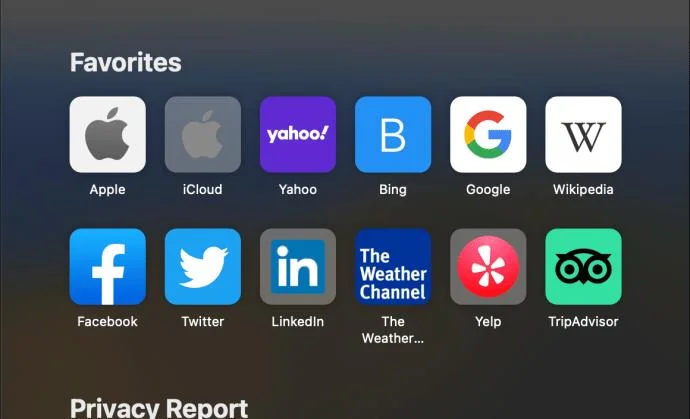
  1. Open Safari on your Mac, and click Safari in the menu.
    How To Enable JavaScript In Google Chrome, Firefox, Microsoft Edge, And Safari
  2. Choose Preferences and then Security.
    How To Enable JavaScript In Google Chrome, Firefox, Microsoft Edge, And Safari
  3. Check the Enable JavaScript box.
    How To Enable JavaScript In Google Chrome, Firefox, Microsoft Edge, And Safari

Safari (iOS/iPadOS)

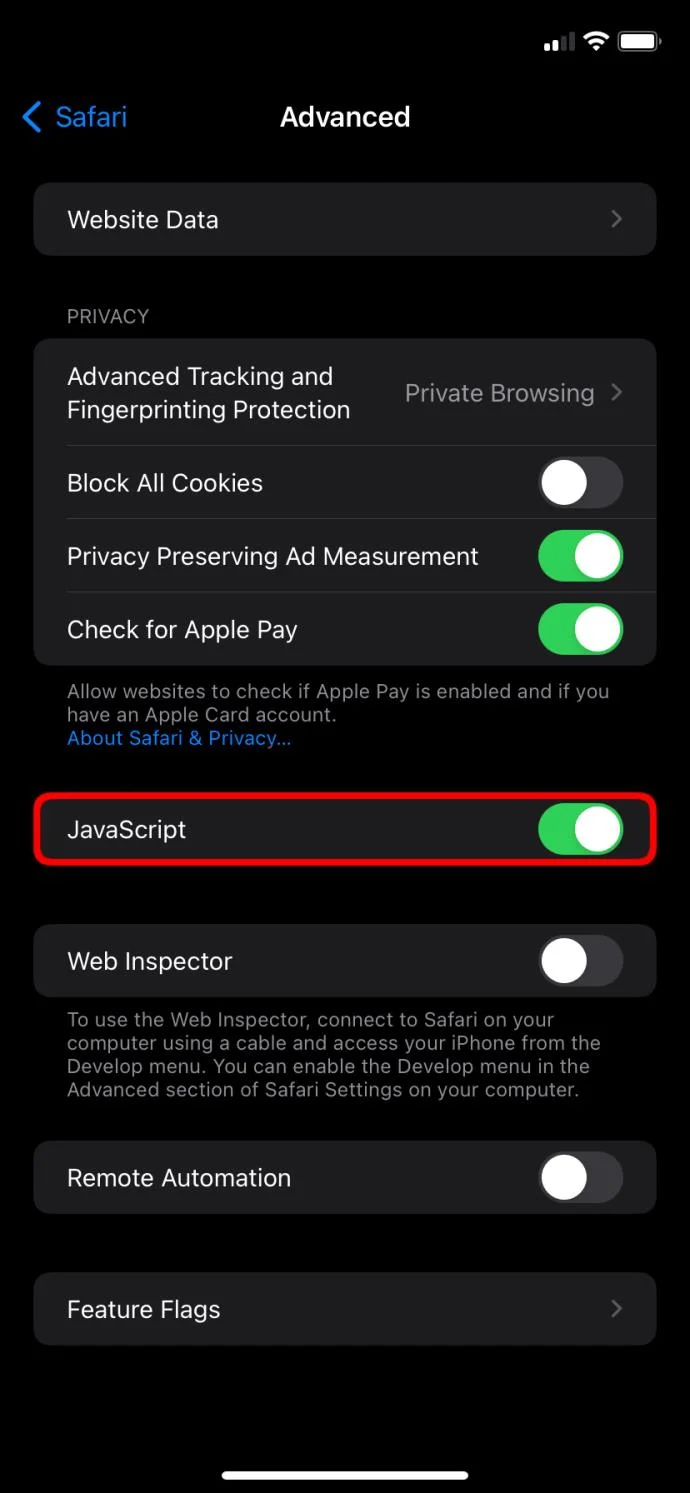
  1. Go to Settings on your iPhone or iPad and scroll down to Safari.
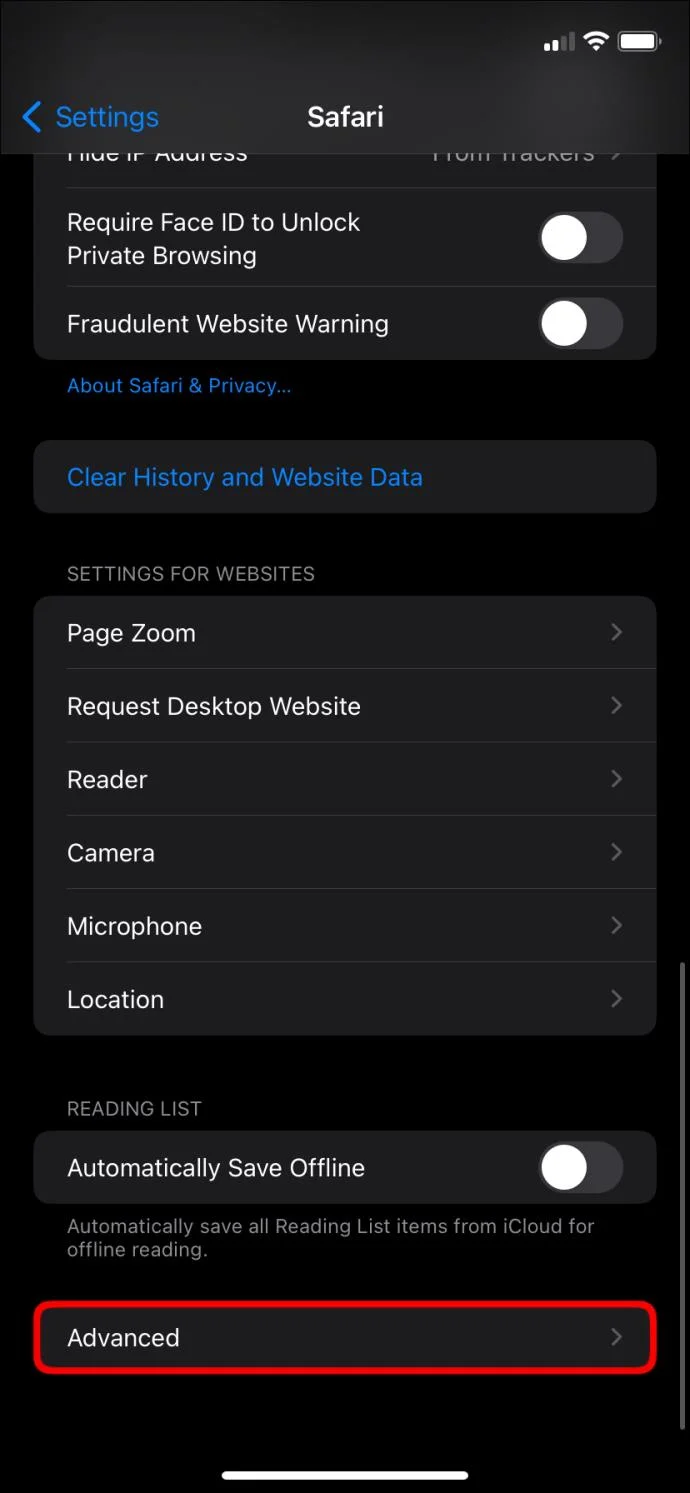
  2. Tap Advanced.
    How To Enable JavaScript In Google Chrome, Firefox, Microsoft Edge, And Safari
  3. Toggle JavaScript to On in this menu.
    How To Enable JavaScript In Google Chrome, Firefox, Microsoft Edge, And Safari

Opera

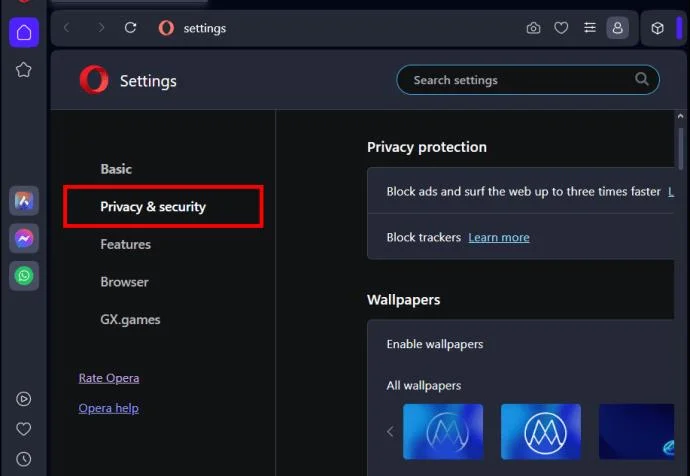
Opera’s JavaScript settings are tucked under Privacy & security section. 

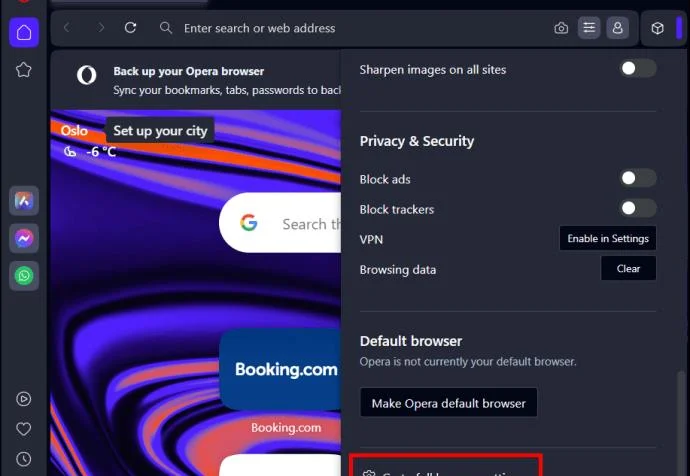
  1. Click the Opera menu and select Settings.
    How To Enable JavaScript In Google Chrome, Firefox, Microsoft Edge, And Safari
  2. Pick Privacy and security and go to Site Settings.
    How To Enable JavaScript In Google Chrome, Firefox, Microsoft Edge, And Safari
    How To Enable JavaScript In Google Chrome, Firefox, Microsoft Edge, And Safari
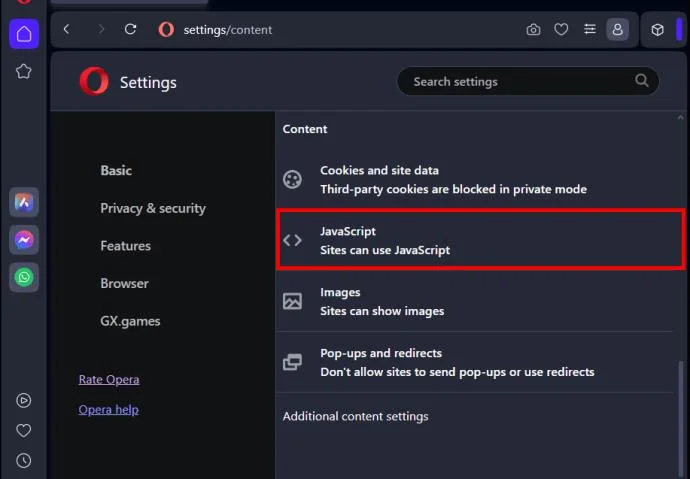
  3. Click JavaScript and choose Sites can use JavaSript.
    How To Enable JavaScript In Google Chrome, Firefox, Microsoft Edge, And Safari

Enable the True Internet

Enabling JavaScript is easy on every web browser and unlocks the web’s real potential. It’s a tiny change with a significant impact: enjoying the web’s full interactive features. So don’t keep it off, even if there are some security concerns. Just stay vigilant and use it in places you trust.

You might also want to learn how to block a website on Chrome for additional security.

FAQs
Leave a Comment

National Voter Registration Day 2026 Is Today: How to Register or Check Your Status

National Voter Registration Day 2026 Is Today: How to Register or Check Your Status

National Voter Registration Day is September 15, 2026. Learn how to register online, by mail, or in person and verify your voter status.

Podcasting Trends You Need to Know in 2026: A Beginner’s Roadmap

Podcasting Trends You Need to Know in 2026: A Beginner’s Roadmap

New to podcasting? Learn the 2026 trends shaping video, discovery, transcripts, AI, analytics, monetization, and a practical launch plan.

UGC Masterclass: Build User-Generated Content That Earns Trust and Drives Action

UGC Masterclass: Build User-Generated Content That Earns Trust and Drives Action

A practical UGC masterclass for sourcing, permissioning, briefing, publishing, and measuring customer and creator content without losing authenticity.

Why Community Building Is the New Marketing — and When It Is Not

Why Community Building Is the New Marketing — and When It Is Not

Community building can deepen trust, retention, feedback, and advocacy, but it is not a replacement for every marketing channel. Compare the tradeoffs and choose the right model.

Navigating Social Media Algorithm Changes in 2026: What’s Confirmed, Contextual, and Still Unknown

Navigating Social Media Algorithm Changes in 2026: What’s Confirmed, Contextual, and Still Unknown

Learn what major social platforms have actually confirmed about ranking changes in 2026, what depends on context, and how to adapt without chasing myths.

Authentic Storytelling in Brand Marketing: How to Build Trust Without Sounding Scripted

Authentic Storytelling in Brand Marketing: How to Build Trust Without Sounding Scripted

Learn how to make brand storytelling feel credible, human, and specific—using proof, real tension, ethical customer stories, and a practical authenticity check.

Email Marketing Strategies for Q4 Success: What to Prioritize, Test, and Trade Off

Email Marketing Strategies for Q4 Success: What to Prioritize, Test, and Trade Off

Build a smarter Q4 email strategy by balancing reach, frequency, discounts, automation, deliverability, and measurement for profitable holiday growth.

How to Create Short-Form Video That Converts: A Practical Framework

How to Create Short-Form Video That Converts: A Practical Framework

Learn how to create short-form video that converts by balancing hooks, format, authenticity, CTA, platform fit, and testing across TikTok, Reels, and Shorts.

The Shift from Influencers to Key Opinion Consumers (KOCs): What Brands Need to Know in 2026

The Shift from Influencers to Key Opinion Consumers (KOCs): What Brands Need to Know in 2026

Why are brands testing KOCs instead of relying only on influencers? Learn what KOCs are, why social commerce favors them, common myths, and how to run a measurable pilot.

TikTok SEO in 2026: How to Rank Videos in Search Without Keyword Stuffing

TikTok SEO in 2026: How to Rank Videos in Search Without Keyword Stuffing

Learn a practical TikTok SEO workflow for 2026: find real search demand, match search intent, optimize each video, and measure what improves visibility.