4 VPNs That Dont Require Login or Registration

Want to get the benefits of a VPN without signing up for an account? Believe it or not, there are options. Here are 4 VPNs that don’t require registration!

Table of Contents

1. iTop VPN

4 VPNs That Don't Require Login or Registration
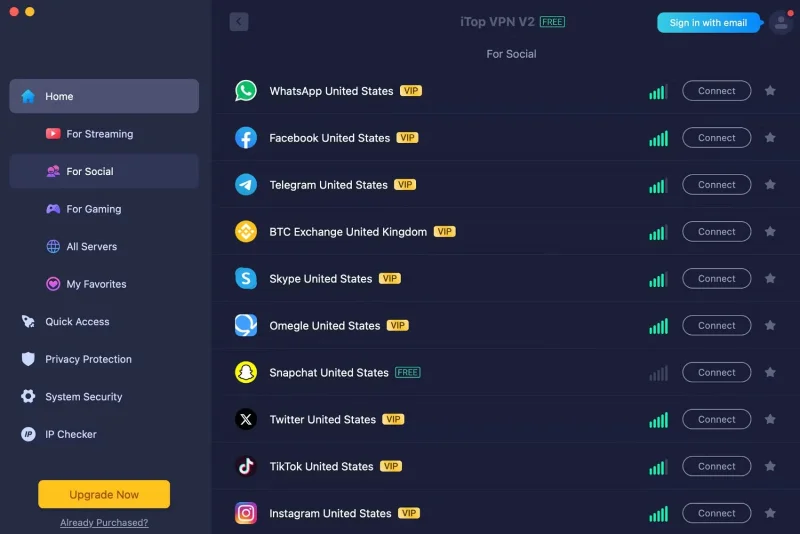
iTop VPN Interface

iTop offers free Smart Location which hides your IP address and allows for anonymous browsing. You can connect to servers in a number of locations without registering an account, including many in the United States. Other countries include Japan and the United Kingdom.

In addition to connecting to servers in different countries, iTop allows free connections to a number of streaming servers. These include beIN Sports, Sling TV, and Pluto TV. Server strength varies, but connection quality can be checked via the right sidebar in the app.

Advantage

  • Servers available for different streaming services and locations
  • Good connection speed
  • Available on iOS, Android, Mac and Windows

Disadvantages

  • Support for hard to reach customers
  • Limited advanced features

Does iTop VPN have a paid option?

If you want access to more servers and features like extra encryption, iTop has one-year and two-year subscriptions. A one-year VIP subscription costs $143.88 and a two-year plan costs $287.76.

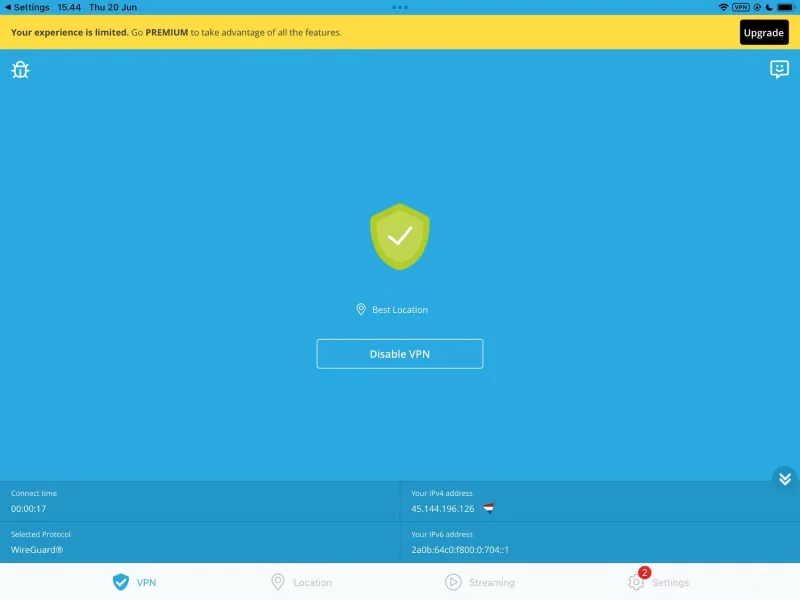
2. Aloha

4 VPNs That Don't Require Login or Registration
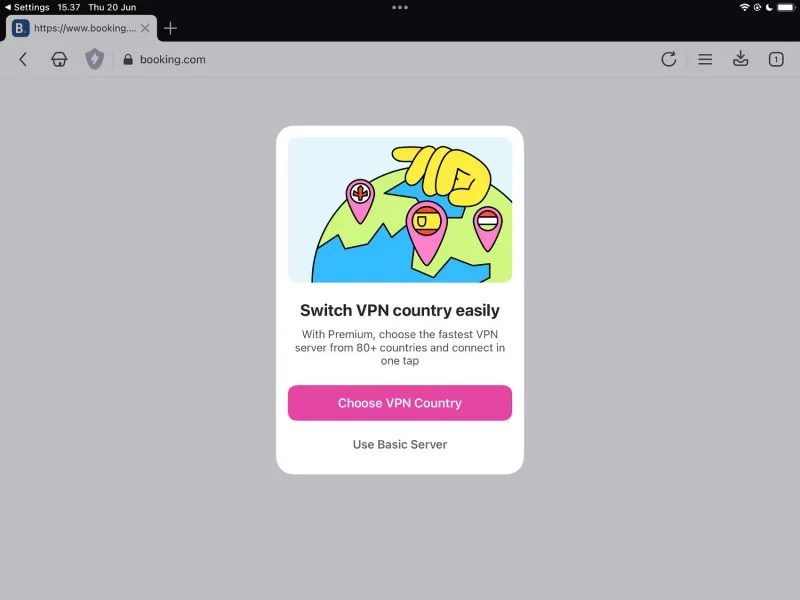
Aloha VPN in browser

Aloha is one of the best VPN services that doesn’t require you to log in or register for an account. Unlike iTop, which is a standalone VPN tool, Aloha is built into the Aloha browser. However, you still have to download the app to use the service on your computer or smartphone.

The basic server is available for the free version of Aloha. These servers are based in Europe and the US, but unlike iTop and others, you can’t change your location. It essentially works the same way as iCloud Private Relay. If you don’t care about top-tier services and just need something to protect your private Wi-Fi, etc., this might be more than enough.

Advantage

  • Easy connection on mobile devices
  • Aloha is a privacy-oriented browser

Disadvantages

  • Aloha browser does not give as good search results as Opera
  • Cannot change server without paid subscription
  • Inconsistent user experience across web applications

Aloha Premium Price

If you need better VPN access, you can upgrade to the premium version of Aloha. You will have full access to Aloha’s servers and can choose from over 80 locations. Aloha is actually quite affordable and the prices are as follows:

  • Monthly: $3.99/month
  • Annual: $24.99/year

3. Hide.me

4 VPNs That Don't Require Login or Registration
Hide.me VPN Interface

Hide.me is another popular free VPN that doesn’t require a subscription. You can access eight server locations: Canada, UK, Singapore, Germany, US, France, Netherlands, and Spain. Once connected, Hide.me will choose the best option for your device. You also get unlimited data when you connect to the free version of the VPN. Another big plus is that Hide.me offers 24/7 customer support for both free and paid customers.

The free version of Hide.me allows connections to up to one device, but the paid plan allows connections to up to 10 devices. Before signing up for Hide.me or any VPN on this list, consider reading whether a free VPN is better than no VPN .

Advantage

  • Available on TV, not just on computers, laptops and tablets
  • 24/7 Support
  • Consistent app functionality across all devices
  • Access to multiple server locations

Disadvantages

  • 10GB monthly limit

Hide.me Price

If you want a more comprehensive VPN, Hide.me offers monthly, yearly, and 27-month plans. You’ll get access to faster browsing speeds and more servers. The prices are as follows:

  • Monthly: $9.95/month
  • Annual: 45 USD/year
  • 27 months: $69.95

4. Opera VPN

4 VPNs That Don't Require Login or Registration
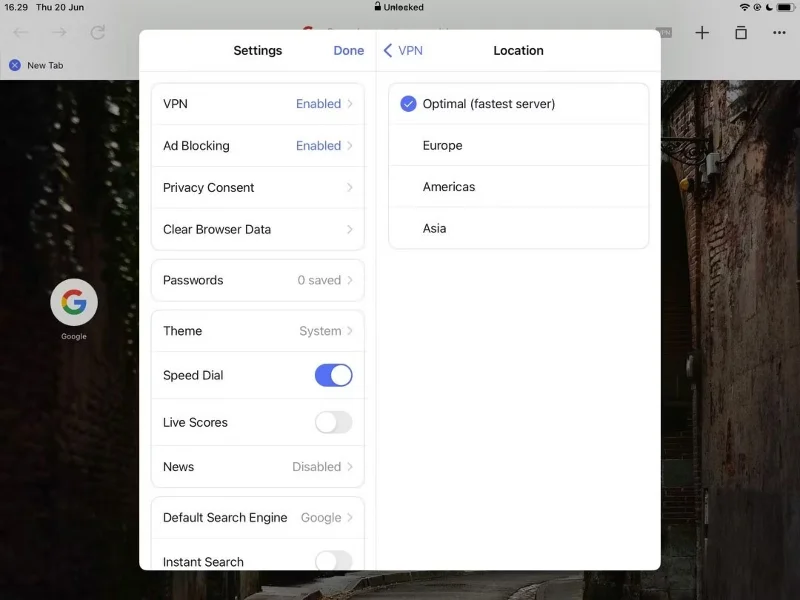
Install Opera VPN

Opera is one of the most popular privacy-focused browsers, and there are a number of Opera browser tips and tricks that beginners can use to maximize their experience. One of them is to use the Opera VPN, which is built into the app.

When using a VPN in Opera, you can choose from Europe, Americas, and Asia. Opera also automatically connects to the fastest server. However, you can't choose the specific country you want to connect to. The VPN will mask your information and enable other privacy-focused features of Opera, such as the built-in ad blocker.

Advantage

  • Average fast connection speed
  • Complements Opera's other privacy-oriented features well

Disadvantages

  • Works only in Opera
  • No customization other than choosing server region

Opera VPN Pro Price

In addition to the free version, there is a paid version of Opera VPN. You can use the service on up to 6 devices and access over 3,000 global servers. There are monthly, 6-monthly, or annual options, depending on your preference.

  • 1 month: 8 USD/month
  • 6 months: 30 USD
  • Annual: 48 USD/year

When to use a VPN without an account and when to sign up?

If you’re new to VPNs, using a service that doesn’t require you to sign up can help you decide which one is best for your needs. In addition to the fact that signing up can be a pain (even for free servers), some VPNs that offer free trials require you to add your debit or credit card information. You won’t have to do this if you choose a VPN that doesn’t require you to sign up for an account.

Using a VPN without a subscription is also beneficial if you want something basic to protect yourself – but you don’t mind accessing restricted content. VPNs that don’t require a subscription will keep your details safe on public Wi-Fi, but some won’t be able to unlock content on streaming services (iTop is an exception).

We still recommend signing up for a paid VPN in most cases. You’ll generally get better protection and access to better (and more) servers. Plus, you’re usually not limited to a specific browser.
Leave a Comment

Some apps will still know your real location even if you use a VPN

Some apps will still know your real location even if you use a VPN

One benefit of using a virtual private network (VPN) is that it masks your real location. But if that's your main goal, you might be surprised to learn that some apps can still see your real location.

Useful virtual private networks on Google Chrome

Useful virtual private networks on Google Chrome

VPN (Virtual Private Network) is simply understood as a virtual private network system, capable of creating a network connection based on a certain service provider.

ExpressVPN Now Supports Windows ARM PCs

ExpressVPN Now Supports Windows ARM PCs

One of the world's most popular VPN services - ExpressVPN - has officially launched an app version for Windows PCs running on ARM-based processors.

Everything You Need to Know About VPN Before You Start Using It

Everything You Need to Know About VPN Before You Start Using It

Switching to VPNs has completely changed the online privacy of many people, but there are a few things you need to know before you start using them.

The Difference Between a Good and a Bad VPN

The Difference Between a Good and a Bad VPN

To really understand whether a VPN is right for you, there’s no better way than to try it out. Install a few clients, connect to the best servers, test your favorite sites, and see how they perform.

Which free VPN is best for iPhone and iPad?

Which free VPN is best for iPhone and iPad?

VPNs have a number of advantages, such as protecting your online identity and allowing you to access content in other countries. You may even experience faster connection speeds.

What is the difference between fake location and VPN?

What is the difference between fake location and VPN?

Mock locations and VPNs are often used interchangeably when discussing online privacy and security, but they are not the same.

5 Features to Check Before Signing Up for a Free VPN

5 Features to Check Before Signing Up for a Free VPN

Not all VPNs are created equal, and that's especially true for free services.

What information can your ISP see when you turn on a VPN?

What information can your ISP see when you turn on a VPN?

When you turn on a VPN, your internet connection is encrypted, making it harder for snoopers—like your ISP (Internet Service Provider)—to monitor what you're doing. But what exactly does your ISP see after you turn on a VPN?

Microsoft Defender VPN will stop rolling out to Microsoft 365 subscribers

Microsoft Defender VPN will stop rolling out to Microsoft 365 subscribers

Back in 2023, Microsoft launched a new feature for Microsoft Defender users called Privacy Protection.

How To Use A VPN With Caesars Sportsbook

How To Use A VPN With Caesars Sportsbook

Discover how to use a VPN with Caesars Sportsbook to access your favorite sports betting platform while traveling outside the U.S.

The Best Chrome Extensions For Changing Your IP Address

The Best Chrome Extensions For Changing Your IP Address

Discover top Chrome extensions that change your IP address and enhance your privacy. Explore options like ExpressVPN and GeoProxy for safer browsing.

Why do you need both a VPN and a firewall?

Why do you need both a VPN and a firewall?

Understanding the difference between a VPN and a firewall, as well as why using them together provides better security, will help keep you safe.

The Best VPNs for Gamers

The Best VPNs for Gamers

A good VPN will improve every aspect of gaming. For example, by using a VPN to mask your location, you can play geo-restricted games.

Solving Microsoft Teams Shortcut Error Not Opening

Solving Microsoft Teams Shortcut Error Not Opening

Tired of Microsoft Teams shortcut error preventing you from opening the app? Follow our expert, step-by-step guide with the latest fixes for instant resolution. Works on Windows, Mac & web – no tech skills needed!

Solving Microsoft Teams Task Management Sync Error

Solving Microsoft Teams Task Management Sync Error

Tired of Microsoft Teams Task Management Sync Error halting your workflow? Follow our proven, step-by-step fixes to resolve sync issues fast and restore seamless task collaboration. No tech expertise needed!

Troubleshooting Microsoft Teams Wiki Error Formatting

Troubleshooting Microsoft Teams Wiki Error Formatting

Struggling with Microsoft Teams Wiki Error Formatting? This step-by-step guide reveals proven fixes for common wiki tab issues, ensuring smooth editing and collaboration in Teams. Get back to productive wikis fast!

How to Fix Microsoft Teams Installation Error for Linux

How to Fix Microsoft Teams Installation Error for Linux

Struggling with Microsoft Teams installation error on Linux? Discover step-by-step fixes for Ubuntu, Fedora & more. Resolve dependency issues, crashes, and errors quickly with our ultimate guide. Get Teams running smoothly today!

Solving Microsoft Teams Error Page Not Loading

Solving Microsoft Teams Error Page Not Loading

Struggling with Microsoft Teams "Error Page" not loading? Get step-by-step fixes for desktop, web, and mobile. Solve Microsoft Teams Error Page issues quickly and resume seamless teamwork today.

Solving Microsoft Teams Error Screenshot Issues

Solving Microsoft Teams Error Screenshot Issues

Tired of Microsoft Teams "Error Screenshot" blocking your workflow? Get proven, step-by-step solutions to resolve screenshot errors in Teams instantly and boost productivity. No tech skills needed!

How to Fix Microsoft Teams Error U User

How to Fix Microsoft Teams Error U User

Tired of Microsoft Teams "Error U" User blocking your chats? Get proven, step-by-step fixes to clear cache, reset, and restore seamless collaboration instantly.

Where are Microsoft Teams Registry Keys Located on Windows 11?

Where are Microsoft Teams Registry Keys Located on Windows 11?

Unlock the precise locations of Microsoft Teams registry keys on Windows 11. Step-by-step guide to find, access, and safely tweak them for optimal performance and troubleshooting. Essential for IT pros and Teams enthusiasts.

How to Fix Microsoft Teams Training Error Video Lag

How to Fix Microsoft Teams Training Error Video Lag

Tired of Microsoft Teams "Training Error" Video Lag ruining your meetings? Follow our step-by-step guide with the latest fixes for smooth video calls—no more frustration!

How to Fix Microsoft Teams Error occurred During Sign-In

How to Fix Microsoft Teams Error occurred During Sign-In

Frustrated by Microsoft Teams "Error occurred" during sign-in? Discover proven, step-by-step fixes to get back online fast. Clear cache, reset app, and more for seamless login. Works on Windows, Mac & web.

Troubleshooting Microsoft Teams Call Error Disconnecting

Troubleshooting Microsoft Teams Call Error Disconnecting

Struggling with Microsoft Teams "Call Error" Disconnecting? Discover proven, step-by-step fixes for call drops, network issues, and more. Get back to seamless meetings fast with our expert troubleshooting guide.

How to Fix Microsoft Teams Error 2603: Login Loop Fix

How to Fix Microsoft Teams Error 2603: Login Loop Fix

Stuck in Microsoft Teams Error 2603 login loop? Get proven step-by-step fixes to resolve the issue fast and restore seamless teamwork. Clear cache, reset, reinstall – all covered!

How to Fix Microsoft Teams Voice Call Error

How to Fix Microsoft Teams Voice Call Error

Tired of Microsoft Teams voice call errors? Follow our step-by-step guide to troubleshoot no audio, echo, or call drops. Proven fixes for crystal-clear calls every time.

How to Fix Microsoft Teams Workflows Error Power Automate

How to Fix Microsoft Teams Workflows Error Power Automate

Struggling with Microsoft Teams "Workflows Error" in Power Automate? Discover proven, step-by-step fixes to resolve connection issues, permissions, and more. Get your workflows running smoothly today!

How to Fix Microsoft Teams Reddit Popular Error Fixes

How to Fix Microsoft Teams Reddit Popular Error Fixes

Tired of Microsoft Teams crashes, black screens, and sign-in loops? Unlock Reddit's most popular, proven fixes to resolve common Microsoft Teams errors quickly and get back to productive meetings. Step-by-step guides inside!