Desk Decorating Ideas for a Spooky Office Cubicle

Create a spooky office cubicle with Halloween desk decor ideas that keep your workspace usable, tidy, and mindful of workplace safety.
We are witnessing an explosion of AI models. But a problem is emerging: the names of these models are becoming increasingly complex, a maze of acronyms and technical terms that confuse even enthusiastic AI users.
We need simpler names for AI models
While each new AI model can be innovative, their complex names pose a serious barrier to users trying to understand and differentiate between models. This complexity not only hinders accessibility for the average user, but also creates a significant barrier to understanding and using the full potential of these powerful tools.
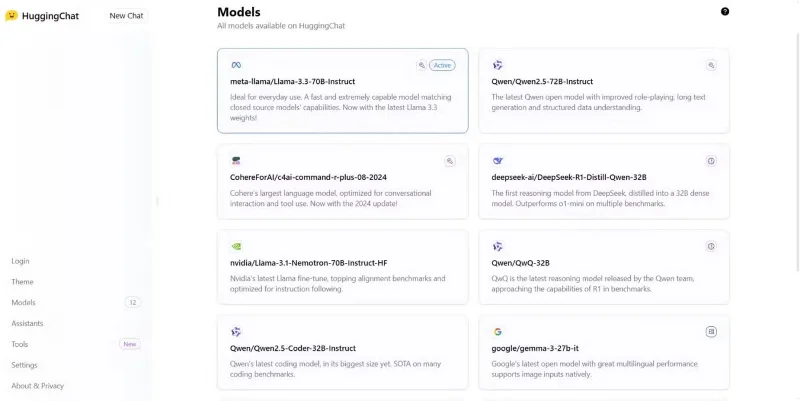
For example, when Chinese tech giant Alibaba launched the Qwen2.5-Coder-32B model, who really understood what it could do? You had to dig into the terminology to find out.
While AI companies often decide on creative product names, like Gemini, Mistral, or Llama, the final name of a model incorporates certain technical attributes, like version or build number, architecture or type, number of parameters, and other specific characteristics. For example, the name Llama 2 70B-chat tells us that this model from Meta (Llama) is a large language model with 70 billion parameters (70B) and is specifically designed for conversational (-chat) purposes.
In essence, an AI model's name serves as a shorthand for its key properties, allowing researchers and technical users to quickly understand its nature and purpose — but mostly sounds like jargon to non-specialists.
Consider a situation where a user wants to choose between the latest models for a particular task. They are faced with options such as the “Gemini 2.0 Flash Thinking Experimental”, “DeepSeek R1 Distill Qwen 14B”, “Phi-3 Medium 14B”, and “GPT-4o”. Without delving into the technical specifications, distinguishing between these models becomes a difficult task.
A series of model names, each more confusing than the last, underscores the need for a fundamental change in how we label and represent AI models. Ideally, an AI model name should be a simple, clear, and memorable representation of its purpose and capabilities.
Imagine if cars were named after their engine specs and suspension types instead of simple, evocative names like “Mustang” or “Civic.” Current naming conventions for AI models often prioritize technical specifications over user friendliness. And while some of the terminology is necessary for researchers, it’s largely meaningless to the average user.
The industry needs to adopt a more user-centric approach to terminology. Simple, intuitive, and descriptive names can significantly improve the user experience.
An easier way to explore the possibilities
In addition to confusing names, discovering what a particular AI model can actually do is another major hurdle. Often, capabilities are buried deep in technical documentation. This is compounded by the sheer variety and specialized functionality of AI models. A simple name may not convey the full spectrum of an AI model’s capabilities.
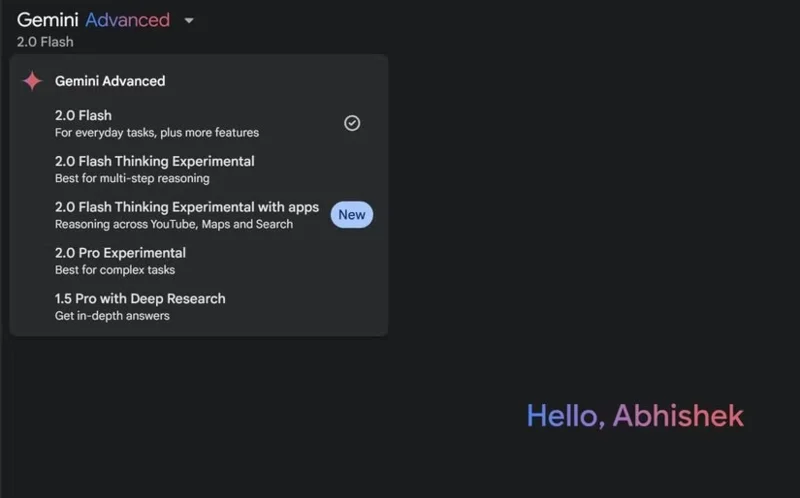
Fortunately, AI tools that leverage these models add a little description to specify their use case or capabilities—for example, Google specifies that the Gemini 2.0 Flash Thinking model uses advanced reasoning while the 2.0 Pro model is best for complex tasks. This isn't ideal, but it does help.
Rather than relying on technical terms, model names should reflect their primary function or capability. If abbreviations are required, they should be carefully chosen to ensure they are memorable and easy to pronounce. Additionally, clear and concise version numbers should be used to indicate updates and improvements.
Furthermore, AI models can be categorized with names that convey their primary function or unique features, such as “Conversational Bot,” “Text Summarizer,” or “Image Recognizer.” Such clarity demystifies AI technology. This approach streamlines the discovery process, allowing you to quickly identify the most appropriate AI models and tools for your tasks without having to sift through a maze of confusing names and descriptions.
However, most language models are highly variable and can perform more than a single task, so this approach may not be ideal for large, advanced language models .
The current state of AI model names can be confusing. Moving to simpler nomenclature and improved discovery methods could significantly improve the user experience and make cutting-edge technology more accessible to everyone. Until then, staying informed, taking advantage of community resources, and experimenting with different models can help users navigate the complex world of AI.
Create a spooky office cubicle with Halloween desk decor ideas that keep your workspace usable, tidy, and mindful of workplace safety.
Plan a recognizable Halloween 2026 look with pop culture costumes inspired by Spider-Man, Supergirl, Toy Story 5, Moana, Mario, and Wednesday.
Sort leftover Halloween candy safely, share or repurpose sealed treats, and choose food use or compost for pumpkins based on their condition.
Compare workplace Halloween costume choices by respect, dress code, mobility, and safety—and learn when a subtle accessory or a policy check is the better option.
Find a couples costume that fits your style, budget, and comfort level, from Addams Family classics to original inside-joke duos.
Need a last-minute high school Halloween costume? Compare 10 easy closet-based ideas by prep time, comfort, school-day practicality, and simple safety checks.
Use a simple 2026 Halloween decorating timeline for indoor décor, outdoor displays, and fresh pumpkins, with practical adjustments for weather and events.
Mix five vivid, approachable Halloween cocktails with measured recipes, simple prep tips, and an alcohol-free option for your party guests.
Find 15 office-friendly Halloween costume ideas for 2026, with practical checks for dress codes, respectful themes, comfort, and workplace safety.
Plan a fun elementary school Halloween party with easy crafts, games, inclusive treats, costume tips, and a sample 75-minute classroom schedule.








