Does Facebook notify you when you take a screenshot?
Have you ever wondered if Facebook notifies others when you take a screenshot of something they post?
For content on legitimate websites such as Instagram or Youtube, users will be interested and curious, so often click on the link attached to view the content. However, URLs now have a lot of fake cases and can cause you a lot of trouble.
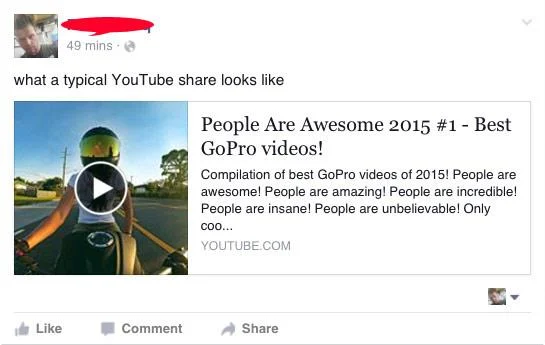
When browsing through the New Feed on Facebook , there will be a lot of news and new links displayed with eye-catching information such as title, description, image and URL, which makes users curious and want to click to view content.

Facebook is filled with content such as ads, spam content, news, notifications ... users will not care much about these links, but when you see the url of Youtube or Instagram users will be more interested because Those are reputable sites, but some guys have taken advantage of YouTube's reputation to forge links.
Although the links before sharing on Facebook cannot be edited, but to prevent false or misleading information. Facebook removed the ability to edit the title, thumb image and description of the links shared on the page in July.
However, spammers can fake the URL of shared links to trick users into clicking on links and redirecting to websites that are not as displayed, or redirecting users to partly Soft and malicious content. Worse, the link can lock your Facebook or send your friends information about that link, make you uncomfortable when using Facebook or create a new Facebook account and you'll have to make friends. and reset the information from the beginning.
Barak Tawily , a security researcher, discovered a simple trick that any user could forge links on URLs by exploiting a preview of Facebook links.
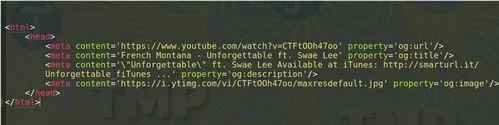
Facebook will scan parts of the sharing link, including the Open Graph meta tag to identify attributes like "og: url" , "og: title" to get the URL, thumb image and title of the site.

Tawily said the interesting point is that Facebook will not confirm if the link in the "og: url" meta tag is the same as the page URL, enabling spammers to spread malicious websites on Facebook with fake URLs. by adding valid URLs to the "og: url" in the Open Graph meta tag on their web pages.
Answering on The Hacker News , Tawily said: "People on Facebook often think that the preview data displayed on Facebook is reliable data, and they will click on the links that interest them. this invisibly provides an opportunity for the attacker. Hackers can abuse this feature to perform various attacks, including fraudulent / advertising / click-based campaigns. " .
Although Tawily reported the issue to Facebook, the social networking site refused to consider it a security flaw, saying it would use " Linkshim ". A system that checks the URL when a user clicks on any link on Facebook to see if it is a malicious link or not to handle and combat such attacks. However, if fake links are created from a new domain , Linkshim will find it difficult to determine if the link is malicious.
And although Linkshim used Machine Learning to identify the content of malicious websites. Tawily discovered that Linkshim's protection mechanism could be bypassed by directly providing non-toxic content to Facebook bots based on User-Agent or IP address.
Since there is no way to check the actual URL after the link has been shared on Facebook, the only way is to open the link, users must consider the warning and caution before clicking to open the link to protect the account themselves. mine. One more thing is that even your phone will be sticky, so you have to be careful when clicking on strange links because if the phone is infected with malicious code, it will be very dangerous.
Have you ever wondered if Facebook notifies others when you take a screenshot of something they post?
Users no longer need to use the standalone Messenger app to text because Facebook has integrated the messaging platform back into the main interface of this social network.
Apple Intelligence is an artificial intelligence (AI) system developed by Apple specifically for its devices including iPhone, iPad and Mac.
If everything goes according to plan, you can eventually see your AI-generated user, complete with profile picture and generated bio, commenting on your posts and interacting with you.
While using Facebook, sometimes you may come across people you do not want to interact with. In such situations, blocking is a measure used by many people.
Today WebTech360 will guide you how to determine whether a friend is blocking you on Facebook Messenger or not. Please refer to it!
Learn how to change your Facebook profile picture, cover photo, and avatar with up-to-date methods for 2024 and 2025 to make a memorable impression on visitors.
Step-by-step guide on how to create a green tick for Facebook. Learn how to verify your account and gain credibility with the green verification mark.
Learn how to login to Facebook using your email, phone number, or even QR Code authentication without entering a password.
Facebook allows users to log in on a computer by scanning a QR Code without entering a password. Learn how to easily log into Facebook on your computer using this method.
Learn how to create a snowing effect on Facebook Messenger to enhance your holiday chats. This guide includes detailed steps and helpful images.
Sometimes words cannot express emotions completely. Using emoticons in chat is an interesting habit of most users, creating a lively and attractive look for any online conversation.
Instructions for creating and searching for draft articles on Facebook. Currently, we can save articles that we have created but have not yet posted on Facebook. Here, WebTech360 invites
To fix the “An unexpected error occurred” issue when logging in to Facebook, you can try the following steps
Users reported that their Facebook, Messenger and Instagram accounts were suddenly logged out and could not be accessed again, both on the app and web version.
Struggling with Microsoft Edge Winaero Tweaker Settings Error? Discover proven, step-by-step fixes to resolve it quickly, restore smooth browsing, and prevent future issues. No tech expertise needed!
Discover proven, safe steps to remove Microsoft Edge from Windows 10 without risking system stability. Step-by-step PowerShell guide, precautions, and alternatives for a clutter-free PC. Works flawlessly on the latest updates!
Struggling with Microsoft Edge "PDF Preview Handler" error? Discover step-by-step fixes to restore PDF previews in File Explorer. Quick, reliable solutions for Windows users.
Tired of Microsoft Edge Startup Boost causing lag and slow boots? Follow our proven, step-by-step fixes to restore lightning-fast startup speeds on Windows. No tech skills needed!
Tired of Microsoft Edge crashing with Wallpaper Engine? Get instant relief with our proven How to Fix Microsoft Edge "Wallpaper Engine" Crash guide. Step-by-step solutions for seamless wallpapers and browsing. No tech skills needed!
Master how to set up Microsoft Edge parental controls in 2026 with this step-by-step guide. Protect your children online using Family Safety features, content filters, and screen time limits for worry-free browsing.
Struggling with audio out of sync in Microsoft Edge web videos? Get instant fixes for perfect audio-video sync. Step-by-step guide with proven methods to resolve lag, delay, and desync issues on sites like YouTube and Netflix.
Tired of the frustrating Microsoft Edge "Windows Hello PIN" reset error blocking your browsing? Follow our proven, step-by-step fixes to resolve it fast and securely on the latest Windows versions. No tech expertise needed!
Tired of Microsoft Edge startup logo stuck freezing your browser? Get step-by-step fixes for 2026, from quick resets to advanced troubleshooting, and browse smoothly again. No tech skills needed!
Tired of the Microsoft Edge Sidebar Not Showing glitch? Get instant fixes with this step-by-step guide. Restore your sidebar for Copilot, shopping, and more – quick, easy, and effective solutions that work on the latest Edge versions.
Tired of Microsoft Edge context menu slow delays? This ultimate troubleshooting guide delivers proven fixes, quick resets, and advanced tips to restore lightning-fast right-click speed in Edge. Get started now!
Tired of Microsoft Edge crashing with "Status_Stack_Overflow" error? Follow our expert, step-by-step guide to solve the Status_Stack_Overflow error fast and restore smooth browsing. No tech skills needed!
Tired of Microsoft Edge crashing with "Unknown Hard Error" on your laptop? Follow our proven, step-by-step guide to fix this BSOD issue fast – no tech skills required! Get smooth browsing back today.
Struggling with Microsoft Edge "Script Error" in Outlook? Discover step-by-step troubleshooting fixes, from clearing cache to advanced resets, to resolve the issue fast and regain seamless email access. Updated with the latest solutions.
Stuck without your perks and levels after DBD account migration? Discover the ultimate step-by-step guide to recover your Dead by Daylight progress quickly and painlessly. Cross-progression fixed!