Put a Synapse Matrix Server Behind Cloudflare Safely
Route Matrix clients and federation through Cloudflare on HTTPS 443, preserve Synapse discovery, and avoid caching API traffic or breaking media uploads.
To put a Synapse Matrix server behind Cloudflare’s standard orange-cloud proxy, send both client API and incoming federation traffic through HTTPS on port 443. Keep TLS enabled from Cloudflare to your origin with Full (strict), route Matrix paths unchanged to Synapse, publish federation discovery that points to your 443 hostname, and bypass cache on the API paths. Do not point a normal proxied record at Matrix’s default federation port 8448: Cloudflare’s standard proxy does not list that port as supported.
This example assumes Synapse runs behind a reverse proxy such as Nginx, Caddy, or Traefik. Synapse can stay on its private Docker network on HTTP port 8008; the front proxy handles public TLS. Federation can use HTTPS 443 when discovery points remote homeservers there. Synapse supports 443 as an alternative to default port 8448, while Cloudflare lists 443 but not 8448 among its standard proxy ports. See the Synapse port guidance and Cloudflare’s supported-port list.
Use this approach when clients and federation should share a proxied HTTPS hostname. If you must keep federation on 8448, use a DNS-only record or a Cloudflare product that supports that TCP port. The example uses example.org for Matrix IDs such as @alice:example.org and matrix.example.org for Synapse. Substitute your hostnames, but keep the existing Synapse server_name; changing it changes users’ Matrix IDs.
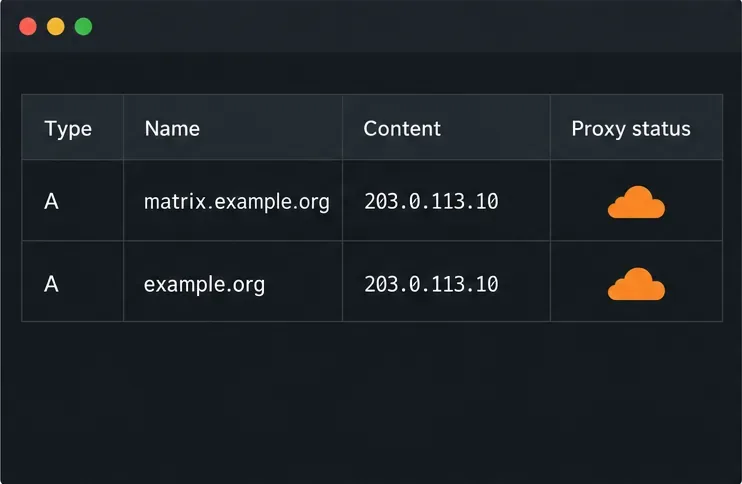
In Cloudflare DNS, set the A/AAAA record for matrix.example.org to your reverse proxy’s public address and mark it Proxied. The example.org hostname must also reach a web server for the discovery files. Remove an unusable AAAA record. Keep MX, mail-only, and non-HTTP records DNS-only. Cloudflare terminates TLS at its edge and opens a separate connection to your origin.
In Cloudflare SSL/TLS settings, select Full (strict). The origin proxy must accept HTTPS on 443 and present an unexpired certificate matching matrix.example.org, issued by a trusted authority or Cloudflare Origin CA. This encrypts and validates both legs; Flexible mode can leave the origin connection unencrypted or cause redirect loops. See Cloudflare’s Full (strict) setup guide.
Configure the reverse proxy’s HTTPS virtual host for matrix.example.org to pass paths beginning /_matrix and /_synapse/client to Synapse on the private network, commonly http://synapse:8008 in Compose. Preserve the full request path, forward the original Host, and set X-Forwarded-For and X-Forwarded-Proto. These routes include client API calls and federation endpoints; avoid sending only the browser homepage to Synapse or trimming a path prefix.
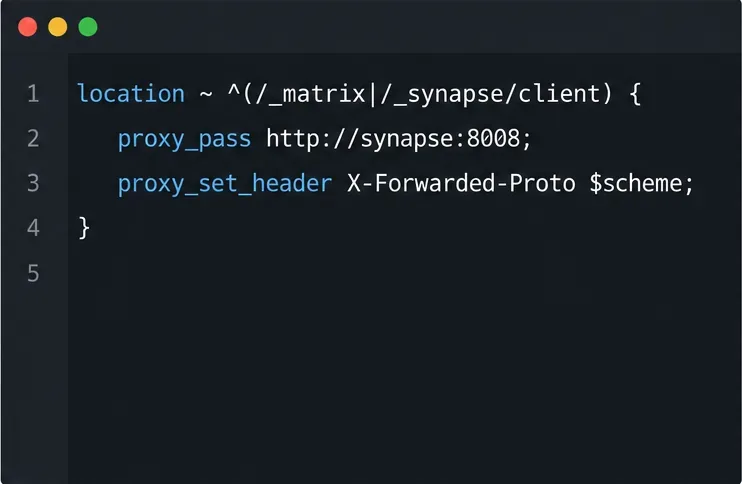
In Synapse’s existing HTTP listener, set x_forwarded: true so it reads the client address and scheme from the proxy. Do not bind a containerized listener to 127.0.0.1, which blocks other containers from reaching it. Keep port 8008 private to Compose. See Synapse’s reverse-proxy instructions for the syntax of your specific proxy.
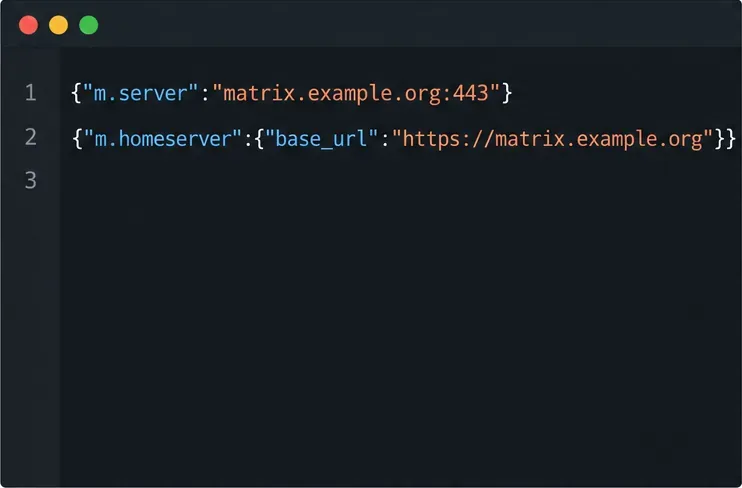
Because users’ Matrix IDs use example.org while Synapse is reached at matrix.example.org, serve a federation discovery file at https://example.org/.well-known/matrix/server. Return status 200, JSON content, and this value:
{"m.server":"matrix.example.org:443"}The explicit :443 sends remote homeservers to the supported proxied port. The Matrix federation specification defines this m.server delegation. If the Synapse server name itself is matrix.example.org, serve the matching well-known file there or use Synapse’s serve_server_wellknown option when that hostname routes to Synapse on 443.
For client auto-discovery, serve https://example.org/.well-known/matrix/client with {"m.homeserver":{"base_url":"https://matrix.example.org"}}. Browser clients also need the CORS headers required by the Matrix client-server specification. Set Synapse’s public_baseurl to the HTTPS URL users should enter. See the Matrix server discovery specification and Synapse configuration reference.
Create a Cache Rule for matrix.example.org matching paths that start with /_matrix/ or /_synapse/client/, and select Bypass cache. This protects login, sync, federation, and media APIs from custom cache-everything rules. Check WAF, bot, and redirect rules too: Matrix clients cannot solve browser-interstitial challenges. Keep protections enabled and scope any exception to protocol paths. Cloudflare describes bypass in its dashboard instructions.
Run these checks from a machine outside the server’s LAN, so the request follows public DNS and Cloudflare:
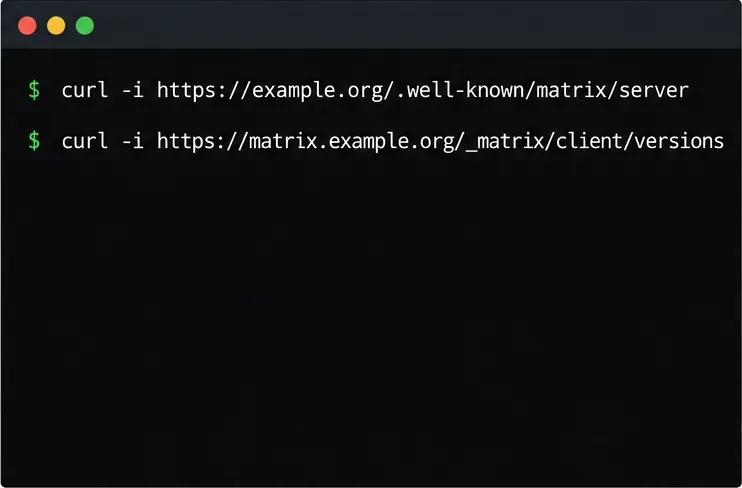
curl -i https://example.org/.well-known/matrix/server
curl -i https://example.org/.well-known/matrix/client
curl -i https://matrix.example.org/_matrix/client/versions
curl -i https://matrix.example.org/_matrix/federation/v1/version
Confirm the first request returns JSON with m.server set to matrix.example.org:443, the client file names the HTTPS base URL, and the last two return valid JSON rather than a Cloudflare challenge page, 404, or 502. Then sign in from a client and test a room sync, upload a file, and federate with a room on another homeserver. Matrix servers cache federation discovery responses, so remote servers may retain an earlier value for a while after you change it; use the response’s cache headers and allow time for cached records to expire.
If file uploads fail with HTTP 413, compare the file size with the Cloudflare zone’s current upload limit and Synapse’s max_upload_size; the reverse proxy has its own request-body limit too. Synapse’s documented default is 50 MB, and Nginx’s default body limit can be lower. Cloudflare’s limits vary by plan and can be adjusted within plan rules, so check its current upload-limit documentation before raising Synapse’s limit. If the API works but federation fails, first check that the server well-known URL is public, its hostname certificate is valid, and the delegated port is explicitly 443. If you intentionally keep port 8448, stop proxying that record through standard Cloudflare DNS proxy and use a direct DNS-only federation hostname instead.
Route Matrix clients and federation through Cloudflare on HTTPS 443, preserve Synapse discovery, and avoid caching API traffic or breaking media uploads.
Back up Synapse with pg_dump, protect its signing key and media, and restore into a clean PostgreSQL database without reusing stale one-time keys.
Set up Mjölnir with a dedicated Matrix account, encrypted management room, Docker Compose, policy list, and permission checks.
Skip the retired proxy and configure Synapse’s built-in Sliding Sync. Check client discovery, then measure room-list loading and reconnect behavior on a compatible phone.
Deploy Element Web as a static site, point it to your Matrix homeserver, add HTTPS, and configure Nginx to serve updates without stale files.
Set up Conduit on a 64-bit Raspberry Pi 4 with persistent data, HTTPS federation, protected registration, and checks for a working homeserver.
Give a Matrix room an easy-to-share address on your domain using Element or the Matrix API, with checks for permissions, Synapse naming, and federation.
Configure coturn and Synapse with matching TURN credentials, open the required relay ports, and verify that Matrix clients can obtain relay candidates.
Set up a persistent Synapse homeserver with Docker Compose, PostgreSQL, a private config, and checks before exposing it through HTTPS.
Set a branded name, custom colors, and login assets for your Element Web deployment while understanding which parts remain Element-branded.