Even though Instagram notifies you every time another user follows you, you won’t know if someone unfollowed you unless you check your profile. While there is no direct way of knowing who unfollowed your account due to Instagram’s privacy policy, there are a couple of workarounds that can help you.
In this article, we’ll discuss how to find out who unfollowed your Instagram account.
How to Find Out Who Unfollowed You on Instagram
You visit your Instagram profile, and you notice you have one follower less compared to the last time you checked. In other words, someone unfollowed you.
Although Instagram users with hundreds of thousands of followers might not care if someone unfollows them, people with non-famous accounts and only a hundred followers may be curious. This type of information can also be important for social media managers, influencers, and small online businesses. In these cases, the following-to-follower ratio can say a lot about your account. For others, not knowing who unfollowed you can simply be frustrating.
One of Instagram’s newest features is the “Accounts You Don’t Follow Back” category in your list of followers. You can also see which accounts you interact with the least. However, there is no category for people who don’t follow you back.
There are two ways you can find out who unfollowed you on Instagram. The first one is done manually, and the second is through a third-party app. These two methods can also be used to check who never followed you back.
How to Manually Find Out Who Unfollowed You on Instagram
This method is a good option for Instagram accounts that don’t have a large number of followers. If you have more than one thousand followers, it will take you a long time to go through your entire “Followers” list. If there’s a big difference between the number of accounts you follow and the number of accounts that follow you, this might not be the best solution for you.
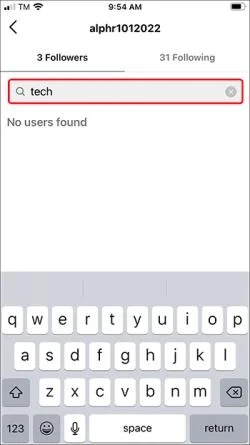
Basically, you can check who unfollowed you by comparing your Followers and Following lists. First, go to your Following list, choose one account, and then search for them in the Followers list.
If you want to check if someone specifically unfollowed your Instagram account, this is what you should do.
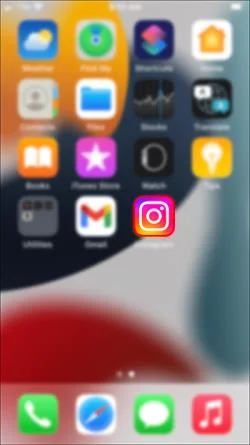
- Open the Instagram app on your mobile device.

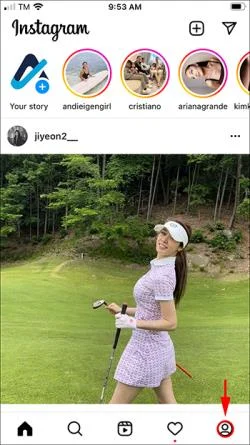
- Tap on your profile picture in the bottom-right corner of your screen.

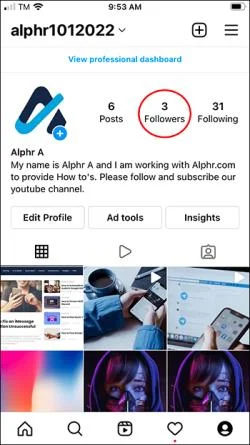
- Go to Followers in the top-right corner of your profile.

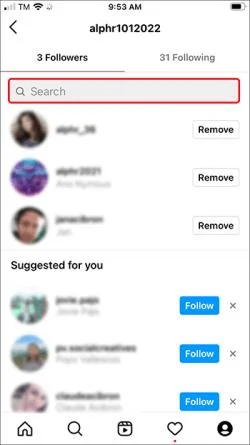
- Tap on the Search bar at the top of the page.

- Enter the username of the person you suspect unfollowed you.

If they aren’t on the Followers list, it either means they unfollowed you, or they never followed you back in the first place.
How to Find Out Who Unfollowed You on Instagram Through a Third-Party App
Since the manual method might be time-consuming, especially if you have a large number of followers, it’s much more efficient to install a third-party app.
There are several third-party apps you can use to check who unfollowed you, and most of them are free. Keep in mind that not all of these apps are reliable or safe to use, as they may offer incorrect information. Not to mention that a lot of these apps can’t track Instagram’s new API. So it’s important to download one that will produce accurate results.
Once you download a follower-tracking app, you need to sign in to your Instagram account through the app and give it permission to access your Instagram-related data. If you don’t feel comfortable giving away your data, you’re better off skipping this method.
These kinds of apps track your profile activity, not just who unfollowed you. For example, some apps will tell you who isn’t following you back, who you aren’t following back, who blocked you, who recently followed you, and so on. Some of these features require in-app purchases or upgrades to premium versions of the app.
Here are a few reliable third-party apps you can use to see who unfollowed your Instagram.
Reports: Followers Tracker
This app isn’t only useful for tracking who unfollowed you but for various other engagement statistics as well. It can be very useful for social media managers and influencers. This app is easy to use, but it comes with some in-app purchases.
Reports: Followers Tracker lets you see who followed and unfollowed you, which profiles interact with your account, profiles that don’t follow you back, etc. It even lets you use multiple Instagram accounts at once. You’ll receive notifications about any account activity. You can even unfollow whoever you want directly from the app.
Follower Track for Instagram
This app lets you see who followed and unfollowed you, as well as accounts you don’t follow back or that don’t follow you. If you have more than one Instagram account, you can use this follower app to monitor all of them at once. It even reveals which of your followers engage with your profile and which don’t.
The Follower Track app is only available for iOS devices. It comes with a premium version that gives you access to exclusive features.
FollowMeter
FollowMeter is available for both iOS and Android devices. It has a simple dashboard, and it’s easy to use. With this app, you’ll be able to track who unfollowed you and who doesn’t follow you back, who views your Instagram Stories the most, accounts that like your posts the most, users who blocked you, and more. However, some of these features are only available for the Plus Subscription.
You can also use this app to track “ghost” followers—Instagram accounts that follow you but don’t interact with your profile in any way.
Keep Track of Your “Unfollowers”
While you can always check who followed you on Instagram, finding out who unfollowed you is slightly tricky. One option is to check your “Followers” list manually, and the other is to install a third-party follower-tracking app. No matter which option you choose, you’ll be able to find out who unfollowed you one way or the other.
Have you ever tried to find out who unfollowed you on Instagram before? How did you figure it out? Tell us in the comments section below.