How to Fix Ubuntu 24.04 Wi-Fi Disconnecting After Suspend

Fix Ubuntu 24.04 Wi-Fi drops after suspend with checks for NetworkManager, radio blocks, updates, power saving, and drivers—then verify each resume.
Running out of storage space used to mean spending a weekend digging through folders, but now there's a better solution. CCleaner scans for duplicate files in just a few minutes, then lets you decide which ones are safe to delete.
Annoying problem that slows down your computer
Your Windows laptop may have been running out of space for weeks. Every time you try to install a new file or copy a large folder, the storage bar in File Explorer turns red. At first, you might think the usual suspects are to blame: large videos, multiple downloads, and maybe too many apps. But on closer inspection, the problem turns out to be much simpler.
Duplicate files can accumulate over years without you even realizing it. They don't directly slow down Windows, they just take up space. And once your storage space gets too low, your entire system slows to a crawl.
Old backups, copied photos, and multiple versions of the same installer are all over the place, no matter how many Windows backup tips you follow over time. Cleaning them up manually takes days, so many people end up turning to CCleaner, a tool they’ve heard of but never used.
How to Free Up Gigabytes of Space with One Simple Tool
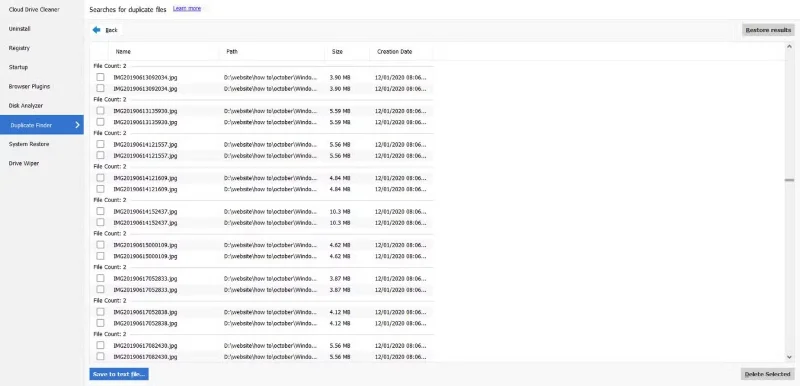
Many people think of CCleaner as a tool for deleting temporary files and junk files, so they are surprised to see that it also has a built-in Duplicate Finder feature. Located in the Tools menu , this feature allows you to scan any drive or folder for identical files with just a few clicks.
When you start your search, CCleaner lets you choose how to compare files: Name , Size , Modified Date , or Content . While the first three options are faster, they can sometimes be misleading, as files with the same name or size are not always exact duplicates.
However, the Content option performs a deeper analysis by examining the actual file data. For the most accurate results, you should only select Content and deselect the other options.
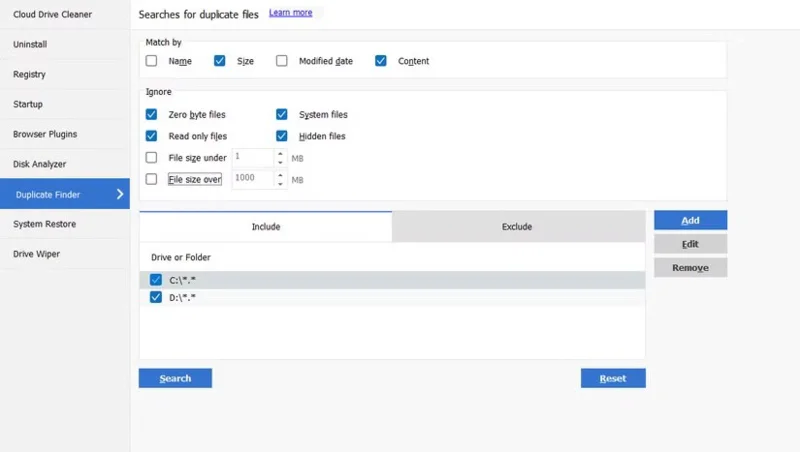
With those settings, scan both the C: and D: drives. This completes quickly on the example setup, sorting the results into groups that show exactly where the duplicate files are stored. This makes it easy to keep one copy and delete the rest.
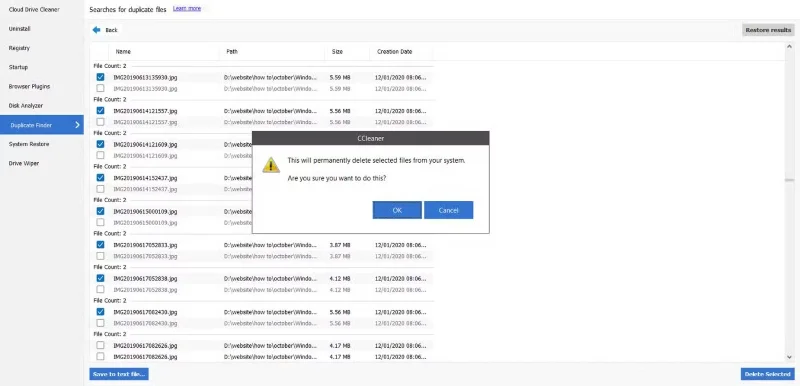
Before deleting, CCleaner clearly warned that the files would be deleted permanently and asked for confirmation. Much of the space on the drive was taken up by duplicate photo folders that had been copied multiple times; project files were stored on both the laptop and the backup drive.
After going through the list, you can delete any duplicate files you don’t need. When you’re done, you’ve reclaimed nearly 7GB of storage. That’s a huge relief, and for the first time in a while, browsing through folders isn’t a pain.
Why do people trust this app and what surprises them?
Before installing CCleaner, many people were concerned about whether it was trustworthy. Its history has not always been transparent. In 2017, a backdoor was installed in a version before it was released to users, with 2.27 million people downloading the compromised installer. This came just weeks after Piriform, the developer of CCleaner, was acquired by Avast. To their credit, Avast has released detailed reports explaining the issue and how it will secure future updates.
The troubles don’t stop there. In 2018, CCleaner was criticized for adding telemetry data and forcing users to auto-update, which many users had trouble disabling. By 2020, Microsoft had flagged a number of installers as Potentially Unwanted Applications (PUAs) because they included additional incentives. None of this malware was outright malicious, but it did hurt the tool’s reputation.
So why would anyone give it another chance? First, Avast has been transparent about the 2017 breach and fixes. Second, they only download from the official website and stick to the free version, avoiding extra features. And third, they only use the Duplicate Finder feature, which simply identifies duplicate files. Skip the more dangerous tools like registry cleaners.
With those precautions in place, you should feel confident enough to incorporate CCleaner into your workflow. Hopefully, by now, it will be a reliable tool rather than a risk.
Fix Ubuntu 24.04 Wi-Fi drops after suspend with checks for NetworkManager, radio blocks, updates, power saving, and drivers—then verify each resume.
Learn why tracker-miner-fs-3 uses high CPU in Ubuntu GNOME and how to check indexing, exclude folders, update Ubuntu, or safely rebuild the search index.
Fix Debian’s UEFI boot error by checking boot mode, the EFI System Partition, GRUB files, and firmware boot order—without reinstalling Debian first.
The Outlook Inbox Repair Tool fixes corrupted PST files quickly so you can recover emails and restore normal Outlook function. Follow these exact steps to run scanpst.exe without data loss.
Get the Adobe PDF Installer Offline to install Acrobat Reader on any PC without needing internet during setup. Follow these exact steps for the full standalone package.
Learn how to Chromecast from laptop to TV with this step-by-step guide. Stream browser tabs, videos, or your full screen from Windows or Mac to your TV in minutes.
Learn how to edit an Adobe PDF file in Adobe Acrobat with precise steps for text, images, and layout changes. Make professional edits quickly and save time.
Get your Free Foxit Reader Free Download from the official source with this step-by-step guide that ensures a safe and quick installation for viewing PDFs.
Learn how to get help in Windows 11 with built-in tools like the Get Help app and Quick Assist for fast, official support without third-party downloads.
Learn how to retract an Outlook email in Microsoft Outlook when you need to correct a mistake before the recipient opens it. Follow these precise steps for Exchange accounts.