Pop Culture Costume Ideas That Will Dominate Halloween 2026

Plan a recognizable Halloween 2026 look with pop culture costumes inspired by Spider-Man, Supergirl, Toy Story 5, Moana, Mario, and Wednesday.
Social media is often seen as a hub of creativity, a source of interesting trends, and a useful community for businesses looking to promote their products. It allows brands and individuals to engage with people who share similar interests. However, building a loyal audience requires more than posting a few times a week. Instead, developing a following and an engaged community requires careful planning.

Data is the engine that drives effective strategies, enabling users to achieve and exceed their goals. Through testing and tweaking, anyone can create a plan that caters to their specific needs and goals.
Use platform-specific metrics
It can be easy to get caught up in numbers and target metrics, but ask yourself “ Have I tailored these for each platform? ” The reason that’s important is that each platform can be used to drive different actions with the right approach to content.
For example, a target metric for a YouTube video might revolve around views, while a target metric for a LinkedIn poll might focus on engagement as a KPI. Consider the channel and audience, then adjust based on what works best.
Analyze regular interaction rates
Ignoring engagement rates is a big no-no when it comes to social media analytics, especially when you're trying to foster an active community or target audience. Social media is a "conversation," so focus on achieving more than just vanity metrics.
Adjust based on data
Once you have control over tracking and measurement, use the data. Adjust your campaigns, change your posting schedule, and plan according to what is and isn’t working. Data can be a glimpse into your target audience. Once you can gauge response, improve your content to help you reach or even exceed your original goals.
Know the difference between reach and impressions
These two metrics may seem similar and are often confused with each other. Neither metric is “better” than the other, but it’s important to know the difference. Reach refers to the number of unique users who see your content, while impressions refer to the number of times your content is displayed or viewed (including the same person viewing the content more than once). Understanding the difference will allow you to figure out your engagement rate as well as what keeps your target audience coming back.
Identify trends and patterns in your data
When looking at your data, look for recurring patterns. Patterns will help you determine what content is working and what content needs to be changed. By understanding what your target audience likes and dislikes, you can start making small changes for maximum impact.
A/B testing: experiment to find out what content works
Split testing your content is one of the easiest ways to find out what type of content resonates with your target audience. Test images, captions, and CTAs to determine what works best. Use the results to guide your actions in the right direction. Continue A/B testing throughout your campaigns to build on your learnings and understand what works with different target audiences.
Monitor your competitors for inspiration: what content is working for them?
Market research is what gives you a competitive edge. This applies to content creators as well. Understanding what others in your industry or niche are doing and how their content and campaigns are performing will give you a deeper understanding of your target audience. The better you understand your target market, the easier it will be to communicate with them through social media channels.
Use unique statistics from surveys to evaluate performance
Conduct surveys to understand your target market. These unique metrics will give you exclusive insights into your followers that you can use to influence your social media efforts. This will give you valuable insights that you can’t find elsewhere into why your audience follows you and what they want from your content.
Create reports for future reference
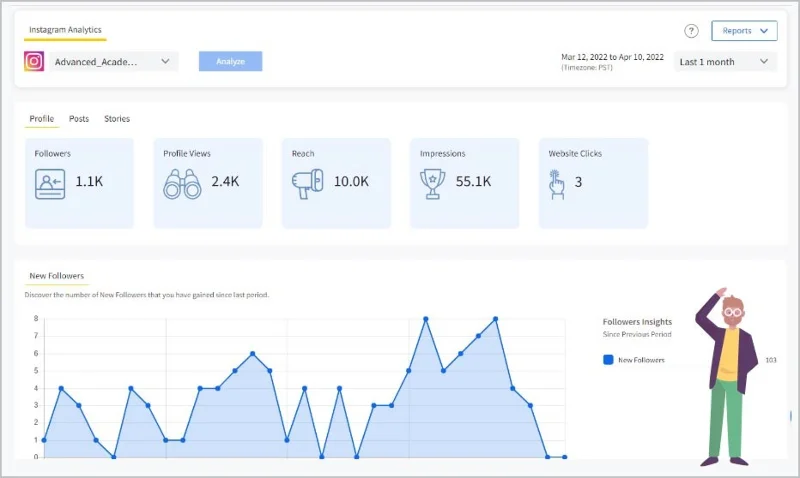
Reports: You may love them or hate them, but there’s no denying that they can be incredibly useful. By regularly compiling results and insights, there’s a clear way to track progress and measure results against previous weeks and months. This information can also be used to refer back to when strategizing for future quarters.
Data can be confusing, but learning and using the basics can have a significant impact on your key metrics. Testing, monitoring, and adjusting accordingly can help you build an effective social media content strategy.
Plan a recognizable Halloween 2026 look with pop culture costumes inspired by Spider-Man, Supergirl, Toy Story 5, Moana, Mario, and Wednesday.
Sort leftover Halloween candy safely, share or repurpose sealed treats, and choose food use or compost for pumpkins based on their condition.
Compare workplace Halloween costume choices by respect, dress code, mobility, and safety—and learn when a subtle accessory or a policy check is the better option.
Find a couples costume that fits your style, budget, and comfort level, from Addams Family classics to original inside-joke duos.
Need a last-minute high school Halloween costume? Compare 10 easy closet-based ideas by prep time, comfort, school-day practicality, and simple safety checks.
Use a simple 2026 Halloween decorating timeline for indoor décor, outdoor displays, and fresh pumpkins, with practical adjustments for weather and events.
Mix five vivid, approachable Halloween cocktails with measured recipes, simple prep tips, and an alcohol-free option for your party guests.
Find 15 office-friendly Halloween costume ideas for 2026, with practical checks for dress codes, respectful themes, comfort, and workplace safety.
Plan a fun elementary school Halloween party with easy crafts, games, inclusive treats, costume tips, and a sample 75-minute classroom schedule.
Compare realistic side hustles for 2026 by startup cost, fees, flexibility, and income control, with current tax and scam guidance from official sources.








