
Skype Free Phone Calls

Skype Free Phone Calls let you connect with friends and family worldwide at no cost. Follow this guide to set up and start making free calls quickly and easily.
Late last June, Bloomberg reported that Apple had begun development on iOS 19, macOS 16, watchOS 12, and VisionOS 3 for next year.
Apple launches iOS 19 update
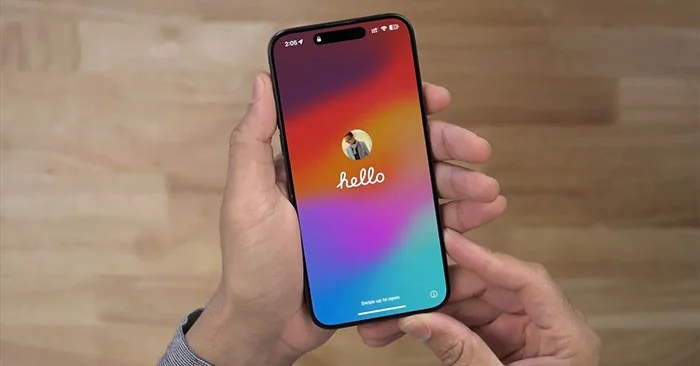
In the latest edition of his Power On newsletter, Mark Gurman reports that Apple has “officially started working on its major operating systems for 2025.” While this may seem early, Gurman notes that this is the usual schedule for Apple’s software development timelines.
However, it's still too early to know anything about Apple's plans for software updates next year.
The company has officially started rolling out its major operating systems for 2025: iOS 19 (“Luck”), macOS 16 (“Cheer”), watchOS 12 (“Nepali”), and VisionOS 3 (“Discovery”). It’s too early to predict anything right now. After all, this year’s software hasn’t been released to the public yet. But here’s the usual schedule: The company is developing next year’s hardware products and needs the accompanying software to start testing the devices.
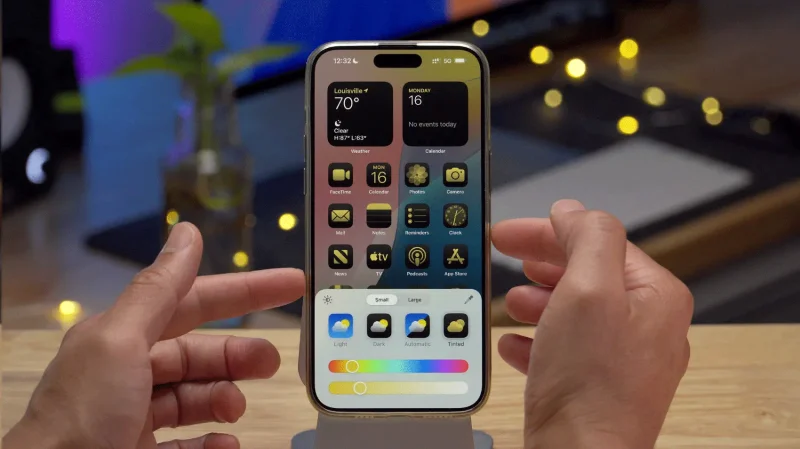
iOS 19 may have a completely new design
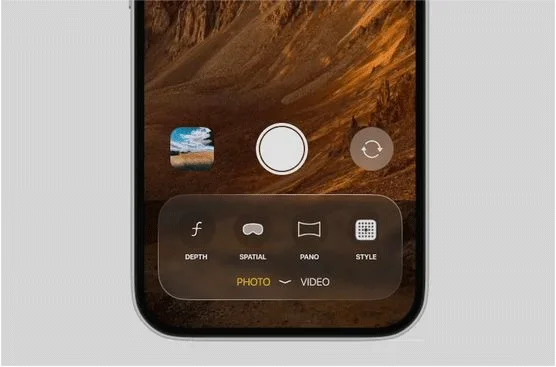
iOS 19 is still about six months away from launch, but a new leak has allegedly revealed a completely redesigned Camera app.
Based on the footage, YouTube channel Front Page Tech shared a video showing what the new Camera app looks like, with the main change being a transparent menu for controlling the camera. Overall, the design of these menus looks similar to visionOS, the software platform for Apple's Vision Pro headset.
More is visible from the camera viewfinder, with camera controls divided into Photo and Video categories at the bottom of the app.
Camera controls include options to record space video, enable a photo timer, and more. Additional controls for video resolution and frame rate will appear at the top of the screen when needed, according to the video.
It's unclear whether the visionOS-like design changes will extend to other parts of the iOS 19 interface or more of Apple's built-in apps.
iOS 19 is expected to be announced at WWDC 2025 in June and released next September.
Apple Will Reportedly Delay a Large Number of Upcoming iOS 19 Features
According to Bloomberg's Mark Gurman, Apple has delayed a large number of iOS 19 features to the later iOS 19.4 release, meaning they likely won't appear until spring 2026.
This isn't unusual, and we've seen Apple adopt this strategy with Apple Intelligence and iOS 18, with the improved Siri not being available until iOS 18.4 next spring, despite being announced at WWDC24 along with all the other iOS 18 features.
Gurman didn't clarify which features would be delayed, but he did say the delayed features extend beyond the new Siri LLM mentioned last week:
I understand that a larger than usual number of features scheduled for iOS 19 (besides new Siri) have been delayed until spring 2026 (when iOS 19.4 comes out).
To reiterate, Apple is reportedly working on a new 'Siri LLM' for iOS 19 that will "handle tasks in a manner similar to Google's ChatGPT and Gemini ." However, it won't appear until a few months before the iOS 20 launch.
Apple is expected to unveil iOS 19 at its annual developer conference, WWDC, in early June 2025. The first public version will then be shipped to customers in September alongside the new release of the iPhone 17 models, which are expected to include a completely new form factor — the iPhone 17 Air .
Skype Free Phone Calls let you connect with friends and family worldwide at no cost. Follow this guide to set up and start making free calls quickly and easily.
Stuck in the Discord Update Failed Loop? Follow these targeted fixes to break the cycle and complete the update without repeated failures or reinstalls.
Travel planning used to mean folders full of printed confirmations, handwritten notes, guidebooks, and a slightly terrifying number of browser tabs. Now, pretty much everything you need for a trip can live on the device already in your pocket.
Discover how Canva Free for Teachers gives educators full access to premium design tools at no cost. Verify your status and start creating classroom materials in minutes.
Skype How to Call International is simple and cost-effective once you set up credit and use the right country codes. Follow this guide to place clear calls from anywhere.
Make Skype to Skype Calls Free in minutes with this clear guide. Set up your account, add contacts, and start unlimited voice and video calls at no cost.
Fix the Your Connection is Not Private Chrome error quickly with these exact steps. Restore secure browsing by addressing certificate and settings issues in minutes.
Record heat has lifted air-conditioning demand while gas-market shocks have returned volatility to power prices. That creates a real risk of painful bills—but not a guaranteed, Europe-wide price explosion.
Large format printing has long faced criticism for its environmental impact. Traditional substrates, solvent-based inks, and short-lived promotional campaigns have all contributed to the perception that eye-catching graphics come at a high environmental cost.
Long-distance travel can involve heavy traffic, changing weather conditions, and rider fatigue. If you are also dealing with the responsibilities of moving home, such as packing belongings or coordinating accommodation, a long ride may add unnecessary pressure to an already busy schedule.





