Note when using infrared cookers

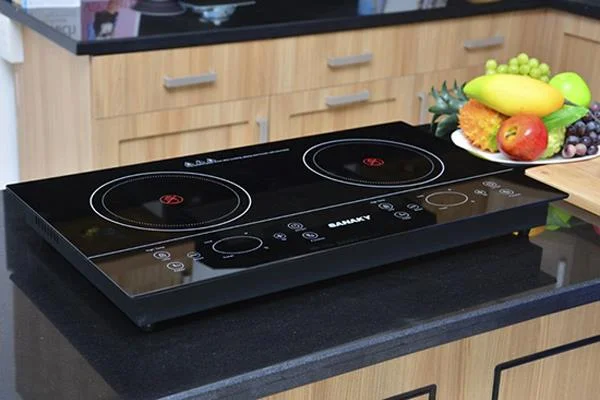
Infrared stove is one of the popular electric cookers , using electric power to make Halogen bulbs generate heat, thereby transferring heat through the glass, pot body and cook food. Infrared cookers have many advantages such as safety, no harm to health and the environment, and quick cooking. However, using the stove in contravention of safety rules will affect the user and reduce the life of the kitchen.

What is infrared stove?

Do not touch the stove during cooking and after cooking
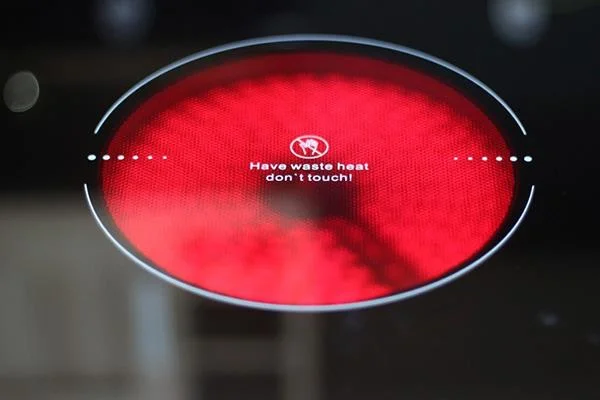
Note when using infrared cookers

Do not touch the countertop while cooking is finished

The infrared stove in operation will heat up the stove surface, not through the pot directly like an electromagnetic stove. The temperature on the stove top is even hotter than the pot temperature. After using, the stove cannot cool immediately. Therefore, do not touch the stove while cooking and when you are finished, even use a damp cloth to clean it. You must wait until the kitchen surface is completely cooled, unplugged before cleaning the kitchen. Many infrared cookers such as Sanaky , Iruka have symbols that warn not to touch when the stove is operating.

Do not leave the kitchen in water

Infrared cookers both when operating and when turned off are hydrophobic with water. Do not use towels with too much water to wipe, or splash water on the kitchen surface while cooking to avoid the risk of damage, electric shock and burns.

Do not drag objects on the countertop

Note when using infrared cookers

Do not drag and place heavy objects on the countertop

Infrared stove top, though made of Ceramic or tempered glass with high bearing capacity, such as Gali stove , Comet ... however dragging things on the kitchen surface will gradually peel off the transparent protective coating of the kitchen. glass. Do not leave heavy objects on the stove even when it is not in use. When the stove is working, avoid placing small metal objects such as spoons, knives and forks on the countertop because the stove will heat all of them, causing burns if not carefully touched.

Do not turn on the stove for long without food

If the cooker stays on for a long time without placing the pot or without food, it will not only waste electricity, but also reduce the life of the stove because the heat used for reheating focuses on heating the countertop. In addition, it can damage the pot when the temperature is too great, especially the pot made of poor heat-resistant materials like aluminum pots.

Do not disconnect the power supply immediately after use

Note when using infrared cookers

Fan still works when turned off with the Off button

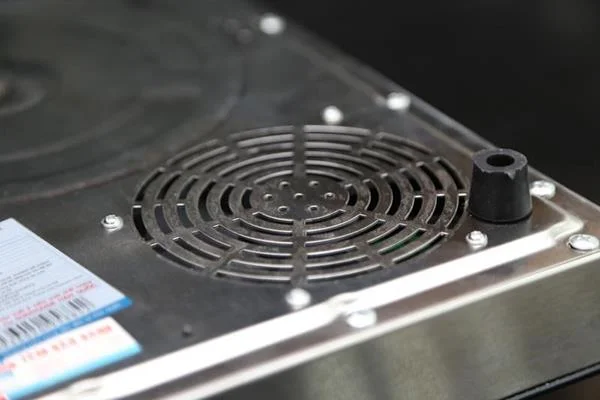
After using the infrared stove, only turn off with the Off button on the stove body, so the cooking power is turned off but the radiator fan is still active, reducing the kitchen temperature quickly. If you turn off the power by unplugging the cord, the stove will be hot for a long time, dangerous for people who accidentally touch the countertop.
WebTech360

Leave a Comment

What Young Riders Should Know About Moving Their Motorcycles Across Cities

What Young Riders Should Know About Moving Their Motorcycles Across Cities

Long-distance travel can involve heavy traffic, changing weather conditions, and rider fatigue. If you are also dealing with the responsibilities of moving home, such as packing belongings or coordinating accommodation, a long ride may add unnecessary pressure to an already busy schedule.

Solving Microsoft Teams Shortcut Error Not Opening

Solving Microsoft Teams Shortcut Error Not Opening

Tired of Microsoft Teams shortcut error preventing you from opening the app? Follow our expert, step-by-step guide with the latest fixes for instant resolution. Works on Windows, Mac & web – no tech skills needed!

Solving Microsoft Teams Task Management Sync Error

Solving Microsoft Teams Task Management Sync Error

Tired of Microsoft Teams Task Management Sync Error halting your workflow? Follow our proven, step-by-step fixes to resolve sync issues fast and restore seamless task collaboration. No tech expertise needed!

Troubleshooting Microsoft Teams Wiki Error Formatting

Troubleshooting Microsoft Teams Wiki Error Formatting

Struggling with Microsoft Teams Wiki Error Formatting? This step-by-step guide reveals proven fixes for common wiki tab issues, ensuring smooth editing and collaboration in Teams. Get back to productive wikis fast!

How to Fix Microsoft Teams Installation Error for Linux

How to Fix Microsoft Teams Installation Error for Linux

Struggling with Microsoft Teams installation error on Linux? Discover step-by-step fixes for Ubuntu, Fedora & more. Resolve dependency issues, crashes, and errors quickly with our ultimate guide. Get Teams running smoothly today!

Solving Microsoft Teams Error Page Not Loading

Solving Microsoft Teams Error Page Not Loading

Struggling with Microsoft Teams "Error Page" not loading? Get step-by-step fixes for desktop, web, and mobile. Solve Microsoft Teams Error Page issues quickly and resume seamless teamwork today.

Solving Microsoft Teams Error Screenshot Issues

Solving Microsoft Teams Error Screenshot Issues

Tired of Microsoft Teams "Error Screenshot" blocking your workflow? Get proven, step-by-step solutions to resolve screenshot errors in Teams instantly and boost productivity. No tech skills needed!

How to Fix Microsoft Teams Error U User

How to Fix Microsoft Teams Error U User

Tired of Microsoft Teams "Error U" User blocking your chats? Get proven, step-by-step fixes to clear cache, reset, and restore seamless collaboration instantly.

Where are Microsoft Teams Registry Keys Located on Windows 11?

Where are Microsoft Teams Registry Keys Located on Windows 11?

Unlock the precise locations of Microsoft Teams registry keys on Windows 11. Step-by-step guide to find, access, and safely tweak them for optimal performance and troubleshooting. Essential for IT pros and Teams enthusiasts.

How to Fix Microsoft Teams Training Error Video Lag

How to Fix Microsoft Teams Training Error Video Lag

Tired of Microsoft Teams "Training Error" Video Lag ruining your meetings? Follow our step-by-step guide with the latest fixes for smooth video calls—no more frustration!