Skype Free Phone Calls

Skype Free Phone Calls let you connect with friends and family worldwide at no cost. Follow this guide to set up and start making free calls quickly and easily.
Developer NTDEV has created a stripped down version of Windows 11 that is only 100MB in size. This may be the smallest version of Windows 11 ever, and with the significantly reduced size, this version of Windows has many limitations.
Table of Contents
After installation, all Windows 11 folders take up only about 1.91GB, while the standard version requires at least 64GB of free space.
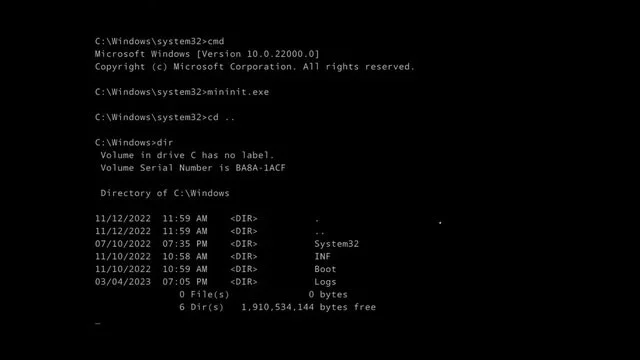
To achieve this, the entire user interface of Windows 11 is cut off, NTDEV leaves only the command line mode. This means that similar to MS-DOS, users will manipulate this "Windows 11" operating system using commands.
After the entire graphical interface and native apps are stripped away, this Windows 11 can still function to some extent, and can even multitask in Windows 11's "text-only" mode.
The biggest problem with this version of Windows 11 is the lack of user interface and most of the features. In addition, this version of Windows 11 is quite slow.
The 100MB Windows 11 is just an experimental project by NTDEV and is unlikely to be deployed in real life. However, this result shows that when you understand how the operating system works, you can remove many things and the system will still work.
Tiny11 2311, a lightweight version of Windows 11 23H2 is now available for download.
This Windows 11 mod is lightweight, removes unnecessary components, and has low hardware requirements, taking up only 8 GB after installation.
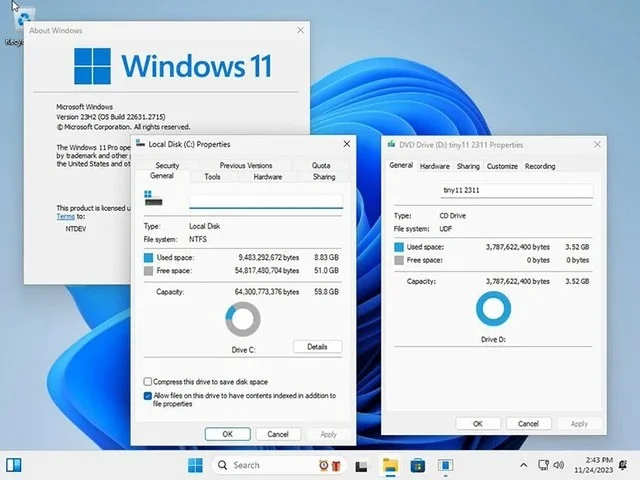
Despite being stripped down, tiny11 2311 still has the new features introduced by Microsoft, including native RAR support, Copilot (requires downloading Microsoft Edge via widget since there is no built-in browser), RGB controls in the Settings app, and a redesigned volume slider.
Version 2311 is 20% smaller than the previous tiny11 release. This requires removing the component log, including Xbox-related features. However, users can restore the removed game features by downloading an Xbox title from the Microsoft Store. Users can also add .NET 3.5 and additional languages if needed.
With version 2311, users can download and install cumulative updates to ensure their computers are secure and receive future improvements.
To download tiny11 2311, users will need to register with the Internet Archive first.
Also, tiny11 2311 is not activated. Just like the standard Windows 11 installation, this slim version requires a genuine Windwos 10 or 11 activation key. Since it is locked for Windows 7/8/8.1, you cannot use the old Windows 7/8/8.1 key.
Tiny11 core is a brand new stripped down version of Windows 11 created by @NTDEV_, a modder who has been creating modified versions of Windows that make the operating system lighter and smoother.
Tiny11 core brings everything about Windows into an ISO installation file that weighs just 2GB and the entire installation process requires over 3GB.
To make Windows 11 17GB lighter, NTDEV has made significant changes in Windows Component Store, Windows Defender, Microsoft Edge, Windows Update,... So tiny11 core cannot install new updates from Microsoft, there is no built-in browser or antivirus.
Tiny11 core, despite its small size, can still install applications from Microsoft Store or other sources, so it still works more or less normally. Here is a quick demo video of Tiny11 core:
Tiny11 core is not intended to replace previous tiny11 releases, but was developed by NTDEV to provide users with a "fast and clean environment to test" applications or drivers inside a virtual machine. You can then use Tiny11 core without downloading large ISOs.

So Tiny11 core is not a good choice on my work PC.
If you want to experience the 2GB ISO based on Windows 11 Professional version 23H2 (build 22631.2361), you can download tiny11 core beta 1 from the link below.
NTDeve, has set a new record for this operating system. Specifically, this person launched Windows 11 on a system with 176 MB of RAM, which is less than 1/20 of the RAM recommended by Microsoft, which is a minimum of 4GB.
About 6 months ago, NTDeve also successfully ran Windows 11 on a system with only 200 MB of RAM.
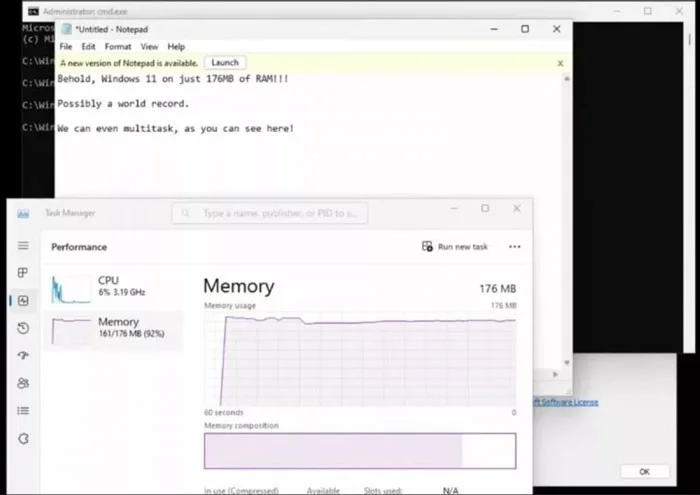
To get Windows 11 to still run on PCs with 176MB of RAM, NTDev used Tiny11, a stripped-down version of Windows 11 that runs on PCs with Ryzen 7 5800HS processors.
As a result, the Tiny11 system is stable but slow, and small applications and utilities cannot respond.
According to NTDev, this Tiny11 version only retains the drivers and services needed to boot Windows 11, so there may be errors during operation. Even the drive interfaces that are introduced into the system are carefully examined. When the system boots, which drivers are started, which drivers are stopped, and which drivers are disabled are all shown by NTDev in the video. To demonstrate the evidence of their work, the developer also ran NirSoft's ServiWin tool on a 176 MB RAM system.
Previously, NTDev also achieved other impressive achievements such as launching Tiny10 versions of Windows 10 or even demonstrating Windows 11 running entirely based on GPU VRAM.
Skype Free Phone Calls let you connect with friends and family worldwide at no cost. Follow this guide to set up and start making free calls quickly and easily.
Stuck in the Discord Update Failed Loop? Follow these targeted fixes to break the cycle and complete the update without repeated failures or reinstalls.
Travel planning used to mean folders full of printed confirmations, handwritten notes, guidebooks, and a slightly terrifying number of browser tabs. Now, pretty much everything you need for a trip can live on the device already in your pocket.
Discover how Canva Free for Teachers gives educators full access to premium design tools at no cost. Verify your status and start creating classroom materials in minutes.
Skype How to Call International is simple and cost-effective once you set up credit and use the right country codes. Follow this guide to place clear calls from anywhere.
Make Skype to Skype Calls Free in minutes with this clear guide. Set up your account, add contacts, and start unlimited voice and video calls at no cost.
Fix the Your Connection is Not Private Chrome error quickly with these exact steps. Restore secure browsing by addressing certificate and settings issues in minutes.
Record heat has lifted air-conditioning demand while gas-market shocks have returned volatility to power prices. That creates a real risk of painful bills—but not a guaranteed, Europe-wide price explosion.
Large format printing has long faced criticism for its environmental impact. Traditional substrates, solvent-based inks, and short-lived promotional campaigns have all contributed to the perception that eye-catching graphics come at a high environmental cost.
Long-distance travel can involve heavy traffic, changing weather conditions, and rider fatigue. If you are also dealing with the responsibilities of moving home, such as packing belongings or coordinating accommodation, a long ride may add unnecessary pressure to an already busy schedule.





